







Odoo Licensing and Pricing: What You’ll Actually Pay
Updated September 7, 2026

 Summarize in ChatGPT
 Summarize in ChatGPT
A team opens Odoo’s pricing page, looking for a number to take to the board. The per-user fee is right there. The plans are laid out. The tiers are transparent. The trickier question is what the full cost actually looks like once hosting, modules, customization, and data migration enter the picture. Those decisions sit between the pricing page and the real budget, and they tend to shape the final figure more than the license fee itself.
Getting a defensible number means mapping the moving pieces upfront: which edition fits the use case, where the system will run, how much customization the workflows need, and which support model the business will lean on after go-live. Each one is predictable once it’s on the table.
In this article, we cover how Odoo licensing works in 2026, what each plan includes, and which cost drivers shape the total, so picking the right plan becomes a clearer call, and a partner conversation starts from a stronger position.
Content
Odoo licensing is the right to use Odoo software under specific terms, covering the platform itself and the modules and apps you enable. Because Odoo is modular, you don’t have to buy the whole stack on day one. Most teams start with two or three core functions, say CRM and Sales, then add Accounting, Inventory, Manufacturing, or HR when both the business and the team are ready for them.
There are two licensing paths to choose from: open-source (Odoo Community) and commercial (Odoo Enterprise). On the commercial side, Odoo cleaned up its older tiered model back in 2024, replacing it with two paid plans, Standard and Custom. That structure is still the baseline most buyers compare against heading into 2026.
One thing to set straight early: licensing is just one piece of the total cost of ownership. Implementation, hosting, customization, and ongoing support typically account for a much larger share of the budget, especially for mid-sized and enterprise rollouts.
Before getting into prices, it pays to know which version of Odoo software you’d actually be paying for. The two editions target different kinds of businesses, and the cost implications are different.
Odoo Community is the free, open-source release of the platform, distributed under the LGPL v3 license. You get core modules: CRM, Sales, Inventory, Purchase, basic Accounting, and Project. No licensing fee, but the business carries hosting, customization, and support on its own. Community fits small companies that have technical people in-house, or teams that want to try Odoo before signing up for a paid plan.
Odoo Enterprise is the commercial release with per-user licensing. You get everything in Community plus the advanced modules, official support, mobile apps, version upgrades, and access to Odoo Online and Odoo.sh hosting. Enterprise is the right fit for mid-sized and growing companies that want a comprehensive solution working from day one.
A recent rollout makes this concrete. Glorium Technologies handled an Odoo 18 Enterprise implementation for a U.S. construction project management company, rebuilding procurement and execution workflows across Purchase, Inventory, Project, Timesheets, and Accounting. The numbers afterward: 2x faster supplier response, 18% lower procurement costs, 30% less administrative workload, and 23% faster project delivery.
| Feature | Odoo Community | Odoo Enterprise |
| Licensing cost | Free (open-source) | Per user, per month |
| Included Odoo apps | Core modules only | Full app catalog |
| Hosting | Self-hosted | Odoo Online, Odoo.sh, or on-premise |
| Official support | Community forums | Included with subscription |
| Version upgrades | Manual | Included |
| Odoo Studio | Not included | Included (Custom plan) |
| Mobile apps | Not included | Included |
| Custom modules | Allowed (with effort) | Fully supported (Custom plan / Odoo.sh) |
| Best for | Small businesses with technical teams | Mid-sized and enterprise companies |
Odoo charges per user, per month, but the three-tiered plans change what’s included. Each plan unlocks different features and hosting options, so picking the right Odoo plan starts with knowing what your team actually needs.
The One App Free plan gives you access to one Odoo app with unlimited users, free forever on Odoo Online. It’s a fair way to test a single function, such as CRM, accounting, invoicing, or another standalone module. The limitations are clear: no Odoo Studio, no custom modules, no multi-app combinations. The moment you install a second app, you upgrade to the Standard plan.
The Standard plan unlocks all Odoo apps on Odoo Online hosting. U.S. pricing sits around $24.90 per user, per month when billed annually (with a first-year discount), rising to roughly $31.10 per user, per month after that. The plan covers most SMB needs but doesn’t support custom development or self-hosting.
The Custom plan adds Odoo Studio, Odoo.sh hosting, external API access, and the ability to manage multiple companies on a single database. It supports custom modules, custom code, and the kind of tailored solutions that growing businesses need. U.S. pricing starts around $37.40 per user, per month with the introductory discount, then moves to roughly $46.80 per user, per month for ongoing users.
| Plan | Per-user monthly cost | Apps included | Hosting | Odoo Studio | Custom modules | Best for |
| One App Free | $0 | One app only | Odoo Online | No | No | Testing a single function |
| Standard | $24.90–$31.10 | All apps | Odoo Online only | No | No | SMBs with standard workflows |
| Custom | $37.40–$46.80 | All apps | Odoo Online, Odoo.sh, on-premise | Yes | Yes | Multi-company setups, customization |
Licensing fees are rarely the largest line item. Several factors influence the total Odoo implementation cost, and understanding them up front helps avoid unexpected costs later.
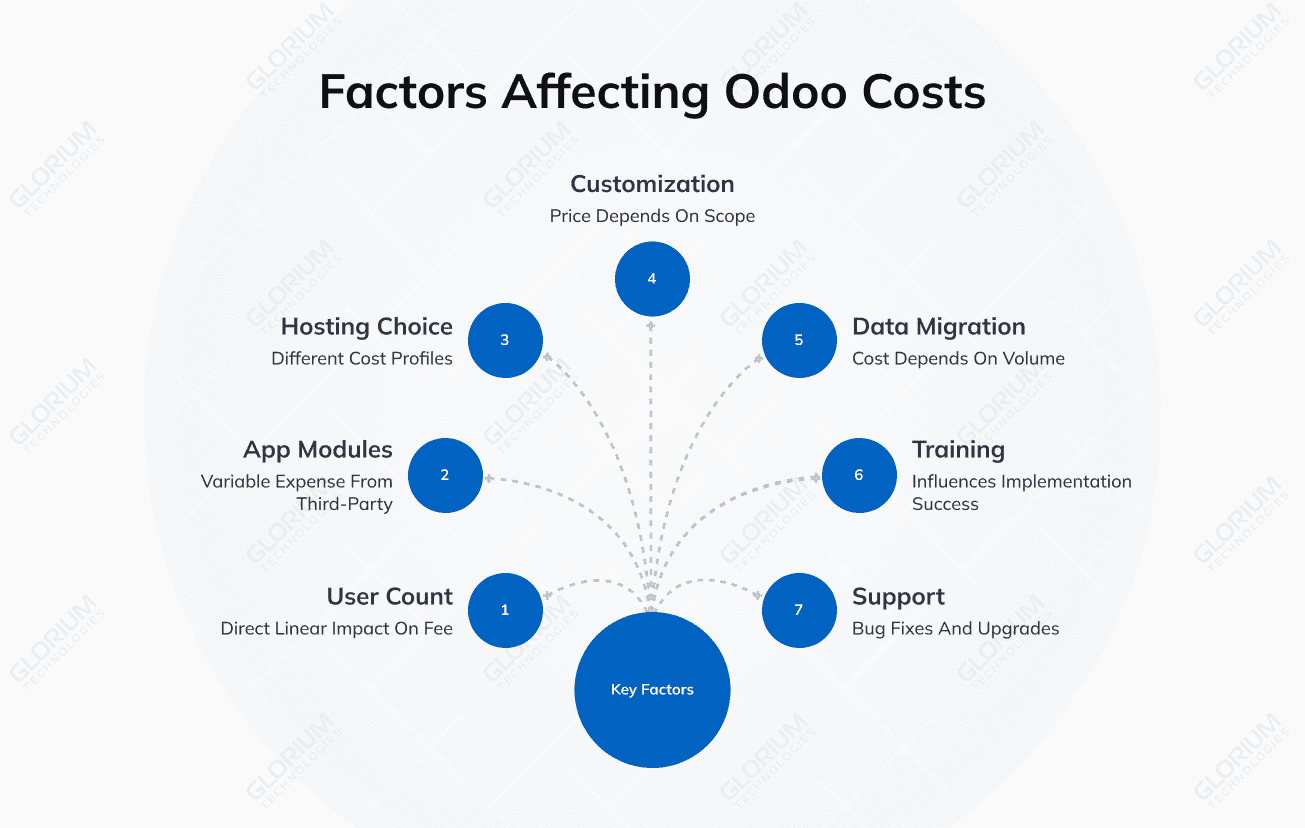
User count has a direct linear impact on the license fee. Twenty users on the Custom plan run roughly $748 per month at $37.40 per user; fifty users at the same rate hit $1,870. It pays to project total user-license costs over 3 to 5 years. Be careful with the count itself: backend users (employees who view, create, or edit records) are billable. External portal users, customers, and website visitors are not.
The Standard and Custom plans include all native Odoo apps under one fee. The variable expense comes from third-party Odoo modules in the Odoo Apps Store. Some industry-specific apps carry separate pricing of $200 to $800 annually per database, and those costs add up across a multi-module deployment.
Odoo Online, Odoo.sh, and on-premise each carry different cost profiles, and the choice affects both monthly fees and long-term flexibility. The next section breaks this down in more depth.
Custom development is where the Odoo ERP software costs swing the most. The price depends on scope, complexity, and the Odoo partner’s hourly rates. And don’t forget about the post-launch costs.
Customization and data migration handled without a professional team often resurface as expensive rework after go-live: broken workflows, version-locked code that breaks during upgrades, and integrations that quietly drift out of sync. Working with an experienced partner during the build is the cheapest way to avoid those bills later.
Take a real example. Glorium Technologies handled an Odoo QuickBooks integration with Avalara AvaTax. We helped a B2B e-commerce company connect Odoo Enterprise with QuickBooks Online, Avalara AvaTax, and Stripe. The work went well past a basic sync. We set up a self-service B2B customer portal, configured real-time multi-jurisdiction tax calculation, embedded secure Stripe payments, and synchronized quotations, invoices, and payments with QuickBooks Online. The client cut down on manual order handling, the recurring tax calculation errors went away, payment tracking got cleaner, and the accounting team gained faster access to reconciled sales and tax data. It’s the kind of rollout where Odoo.sh earns its place, with API-based integrations and custom business logic that pick up where standard ERP system functionality runs out.
Moving from legacy systems requires planning, mapping, and validation. Cost depends on data volume, source systems (QuickBooks, SAP, Excel, custom databases), and data quality. Unstructured legacy data is the single most common reason migration budgets blow up.
Often underestimated, training and adoption directly influence whether the implementation is successful. A well-configured Odoo environment that nobody uses ends up costing more than a partially configured one that the team actually adopts.
Bug fixes, version upgrades, compatibility updates, and security patches all carry ongoing costs. Most mid-sized companies retain a partner on a monthly retainer or buy support hours as needed.
The ERP implementation process covers discovery, configuration, custom development in some cases, testing, and go-live. Each phase has its own cost implications, and skipping any of them tends to surface as a problem later.
A standard Odoo implementation usually moves through these stages:
Implementation cost varies widely by company size and project scope. The table below shows typical implementation cost ranges:
| Company size | Typical implementation cost | Timeline | Scope |
| Small (5–15 users) | $10,000–$30,000 | 2–4 months | 2–3 core modules, minimal customization |
| Mid-market (15–50 users) | $30,000–$100,000 | 4–8 months | Multiple modules, custom modules, integrations |
| Enterprise (50+ users) | $100,000–$300,000+ | 8–18 months | Multi-company, complex integrations, heavy customization |
Custom development pays off when the business has unique workflows, industry-specific compliance needs, or integrations with proprietary tools that standard Odoo modules can’t handle. The trick is to build custom code with upgrade compatibility in mind, so future Odoo versions don’t break the customizations.
Hosting is one of the most overlooked cost areas. The decision between Odoo Online, Odoo.sh, and on-premise affects monthly fees, flexibility, scalability, and the ongoing maintenance burden.
Odoo Online is fully managed by Odoo, with hosting included in the Standard plan at no extra cost. Maintenance, backups, and updates happen automatically. The trade-off is limited customization: no custom code, no third-party modules from the Odoo Apps Store. It works well for small businesses that want a quick, low-maintenance start.
Odoo.sh is Odoo’s platform-as-a-service, built for teams that need custom modules and Git-based development workflows. It’s available with the Custom plan and adds roughly $42 per month per project on top of licensing. You get mid-tier infrastructure cost in exchange for far higher flexibility, including staging environments, development branches, and full support for custom code.
On-premise hosting means running Odoo on your own servers or cloud accounts (AWS, Azure, DigitalOcean). There are no hosting fees to Odoo, but full responsibility for infrastructure, backups, security, and upgrades falls on the business. It’s the right choice for enterprises with strict data residency requirements, regulated industries, or existing cloud infrastructure they already use.
| Hosting | Monthly cost | Customization | Scalability | Control | Maintenance burden | Ideal for |
| Odoo Online | Included in license | Limited (Studio only) | Automatic | Low | None (Odoo handles it) | Small businesses, fast starts |
| Odoo.sh | ~$42/month + license | Full (custom code) | Managed | Medium | Low (Odoo manages infrastructure) | Growing companies with custom needs |
| On-premise | Infrastructure costs vary | Full (custom code) | Manual | High | High (in-house team or partner) | Enterprises with compliance or data residency needs |
Most ERP buyers spend a lot of energy on the initial implementation cost and not nearly enough on what it takes to keep the system in good shape year after year. Ongoing support is what protects the investment and keeps operational efficiency steady once everyone has moved past go-live.
Typical ongoing costs include:
Monthly support retainers for mid-sized businesses usually run between $2,500 and $5,000 or higher, depending on system complexity, support hours, and how fast you need responses.
Odoo projects usually exceed their budget because of work that wasn’t scoped at the beginning. Knowing where the typical hidden costs sit helps protect both the budget and the timeline.

Watch for these:
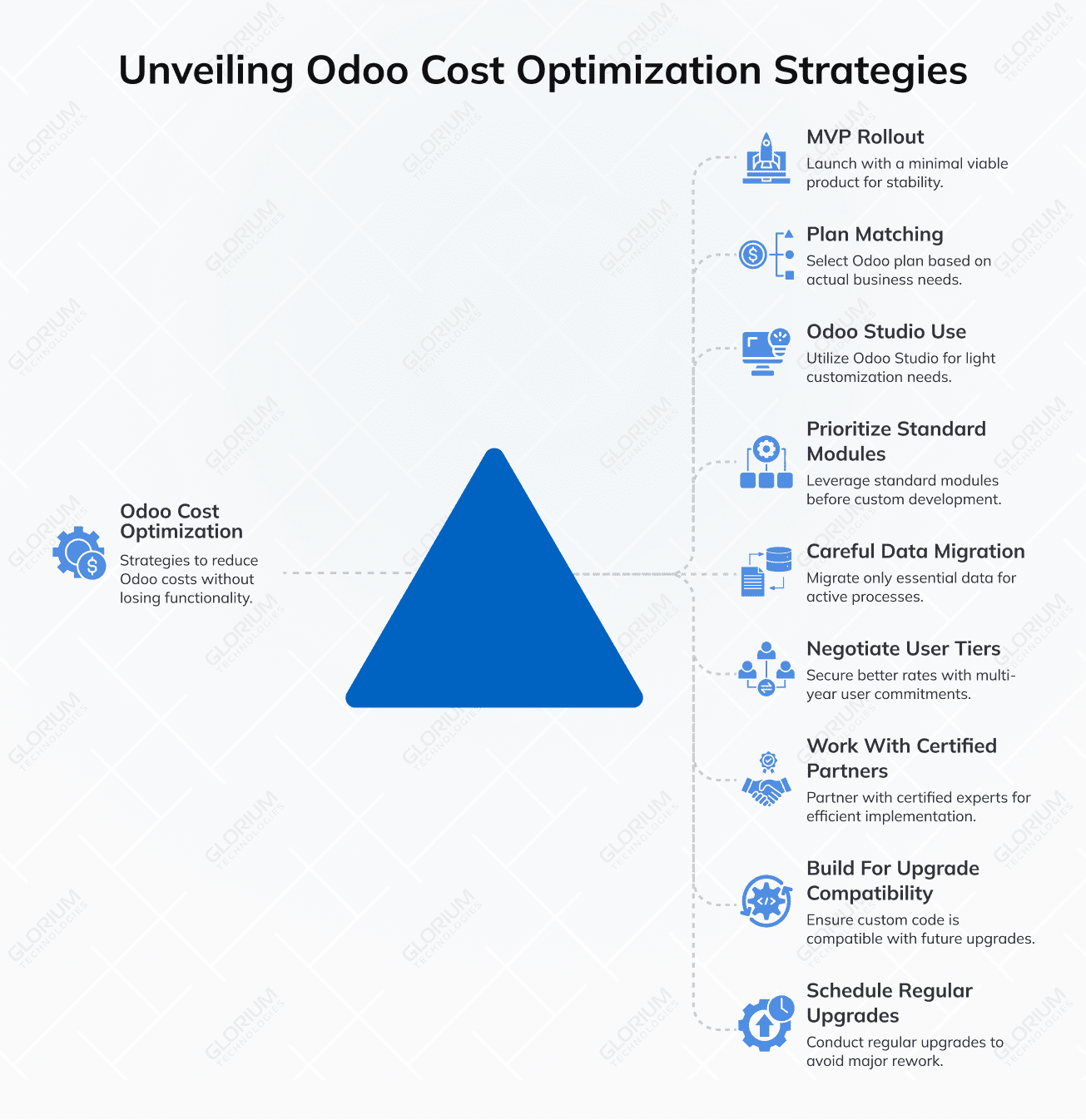
Once the cost structure is clear, there are practical ways to bring the total down without compromising functionality. These tips help businesses optimize costs across licensing, implementation, and ongoing operations.
Even with a clear understanding of pricing, most businesses benefit from a conversation with experienced Odoo consultants before committing to a plan. The right partner helps scope the project, suggest cost-effective solutions, and avoid the pitfalls that drive budgets up after go-live.
Signs the project is ready for partner involvement:
If you’re still in the assessment phase, working through an ERP readiness checklist is a useful first step before reaching out to an Odoo partner.
What a good Odoo partner provides:
Red flags to watch for: vague proposals without scope, no plan for version upgrades, no technical documentation, and no clarity on data ownership or source code access.
Glorium Technologies is a certified Odoo partner that covers the full lifecycle: Odoo implementation services, custom development, integrations, data migration, and ongoing support. Every engagement opens with a short discovery phase. You see the expected effort, rollout timeline, and the main cost factors before committing to the full project, so there’s no awkward conversation later about scope quietly expanding beyond the proposal. From there, the team builds upgrade-friendly customizations, runs structured data migration, and stays involved through go-live and beyond.
If you’re scoping an Odoo project and want a clear, transparent cost estimate, book an intro call with Glorium Technologies to talk through your business requirements and next steps.
Custom modules built quickly, without consideration for future Odoo versions, often break during major releases. Views stop working, deprecated methods cause errors, and fields that used to exist disappear. That’s where unexpected upgrade costs come from. To avoid this, customize Odoo using inheritance patterns and follow Odoo’s official development guidelines from day one.
Odoo offers enough modules to replace several tools at once: CRM, accounting, inventory, HR, project management, manufacturing, and e-commerce. Replacing them all in a single go-live is risky, though. Big-bang ERP rollouts often run into trouble when every department is learning a new system at the same time while trying to keep daily business operations running.
Our usual recommendation is a phased approach. Start with 2 or 3 core modules where the impact will be greatest (often inventory and accounting, or CRM and project management), let the team adjust to the new workflows, then layer in additional Odoo applications over the next 6 to 12 months. The implementation process becomes easier to manage, you see cost savings sooner on the modules launched first, and you avoid freezing operations during a single high-stakes event.
Both. The implementation team handles configuration, custom development, and data migration during the build phase. After go-live, support takes over on a monthly retainer or hourly basis, depending on how much help you actually need.
Post-launch work covers bug fixes on custom modules, compatibility checks when Odoo releases new versions, performance tuning, security patches, and functional support for business users. Most clients stay with us long past go-live because Odoo customization keeps evolving with the business: new departments, new countries, new integrations. Keeping the same team on maintenance is usually cheaper than handing the codebase to someone who has to learn it from scratch.