What Is Odoo? A Complete Guide to the Open-Source ERP System That Powers Modern Business Operations
Updated August 17, 2026

 Summarize in ChatGPT
 Summarize in ChatGPT
Many small and mid-sized businesses experience a familiar pattern. Sales lives in HubSpot, finance lives in QuickBooks, inventory sits in three spreadsheets, and someone on the team spends Friday afternoons reconciling the differences. The longer it goes on, the more numbers stop matching, and at some point, a CFO or COO starts asking what it would take to put everything in one system. That’s almost always when implementing an ERP enters the conversation, and often, small businesses find themselves interested in Odoo.
Odoo is an open-source ERP platform encompassing 80+ business apps that share a single database. The apps cover CRM, accounting, inventory, manufacturing, HR, point of sale, and e-commerce, and they’re designed to talk to each other natively. Today, the platform has more than 13 million users worldwide, and Odoo S.A. is on track to reach €1 billion in billings by 2027 after a Sequoia and CapitalG round in early 2025 valued the company at €5 billion.
If you’re evaluating Odoo for your own business, you probably want fewer marketing claims and more practical information: which Odoo edition fits your business needs, where you can host it, what’s actually included, what isn’t, and what the real Odoo cost looks like over five years. This guide walks through all of that, explaining what Odoo does, how each module can benefit your business, and how you can start implementing Odoo with a professional team.
Content
Odoo is an open-source ERP system, primarily utilizing Python for backend logic, PostgreSQL for database management, and JavaScript for the user interface. The system offers a modular setup that, unlike traditional monolithic ERP systems shipping as one massive product, lets you start with one app and add the rest of the Odoo apps as your business processes evolve.
The platform began in 2005 as TinyERP, was renamed OpenERP in 2008, and became Odoo in 2014 once the product had clearly grown beyond accounting alone.
Where Odoo really differs from SAP, Oracle, or Microsoft Dynamics Business Central is in its open-core business model. The Odoo Community Edition source code is publicly available under the LGPLv3 license, which makes Odoo one of the most widely used pieces of open-source software in the ERP space.
Choosing between Community and Enterprise is one of the first real decisions you’ll make. The two share the same core codebase, yet the gap in features, support, and lifecycle management is wide enough to shape the rest of your implementation plan. Before comparing the two side by side, it helps to look at each edition on its own terms.
Community Edition is licensed under GNU LGPLv3, which means you can freely use, modify, and distribute it (Odoo documentation, Licenses v19.0). It covers the essentials: CRM, sales, invoicing, basic accounting, inventory, and a website builder. The Odoo Community Association (OCA), an independent non-profit, maintains another 250+ open-source modules on top of that (OCA FAQ).
Community works well for technically capable teams that can manage their own upgrades, security patches, and module maintenance. That self-sufficiency comes at a cost, though, and we’ll come back to it in the misconceptions section.
Enterprise Edition is built for the situation most growing companies actually find themselves in: too much complexity for spreadsheets, not enough internal capacity to run a self-managed open-source ERP. You pay a per-user subscription, and in return, you get a polished feature set plus an operational safety net of support, updates, and managed hosting.
The Enterprise exclusives, per the Odoo editions comparison page, include:
Enterprise edition also includes official Odoo support, automatic version upgrades, and managed hosting options that Community users have to arrange on their own.
The table below pulls together the practical differences across the points that usually drive the decision.
| Feature | Community Edition | Enterprise Edition |
| License | LGPLv3 (free) | Proprietary (subscription) |
| Core ERP modules | Included | Included |
| Odoo Studio | Not available | Included |
| IoT integration | Not available | Included |
| Multi-company support | Not available | Included |
| External API | Not available | Included |
| Advanced accounting | Basic only | Full suite |
| Document management | Not available | Included |
| Official support and SLA | Community forums only | Included |
| Automatic upgrades | Self-managed | Included |
Odoo follows a yearly major release schedule. For example, Odoo 18 launched in October 2024 with a redesigned point-of-sale module, a new mobile UI, and an improved accounting panel. Odoo 19 followed in October 2025, bringing inventory valuation improvements, consolidated field service and planning, and mobile file sharing.
There’s also a strategic point worth flagging here. From version 17 onward, Odoo has been adding native AI features: lead scoring, document recognition, content generation, and automated workflow suggestions. Odoo 19 expanded that footprint considerably. For teams thinking about future-readiness, that matters. The platform is investing heavily in the same automation layer that most ERP buyers will want over the next three years, which means staying current pays off in capabilities, not just compliance.
This release rhythm also means Odoo evolves quickly in response to user feedback, with new modules and refinements shipping every year. You don’t always need to upgrade the moment a new version drops; older Odoo versions remain stable and supported for a few releases. An upgrade becomes necessary when an older version reaches the end of support, when new features genuinely change the operational picture, AI being the recent example, or when third-party modules you depend on start dropping support for legacy versions. When that day comes, it’s worth doing the migration with a professional partner like Glorium Technologies.
Odoo offers three deployment paths, all running the same software. The choice comes down to how much control you want versus how much infrastructure you’re willing to manage. Each path makes sense for a different type of buyer, so it’s worth looking at them one at a time before comparing.
Odoo Online is the fully managed SaaS offering. Odoo S.A. handles hosting, backups, security, and upgrades. It’s the quickest way to start working with the platform: sign up, choose your Odoo apps, and start configuring. The downsides of Odoo Online are that you can’t access your own code, install third-party modules from the app store, or get SSH access. This is the best option for companies that can work with the standard module set and don’t need customizations.
Odoo.sh is the PaaS (platform-as-a-service) option for companies that use (or want to use) custom modules or third-party integrations, but don’t want to manage the servers. They offer Git-based CI/CD pipelines, development and staging environments, SSH access, and a 99.9% uptime SLA with daily incremental backups stored in data centers on three continents (Odoo.sh documentation, v19.0). This is the recommended deployment option if you plan to build custom business applications on top of the Odoo platform.
Odoo.sh is also a strong fit for projects where Odoo needs to work as part of a larger business ecosystem, not just as a standalone ERP. This is highlighted in our recent client success story—a U.S. B2B e-commerce company that needed to connect Odoo Enterprise with QuickBooks Online, Avalara AvaTax, and Stripe. In this project, we configured a self-service B2B customer portal, automated real-time multi-jurisdiction tax calculation, embedded secure Stripe payments, and synchronized quotations, invoices, and payments with QuickBooks Online.
These customizations reduced manual order handling, removed tax calculation errors, improved cash flow through direct portal payments, and gave accountants real-time visibility into reconciled sales and tax data. It’s a practical example of how Odoo.sh can support custom modules, API-based integrations, and controlled releases when the client needs more than standard Odoo functionality.
On-premise deployment puts you in full control of the hardware, security, and networking. It’s a fit for organizations with data residency requirements, in-house infrastructure teams, or regulatory frameworks that mandate self-hosting. The downside is the same as the upside: you own everything, including the security patching and version upgrades.
Here’s how the three options compare across the criteria most teams care about.
| Criterion | Odoo Online | Odoo.sh | On-Premise |
| Custom code | No | Yes | Yes |
| Third-party modules | No | Yes | Yes |
| Infrastructure management | Odoo handles | Odoo handles | You handle |
| Uptime SLA | Included | 99.9% | Your responsibility |
| Best for | Standard workflows | Custom development | Regulated industries |
Because all three options share the same software, you can migrate between them later without rebuilding your configuration. That’s a meaningful hedge against vendor lock-in.
Odoo has more than 80 first-party business apps to choose from. Let’s review the six most relevant modules to founders, CTOs, and ops engineers who are evaluating Odoo:
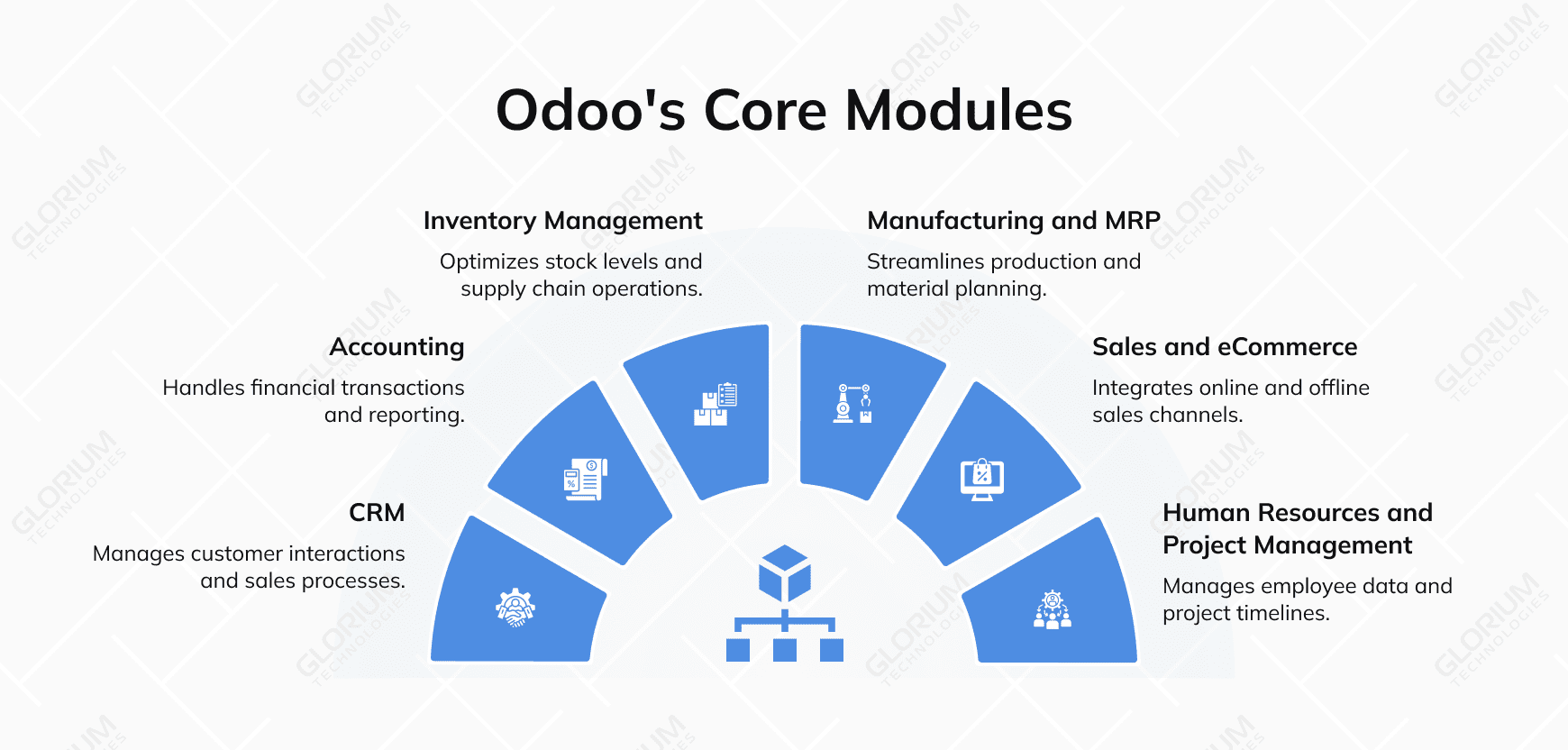
Odoo’s CRM is the system of record for everything happening between your sales team and a prospective customer, from first contact through closed deal. The core difference from a standalone CRM like HubSpot or Salesforce is that Odoo CRM lives inside the same database as your products, prices, inventory, and accounting. So when a salesperson generates a quote, the platform pulls live product availability and current pricing automatically, and when the deal closes, the invoice is one click away, with no data hop between systems.
Day-to-day, the team works in a Kanban-style pipeline view where deals move through stages: new lead, qualified, proposal, won. Tasks, calls, and emails are logged against each opportunity. Reporting dashboards show win rates, average deal size, conversion times, and forecasted revenue by salesperson or region.
The Odoo accounting module covers the full financial workflow: invoicing, bank reconciliation, multi-currency handling, tax compliance, and reporting. The Community version is enough for small businesses with simple needs, such as basic invoicing and a few currencies. The Enterprise version is where the platform earns its license fee for finance teams: automated bank synchronization, multi-company consolidation, deferred revenue handling, and OCR-based invoice capture that converts photographed bills into draft entries. For companies operating across multiple jurisdictions, the Enterprise accounting suite is usually enough on its own to justify the upgrade.
Inventory is one of the modules where Odoo’s integrated nature shines. Multi-warehouse stock tracking, lot and serial number tracking, automated reordering rules, and configurable routing for dropshipping or make-to-order processes all run from a single configuration. Barcode scanning works out of the box, and the Enterprise IoT module connects industrial scales, label printers, and scanners so that stock moves are recorded on the shop floor without anyone retyping numbers into a screen. Because Sales, Purchase, and Manufacturing all share the same product master, every order, work order, and PO updates inventory in real time.
For discrete manufacturers, Odoo provides bills of materials, work orders, quality control checkpoints, and maintenance scheduling. The Material Requirements Planning, or MRP, layer ties production schedules to BOMs, demand forecasts, and current inventory levels, so the system can tell you whether you have the parts to fulfill an order, when to issue purchase orders, and where production capacity is constrained. For companies running their MRP in spreadsheets today, Odoo Manufacturing is usually the strongest argument for moving to an integrated ERP.
The Sales module handles quotation generation, order entry, upselling rules, and subscription billing. It connects natively to the eCommerce app, which means an order placed on your website flows straight into inventory and accounting without an integration layer. For B2B teams, the same pipeline supports contract negotiation and renewal workflows. For B2C teams, payment gateway integrations, shipping carrier connections, and abandoned-cart recovery all sit one configuration step away.
The HR layer covers recruiting, onboarding, leave tracking, payroll, performance reviews, and timesheets. Project Management adds task management, Gantt charts, and time-against-task tracking, with optional integration into invoicing for service businesses billing hourly. Most companies don’t start with these modules; they typically arrive after the financial and operational core is stable, then connect timesheets to payroll and project hours to client invoices.
Once edition and hosting are settled, a simpler question takes over: how does running on Odoo change the way you work each day? For a company growing fast enough to outpace its tools, four benefits tend to matter more than the rest. Each one maps to a pain point that spreadsheets and disconnected apps create as headcount and order volume climb.
The same modular core behaves very differently depending on who’s running it. A manufacturer leans most on production planning, a distributor on stock accuracy, and a service firm on billable hours, so the apps that matter shift from one business to the next. The sections below show where Odoo tends to prove its worth.
When production planning lives in spreadsheets, nobody can say with confidence whether the parts exist to fill an order, and that uncertainty shows up as missed ship dates. Linking bills of materials, work orders, and MRP to live inventory means a sales order checks real component availability before it’s promised, and the shop floor sees an accurate build schedule instead of a guess. That connected approach is the core of Odoo for manufacturing.
As order volume climbs, manual stock counts fall behind, and the gap between system and shelf turns into backorders and write-offs. Multi-warehouse tracking, automated reorder rules, and barcode-driven picking keep quantities accurate across locations, so reorder points trigger on real data and pickers work from a current list. Odoo for wholesale and distribution is built around keeping that accuracy intact as you scale.
Selling across a website and physical stores usually means two systems that disagree about inventory and revenue, which forces nightly reconciliation and risks overselling. Odoo routes web orders straight into inventory and accounting, and runs point of sale off the same catalog and ledger, so stock and sales stay in sync whether a customer buys online or in person. Both e-commerce and retail deployments lean on that single source of truth.
Safety, labeling, and recall readiness leave little room for guesswork, since a single traceability gap can stall a shipment or trigger a recall. Lot and expiry tracking, recipe-based costing, and end-to-end traceability let you trace any ingredient from supplier to finished product and pull an accurate margin on every recipe as input costs move. Those controls sit at the center of Odoo for food and beverage.
Regulatory pressure is constant, and an audit can arrive at any time, so the records have to be right the first time. Batch tracking, controlled-substance logs, and audit-ready reporting capture the chain of custody and dispensing history regulators expect, without staff rebuilding it from scattered notes after the fact. That compliance backbone is what Odoo for pharmacy is designed around.
When revenue comes from time and contracts rather than products, money leaks through hours that never get logged and milestones that slip past unbilled. Tying project hours, timesheets, and property or contract records to invoicing turns recorded work directly into invoices, so billing reflects what was actually delivered. Odoo for real estate maps that flow for service-driven businesses.
Odoo rarely makes a shortlist alone. It usually sits next to SAP Business One, Oracle NetSuite, or Microsoft Dynamics 365 Business Central, each built around a different priority.
Odoo’s strengths are flexibility and a low entry point, with deep customization and a modular path that lets you start with one app and grow. The alternatives each lead somewhere specific. SAP Business One suits established SMBs that need a compliance tool out of the box. NetSuite fits finance-heavy, multi-entity firms scaling fast. Dynamics 365 Business Central is the natural choice for teams already standardized on Microsoft.
The right pick comes down to your operating model. Odoo usually wins on total cost of ownership over three to five years, while the others justify their pricing with deeper out-of-the-box depth in their specialties.
| Platform | Best fit | Customization | Pricing position |
| Odoo | SMBs and mid-market teams that want modular, source-available growth | Deep, via Python and Studio | Lowest entry point |
| SAP Business One | Established SMBs in manufacturing and distribution | Partner-led, with strong industry templates | Premium, justified by built-in compliance depth |
| Oracle NetSuite | Finance-heavy, multi-entity firms scaling fast | Suite-based, via SuiteScript | Premium, justified by financial consolidation depth |
| Dynamics 365 Business Central | Companies already standardized on Microsoft 365 | Flexible, via AL and the Power Platform | Premium, with value tied to Microsoft integration |
Odoo runs on an open-core business model: Odoo Community is free, and Odoo S.A. monetizes Odoo Enterprise through subscriptions, hosting, and Success Packs (paid implementation consulting). The pricing changed materially in 2026, so it’s worth looking at the current numbers, the published trajectory, and the company’s financial footing before signing a multi-year subscription.
For US and Canada customers, the Standard plan is $24.90 per user per month, billed annually, and includes all Odoo apps. The Custom plan, which adds Odoo Studio, multi-company support, and external API access, is $49.00 per user per month. Both numbers reflect a price increase of up to 30% over 2025 rates in the US and Canada. For a 50-user custom deployment, that lands at roughly $29,400 per year in licensing alone, before implementation work.
Here’s the at-a-glance view of how the plans compare:
| Plan | Cost per User/Month | What’s Included |
| One App Free | $0 | One Odoo app, free for unlimited users |
| Standard | $24.90 | All Odoo apps, one user database, hosting on Odoo Online |
| Custom | $49.00 | All Odoo apps + Odoo Studio, multi-company, external API, on-premise option |
Pricing trajectory shows how Odoo costs are likely to change after the first subscription year. Trajectory is an essential metric to measure, since ERP systems aren’t a one-time purchase software that can be substituted easily. They sit in place for years, while users, modules, and support needs change. This can all affect the final cost, so if you’re planning for the next three to five years, two factors can affect your long-term costs:
Even with these increases, Odoo ERP still costs less per user than SAP Business One or comparable mid-market ERP software. The gap is narrowing, though, and you should be modeling the total cost of ownership over three to five years rather than focusing on year one alone. For finance leaders, this is also where comparing Odoo against other ERP software pays off: list price differences look smaller once implementation, training, and ongoing support are folded in.
The same handful of questions come up in nearly every Odoo evaluation conversation: Is Odoo too complex? Can we handle implementation and migration? Will we be fine with simply the Community Edition?
These are questions that naturally arise when businesses consider implementing a new ERP system. Below are the four common misconceptions and questions—answered—we most often encounter in our ERP implementation projects.
This is a common question that naturally occurs. However, Odoo is one of the most suitable ERPs for small and mid-sized businesses. The modular setup actually makes Odoo unusually friendly to small teams. You can start with just CRM or invoicing and add other Odoo modules as the business expands. Odoo Online’s free tier even lets you run one app at no upfront cost, and Odoo offers that starting point precisely so smaller teams can validate fit without committing budget. That said, this isn’t a “no work required” situation.
The license of Odoo Community Edition is genuinely free, but the operations behind it aren’t. Without Odoo Enterprise, you give up official Odoo support, automatic upgrades, Odoo Studio, the external API, and multi-company management. For most organizations beyond a small technical team, the internal labor cost of maintaining, upgrading, and securing an Odoo Community deployment outweighs the Odoo Enterprise subscription. The free community version is a real option if you have a strong technical team and modest needs.
Enterprise subscribers get official Odoo support with SLAs. Community users can lean on the OCA, public forums, and the global network of certified Odoo partners. Support exists in both cases; what changes is who provides it and on what terms. For teams that don’t want to depend on Odoo S.A.’s standard support hours or community responsiveness, working with a certified Odoo partner like Glorium Technologies is a common path. You get a dedicated team that knows your specific deployment, can build customizations against your business logic, and stays available between version upgrades.
Yes, and in most mid-market scenarios, it remains the cost-efficient choice. The table below shows how Odoo’s two main paid tiers compare to a widely deployed proprietary ERP option at 2026 published pricing.
| Platform | Starting Price (per user/month) | Pricing Model | Best Fit For |
| Odoo Standard | $24.90 | All Odoo apps in one subscription | SMBs and mid-market teams that want modular growth |
| Odoo Custom | $49.00 | All Odoo apps + Studio + multi-company | Mid-market teams with custom workflows or multiple entities |
| SAP Business One | Varies by deployment | License + implementation, often perpetual | Established SMBs in manufacturing and distribution |
What stands out is less the headline number than the pricing model itself. Odoo bundles every app into one subscription, while traditional proprietary mid-market ERPs typically scale costs as you add modules and users. The right answer depends on which ecosystem and operating model fits your business, not on a single line of pricing, so total cost of ownership over three to five years is a more useful lens than entry pricing alone.
You can set up Odoo yourself if you’re rolling out a single module, your data is clean, and your processes are reasonably simple. Odoo is a user-friendly platform and even supports small manual customizations, but most companies don’t have it so easy. Once the scope grows beyond one app—and for most growing businesses, that happens quickly—the real risk shifts. You stop asking “Can I configure this?” and start asking “Will this configuration still hold up in 18 months?” That’s where a professional Odoo implementation partner earns its fee.
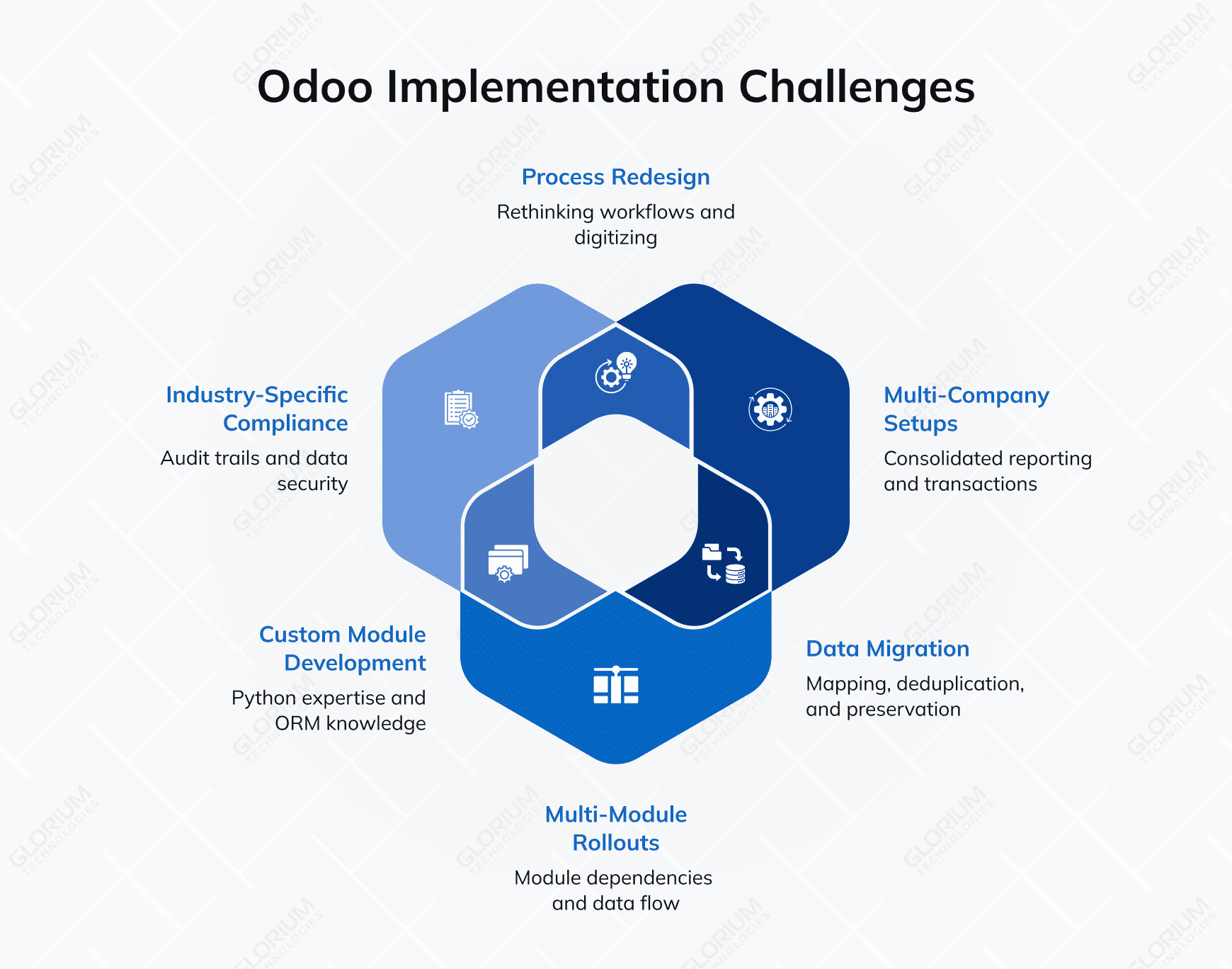
You should plan for outside help in any of the following scenarios:
Odoo S.A. offers prepaid Success Packs of consultant hours, and reports that 80% of those projects reach production within 200 hours. That model fits when the scope is well defined, and the underlying processes are reasonably standard. Once the project includes ERP modernization, heavy customization, or industry-specific compliance, prepaid hours rarely cover everything you need: architecture planning, data migration strategy, training, and post-launch optimization. That’s the gap a dedicated Odoo implementation partner is built to close, with ongoing support and maintenance once the system is live.
The cost of getting implementation wrong isn’t the consulting fee. It’s months of operational disruption, data quality problems, and user-adoption issues that show up well after go-live. A capable partner compresses that timeline and reduces the surface area for mistakes.
Glorium Technologies is a certified Odoo partner with 15+ years of business experience and a portfolio of full-cycle Odoo 18 and Odoo 19 deployments across manufacturing, food and beverage, retail, construction, and healthcare. Our work covers the full path from initial process discovery and module configuration through data migration, custom Python development on Odoo’s ORM, and post-launch support.
Two recent projects show what that looks like in practice. For a Belgian chocolate manufacturer running on spreadsheets and disconnected legacy tools, our team deployed a tailored Odoo 18 stack that connected production to labor tracking and reporting, resulting in a 90% reduction in reporting time and a unified financial view across the business. For a U.S. construction project management company, we rolled out Odoo 18 Enterprise and automated supplier bids and procurement, improving on-time delivery rates by 23% and reclaiming 30% of the procurement team’s time.
If you’re evaluating Odoo for your business, weighing Community against Enterprise, or trying to scope an implementation realistically, our team can help you evaluate the ERP readiness of your business, give realistic estimates, and help you take the first steps toward Odoo implementation. You can book a free, guided demo or schedule an intro call with our ERP experts.
Odoo comes in two editions: Community and Enterprise. Community is free and open-source, covering core functions like CRM, inventory, and basic accounting, but it has fewer modules and no official vendor support. Enterprise requires a per-user monthly subscription, starting at around $31.10 per user per month as of 2025, and adds advanced modules, Odoo Studio for no-code customization, and dedicated support. Odoo Online also offers a free tier, but it is limited to a single app, which rarely covers the needs of a growing business. The license cost is only part of the picture — hosting, implementation, data migration, and partner fees all factor into the total cost of ownership, so those should be accounted for before settling on an edition.
All three are capable ERP platforms, but they serve different priorities. Odoo’s open-source foundation makes it the most flexible of the three, with deep customization available through Python development and a modular structure that lets businesses start small and expand over time. SAP Business One is purpose-built for SMBs in manufacturing, distribution, and retail, with stronger out-of-the-box industry functionality and more mature compliance tooling for regulated sectors. Microsoft Dynamics 365 Business Central integrates natively with the Microsoft ecosystem, including Office 365, Teams, and Power BI, making it a natural fit for organizations already running Microsoft infrastructure. Odoo is generally the most cost-effective starting point, while SAP and Business Central carry higher implementation costs that are often justified by deeper out-of-the-box functionality for specific industries.
Yes, both are supported natively, though the depth depends on your edition. Multi-company is available in both Community and Enterprise, allowing multiple legal entities to be managed within a single database. Enterprise adds inter-company transaction automation and consolidated financial reporting across entities, which Community does not include. Multi-currency is part of Odoo’s accounting module and works in both editions, letting you record invoices and transactions in foreign currencies with exchange rates updated manually or automatically. For businesses with complex inter-entity workflows or multi-country operations, Enterprise provides considerably more automation, while Community may require manual workarounds or custom development to cover the gaps.
Timelines vary significantly depending on scope, data quality, and partner experience. A standard rollout covering three to five modules for an SMB typically takes 6 to 12 weeks, assuming clean data and available internal stakeholders for testing. Projects involving legacy data migration, custom development, or third-party integrations generally run 3 to 6 months, and multi-entity implementations with compliance requirements can extend further. The most consistent factors affecting delivery are how clearly the scope is defined upfront, the condition of the data being migrated, and the prior experience of the implementation partner in your industry.
Odoo is built on Python with a PostgreSQL database, and custom module development is fully supported. For Enterprise users, Odoo Studio provides a no-code environment for modifying views, adding fields, and creating automated workflows without writing code. Deeper customizations, such as new business logic or external integrations, require Python developers familiar with Odoo’s framework and architecture. Odoo.sh is the recommended environment for deploying custom development, offering Git-based version control, staging branches, and automated testing pipelines. Custom modules built without a solid understanding of Odoo’s upgrade path can become a maintenance burden over time, so working with an experienced development partner from the start is worth the investment.