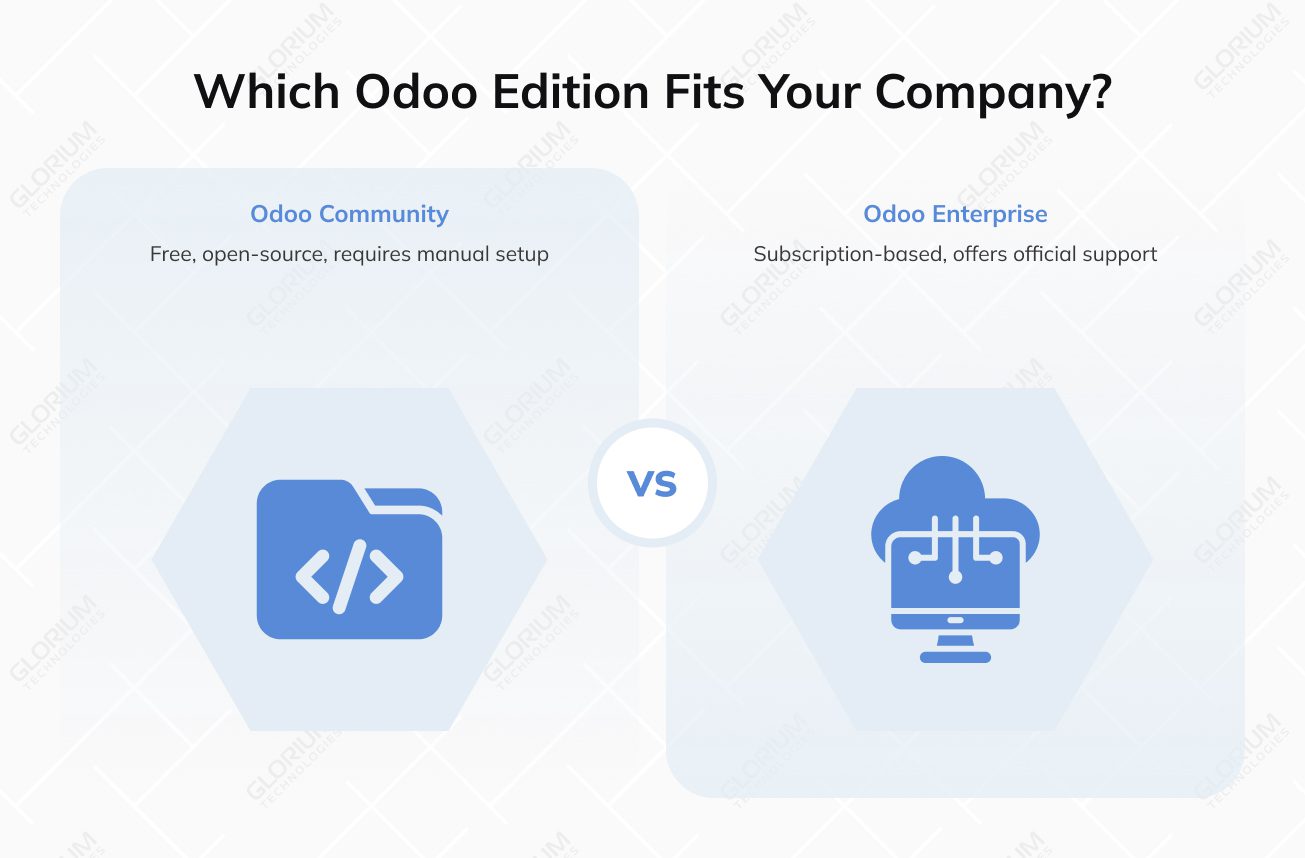
Imagine you’re standing at a crossroads with two keys in your hand. The first key lets you use a robust engine for free, but you have to assemble and tune it yourself. The second key comes with a subscription, but it gives you access to a fully loaded vehicle. This is the reality of choosing between Odoo Community vs Odoo Enterprise.
Is ‘free’ software still free if it costs you 20 hours a week in manual work? Maybe, if you have a tech-heavy team that can spend hours building what’s missing, as Odoo Community is a masterpiece of open-source engineering. However, if you want to be among the 49% of companies that go live on schedule and with a safety net of official support, the Enterprise edition can be more appealing.
When comparing Odoo Community vs Enterprise, you should not zero in on the feature list alone. Let’s discover the long-term ripple effects each edition will have on your scalability and your team's productivity.
Overview of Odoo Community Edition
The Community version provides access to the platform’s open-source framework distributed under the LGPL-v3 license. It covers essential modules such as inventory, manufacturing, sales, and accounting, making it a viable starting point for smaller teams or companies with in-house technical expertise. However, its capabilities are limited when advanced automation, reporting, or vendor-backed support is required.
Advantages
For many, the primary draw of Community is the absence of licensing fees. But its real benefit comes from the community support provided by the Odoo Community Association. It is a massive global network of developers who contribute thousands of free yet customizable modules. As an Odoo Community user, you can use them to extend your business functionalities; you gain total control over the source code. It is your ultimate playground if you are a DIY developer, non-profit, or startup with more technical talent than capital.
Potential drawbacks
When looking at the Community vs Enterprise difference in user experience, you should know that here you’ll get a no-frills one. Accessibility makes for another limitation (especially for field teams or warehouse staff), as the free version is primarily web-based and lacks a native interface for Android or iOS mobile devices. On top of that, you have to rely on community forums for troubleshooting rather than receiving dedicated support from Odoo SA. This edition handles basic inventory management and business operations well, but it lacks the cutting-edge functionality offered by the paid alternative.
Overview of Odoo Enterprise Edition
Enterprise is the high-octane model of the Odoo ecosystem. As a licensed and shared source platform, it wraps the open-source core in a comprehensive suite of advanced features. The Enterprise version is specifically engineered for organizations that prioritize operational efficiency and cutting-edge functionality over DIY customization.
Advantages
Unlike the Community version, which requires significant technical expertise to maintain, Enterprise offers a seamless experience through Odoo SA’s official hosting assistance. Whether you choose the simplicity of cloud hosting via Odoo Online or the flexibility of private cloud hosting support on Odoo.sh you gain unlimited functional support and frequent upgrades. This ensures that as new features, for example, marketing automation and data cleaning, roll out, your ERP system won’t break down.
In the Odoo Community Edition vs. Enterprise comparison, mobile functionality is one of the clearest gaps, with native apps available only in Enterprise. This mobility transforms how teams work, enabling real-time barcode integration for inventory management, live updates for field service, and ‘from anywhere’ access to executive dashboards. For Enterprise users, this connectivity means the difference between a static database and a dynamic, responsive Odoo ERP system.
Drawbacks
Unlike the free version, Odoo Enterprise requires a subscription fee based on the number of Enterprise users, which can represent a significant line item in a small company's budget. Add there some additional costs for third-party app integrations and customization capabilities, and the required investment may feel extreme. For smaller firms with very static business requirements, the sheer volume of additional features and proprietary services might feel like paying for a Ferrari when a bicycle would do.
Key Odoo Enterprise vs Community Differences
Odoo's two primary editions share a common lineage, but they handle complexity and growth way too differently. Let’s break down the Odoo Enterprise vs Community landscape across five critical pillars to help you identify which path aligns with your long-term business needs.
Odoo Community vs Enterprise features
The Community version can be enough to handle basic business operations, for instance, CRM or inventory management. If you need the full accounting suites (with AI-driven OCR and bank synchronization) or high-tier manufacturing (PLM and Quality Control), the Enterprise edition is your only go-to. It can also provide you with marketing automation, quality management, and AI-driven data cleaning.
Odoo Community vs Enterprise features comparison table
|
Modules |
Odoo Community Features |
Odoo Enterprise Features |
|
Finance Management |
|
and more |
|
Inventory Management |
|
|
|
Project Management |
|
|
|
Sales & CRM |
|
and more |
|
Marketing |
|
|
|
Human Resource |
|
|
|
Website & E-commerce |
|
|
Customization and Odoo Studio
Enterprise introduces the Studio app, a low-code tool that allows non-developers to create modules, modify reports, and automate workflows via a drag-and-drop interface. Odoo Community offers limited flexibility here; if you want to make drastic changes, you need someone with deep knowledge of Python and XML, which can lead to additional developer hours that quickly eclipse the cost of a subscription.
Support and maintenance
Odoo Enterprise users can benefit from dedicated support from Odoo SA, covering unlimited functional support and bug fixes. Community users can only rely on community forums and their own technical expertise. The Enterprise subscription doesn’t automatically handle edition switching and requires compatible custom modules for the target version. Yet, official hosting assistance, coming with the ‘peace of mind,’ can be the deciding factor in choosing the paid version.
Long-term scalability
Scalability is where Odoo Enterprise transforms a business. It offers native integration with Odoo.sh, a PaaS platform that simplifies deployment and testing. Furthermore, Enterprise provides multi-company synchronization and advanced reporting tools that Community lacks.
Licensing and cost structure
The Odoo Community version has no license fees, making it appealing to those on a tight budget. Odoo Enterprise uses a proprietary license and follows a subscription-based pricing model. Your expenses will grow together with the number of users, but you won’t have to fork out on official maintenance and future version upgrades.
Community and Enterprise editions price comparison
|
Community |
Enterprise |
|
|
Standard |
Free |
$19.90 user/month |
|
Custom |
Available for certain apps only |
$13.60/ user/month for all apps |
|
Note: If you only need 1 module, you can get it for free for unlimited users |
||
Odoo Enterprise vs. Odoo Community in Modern Context
The gap between Odoo editions has widened with the rollout of Odoo 19. Today, not only does Odoo Enterprise offer more advanced features, but it also projects the next level of enterprise readiness. While Odoo Community remains a robust, open-source sandbox for developers and lean startups, its paid alternative has matured into a sophisticated AI-driven powerhouse. The latter is often preferred when you need official mobile apps, broader accounting features, vendor support, and high-level automation.
Product maturity and AI integration
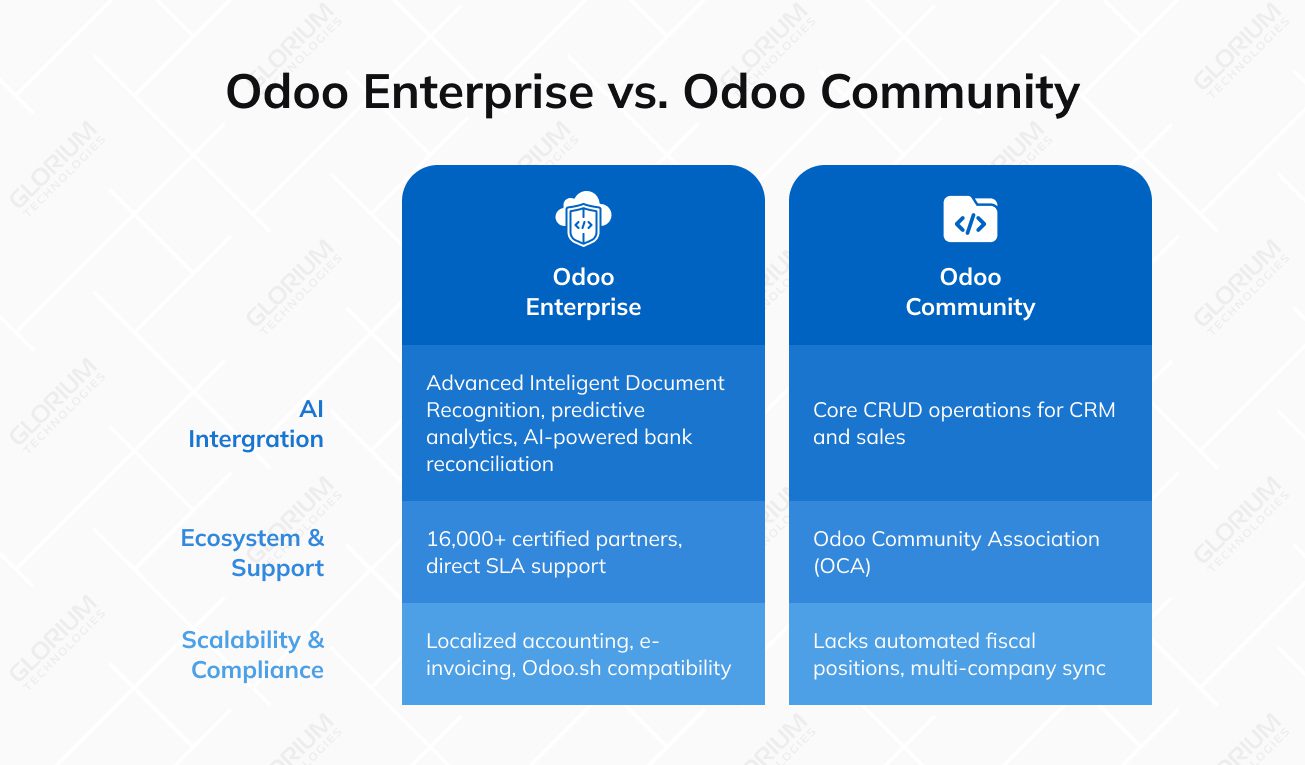
AI and automation are what determine whether business management software is worth the investment. The Enterprise edition now features advanced Intelligent Document Recognition and predictive analytics that the Community lacks. While Community provides the core CRUD (Create, Read, Update, Delete) operations for CRM and Sales, Enterprise integrates AI to forecast stock needs via demand analytics on sales/trends. Bank reconciliations use AI-powered matching, OCR for bills, and learned models with 3% tolerance for auto-matching, reducing manual effort significantly.
Ecosystem and partner support
The Odoo ecosystem has grown to over 15 million users, but the support structures for the two editions have diverged. Enterprise users benefit from a global network of 16,000+ certified partners, one of which is Glorium Technologies, and direct SLA-backed support from Odoo S.A. Conversely, the Community edition only relies on the Odoo Community Association (OCA). While the OCA is prolific, maintaining a Community instance requires significant internal technical debt to bridge the gap in features like barcode scanning and shipping integrations.
Scalability and global compliance
For businesses scaling across borders, Enterprise is the only ‘ready’ option. It includes localized accounting packages for dozens of countries, ensuring compliance with ever-changing tax regulations (like e-invoicing mandates). The Community version lacks these automated fiscal positions and may require additional configuration/add-ons/partner work depending on country requirements. Furthermore, Enterprise’s compatibility with Odoo.sh provides managed Odoo hosting with tools for staging/testing and deployment.
Implement Odoo Enterprise with Glorium Technologies
Partnering with an official Oddo partner for your ERP rollout means a high-speed, low-risk digital transformation. Our expert-led approach focuses on maintaining a 98% user adoption rate, helping businesses across manufacturing, healthcare, and retail transition into automated, data-driven powerhouses with zero downtime.
Glorium Technologies excels in extending Odoo Enterprise beyond its out-of-the-box state. Our developers specialize in creating bespoke modules for niche industry requirements, for example, complex PLM for manufacturers. Furthermore, they provide robust API integration services that seamlessly connect
Odoo with third-party platforms and specialized legacy systems to create a unified data ecosystem.
Make Odoo Enterprise drive execution across complex, multi-layered operations. Schedule a call with our experts today.
FAQ
Is it possible to migrate from the Community to the Enterprise edition as my business grows?
Yes, you can start with the free (Community) edition to manage core operations and, as your complexity increases, migrate to the Enterprise one for other modules, advanced features like AI-powered accounting, mobile apps, and official support.
Even though the database structures of the two versions remain compatible, you should invest in a professional migration. Thus, you can ensure that any custom code or third-party modules from your Community setup are properly integrated into the Enterprise version.
How can you transform your business operations using Odoo’s HR tools?
You can centralize your entire team's lifecycle—from hiring to payroll—within Odoo’s user-friendly interface. This open-source platform gives you total control, allowing business leaders like you to automate time-tracking and appraisals so you can focus on strategy rather than paperwork.
Why should you upgrade to the Enterprise version?
The Enterprise version is your go-to for high-level automation and professional scalability. While both editions are robust, the key differences lie in module features and exclusive tools, allowing business owners to scale faster. By investing in this edition, you gain access to the full Odoo ecosystem—including native mobile apps—ensuring your team remains productive from any device.
About Anna Voznaya