
User-Centered Design Statistics in 2026: Methodology and Benchmarks
Market Insights
Imagine a consumer who has spent 20 minutes meticulously selecting a product, only to be confronted at the final stage by a mandatory account-registration wall. For the user, the "Register" button is a barrier. For the business, it is a structural leak. This friction point is a primary driver of the 70% average cart abandonment rate currently plaguing the digital economy. We are in the "Design and Make" era: a period where the convergence of architecture, engineering, and digital experience determines which organizations thrive and which vanish. Design moved from speculative experimentation to the operationalization of intelligence at scale. This happened in the background of a complex matrix of inflation, talent gaps, and the aggressive pursuit of digital maturity. In this article, we discuss what user-centered design is, backed by reliable stats. But first, let's clarify the design terms you will encounter.
Before you dive deep into this topic, here are the key terms you must understand:
The economic value of the design industry continues to grow steadily, with graphic, UX, and motion design all expanding. Despite fluctuating investments and tight cost control, businesses now see design as essential to long-term resilience, not just a creative luxury. The global graphic design market, a primary indicator of creative activity, was valued at $55.1 billion in 2025 and is estimated to reach $59.29 billion by 2026. This segment is on track to reach $85.53 billion by 2031, with a CAGR of 7.60% from 2026. This type of growth usually indicates a rising demand for digital content and the democratization of design. In parallel, the User Experience (UX) design market is experiencing even more accelerated growth. Valued at $11.41 billion in 2025, it is expected to hit $13.06 billion in 2026, with a projected CAGR of 14.49% through 2031. The momentum for this growth is the strategic recognition of UX as a core lever for revenue. For example, organizations like Microsoft and Alphabet have reported record revenues in 2025—$70.1 billion and $90.2 billion, respectively. These revenues were driven in large part by the demand for sophisticated, AI-enhanced cloud and consumer interfaces. The motion graphics sector is a high-growth industry. In 2025, the market size reached $98.3 billion, with expectations of growth at a CAGR of 12.2% to $280 billion by 2034. This growth is driven by the shift to digital media, where moving images are more effective than static ones at grabbing attention on crowded social platforms and streaming services. North America remains the largest design market, driven by strong corporate spending and major tech hubs. In 2025, it accounted for 39.1% of the graphic design market and 43.8% of the UX market. However, the Asia-Pacific region is growing the fastest, with graphic design expanding at over 11% annually and leading the adoption of AI in manufacturing.
User-centered design is an approach that’s often used to create products, services, systems, apps, and more, with users in mind. This approach centers the customer’s needs, behavior, and goals in every design decision. UCD ensures that your final product is something that the real users will actually like. It helps businesses avoid assumptions by understanding the target audience through research and continuously testing solutions with them.
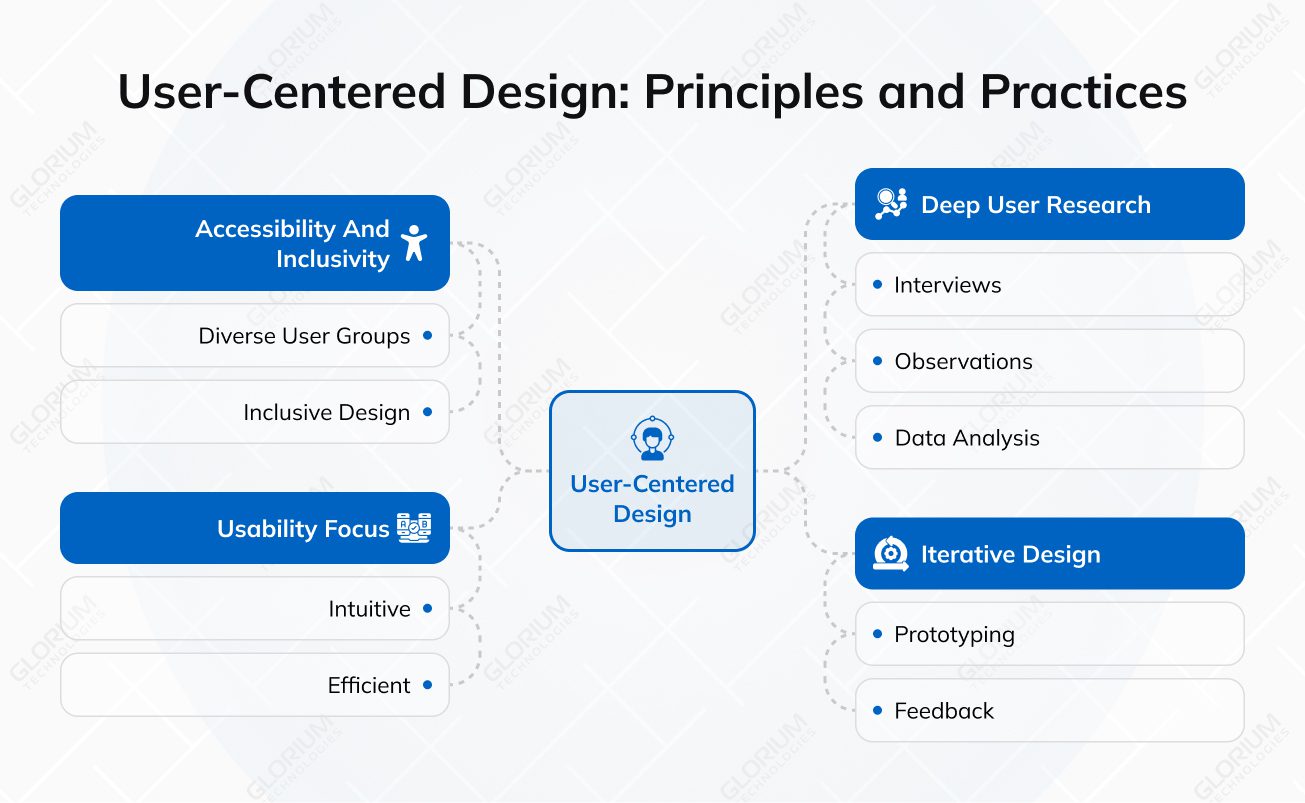
The concept was popularized by usability expert Don Norman and is now a core principle in UX, product design, and software development.
When creating a new product, there’s always the urge to add exciting features and advanced functions. The user-centered design shifts this dynamic and moves beyond the traditional approach, introducing the user at the heart of every stage of development strategy. This approach ensures that products are shaped by real needs rather than assumptions. The human-centered methodology is formalized in the international standard ISO 9241-210:2019, which offers a structured framework for designing interactive systems that are both usable and meaningful.
The ISO standard defines the ergonomics of human-system interaction, emphasizing that usable systems improve human well-being, improve productivity, and counteract adverse effects on health and safety. The UCD process is characterized by an iterative lifecycle consisting of four key activities:
These user-centered activities are iterative and can be repeated multiple times during a project.
The 2020 revision of ISO 9241-110 introduced seven user-centered design principles that serve as the gold standard for interface evaluation. These principles are applicable to any interface, whether it is software, hardware, or a combination of both:
Overall, the principles of ISO 9241-110 establish clear criteria for what constitutes good interaction.
The psychological threshold for poor digital experiences has plummeted. We at Glorium Technologies see that users demand immediacy and aesthetic credibility. Poor aesthetics trigger immediate credibility concerns that can undermine a brand's authority regardless of product quality. All of this is supported by recent research and reports:
In 2026, accessibility is not a niche compliance checkbox: It's a fundamental pillar of high-performance software engineering. As digital ecosystems become more complex, inclusive design has transitioned from a social responsibility to a strategic imperative. The following data points outline why prioritizing accessibility is the most effective way to future-proof software:
Inclusive design benefits the target demographic and also improves the experience for all users. It can increase overall usability by up to 30%. Organizations that lead in disability inclusion report 1.6 times more revenue and 2 times more economic profit than their peers. Accessibility is also a significant driver of brand trust. Approximately 84% of consumers report higher trust in brands that represent disability in their marketing and product design. As the regulatory environment tightens, including the move toward WCAG 3.0 standards, accessibility research is becoming a standard part of the design roadmap.
The quality of the digital interaction design foundation remains a critical competitive differentiator. Large-scale benchmarking by the Baymard Institute reveals that many leading platforms continue to fall short of basic user expectations. Analysis of over 41,000 checkout performance scores shows that 64% of desktop sites and 63% of mobile sites have a mediocre or worse checkout performance. This poor performance directly leads to cart abandonment, which currently averages 70% among e-commerce users.
|
Platform Type |
Mediocre or Worse UX |
Good UX |
|
Desktop Sites |
64% |
2% |
|
Mobile Sites |
63% |
2% |
|
Mobile Apps |
46% |
7% |
Research shows that the average large-sized ecommerce site can achieve a 35% increase in conversion rates simply by making design changes to the checkout process. Specific pitfalls identified in 2025 include:
According to Network Solutions, the average bounce rate for blogs/content sites is 40-60%, for e-commerce sites is 20-45%, for services pages is 30-55%, and for FAQ pages is 65-80%. And only a positive user experience can help to decrease these numbers.
The application of UCD principles varies dramatically by sector, with different risk profiles and regulatory frameworks shaping the design process.
In the healthcare industry, poor UX is not just a commercial risk. Systems used by technicians and engineers must align with how people naturally think and act on the job to reduce errors in high-stakes environments such as offshore drilling or surgical theaters. The ROI of healthcare UX is specifically high, with organizations reporting a return of $3.20 for every $1 invested, particularly when integrated with AI-driven automation. UCD in healthcare often focuses on clinical workflow automation to address the 50% of staff time currently spent on documentation rather than patient care. By improving the usability of electronic health records (EHRs) and patient management systems, facilities can realize huge benefits. For example, Glorium Technologies developed a radiology workflow management tool designed to streamline complex imaging operations and improve clinical efficiency. The UI/UX design focused on translating real radiology processes into an intuitive digital experience, with a centralized dashboard that provides clear task prioritization, real-time status visibility, and quick access to patient data. By applying user-centered research, workflow mapping, and iterative usability validation, our team created role-specific interfaces that reduce cognitive load and enable faster decision-making. The most common hurdle for digital transformation is the siloed nature of large organizations. 68% of executives acknowledge legacy technology as a significant hurdle to their modernization efforts. Siloed structures often lead to user debt, where companies continue to support outdated, frustrating interfaces because they lack the cross-functional buy-in to invest in a holistic redesign. This is compounded by stakeholders who skip UX research to speed up the development process, only to find that their product yields no measurable business outcomes.
For SaaS firms, user-centric design is the primary growth lever for retention and adoption. Forrester research indicates that adopting user testing for digital experiences can lead to a 10.8% higher revenue retention over a three-year period. This is critical in a market where a 5% boost in customer retention can grow profits by 25-95%. SaaS companies that prioritize UCD also see significant internal efficiencies. By validating concepts pre-launch, they reduce iteration cycles by 25% and save developers from rework that typically consumes 50% of their time. For example, Spotify’s investment in UCD created a deeply loyal customer base of over 300 million active users. By focusing on personalized playlists, intuitive interface design, and seamless cross-device synchronization, Spotify transformed how users interact with music. Their research-driven approach ensures that the "Discovery Weekly" and "Wrapped" features feel uniquely tailored to the individual.
In e-commerce, the checkout process is the most critical touchpoint for UCD intervention. While global cart abandonment rates average 70.22%, a checkout redesign can increase conversions by 35.26%. Here are the critical 2025-2026 statistics for UCD in e-commerce and FinTech:
One of the best examples of how user-centered design improves conversion and reduces friction is Amazon. Amazon’s success is built on the systematic reduction of user friction. Features like one-click ordering and personalized recommendations are the result of continuous improvement. The famous "$300 million button" case study highlights the impact of removing mandatory account creation at checkout, which increased sales by 45% in the first month alone. Digital friction causes billions in lost productivity annually. About 23% of design professionals report that it is difficult to get buy-in from senior management for UCD initiatives. This resistance often stems from a fear of operational slowdowns during the transition to new systems or a lack of deep understanding regarding the long-term ROI of design.
The demand for UCD expertise has created a significant skills shortage. UI/UX roles are growing at a 45% CAGR through 2030, and the World Economic Forum ranks UI/UX design as the 8th fastest-growing job in the global economy.
|
Workforce Statistic |
Metric |
|
UI/UX Role Growth CAGR |
45% (2025-2030) |
|
Projected UX talent gap |
1.5 million (2025) |
|
Job Growth Ranking (WEF) |
8th fastest-growing job |
|
Firms expanding UX/AI budgets |
85% |
|
Organizations with an accessibility policy |
72% |
Salaries for creative and design roles have risen modestly, though satisfaction is declining. In content design and UX writing, the median global salary for 2025 is $110,000, up from the $80,000–$100,000 range in 2023.
|
Role / Experience Level |
Median Salary (2025) |
|
Content Design (<1 Year) |
$72,800 |
|
Content Design (3-6 Years) |
$90,460 |
|
Content Design (>10 Years) |
$153,000 |
|
Creative Director (Canada) |
$125,000 |
|
Sr. Software Engineer (US) |
75,000 - 180,000 |
Regionally, the United States leads with a median content design salary of $147,000, followed by Australia at $90,000 and Canada at $82,144. Despite these figures, 46% of professionals are unhappy with their current compensation, and 38% are staying in their jobs primarily due to economic uncertainty. 61% of industry leaders say it is difficult to find new employees with the right technical skills, up from 45% in 2024. To address this gap, mature organizations are investing in research democratization. Product managers and engineers are trained to conduct lightweight research using standardized templates and coaching from central design teams. All these are pushing organizations to rethink their workforce strategies, with a heavy focus on AI literacy. 86% of educators believe that teaching students how to use generative AI for creative projects will improve their chances of securing jobs. In the professional sphere, designers are shifting from makers to curators and strategists. While AI improves efficiency for 78.35% of workers, only 36.38% say they fully trust the output. Human oversight and craft remain essential for high-fidelity releases.
Even organizations that actively invest in user-centered design often fall into recurring traps. These mistakes typically don’t happen because teams ignore UCD principles. They occur due to delivery pressure, misaligned incentives, or incomplete processes.
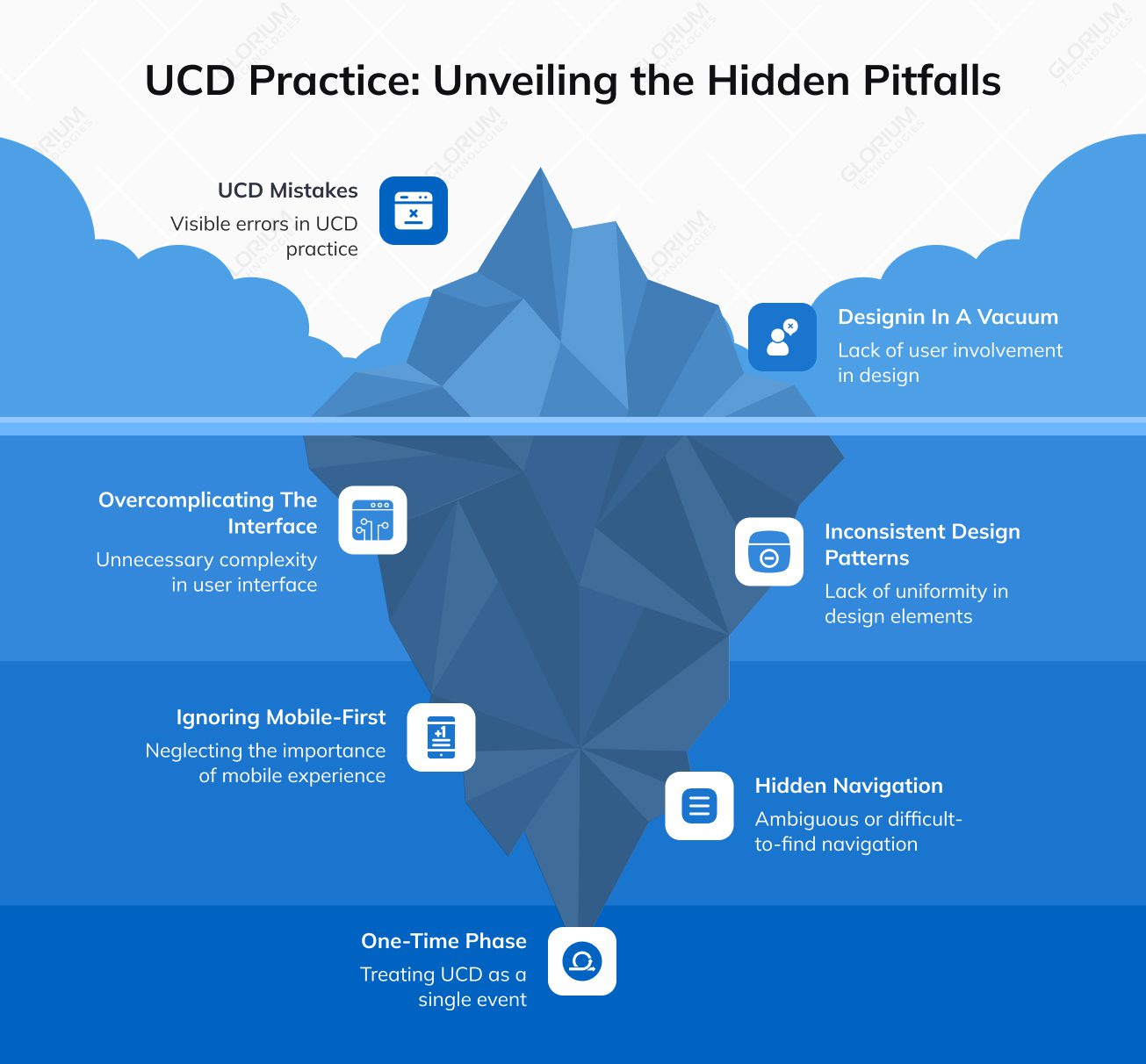
Below is a deeper look at the most common pitfalls and practical ways to address them.
Teams rely on stakeholder opinions, internal brainstorming, or competitor product features instead of direct user insight. Extensive research is skipped or reduced to analytics dashboards without qualitative context. As a result, products reflect assumptions rather than real user needs. Why it’s risky:
Solution options:
Ultimately, designing with direct user insight prevents wasted effort and increases adoption. Putting users above your business goals gives your product and users an edge. Their early and active involvement is paramount.
Feature creep pushes teams to expose too many controls, options, and settings at once. Instead of prioritizing core tasks, interfaces become dense and difficult to scan. Why it’s risky:
Solution options:
This user-centered approach ensures users can accomplish their goals efficiently without unnecessary cognitive load. For example, we developed an IoT platform interface for Ophardt Hygiene that simplifies complex device data and operational workflows into a user-friendly digital environment. Our team designed the experience to help hygiene specialists and healthcare organizations monitor hand-disinfection processes through an intuitive dashboard, structured navigation, and accessible data visualization. We prioritized usability and clarity. Thanks to this, our designers transformed technical IoT interactions into streamlined user journeys.
Different teams ship features independently, resulting in inconsistent UI components, terminology, and interaction behaviors. Without a shared system, the product feels fragmented. Why it’s risky:
Solution options:
Consistent design reduces friction, builds trust, and improves overall usability.
Products are designed primarily for large screens and later adapted to mobile. This often leads to cramped layouts, poor performance, and workflows that don’t align with real mobile behavior. Why it’s risky:
Solution options:
Considering context and mobile realities improves engagement and user satisfaction across platforms.
Critical actions are buried in menus, icons lack clear labels, or information architecture is based on internal logic rather than user mental models. Why it’s risky:
Solution options:
Clear navigation empowers users to find what they need quickly and confidently.
We see that research is done at the start of a project, but not revisited after launch. The product evolves, but user insight does not. Why it’s risky:
Solution options:
Gathering user feedback ensures the product evolves with real user requirements. Different user segments must be engaged in this process.
When you need a partner that deeply integrates design and development process best practices into your product strategy, Glorium Technologies offers tailored solutions. With a strong focus on understanding user problems and applying research and design techniques from the earliest stages to delivery, our team ensures your product design looks great and aligns with how real users think and act. At the core of our approach is a deep understanding of your market, audience, and competition. Through thorough research and discovery, Glorium Technologies’s experts map out intuitive user flows and interactions before moving into visual design and prototyping. We ensure that every interface decision supports user success and business goals. Our UI/UX design team works hand in hand with software developers throughout the design and development process. This is why we balance creative solutions with technical feasibility. With inclusive design, usability testing, and data‑driven iteration embedded into our methodology, you gain a well‑refined digital journey that drives adoption and satisfaction. We invite you to review our case studies and schedule a free consultation with our representatives, who will answer all your questions.
AI is significantly reducing the time required for user research and automating accessibility fixes. It also enables the use of synthetic users for early-stage testing and for predictive analytics to support personalized interfaces.
The core principles include:
These help create highly usable designs that engage users and prompt them to take the targeted actions.
Yes. The integration of AI and ML has transformed UCD from a manual, time-consuming process into a data-driven science. A significant emerging trend is the use of synthetic users—AI participants that simulate human behaviors to stress-test flows before real users are involved. While synthetic users cannot replace real people for nuanced emotional understanding, they allow for rapid directional input early in the design process. Additionally, predictive analytics are increasingly used to prioritize content based on individual user goals, leading to interfaces that adapt to users' expertise levels.
Accessibility opens a brand to the £274 billion "Purple Pound" market in the UK and a $13 trillion global market. Organizations that prioritize accessibility report 1.6 times higher revenue and 30% higher usability for all users.
Common errors include:
AI is fundamentally changing the speed of user research. Sentiment analysis now accounts for 35% of UX research insights, enabling teams to decode user emotions faster than traditional methods. AI in UX research can reduce analysis time by 60-70%.