








The 2026 Guide to ERP Implementation for US
Updated February 17, 2026

 Summarize in ChatGPT
 Summarize in ChatGPT
For many small and mid-sized U.S. businesses, adopting an ERP system in 2025 is no longer a matter of if but how soon. With inflation now the top concern for 46% of small businesses and labor shortages squeezing margins, many SMB leaders still struggle to gain clear visibility into their operations and expenses. Yet, the path from disconnected tools to an integrated ERP often feels risky, especially when budgets are tight and the total cost of ownership can be high or unpredictable.
Today, we’ll break down what it really takes to implement ERP successfully: costs, timelines, project phases, and ROI benchmarks specific to SMBs. You’ll learn how to avoid overspending during data migration and see what a realistic rollout looks like in months, not years.
Backed by over 15 years of software development experience and 150+ successfully delivered projects, Glorium Technologies brings a real-world perspective to every stage of ERP implementation. From manufacturers gaining 100% visibility into labor expenses to retailers increasing inventory accuracy by 80%, our experience turns data into measurable outcomes.
Whether you’re evaluating platforms or preparing for rollout, this guide offers a clear, results-driven roadmap to ERP implementation success in 2026.
Featured Snippet:
ERP implementation for U.S. SMBs in 2025 typically costs between $60,000 and $300,000, depending on the system type, user count, and customization needs. A full rollout takes 3 to 9 months, and most companies see measurable ROI—reduced manual work, faster reporting, improved inventory visibility, and cash flow—within the first 12 to 36 months of adoption.
Content
ERP software has developed from a rigid back-office tool into a flexible, cloud-connected ecosystem built for growth. Instead of buying a single, massive suite upfront, you can now acquire the composable modules you need through vendor app marketplaces and seamless API integrations.
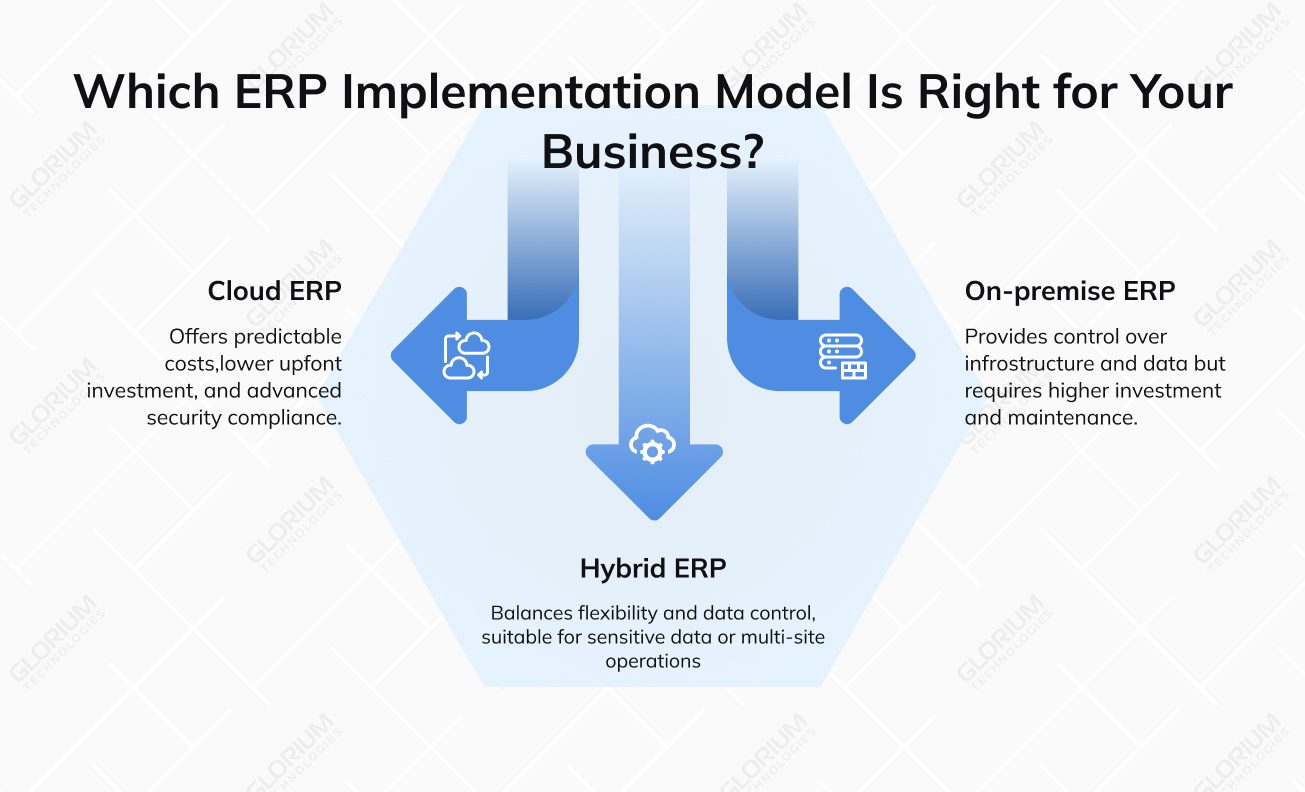
To balance cash flow and scalability, you should choose a deployment model carefully:
If you want to avoid over-customizing the core system, you can rely on custom app development and iPaaS (Integration Platform as a Service). These tools extend ERP functionality, connect third-party systems, and automate workflows without compromising vendor support or upgradeability.
Over 70% of ERP implementation projects don’t achieve their original business goals, and about one in four fail completely. Poor planning, misaligned expectations, or lack of executive support are on the list of culprits. You must be sure your organization is ready for the shift before you invest in the enterprise resource planning (ERP) system.
ERP readiness starts with recognizing the signs of strain across different leadership roles:
Once you identify your company issues, you can build a strategy by mapping your operational pain points to KPI impact and the ERP capabilities that solve them. For example, this may look the following way:
| Pain Point | KPI Impact | ERP Capability |
| Inaccurate stock data | Lost sales, high carrying costs | Multi-warehouse inventory control |
| Manual invoicing | Delayed cash flow | Automated billing and approvals |
| Compliance complexity | Risk of fines | Sales tax automation, EDI support |
You can also build a concise SMB ERP business case template outlining:
A well-defined readiness and business case phase is what can help secure key stakeholder approval. It can become a roadmap for tracking ERP ROI, ensuring that early planning translates into long-term payback.
Is Your Business Ready for an ERP?
Download Your Free ERP Readiness Checklist.
Choosing the wrong ERP partner is costly for any business, but for SMBs, the stakes are even higher. With tight budgets, small project teams, and pressure to see results quickly, every choice—from the software you pick to the people who implement it—carries long-term consequences. The best ERP solutions are built on collaboration between business leaders, IT teams, and experienced consultants, like those at Glorium Technologies, who understand how to align tools with real business functions.
In other words, success depends not only on what system you choose but who guides you through the process.
When evaluating ERP options, as a small and mid-sized business representative, you should look beyond brand recognition and focus on measurable criteria:
A vendor comparison matrix can make your shortlisting process simpler:
| Criteria | Deployment Options | Pricing Model | Extensibility | Marketplace Apps | Analytics |
| Vendor A | Cloud | Subscription | High | 1,000+ | Built-in BI |
| Vendor B | Hybrid | Perpetual | Moderate | 500+ | Add-on |
You need to distinguish between what ERP vendors offer (licenses, base configuration) and what implementation partners deliver, including business process alignment, user training, and post-go-live support.
Finally, create a concise request for proposal—or use the downloadable version we’ve prepared—to outline your project scope, data volumes, required integrations, and expectations for ongoing support.
Choosing the ERP Partner?
Download Your Free ERP RFP Checklist
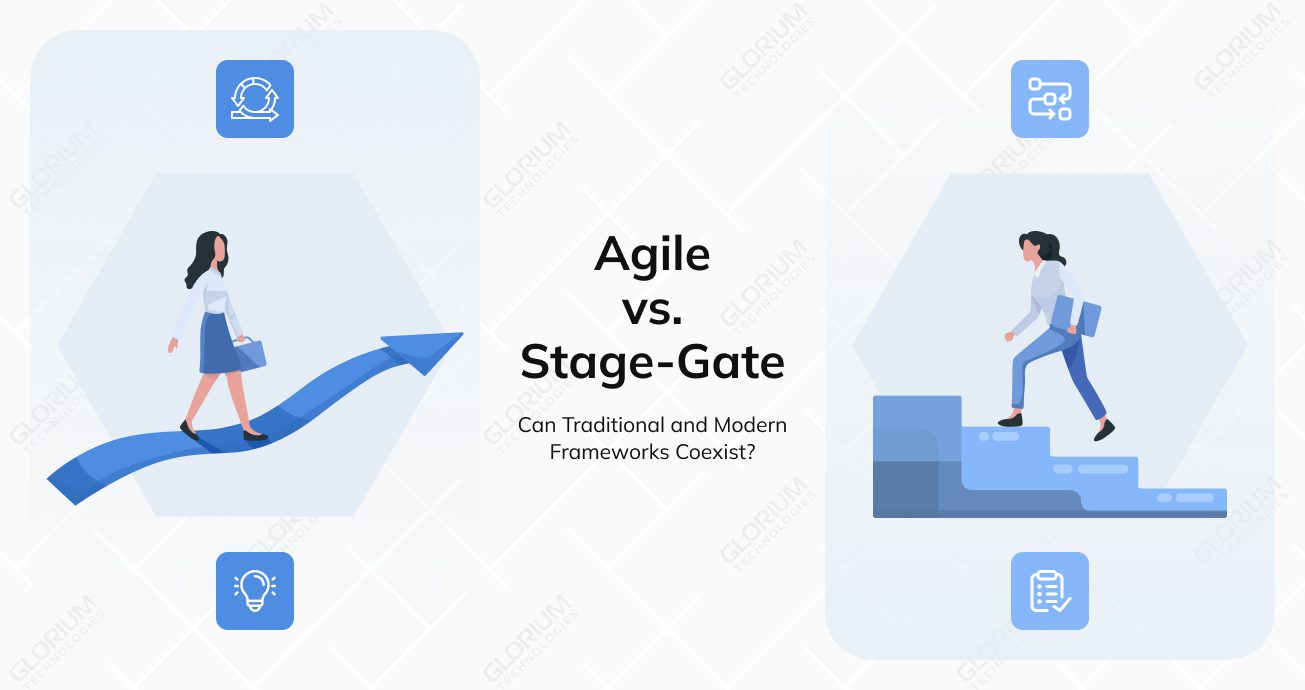
The implementation methodology shapes how smoothly an ERP project progresses from planning to go-live. If the one you choose aligns with your team structure and project scope, you are twice as likely to deliver ERP on time and within budget. This way, you can also avoid costly overruns and implementation fatigue.
There are 3 methodologies to choose from:
Case study: A mid-sized U.S. distributor with three locations chose a hybrid ERP implementation to balance structure with flexibility. By standardizing finance through Waterfall milestones and managing inventory modules in Agile sprints, the company completed rollout in around eight months—well ahead of the 14–15 months typically required for larger, full-scale deployments.
A single oversight can delay adoption or drive costs higher than planned. According to recent studies, 77% of successful ERP projects attribute their success to strong internal alignment and active leadership support. In other words, technology alone doesn’t guarantee results, but strategy and cross-department collaboration do.
Here are 11 essential steps that shape a well-executed ERP rollout and accelerate adoption.
The initial stage involves evaluating existing software, defining business requirements, and identifying process gaps, data handling, and communication. A strong business case links ERP investment to measurable outcomes such as improved cash flow visibility and higher user adoption rates. Plus, it gains leadership buy-in for funding and resources.
Once objectives are defined, compare ERP vendors and deployment options (cloud, on-premises, or hybrid). You should home in on functionality, scalability, integration potential, and total cost of ownership. Consider implementation partners with a proven track record, like Glorium Technologies, who can fine-tune the system to your SMB needs.
This stage involves documenting how each department currently operates—from sales and procurement to finance and inventory. Identifying overlaps, delays, and manual work helps create standardized workflows for automation. The output is a clear map of ‘as-is’ and ‘to-be’ processes that guide system design and configuration.
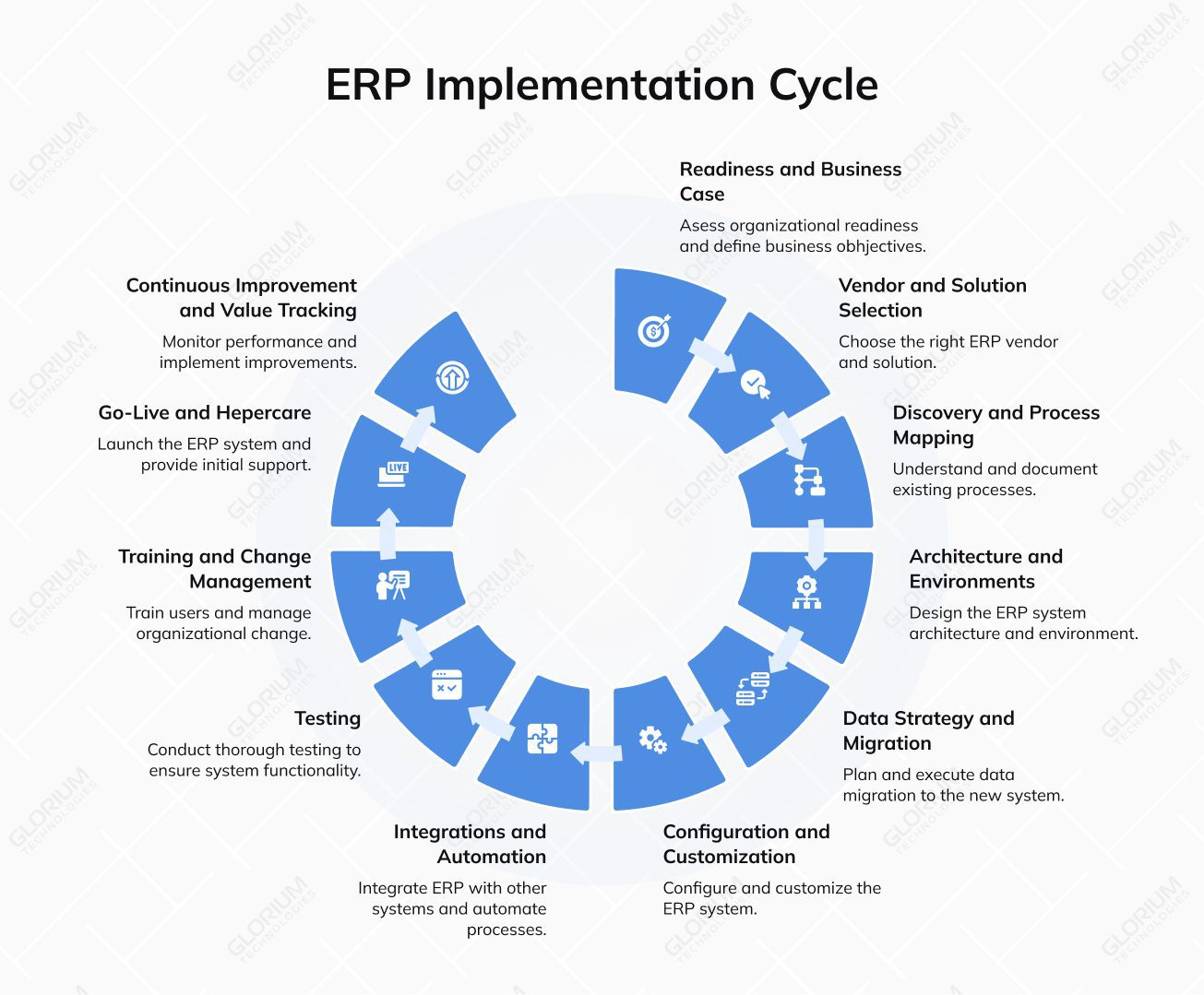
Building the right ERP environment helps your team roll out changes smoothly and avoid costly downtime. Start with a simple three-tier setup, comprising development, testing, and production. This structure lets you experiment safely and validate changes. You can use release trains and CI/CD pipelines to deliver updates and fixes continuously, so your system stays current without disrupting daily operations.
Sandbox, aka controlled, environments are equally valuable, enabling your implementation teams to safely test new modules or marketplace apps before deploying them live. Together, these elements create an adaptable architecture that supports faster innovation and reliable upgrades.
A strong strategy begins with profiling your existing data to spot errors or inconsistencies. From there, you should zero in on cleansing and mapping your legacy info (customers, products, transactions) so that it is transformed and loaded into the new system. Before going live, run mock loads to check accuracy and ensure everything transfers correctly during the final cutover.
Use a clear migration table to track ownership and progress:
| Data Object | Source | Owner | Quality Score | Migration Approach |
| Customers | QuickBooks | Finance | 85% | Map and import via API |
| Orders | Shopify | Sales | 92% | Batch import → ERP |
Ensure clean data for faster adoption and minimal post-go-live issues.
Don’t Leave Data Migration to Chance.
Download Your Free ERP Data Migration Plan Template
You need to adapt system settings such as charts of accounts, approval hierarchies, and user permissions. Balancing standard, built-in features, marketplace extensions, or apps with selective customization helps reduce costs and simplify future updates. Establishing guardrails for any customizations can help you prevent the creation of hard-to-update code.
Modern ERP systems rarely operate in isolation. Depending on the niche you run your business in, you may need to integrate different applications. For example, if your company operates in the eCommerce domain, you may need to connect your software with the rest of your SMB tech stack, like Shopify, Magento, Amazon, or eBay. This can also include payment gateways such as Stripe or Adyen, as well as logistics tools like ShipStation, 3PLs, or EDI systems.
You can connect your systems using APIs, webhooks, iPaaS platforms, or ETL pipelines to keep data flowing smoothly between tools. Automating repetitive tasks (like order entry, invoicing, or reporting via Avalara or TaxJar) improves speed and accuracy while reducing the burden on staff.
You want to make sure your system works as it should before going live. Start with unit testing of individual components, followed by integration testing to check end-to-end workflows, and conclude with user acceptance testing. Rigorous testing minimizes post-launch issues and builds user confidence.
Checklist to test plan essentials:
Don’t Skip the Testing Plan.
Download Your Free Comprehensive ERP Test Plan Template
Role-based training sessions, quick-reference guides, and internal champions help employees adapt faster. In addition to creating SOPs and job aids, consider delivering learning in quick-hit formats, such as short videos or workshops. Track adoption metrics, for instance, login frequency or task completion rates, so that you can measure engagement and identify where additional support is needed. A clear communication plan addresses concerns early and fosters a culture of engagement and accountability.
The go-live phase is when your team officially moves from legacy systems to the new ERP environment. During this period, teams closely monitor performance, data accuracy, and user acceptance in real-time. A clear cutover plan should outline data loads, timing, and responsibilities. It’s always a good idea to have a rollback option ready, just in case. Set up a war-room for real-time issue tracking, define clear SLAs, and assign dedicated hypercare staff for the first 2–4 weeks to ensure smooth adoption across departments.
Continuous monitoring helps measure ROI through key performance indicators (KPIs) such as order accuracy, financial close speed, or inventory turnover. Regular system audits, process optimizations, and user feedback ensure the new ERP solution continues to deliver measurable value long after deployment.
To make scheduling updates and improvements a cinch, set up a quarterly release calendar. You can also apply clear backlog governance to focus on the most impactful changes.
Download Your Free ERP Project Plan Snapshot (Gantt) Template
Setting realistic expectations around time and cost is what determines ERP system implementation success when running a small to medium-sized business. While most U.S. SMB projects take 8–36 weeks from kickoff to go-live, actual timelines vary based on scope, data quality, and integration needs. According to industry data, 49% of companies go live on schedule, 27% experience delays, and 11% miss their go-live dates entirely.
| Scope Size | Duration | Core Team (SMB) | Complexity Drivers |
| Small (single site) | 8–12 weeks | 4–5 people | Basic modules, low SKU count, few channels |
| Medium (2–3 sites) | 12–24 weeks | 5–6 people | Multi-warehouse, multi-channel, moderate SKU depth |
| Larger SMB (3+ sites) | 18–36 weeks | 6–8 people | Compliance, high SKU volumes, EDI, 3PL, advanced reporting |
Before you can forecast ROI or compare vendors fairly, you should be aware of the aspects that an ERP budget encompasses. Many SMBs underestimate the true scope of costs, not because ERP is overpriced, but because successful implementation goes beyond the annual subscription fee.
Your ERP investment will include:
When you understand these components upfront, you can build a realistic budget and avoid unpleasant surprises later in the project.
For most SMBs, the total first-year investment (implementation + software) falls between $60,000 and $300,000, depending on scope, user count, data complexity, and number of integrations.
A well-done full-scale rollout of a new ERP system doesn’t require a large enterprise team. It calls for clear roles, ownership, and communication. SMBs often work with lean teams, sometimes combining responsibilities or using fractional specialists. What matters most is defining who makes decisions, who executes the work, and who signs off at each phase.
At Glorium Technologies, ERP projects are carried out by:
RACI matrix
| Workstream | R | A | C | I |
| Requirements and Process Mapping | BA | PM | Functional Leads | Sponsor |
| Configuration and Build | ERP Dev | Architect | Consultants | PM |
| Data Migration | Data Specialist | PM | Functional Leads | Sponsor |
| Training and UAT | Change Lead | PM | QA / Functional Leads | Sponsor |
| Go-Live | PM | Sponsor | All Leads | All Users |
This structure keeps your team focused, accountable, and able to deliver results without unnecessary complexity.
ERP projects in SMBs rarely fail due to the software itself. This happens because project team members are overloaded, and critical risks aren’t addressed early enough. When people wear multiple hats and timelines are tight, even small oversights can snowball into delays or cost overruns. A clear risk-reduction plan helps keep the project stable and predictable.
Common risks for SMB ERP projects
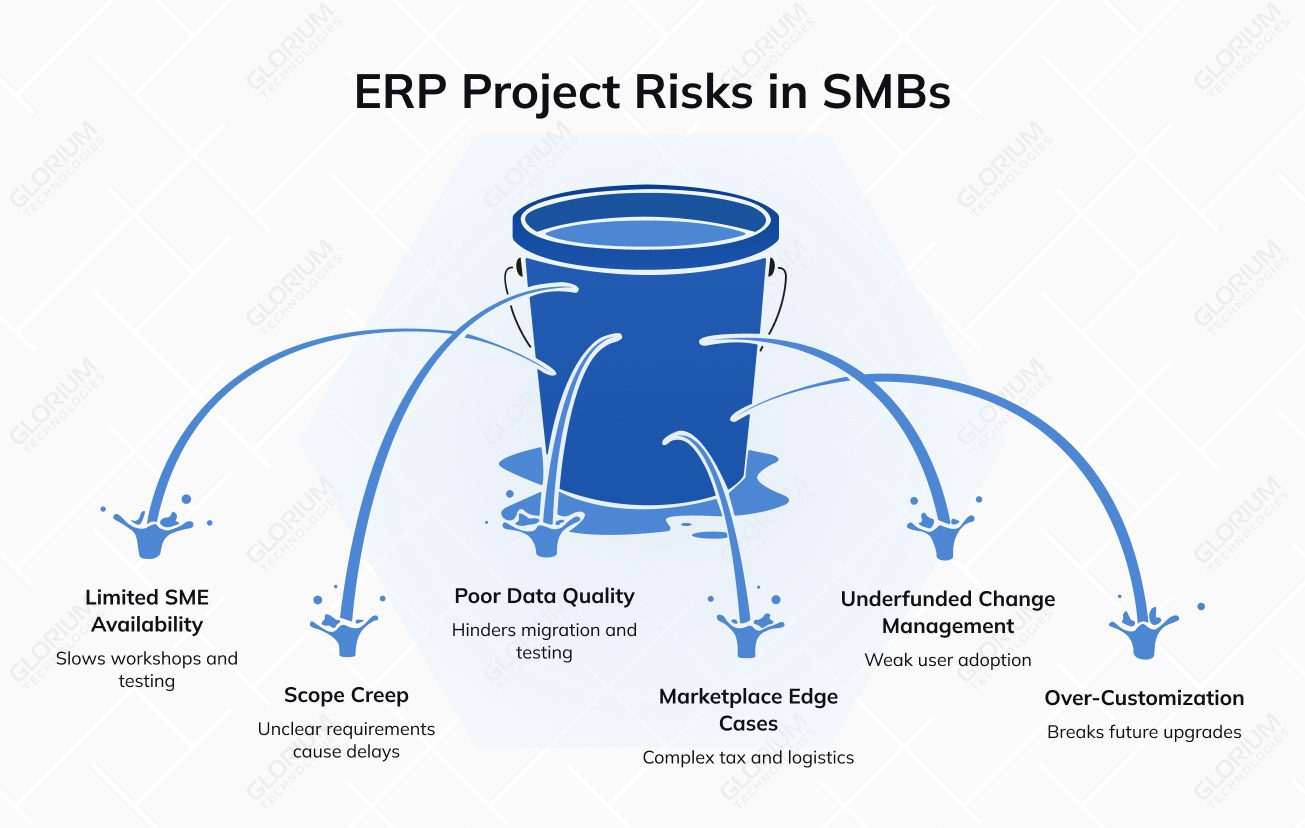
Addressing these issues early means you can reduce the risk of a difficult go-live.
U.S. SMBs have enterprise concerns and face the same regulatory pressures, but with smaller teams and tighter budgets. A modern ERP must support the frameworks and controls that keep your data protected, your reporting accurate, and your business compliant with state and federal requirements.
Key compliance frameworks for SMBs include:
Essential security controls are:
It’s worth selecting ERP vendors that offer U.S. data residency and understand the implications of cross-border backups. Plan for realistic RPO/RTO targets and ransomware resilience suitable for SMB budgets.
In short, staff are given only the access they truly need, all PHI is encrypted, and patient consent is recorded before any use or sharing. Clear retention rules and archival policies define how long information stays on file, while documented deletion workflows ensure PHI is removed safely when the time comes.
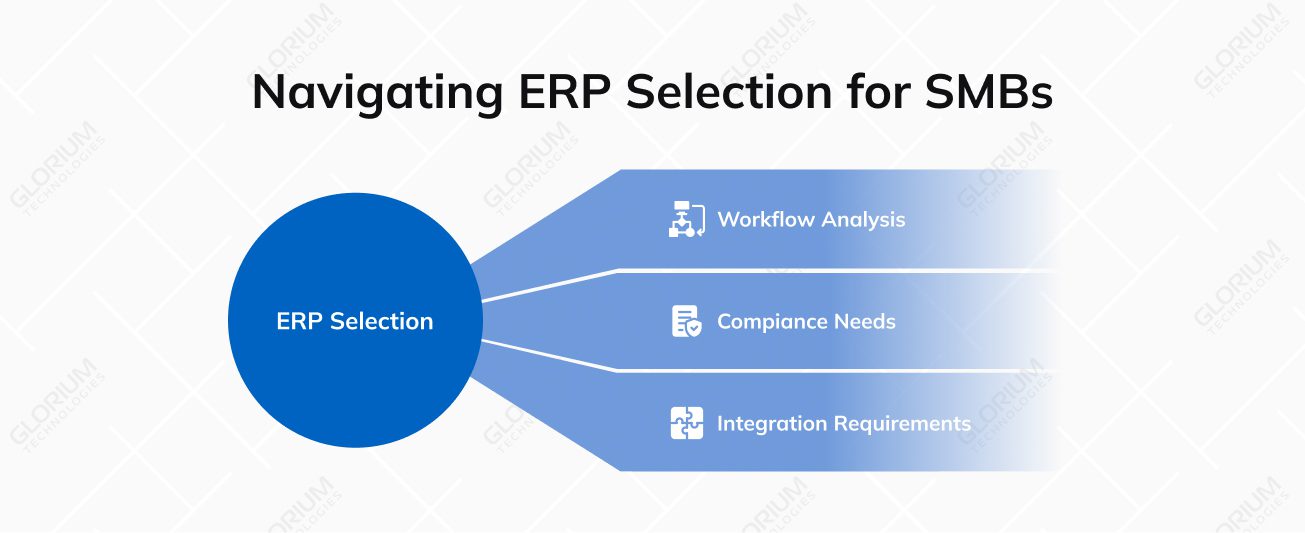
An ERP system isn’t a one-size-fits-all solution, so you can’t choose just a random option for your niche. If you do, you may face customization overload because of poor industry fit. You should analyze your workflows, compliance, and integration needs to avoid costly rework and ensure the system supports your daily business operations.
Manufacturing makes up the largest vertical, eating up 32% of the ERP market. Industrial enterprises face their own set of operational pressures, including complex BOMs, engineering-to-order workflows, unexpected downtime, and quality escapes. They all directly impact delivery promises and margins.
What your ERP needs to deliver:
In industrial manufacturing, the ERP must support the entire flow from engineering through production. That’s why you should be able to connect your system to PLC/SCADA equipment, IIoT platforms, and CAD/PLM tools for real-time visibility into machines and engineering changes. Adding supplier portals and EDI keeps procurement and scheduling running smoothly.
Compliance also matters, especially if you operate under ISO 9001/14001 or deal with export controls like ITAR/EAR. To keep performance on track, you should closely watch KPIs such as OEE, first-pass yield, scrap rate, OTIF, and overall throughput.
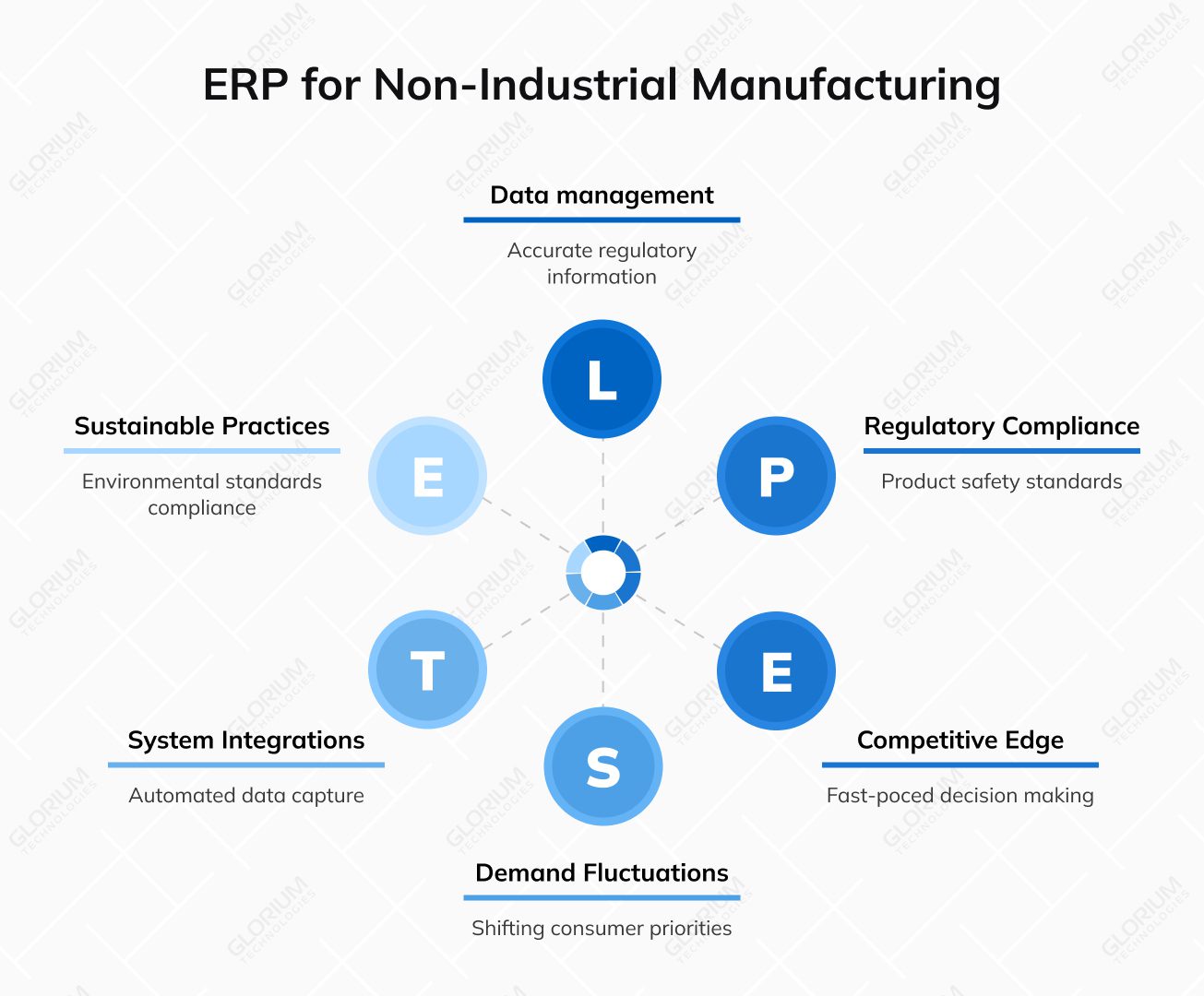
Companies operating in apparel, consumer goods, cosmetics, electronics assembly, or food and beverage sectors have a different rhythm than those in heavy industry. Production runs are shorter, changeovers occur frequently, and demand fluctuations can shift priorities overnight. To reinforce the competitive edge, teams need an ERP that can keep pace with fast cycles and quick decisions.
What your ERP needs to support:
Connections to eCommerce or CPQ systems can help you manage high SKU variety, while 3PL and carrier APIs may simplify fulfillment. Automated labeling integrations ensure that packaging and regulatory information is always accurate.
Compliance requirements – like product safety, labeling rules, or environmental standards – shape how your data is captured and stored. Your teams have to zero in on KPIs such as cycle time, schedule adherence, inventory turns, and fill rate. These numbers reveal how efficiently the supply chain keeps products flowing.
Stockouts, overstocks, high return rates, complex promotions, and constantly shifting sales tax rules can eat into margins overnight. An ERP built for omnichannel retail helps you stay ahead instead of reacting late.
What your ERP needs to ensure:
If you want to keep the entire operation connected, your teams can rely on integrations with Shopify, Magento, and major marketplaces, along with payment service providers, Avalara/TaxJar for tax automation, CDP/CRM platforms, and WMS/TMS for fulfillment and shipping.
Compliance adds another layer: PCI DSS for payment data, CCPA/CPRA and other state privacy rules for customer information, multi-state sales tax nexus, and platform SLAs that impact availability and response times. You can measure performance by metrics that reflect both customer experience and profitability: conversion rate, average order value, return rate, fulfillment SLA adherence, and margin after returns.
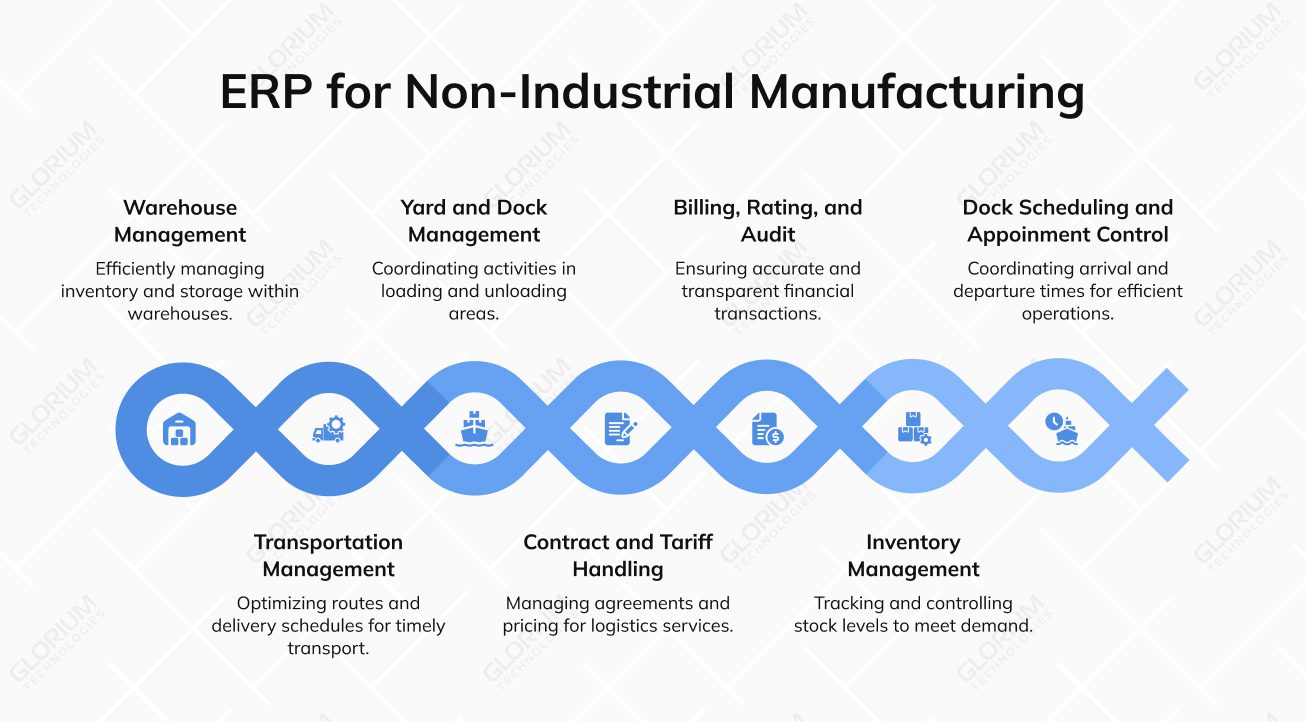
Your teams deal with constant pressure: empty miles that drain profit, ETAs that slip without warning, and billing leakage that’s hard to trace until it becomes expensive. When every mile, pallet, and timestamp matters, an ERP that brings control becomes a must-have.
What your ERP needs to support:
Integrations with telematics and ELD devices can improve ETA accuracy, while carrier networks and EDI can improve tendering and status updates. You can also connect software to route optimization tools to reduce waste and customer or vendor portals to keep everyone informed without endless emails.
Compliance sits at the core of logistics operations—whether it’s DOT or hazmat rules, customs requirements, or lane-specific privacy regulations when moving cross-border freight.
To measure performance and pinpoint improvements, you can track on-time delivery percentage, cost per shipment, dock-to-stock time, and pick accuracy. Together, these metrics show how well your network is performing.
Restaurants and delivery chains run on tight margins and even tighter timelines. Daily challenges, such as spoilage, allergen control, and limited visibility across franchise locations, can quickly impact both customer safety and profitability.
What your ERP needs to support:
You can hardly do without POS systems, delivery aggregators, cold-chain sensors, labeling systems, and QA labs if you want to ensure accurate menus and consistent product quality.
Compliance requirements add another layer of responsibility. From HACCP procedures to FDA labeling and recall rules, food and beverage businesses must accurately document temperatures, allergens, ingredients, and corrective actions.
To support eco-consciousness and keep customer satisfaction high across every location, you need to track:
Seasonality, endless style–color–size variants, high return rates, and the split between wholesale and D2C channels make planning and inventory control uniquely tricky. An ERP that understands these dynamics can make a noticeable difference in margin and speed.
What your ERP needs to support:
Integrations to PLM systems keep design and production aligned, while connections to marketplaces, 3PL partners, and fit/returns portals can help you manage omnichannel demand and reduce costly return cycles.
Compliance requirements – from product safety and labeling/origin rules to loyalty program privacy – shape how data is captured and shared across the chain.
As a fashion brand, you can rely on KPIs that reveal sell-through efficiency and profitability, including sell-through rate, GMROI, return-to-resale time, and stock coverage. These numbers help your teams react quickly to what’s selling.
Companies dealing with FMCG, B2B, electronics, or industrial goods often operate on razor-thin margins, where small inefficiencies add up quickly. Daily pressures like margin erosion, persistent backorders, complex rebates and chargebacks, and multi-warehouse chaos make it difficult to maintain service levels and profitability. A well-aligned ERP helps bring structure, predictability, and transparency across the entire network.
What your ERP needs to support:
You need to consider connections to supplier EDI, customer or vendor portals, CPQ systems, and WMS/TMS platforms to streamline ordering and fulfillment. Barcode scanning can ensure real-time accuracy in receiving, picking, and shipping.
Compliance varies by sector but may include SOX-related controls for financial audits, trade compliance for cross-border shipments, and WEEE/RoHS requirements for electronics distributors.
To measure performance and spot issues early, you can track fill rate, order cycle time, DSO, inventory turns, and rebate accuracy. These metrics can pinpoint where the ERP can help drive better margins and service levels.
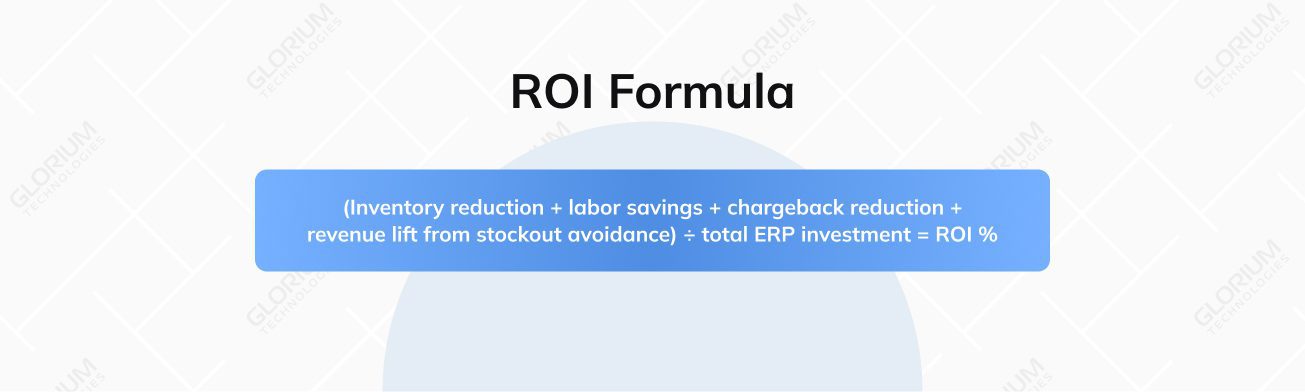
Proving the value of your ERP implementation starts with a clear, honest look at how things worked before go-live and how they work now. That means comparing your pre-ERP baselines with post-go-live performance and paying attention not just to whether the system was deployed correctly, but whether it actually made everyday work smoother and more accurate.
The most telling performance indicators tracked include financial key metrics like close cycle time and DSO, operational metrics such as stockouts, OTIF delivery, first-time-right production quality, and compliance metrics like chargebacks and compliance exceptions. These reveal how well the new system supports day-to-day operations and where additional refinement is needed.
| KPI | Baseline | Target | Measurement | Owner | Cadence |
| Close cycle time | 12 days | 5 days | Financial GL reports | CFO / Controller | Monthly |
| Stockout rate | 8% | 3% | Inventory reporting | Supply Chain Lead | Monthly |
| OTIF delivery | 75% | 97% | Sales/delivery logs | Operations Manager | Weekly |
| DSO | 55 days | 40 days | Accounts receivable report | Accounting Manager | Monthly |
| First-time-right | 85% | 95% | Production/quality module | QA Lead | Weekly |
| Compliance exceptions | 10/mo | 1/mo | System audit log | Compliance Officer | Quarterly |
To keep the value of your ERP growing, create a simple value-realization playbook. Hold quarterly check-ins, review how your KPIs have shifted, and update a prioritized backlog focused on closing gaps and capturing new opportunities. Over time, you can manage to turn your ERP from a one-time project into an ongoing improvement engine.
Want to move beyond theoretical plans and see what a well-executed ERP project looks like for someone balancing custom products and multi-channel sales? Here are brief vignettes illustrating how a phased implementation can deliver rapid, measurable results.
Industry: Manufacturing (standard & custom lighting systems)
Challenge: The company relied on Excel, Outlook, and QuickBooks. This resulted in production delays, inconsistent warehouse processes, scattered communication, slow shipping, a lack of warranty structure, and insights into project profitability.
Our Approach: Glorium Technologies implemented Odoo 18 Enterprise in a phased approach (32 weeks), focusing first on operational automation. This unified manufacturing, quality control, inventory (with barcode scanning), and procurement. Subsequent phases integrated CRM, sales, project costing, and the financial link to QuickBooks.
Quantified Results:
Industry: Multi-location food and beverage (fast-casual dining)
Challenge: Despite rapid growth across three high-traffic locations, the company struggled with operational chaos. Manual systems (spreadsheets) for inventory led to 22% food waste and stockouts, while decentralized POS and manual scheduling resulted in inconsistent reporting and unnecessary overtime costs.
Our Approach: Glorium Technologies deployed Odoo 18 Enterprise across POS, Inventory, Recipe Management, Human Resources, Purchasing, Accounting, and Loyalty in a phased rollout that automated stock control, digitized recipes, centralized workforce planning, and unified financial oversight.
Quantified Results:
As an SMB, you need an ERP rollout that works without dragging your team into months of complexity or unexpected costs. That’s exactly what Glorium Technologies offers as a digital transformation company and an official partner of Odoo and Microsoft Dynamics 365 BC. We deliver practical, scalable implementations, connecting your ERP to Shopify, marketplaces, 3PLs, carriers, and tax tools, while improving reporting, analytics, security, and compliance. Our process is clear, collaborative, and focused on real results, not unnecessary customization or over-engineering.
Ready to simplify your operations and drive profit? Talk to our experts to chart your custom implementation journey.
| Term | Definition |
| API (Application Programming Interface) | A structured way for different software systems to communicate and exchange data |
| APS (Advanced Planning and Scheduling) | Tools that optimize production schedules by balancing labor, equipment, and materials |
| Backorder | A customer order that can’t be fulfilled immediately due to unavailable inventory |
| BOM (Bill of Materials) | A detailed list of components required to build a product |
| Chart of Accounts (CoA) | The organized list of financial accounts used for bookkeeping and reporting. |
| CPRA (California Privacy Rights Act) | A California law that strengthens consumer data privacy protections |
| DSO (Days Sales Outstanding) | Measures how long it takes to collect payment after a sale; key for cash flow |
| EAM (Enterprise Asset Management) | Software for maintaining and optimizing equipment, machines, and other assets |
| EDI (Electronic Data Interchange) | Automated exchange of documents (POs, invoices, shipping notices) in a standard format |
| ELD (Electronic Logging Devices) | They are used to automatically record driving hours, duty status, and vehicle operation data |
| GL (General Ledger) | The primary record of all financial transactions within a business |
| GMROI (Gross Margin Return on Investment) | Shows how much profit inventory generates relative to its cost |
| iPaaS (Integration Platform as a Service) | Cloud tools that connect systems and automate data flows without deep custom coding |
| MRP (Material Requirements Planning) | Calculates material needs based on inventory, demand, and production schedules |
| OCR (Optical Character Recognition) | Technology that converts scanned documents into machine-readable data |
| OTIF (On-Time, In-Full) | A KPI showing how often orders arrive on schedule and with full quantities |
| PCI (Payment Card Industry) | Standards for securely handling credit or debit card information |
| RACI | A responsibility model defining who is Responsible, Accountable, Consulted, and Informed |
| RFP (Request for Proposal) | A document sent to ERP vendors outlining requirements, scope, and evaluation criteria |
| Sandbox Environment | A safe testing area where changes and new features won’t affect live operations |
| SKU (Stock Keeping Unit) | A unique identifier for each product or product variation |
| SIT (System Integration Testing) | Testing that ensures all systems and modules share data correctly |
| SLA (Service Level Agreement) | The expected level of service from a vendor, such as response times or uptime |
| TCO (Total Cost of Ownership) | The full cost of a system over its entire lifecycle, including licensing or subscription fees, implementation, training, maintenance, upgrades, and long-term support |
| TMS (Transportation Management System) | Tools that plan, optimize, and track shipments across carriers |
| UAT (User Acceptance Testing) | Final testing phase where real users verify the ERP works as intended |
| WMS (Warehouse Management System) | Software for managing warehouse activities like receiving, picking, and inventory movement |
| 2-tier ERP | When a company uses a central ERP plus a smaller, flexible ERP for subsidiaries or locations |
Your project’s success comes down to a few simple but essential factors: setting clear goals, preparing data properly, and making sure all business units are on the same page. Working with the right ERP implementation partner, like Glorium Technologies, and having a realistic plan also makes a huge difference. When there are seamless integrations with existing business applications, the whole system feels easier to adopt. People can capitalize on automation and reporting capabilities to improve operational efficiency and modernize routine processes.
Yes, we can absolutely do that. For many SMBs, this approach fits better with real-world operations, resource allocation, and day-to-day workloads. We structure the ERP implementation process so each location goes live with clean, migrated data and a clear set of key metrics. Your teams can adapt gradually and improve data accuracy, while keeping system performance stable. We can also provide a dedicated support team guiding every phase of the rollout.
The right answer will depend on how your SMB operates today and how much flexibility you need tomorrow. An on-premises ERP provides deeper financial management, analytics capabilities, and long-term scalability. An all-in-one alternative offers simplicity of cloud services and user friendliness. When making up an implementation plan, you need to analyze your current business processes and outline aspects you want to improve.
It is the focused support period right after a new ERP implementation, when your team is still adjusting and issues arise quickly. It includes hands-on help, quick fixes, and close monitoring of key performance indicators. For most SMBs, hypercare lasts around 2–4 weeks, long enough to stabilize workflows, improve process efficiency, and make sure the entire organization is comfortable with the system.
You should start by keeping the project simple and well-scoped. Focus on clean, well-prepared data, clear ownership, and realistic timelines. Break the ERP implementation life cycle into manageable steps and avoid unnecessary system upgrades early on. With the right priorities and support, even a small team can achieve meaningful cost savings and long-term success.
You might uncover duplicated or outdated records, inconsistent formats, missing fields, or data stored across multiple tools and spreadsheets. Cleaning and mapping everything takes time, but doing it well upfront prevents reporting issues, workflow errors, and headaches after go-live.
Stakeholders keep an ERP project on track, especially when there are many complex processes. They are responsible for clarifying priorities, approving requirements, and ensuring each department provides accurate input. Stakeholders also help test the system, validate workflows, resolve issues quickly, and support change management. When they stay engaged and aligned, the project moves faster, adoption is smoother, and the ERP begins delivering value much sooner.
You should involve the people who’ll use the system every day. Bring in department leads, power users, and anyone who handles key workflows, such as purchasing, sales, inventory, finance, or production. When your actual team walks through real tasks, you can confirm the ERP truly supports how your business runs.