Selecting an enterprise resource planning (ERP) is one of the most significant capital and operational commitments a mid-market or enterprise-grade organization can undertake. We see that Chief Financial Officers (CFOs) increasingly demand faster return on investment. At the same time, the global businesses shift toward cloud-first ERP solutions. This is why the competition between cloud-based ERP solutions like Oracle NetSuite and Microsoft Dynamics 365 Business Central has intensified:
- NetSuite provides a unified, single-platform suite designed for global scalability
- Microsoft Dynamics 365 Business Central delivers a modular, ecosystem-centric solution deeply integrated with the Microsoft stack
In this article, we compare leading ERP solutions, Microsoft Dynamics 365 Business Central vs NetSuite, across 8 evaluation points.
Overview of NetSuite and Business Central ERP Systems
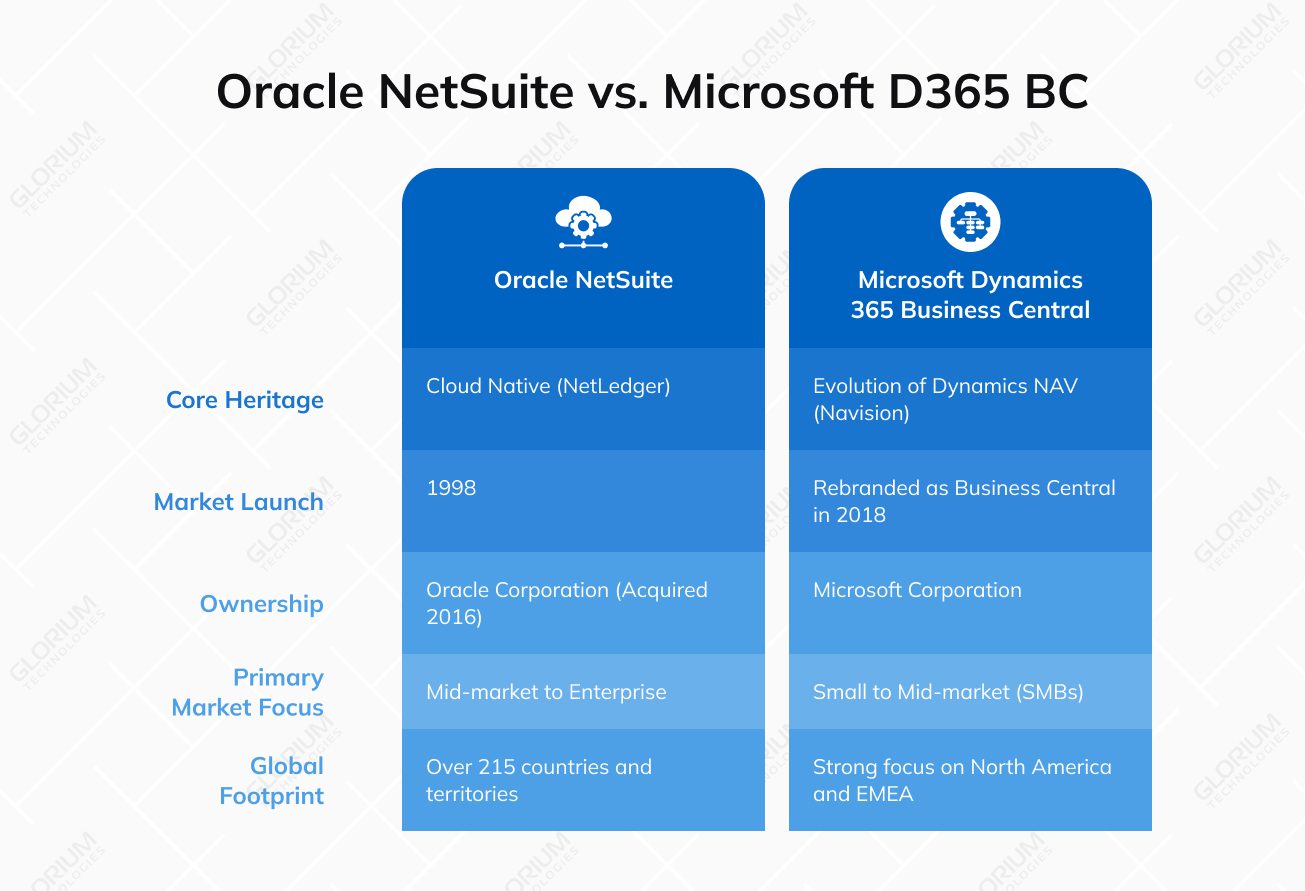
Oracle NetSuite, founded in 1998 as NetLedger, holds the distinction of being the first business application suite built specifically for the cloud. It ensures that all functional modules reside on a single codebase and a unified database structure. This architectural purity facilitates seamless, biannual updates that preserve customizations. As a result, every customer worldwide runs on the same version, without the technical debt associated with legacy upgrades.
Microsoft Dynamics 365 Business Central represents a sophisticated cloud-based evolution of Dynamics NAV, a legacy on-premises solution formerly known as Navision. Microsoft has effectively transitioned the platform to a modern web-responsive interface. Underlying logic maintains the modular flexibility that made NAV a staple in the mid-market for decades. Unlike NetSuite's pure SaaS model, Business Central offers multiple deployment options, including cloud-hosted on Azure, on-premises, or hybrid configurations. This versatility is particularly advantageous for organizations with stringent data residency requirements or those operating in regions with inconsistent internet infrastructure.
The market presence of these vendors reflects their differing strategies:
- Q1 2025 Fusion cloud ERP (SaaS) revenue is $1 billion, up 17% in $ and up 16% in constant currency
- Q1 2025 NetSuite cloud ERP (SaaS) revenue is $1 billion, up 16% in $ and up 15% in constant currency
- Q2 2025 Dynamics products and cloud services revenue increased $254 million or 15% driven by growth in Dynamics 365, offset in part by a decline in Dynamics on-premises products
- Microsoft Dynamics 365 revenue grew 19% driven by growth across all workloads
- Microsoft Dynamics 365 was named a Leader in 3 Gartner Magic Quadrant reports
So, what are the key differences between them in terms of market share? Microsoft is rapidly expanding its cloud footprint. At the same time, NetSuite remains the established incumbent for larger-scale cloud-native ERP requirements.
NetSuite vs. Business Central: Architectural Integrity and Deployment Models
NetSuite operates as a multi-tenant SaaS platform hosted on Oracle Cloud Infrastructure (OCI). In this model, all clients share a common infrastructure but maintain isolated data. This results in high performance and security while allowing Oracle to push universal updates without disrupting individual client configurations. NetSuite’s SuiteCloud platform allows for significant personalization through SuiteBuilder and SuiteFlow, while more complex requirements are handled via SuiteScript, a JavaScript-based language.
Business Central features robust integration capabilities with Microsoft Dataverse, seamlessly synchronizing data across the broader Power Platform. This allows developers to use a versatile toolkit, with AL (Application Language) for core ERP extensions and Power Fx or TypeScript for custom Power Apps.
Microsoft rolls out major updates twice a year to ensure your system stays at the cutting edge. Because customizations represent agile extensions, your partner's expertise here can become a strategic boon. They do what it takes to make custom code scale smoothly with every release. It’s a proactive guarantee that your technology remains optimized and future-proof.
|
Architectural Feature |
Oracle NetSuite |
Business Central |
|
Cloud Model |
Multi-tenant SaaS |
Multi-tenant SaaS (public cloud) or Single-tenant (on-premises/private cloud) options |
|
Infrastructure |
Oracle Cloud Infrastructure (OCI) |
Microsoft Azure |
|
Customization Toolset |
SuiteCloud (SuiteScript, SuiteFlow) |
Power Platform (AL, Power Automate) |
|
Data Model |
Unified single-database model |
Modular via Dataverse / Common Data Model |
|
Update Frequency |
Biannual (Universal/Automatic) |
Monthly service updates; 2 major waves/year |
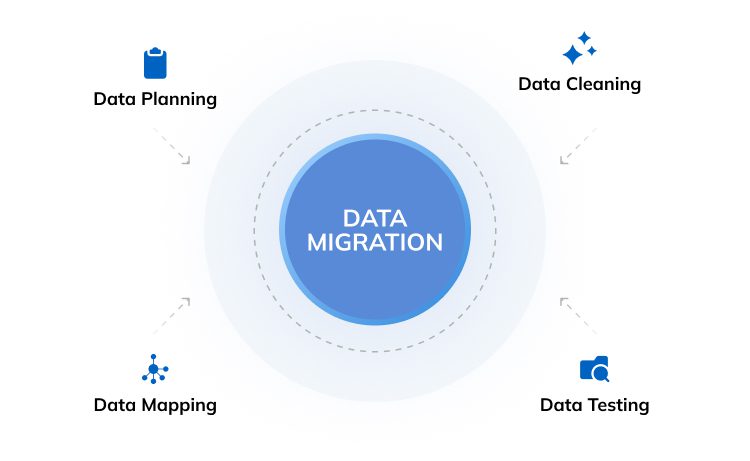
A critical consideration for growing enterprises is the potential for system obsolescence. NetSuite’s single-solution approach allows companies to add capacity and modules as they scale without ever needing to migrate to a new core platform. Conversely, organizations using Business Central may eventually reach a ceiling where the complexity of international financial consolidation or high-volume transactions necessitates a move to Microsoft Dynamics 365 Finance and Supply Chain Management. This migration is not a simple upgrade but a comprehensive data migration project, as the two systems use different underlying codebases.
As your organization scales, Microsoft's ecosystem is designed to grow with you. Business Central serves as an ideal platform for an SME or a starting point for a soon-to-scale business. When the time comes to manage extremely sophisticated international financial consolidation or higher transaction volumes, upgrading to Microsoft Dynamics 365 Finance and Supply Chain Management is a natural next step on that journey.
NetSuite vs. Business Central: Comprehensive Financial Management and Multinational Operations
Oracle positions the NetSuite OneWorld module as the gold standard for organizations managing multiple legal entities across diverse jurisdictions. It provides real-time visibility and automated consolidation across hundreds of subsidiaries, handling:
- Multi-currency conversions
- Local tax compliance (indirect tax)
- Intercompany eliminations
This capability is natively integrated. As soon as a transaction occurs in a subsidiary, its impact is reflected in the consolidated corporate ledger.
Business Central delivers a high-performance financial engine suited for SMBs. It offers sophisticated:
- General ledger
- Accounts payable
- Accounts receivable
- Fixed asset capabilities
It uses a dimension-based accounting system rather than a traditional segment-based chart of accounts, allowing for significant flexibility in reporting without cluttering the general ledger. The system supports multi-currency and can be configured for multi-entity management, but complex global scenarios require additional modules, localization packs, or significant partner assistance.
|
Financial Capability |
Oracle NetSuite |
Business Central |
|
Multi-Entity Consolidation |
Native (OneWorld) |
Supported (Often manual/partner-led) |
|
Tax Management |
Built-in (SuiteTax/Localization) |
Localization packs required per region |
|
Revenue Recognition |
Advanced (ASC 606 / IFRS 15) |
Basic; complex needs require extensions |
|
Intercompany Transfers |
Automated eliminations and netting |
Intercompany journals; manual matching |
|
Audit Trail |
Real-time, immutable logs |
Comprehensive, role-based access |
The mechanism for bank reconciliation also highlights the different approaches to automation. NetSuite modernized its reconciliation framework, deprecating its legacy 2021 model in favor of an AI-driven, bank-feed-centric workflow. This system, known as Intelligent Transaction Matching, uses configurable rules to automatically pair imported bank data with internal ledger entries. Business Central counters with Copilot-assisted reconciliation. Generative AI suggests matches and assists in predicting late payments, using the broader Microsoft AI infrastructure to streamline the month-end close.
NetSuite vs. Business Central: Manufacturing and Supply Chain Operations
Business Central is a superior choice for small to mid-sized manufacturers, particularly those engaged in discrete or light-process manufacturing. In the Microsoft licensing model, advanced manufacturing capabilities are included in the Premium license tier. These include bills of materials (BOM), routing, capacity planning, Material Requirements Planning (MRP), etc. This provides a highly cost-effective entry point for manufacturers who need robust planning tools without the expense of modular add-ons.
NetSuite provides enterprise-grade supply chain and manufacturing functionality, but typically follows a modular pricing structure where these features must be licensed separately. NetSuite’s ability to coordinate demand planning and automated replenishment across a global network of warehouses is a decisive advantage. Furthermore, NetSuite’s native Warehouse Management System (WMS) offers advanced bin management and wave picking. However, these are sold as premium modules that increase the Total Cost of Ownership (TCO).
|
Operational Feature |
Oracle NetSuite |
Business Central |
|
MRP Capabilities |
Advanced (Optional Module) |
Built-in (Premium License) |
|
WMS / Bin Management |
Advanced native module |
Basic included; Advanced via partners |
|
Lot and Serial Tracking |
Complex multi-location support |
Strong native tracking |
|
Manufacturing Type |
Discrete and Process |
Discrete and Process |
|
Supply Chain Visibility |
Global multi-site view |
Regional / Single-environment focus |
The NetSuite SuiteCommerce module provides a direct link between eCommerce storefronts and back-office inventory. Business Central typically handles this through third-party integrations with platforms like Shopify or Amazon.
NetSuite vs. Business Central: Customer Relationship Management and Lifecycle Integration Capabilities
NetSuite includes a natively integrated CRM module that provides a unified view of the customer lifecycle. This includes lead generation, opportunity management, order fulfillment, recurring billing, etc. Because the CRM and ERP share the same data model, sales teams have real-time visibility into customer payment history and credit limits. At the same time, finance teams can accurately forecast revenue based on the sales pipeline.
Out of the box, Business Central provides a solid foundation with CRM tools for contact management and sales opportunities. As business processes become more complex, most mid-market organizations choose to upgrade to Microsoft Dynamics 365 Sales for AI-driven scoring, advanced forecasting, custom dashboards, and marketing automation via the native Dataverse connector. One of the biggest Business Central benefits within this approach is the seamless integration with Microsoft Teams and Outlook.
|
CRM Capability |
Oracle NetSuite |
Business Central |
|
Integration Model |
Native, single platform |
Integrated via Dataverse (External App) |
|
Sales Force Automation |
Included |
Limited (Requires D365 Sales) |
|
Marketing Automation |
Built-in campaign management |
Basic (Requires D365 Marketing) |
|
Customer Support |
Integrated case management |
Integrated service management |
|
Visibility |
Unified real-time customer record |
Linked records via synchronization |
NetSuite vs. Business Central: Ecosystem
Business Central’s most compelling competitive advantage is its native synergy with the Microsoft products. Users can edit ERP data directly in Excel and publish the changes back to the system. Or you can use Power BI to create sophisticated visualizations of financial trends without complex data exports. The Microsoft Power Platform further extends this capability. It allows non-technical users to build custom Power Apps or automate cross-application workflows through Power Automate.
NetSuite maintains a mature and extensive Independent Software Vendor (ISV) ecosystem through its SuiteApp.com marketplace. While it offers native reporting through SuiteAnalytics and Saved Searches, these tools have a steeper learning curve for non-technical users compared to the ubiquitous Excel and Power BI. To match Business Central’s analytical flexibility, NetSuite users turn to third-party data warehouses like Snowflake or specialized BI tools.
|
Ecosystem Factor |
Oracle NetSuite |
Business Central |
|
Office Integration |
Basic (Connectors) |
Deep (Native Excel/Outlook/Teams) |
|
Reporting Engine |
SuiteAnalytics (Built-in) |
Embedded Power BI / Excel |
|
Automation Tool |
SuiteFlow (Internal only) |
Power Automate (Cross-platform) |
|
Mobile Access |
SuiteApp (Role-based) |
Universal App (Phone/Tablet/Web) |
|
App Marketplace |
SuiteApp |
AppSource |
AI has become a primary battlefield in the 2025-2026 ERP market. Microsoft has used its significant investment in OpenAI to embed Microsoft Copilot throughout Business Central. Copilot provides a chat-based assistant that summarizes documents, generates marketing content, and provides predictive insights directly within the ERP interface. NetSuite has industry-specific AI assistants and "Text Enhance" capabilities. It focused on automating repetitive financial tasks and identifying anomalies in high-volume transaction data.
NetSuite vs. Business Central: Storage Architecture and Capacity Management
NetSuite employs a Service Tier structure for performance management as well as storage limits. The Standard tier supports up to 100 users and 100 GB of storage, with a limit of 200,000 monthly transaction lines. As organizations grow, they must upgrade to Premium, Enterprise, or Ultimate tiers. They significantly increase the base subscription cost but provide up to 4,000 GB of storage and 50 million monthly transaction lines.
Business Central users can use up to 80 GB (shared across all environments). However, BC has increased its storage entitlements to align with 2025 pricing updates. The Essentials plan now includes 3 GB of base storage per user (added capacity per user/device), while the Premium plan provides 5 GB (added capacity per user/device). These per-user limits appear smaller than NetSuite’s tier-based allocations, but Microsoft allows organizations to purchase additional storage or use Azure Blob Storage for unstructured data. Business Central uses a pay-as-you-go model for data overhead, applying additional charges only when standard storage thresholds are exceeded. This makes periodic storage audits an essential part of system maintenance.
|
Storage Parameter |
NetSuite (Standard Tier) |
Business Central (50 Users) |
|
File Storage Limit |
100 GB (Fixed per tier) |
150 GB (Cumulative per user) |
|
Transaction Limit |
200,000 lines/month |
Unlimited (Subject to DB size) |
|
Additional Storage Cost |
Tier upgrade required |
Per GB monthly charge |
|
Performance Model |
Multi-tenant shared |
Single-tenant (Dedicated DB) |
|
Sandbox Environments |
Included in Premium+ tiers |
3 standard with production |
NetSuite vs. Business Central: Implementation Methodologies and Support
NetSuite’s SuiteSuccess methodology is designed for speed, employing industry-specific templates that incorporate best practices from over 43,000 customers. However, this standardized approach leaves less room for deep process customization during the initial phases. This leads to friction if the specific business processes do not align perfectly with NetSuite’s templates.
Business Central implementations are partner-led, emphasizing configuration over a rigid template. This allows for a high degree of flexibility, as official Dynamics 365 Business Central partners can tailor the system to match idiosyncratic business workflows.
|
Implementation Aspect |
Oracle NetSuite |
Business Central |
|
Methodology |
SuiteSuccess (Templated) |
RapidStart (Partner-led) |
|
Adoption Strategy |
Configuration-first |
Extension-first |
|
Training Model |
SuiteAnswers / Vendor-led |
Partner-led / Microsoft Learn |
|
Post-Go-Live Support |
Oracle Premium / ACS |
Partner Service Level Agreement |
Support for NetSuite ERP is primarily centralized through Oracle, which offers 24/7 availability but can sometimes feel prescriptive and less intimate. In contrast, Business Central support is decentralized through a massive global network of Microsoft partners. You can find a local partner with specific industry expertise, but that also means the support experience can vary widely across providers. Microsoft Dynamics 365 Business Central implementation cost also varies based on the partner you choose.
NetSuite vs. Business Central: Industry-Specific Vertical Fit
NetSuite is widely considered the premier solution for global software (SaaS) firms, high-growth eCommerce retailers, and international professional services organizations. Its ability to handle complex subscription billing, tiered pricing, and global tax compliance within a single native environment is unmatched in the mid-market.
Business Central is the dominant choice for regional manufacturers, wholesale distributors, and domestic non-profit organizations. Its manufacturing capabilities are more accessible for smaller firms, and its integration with the Microsoft ecosystem makes it the logical choice for organizations already heavily invested in Azure and Microsoft 365. Furthermore, Business Central has a significantly larger catalog of third-party applications on Microsoft AppSource. Thanks to this, you can bolt on niche functionality, such as construction management or advanced fashion retail, more easily than in NetSuite.
|
Industry Vertical |
NetSuite Suitability |
Business Central Suitability |
|
Software / SaaS |
High (Native Rev Rec) |
Moderate (Requires add-ons) |
|
Nonprofit |
Moderate |
High (Flexible budgeting) |
|
Professional Services |
High (PSA / Timesheets) |
Moderate (Basic Project Job) |
|
Growth-Stage Retailers & E-commerce |
High (Omnichannel + scalability) |
High (Strong finance; retail via extensions) |
|
Multi-Warehouse Wholesale & Distribution Firms |
High (Advanced WMS, multi-location, demand planning) |
High (Inventory + warehouse + reordering natively strong) |
|
Manufacturers — Discrete / Job-based / Light Assembly |
Moderate (Manufacturing modules; higher TCO) |
High (Deep BOM, routing, costing, production integration) |
|
Internationally Operating SMEs |
High (OneWorld multi-entity, multi-currency, global compliance ecosystem) |
High (Multi-entity with localization; best for regional growth) |
|
Microsoft-Centric Organizations |
Moderate (Integrations available but not native ecosystem) |
High (Native integration with Microsoft 365, Power Platform, Azure) |
NetSuite vs. Business Central: The Final Verdict on Core Features
The selection between Oracle NetSuite and Microsoft Dynamics 365 Business Central depends on 3 fundamental questions:
- What is the organization’s commitment to the Microsoft ecosystem? If a company already relies heavily on Microsoft applications like Azure, Teams, or Power BI, Business Central offers a level of synergy and all-in-one productivity that NetSuite cannot replicate natively. The integration of AI via Copilot further cements Business Central as the top choice for companies betting on employee productivity and automation
- What is the complexity of the global operation? For organizations with multiple international subsidiaries, complex revenue recognition needs (ASC 606), or a desire for a single-vendor unified suite. Where NetSuite once stood alone in serving complex global enterprises, Business Central now offers a compelling, agile alternative for mid-market players. For internationally operating SMEs, it provides a cost-effective path to multi-entity management and localized compliance without leaving the intuitive Microsoft environment
- What are the budget and predictability requirements? Organizations with strict budget constraints and a need for transparent pricing will find Business Central significantly more appealing. While initial ERP implementation can be costlier, the long-term subscription savings provide a clear advantage for SMBs and mid-market firms
Ultimately, Business Central is the top choice for organizations seeking agility, affordability, and deep Microsoft integration. NetSuite remains the premier solution for high-growth, globally distributed organizations that require the absolute peak of cloud-native ERP functionality and unified data integrity.
Partner with Glorium Technologies to Implement the ERP System
Glorium Technologies specializes in full-cycle implementation of Microsoft Dynamics 365 Business Central and Odoo. As a Microsoft Silver Partner with over 15 years of industry-specific expertise, we focus on strategic alignment rather than simple software installation. We aim for organization-wide improvements and the reduction of manual work.
Our approach is particularly suited for growth-stage retailers and e-commerce, multi-warehouse wholesale and distribution firms, manufacturers (discrete, job-based, light assembly), internationally operating SMEs, and Microsoft-centric organizations. Glorium Technologies provides:
- Structured implementation roadmap: A multi-phase path (Diagnosis, Discovery, Design, Development, Deployment, and Post-Go-Live)
- Specialized vertical expertise: We have prebuilt vertical accelerators for industries including healthcare, manufacturing, real estate, and professional services
- Top integration and scalability: Stable integrations with existing Microsoft tools (Teams, Outlook, Excel) and third-party platforms (Shopify, Amazon) using AL extensions to preserve the ability to update the core system
- Post-launch hypercare: Issue tracking, performance reviews, and knowledge sharing to ensure teams remain productive beyond the initial go-live
We support projects from initial process analysis and diagnosis to custom development, configuration, customization, and long-term support. We invite you to investigate our case studies and book an intro call with our experts to discuss your ERP project request.
FAQ
What are the disadvantages of NetSuite?
Common disadvantages of NetSuite include its opaque pricing model. It requires direct negotiation and can include unpredictable annual increases. We also see a steeper learning curve compared to more modern interfaces, high modular add-on costs, and difficulty exporting data in relational formats. Additionally, NetSuite updates are automatic and universal. This gives your business less control over the timing of major system changes.
Is Microsoft Business Central a good ERP?
Yes. It is widely recognized as a comprehensive ERP solution, having been named the best overall cloud ERP by Forbes Advisor. It is highly regarded for its transparent pricing, rapid adoption rates, and robust capabilities, such as Microsoft Copilot, which automates repetitive tasks for financial and operational departments.
What are the pricing differences between NetSuite and Microsoft Dynamics 365?
NetSuite's pricing is opaque but typically starts with a base platform fee of about $999 per month, plus user licenses ranging from $99 to $199 per month. Microsoft Business Central has transparent pricing. As of early 2026, it starts at $80 per user per month for the Essentials plan and $110 for the Premium plan, with no base platform fee.
How do NetSuite and Business Central compare in terms of their ERP functionalities?
Both NetSuite and Microsoft Dynamics 365 Business Central provide extensive functionality, including finance, supply chain, sales, and reporting. NetSuite delivers more built-in business functions in a single cloud suite. Business Central offers similar core features with stronger flexibility and deep integration across the Microsoft ecosystem.
About Anna Voznaya