Business Process Automation in 2026: A Complete Guide to Benefits, Use Cases, Tools, and Future Trends
Updated September 7, 2026

 Summarize in ChatGPT
 Summarize in ChatGPT
Most growing companies accumulate the same kind of small operational inefficiencies: approvals stuck in someone’s inbox overnight, invoice numbers retyped between three systems, a Friday spreadsheet fixed by hand because the export keeps breaking. Individually, none of these problems looks urgent. Together, they add up to real cost in time, errors, and slower decisions. Business process automation (BPA) is the practical answer: the use of software to run recurring business tasks and workflows with limited human intervention.
The market data shows how widely organizations are acting on this. According to The Business Research Company, the global BPA market is expected to grow from $16.32 billion in 2025 to $18.83 billion in 2026, and reach $33.43 billion by 2030 at a 15.4% CAGR. Companies already operating with automated workflows are pulling ahead. The ones still doing core operations manually are accumulating operational drag that becomes harder to fix as the organization grows.
This guide covers the essentials: what BPA is, how it works, where it pays off, which tools lead the market, and the trends reshaping automation in 2026. By the end, you will have a working framework for where to start and how to sidestep the implementation mistakes that derail many early automation projects.
Content
Business process automation (BPA) is the application of software to business processes that are repetitive, routine, and lend themselves to decision logic (IF/THEN statements). Some examples of BPA include invoice routing, employee onboarding, work approvals, data entry into systems, and generating reports. BPA suggests using software to run repetitive, rule-based business tasks with little or no human input. It usually applies to workflows that follow clear logic, such as invoice routing, employee onboarding, approval flows, data entry, and report generation.
The two terms get used interchangeably, but they describe different things. Business process management is the discipline of analyzing how work flows through an organization, finding friction, and redesigning processes for better outcomes. BPA is the technology layer that runs those processes once they’ve been mapped. You can do BPM without automation, but BPA without BPM tends to automate a broken process and call it progress.
Not every process should be automated. Good fits show up in every department. In finance, it’s reconciliation, invoice processing, and expense approvals. In sales and marketing, it’s lead routing and CRM updates. HR has onboarding, access provisioning, and PTO requests. IT has ticket triage and account setup. Anywhere a process runs the same way every time, with predictable inputs and outputs, you have a candidate. The processes that resist automation are the ones that depend on judgment, context, or real creative work, and even those usually have automatable edges, like data prep before a human takes over.
Process automation has shifted from a competitive edge to a baseline expectation. Companies that still handle core operations manually pay a measurable price in three areas: labor cost, error rate, and speed.
The first argument is fewer errors. Research on AI-driven automation in banking found that intelligent automation reduces operational errors by more than 70%, a number that gets harder to ignore as transaction volumes scale.
The second argument is opportunity cost. A finance team that spends two days a week on invoice processing is losing two days it could spend closing books faster, analyzing margins, or supporting a new market launch. Automating manual tasks shifts headcount toward work that compounds, and existing staff get hours back without the team having to grow just to keep up with volume.
The third argument is competitive pressure. BPA adoption has accelerated across finance, healthcare, manufacturing, and retail. While some teams now run automated workflows across multiple departments, many others still route PDFs through email and hope nothing gets lost. The gap widens, and customers, vendors, and employees all feel the difference in response times. For organizations weighing where to put their next operational dollar, BPA usually pays back faster than a new hire and sticks around longer.
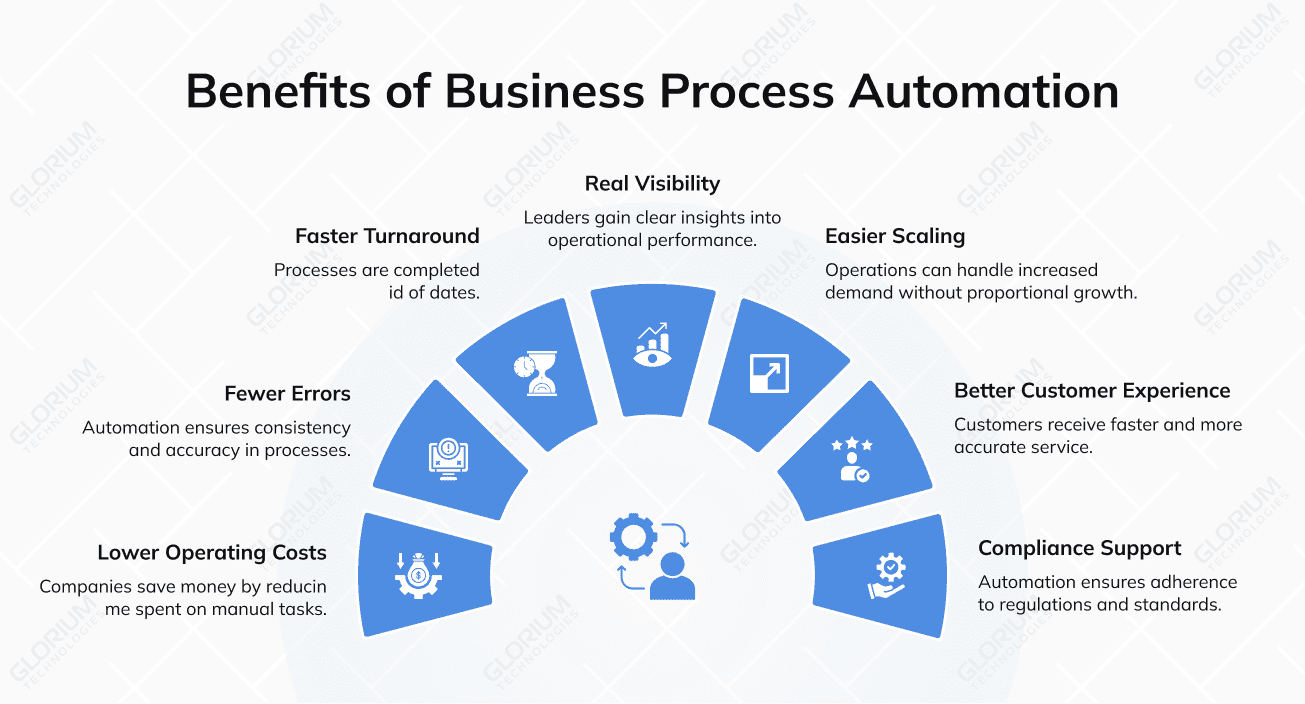
The benefits of business process automation go beyond cost savings. They reshape how work moves through an organization, who handles what, and how leaders see operational performance. The list below captures what most companies report after rolling out BPA across one or more departments.
These wins compound. The fifth or sixth automation almost always delivers more value than the first, because it’s connected to workflows already in place.
Business process automation tools show up in nearly every industry, but the highest-impact applications cluster around a few familiar categories. The examples below illustrate where BPA is producing measurable results today.
Invoice processing, accounts payable and receivable, and reconciliation are textbook BPA use cases. Finance teams that adopted automated payment processing freed up over 500 work hours per year, according to data from the American Express Trendex Report. Add automated reporting and month-end close workflows, and the time savings stack quickly.
Employee onboarding automation handles everything from creating user accounts and provisioning system access to assigning training modules and scheduling first-week check-ins. HR automation has surged dramatically in the last few years, and HR bots now play a role in nearly four out of ten hiring processes. The result is faster onboarding, lower administrative burden, and a more consistent employee experience.
Inventory tracking, purchase orders, and quality control handoffs across the entire process all benefit from automation. When systems talk to each other, procurement managers stop placing rush orders for materials already sitting in the warehouse. Production schedules align with actual stock, not stale spreadsheets.
Patient intake forms, appointment scheduling, claims processing, and prior authorization are areas where automating routine tasks reduces administrative burden and frees clinical staff to focus on care. The compliance angle matters too: automated workflows leave audit trails that paper-based or email-based processes don’t.
Order fulfillment, returns processing, and customer relationship management workflows often span multiple departments. BPA connects them, so a return triggers a refund, an inventory update, and a customer notification without a human touching each step.
Automated provisioning, helpdesk ticket routing, system monitoring, and access reviews run with minimal human intervention. IT teams that automate these layers reclaim time for actual engineering work.
These use cases apply across various business types, from mid-market manufacturers to SaaS companies. Glorium Technologies has helped organizations in several of these verticals design and deploy business process automation solutions and digital transformation initiatives that integrate with existing systems
For example, recently, a US steel manufacturer came to Glorium Technologies, still running quotes and orders through spreadsheets and email. After the team rebuilt the workflow on Odoo, order processing ran 30% faster, with quoting, inventory, and production working from the same data.
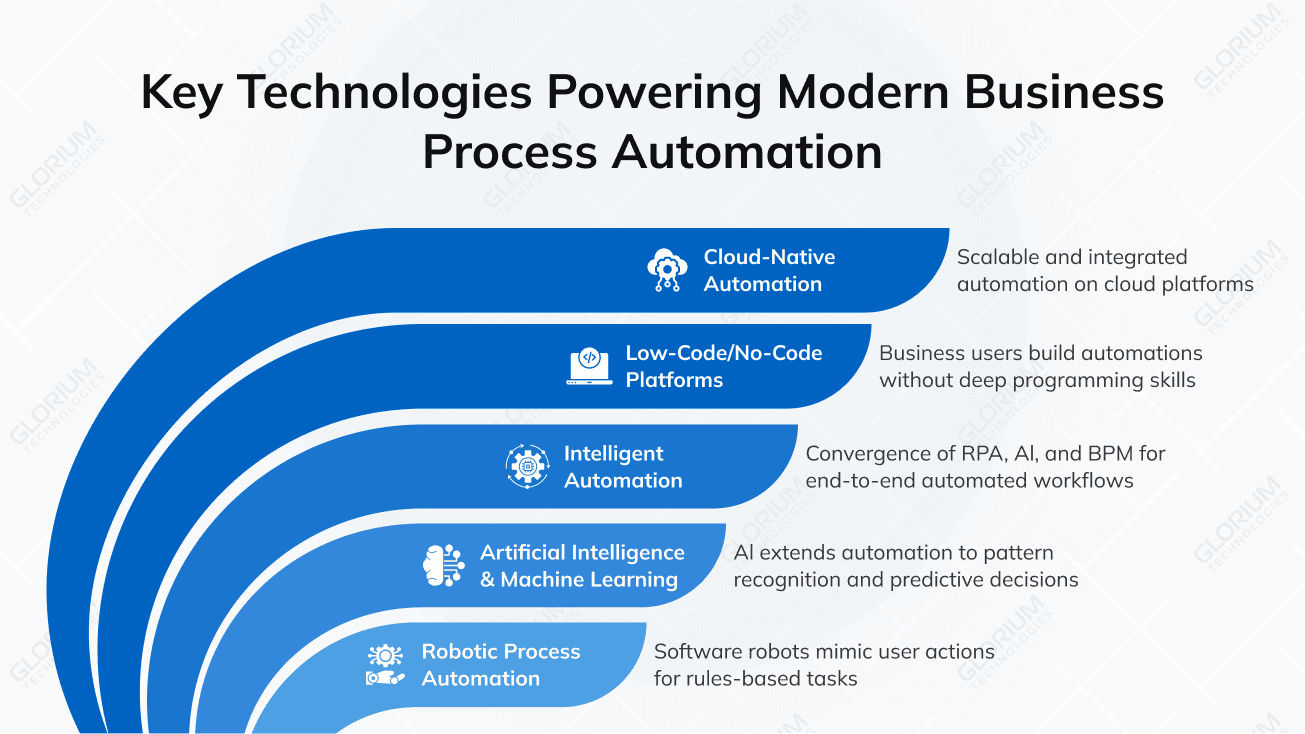
Modern BPA is built on a stack of complementary technologies, each handling a different layer of the work. Knowing what’s underneath helps you evaluate platforms more carefully and avoid buying something that overlaps with tools you already own.
RPA refers to software robots that mimic user actions: clicking, copying, entering data, and moving information between screens. RPA handles high-volume, rules-based tasks like data entry, invoice processing, and form filling. Even as AI advances, RPA remains a core execution layer for transactional work.
AI extends automation process past rules-based work into pattern recognition, anomaly detection, and predictive decisions. Natural language processing lets bots interpret unstructured data: emails, contracts, support tickets, and scanned documents. For teams looking to add AI to existing automation efforts, AI consulting and AI software development services bridge the gap between off-the-shelf models and production-ready workflows.
This is the convergence of RPA, AI, and business process management into end-to-end automated workflows that handle complex processes with minimal coding knowledge. The intelligent process automation market is projected to reach $72.9 billion by 2030, reflecting how quickly the lines between RPA and AI are blurring.
Low-code platforms empower business users to build and modify automated workflows without deep programming skills. This democratization has compressed development cycles and reduced dependency on IT departments, especially for smaller automations that don’t justify a full development project.
Cloud platforms let organizations scale automation capabilities without heavy infrastructure investment. Faster deployment, easier integration with existing workflows, and pay-as-you-grow pricing have all made BPA viable for companies that previously couldn’t afford on-premise automation suites.
For all the wins BPA delivers, the projects that go sideways tend to fail in similar ways. Five problems show up over and over, and most of them are predictable enough to plan around if you know how to look.
The fastest way to lose momentum on automation is to start with the wrong process. Your first project shapes how leadership and other teams judge the whole initiative, so its efficiency should be easy to measure. The four traits below can help you rank your options.
In practice, invoice processing, employee onboarding, and approval routing are the most common options when it comes to first-time automation. You can start with the one that check off all the boxes and budget for the next ten.
The BPA tools market is wider than most buyers expect. It runs from lightweight app-connectors anyone can set up in an afternoon, all the way to enterprise platforms that need a dedicated team to keep running. The right pick comes down to the size of your operation, how technical your team is, and the complexity of what you’re automating. Here’s how the major options compare.
| Platform | Primary strength | Best for |
| UiPath | Robotic process automation at scale | Large enterprises with high-volume repetitive tasks |
| Automation Anywhere | Cloud-native RPA combined with AI | Organizations seeking intelligent automation with minimal infrastructure |
| Appian | Low-code process automation | Teams building complex workflows with minimal coding knowledge |
| Kissflow | No-code workflow automation | Mid-market companies wanting fast deployment without IT dependency |
| Microsoft Power Automate | Tight integration with the Microsoft 365 ecosystem | Organizations already running Microsoft tools across departments |
| Zapier | Lightweight app-to-app automation | Small teams automating specific tasks between SaaS tools |
| n8n | Open-source workflow automation | Technical teams wanting full control and customization |
A few questions matter more than the rest when you’re picking. How well does it integrate with what you already have? How does it hold up under load? Then there’s the security model, the pricing structure (per-bot, per-user, and per-workflow scale very differently), and the quality of vendor support when something actually breaks. A platform that fits a peer company can still be wrong for yours if your priorities are different.
Some operations don’t fit any standalone platform. In those cases, ERP-embedded automation tends to work better. Modern ERPs already include workflow engines, approval routing, and increasingly, AI features, so adding automation on top of them avoids running three separate vendors in parallel. Glorium Technologies helps clients evaluate, configure, and integrate BPA tools into their existing workflows. The team also delivers custom ERP development and Odoo implementation when off-the-shelf tools don’t quite fit.
Two platforms with similar feature lists can perform very differently once they hit your real workload, your real data, and your real compliance rules. The criteria below separate a tool that scales with you from one you may outgrow in a year. Use them as a scorecard when you shortlist vendors.
| Requirement | Why it matters |
| Integration depth | Pre-built connectors and open APIs decide whether the tool fits your stack or forces brittle workarounds. This is the most common reason projects stall. |
| Scalability | A tool that handles ten workflows should handle a thousand without a rebuild. Check how it behaves under load before you commit. |
| Usability | If business users can adjust a workflow without filing an IT ticket, the platform earns its keep. Heavy reliance on developers slows every change. |
| Security and compliance | Role-based access, encryption, and audit logging are non-negotiable in regulated industries. Confirm the certifications match your sector. |
| Analytics and reporting | Built-in dashboards show whether the automation is paying off. Without them, you are guessing at ROI instead of measuring it. |
| Vendor support | Documentation, training, and responsive support determine how fast you recover when a workflow breaks at month-end. Test it before you sign. |
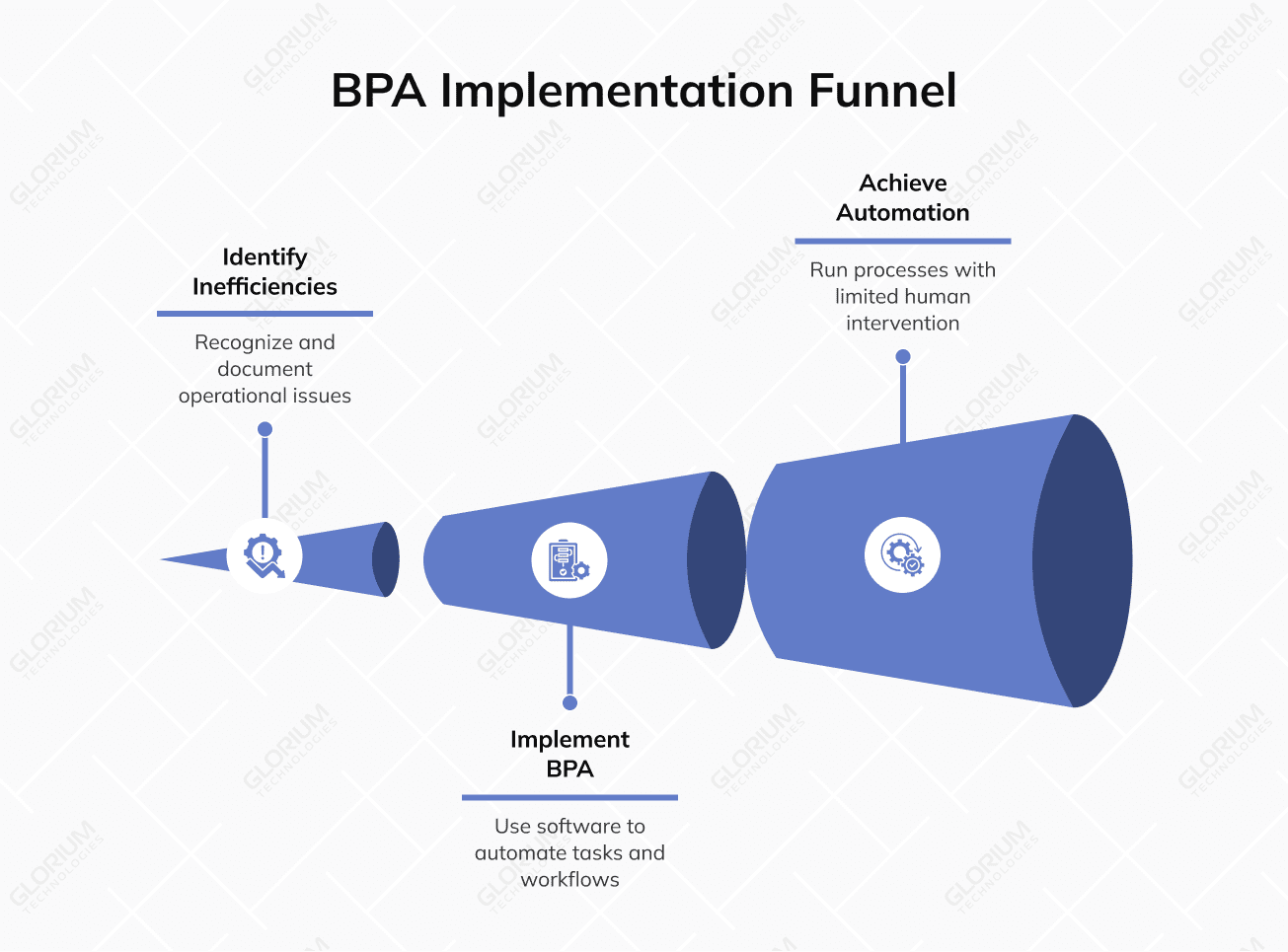
A structured approach to implementation turns automation from a point solution into an organizational capability. The steps below reflect what tends to work across industries, especially for companies tackling their first or second wave of BPA projects.
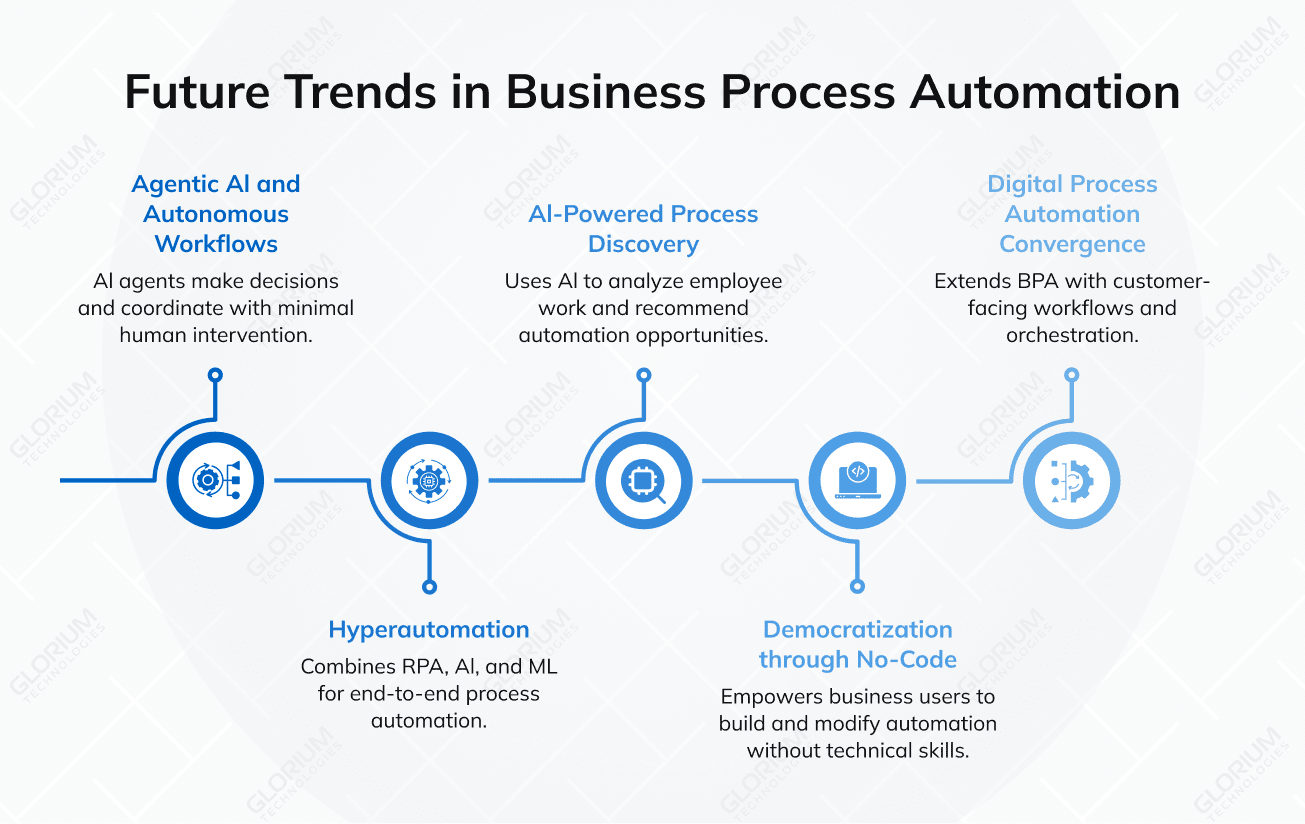
The next phase of BPA is moving beyond execution into orchestration and decision support. Five trends are shaping where the category goes from here, and each one carries different implications for how operations teams should plan their next 12 to 24 months of investment.
AI agents are starting to move past predefined rules into making decisions, coordinating with other agents, and handling complex workflows with minimal human intervention. Gartner predicts that up to 40% of enterprise applications will include task-specific AI agents by the end of 2026, up from less than 5% in 2025. Governance and trust frameworks will determine who actually benefits, so companies running pilots today are focused as much on guardrails and audit logs as on capability.
Hyperautomation combines RPA, AI, ML, process mining, and BPM to automate the entire process end-to-end, not just individual tasks. This is where organizations head off once they’ve squeezed the easy wins out of basic task automation. Instead of automating ten disconnected steps, the goal becomes a single orchestrated workflow that spans systems and departments.
Process and task mining tools use AI to analyze how employees actually work, then recommend which complex business processes to automate next. Less guesswork, more data behind the roadmap. For companies running multi-year automation programs, discovery tools cut down on the political battles over what to automate first.
Low-code and no-code platforms continue to empower business users to build and modify automation without great technical skills. The IT department stops being the gatekeeper for every workflow change, which speeds everything up. The trade-off is governance: more builders means more sprawl unless central oversight scales with the user base.
DPA extends BPA by adding customer-facing workflows, case management, and orchestration across multiple departments. The boundary between back-office automation and front-office experience is fading. A return request, a loan application, or a patient intake form can now flow through a single orchestrated process that touches CRM, ERP, and communication systems without manual handoffs.
The organizations that benefit most from these trends will be the ones treating automation as an ongoing strategic initiative supported by governance, training, and continuous optimization, not as a one-time project that ends when the first bot goes live.
In 2026, BPA is a proven way to lower operating costs, speed up cycle times, and give teams back the hours they currently spend on manual handoffs. The question for most operations leaders today is where to start and who to build with.
Choosing the right partner matters as much as choosing the right tool, and the wrong fit costs weeks of rework. With over 16 years of experience and recognition on the Inc. 5000 list multiple years running, Glorium Technologies helps clients audit current operations, pick fitting BPA tools, and deploy automation that works with existing systems. The team covers custom software development, ERP implementation, AI integration, and full-cycle digital transformation projects.
If your team is weighing where to start with automation, or stuck on a project that didn’t deliver what it promised, a short conversation can save weeks of false starts. Contact us to talk through your operational goals and the fastest path to measurable results.
They’re related but operate at different scopes. RPA is the bot that copies a value from one screen and pastes it into another, or fills out a form, or scrapes a portal for new entries. BPA is the bigger picture: the whole workflow that the bot fits into, including the approvals, integrations, conditional logic, and human checkpoints around it. So RPA is one of the tools BPA uses. Mature automation setups almost always run RPA, AI, and integrations together inside a single automation strategy.
Costs span a wide range. Free or low-cost no-code tools like Zapier and n8n start under $50 per month for small teams. Mid-market platforms like Kissflow and Microsoft Power Automate generally run a few hundred to a few thousand dollars per month, depending on usage. Enterprise platforms like UiPath and Automation Anywhere can run $10,000 to $100,000 per year or more, depending on scale, number of bots, and integration requirements. Glorium Technologies’ custom automation engagements typically start at $1,800 for initial scoping work.
Yes, and arguably more than enterprises do. The arrival of no-code and low-code tools means a five-person operations team can build something useful in an afternoon, with no IT department involved. Where to start: pick whatever task the team complains about most. Usually, that’s invoicing, lead follow-up, onboarding paperwork, or customer email triage. The first automation rarely transforms anything dramatic, but it pays for the tooling and gives the team something to point at when they want to tackle the next one.
It depends entirely on what you’re automating. A two-tool data sync or a basic approval flow can be live by the end of the week. Anything that crosses departments, touches legacy software, or needs a careful security review takes longer, sometimes a few months for the first phase. In Glorium Technologies’ projects, most clients see their first measurable results in two to four weeks, then layer in additional workflows from there. Phased rollouts tend to work better than big-bang launches, both for risk and for getting users on board.
The clearest gains today show up in finance, healthcare, manufacturing, HR, retail, and IT, since these sectors handle the largest volumes of repeatable, rules-based work. But the underlying logic is industry-agnostic. Any team running transactional, high-frequency processes with predictable rules can build a strong business case for automation.