Odoo vs Dynamics 365 Business Central – Which ERP Fits Your Business Better?
Updated November 12, 2025

 Summarize in ChatGPT
 Summarize in ChatGPT
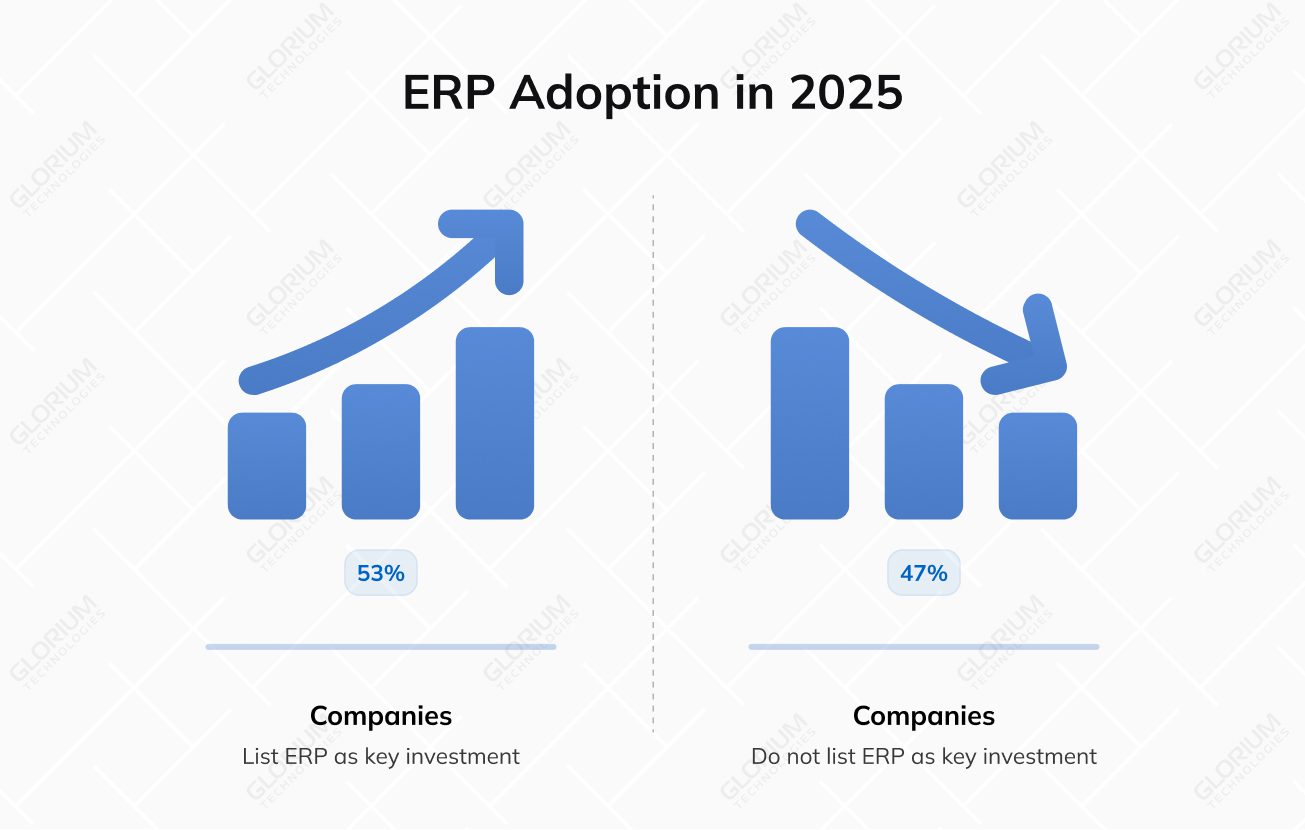
Businesses keep juggling piecemeal systems until numbers stop matching and decisions stall. That’s when top managers realize fragmentation is the culprit and show interest in enterprise resource planning systems. By bringing every process into one place, their teams get real-time, valuable insights instead of yesterday’s data. In 2025, 53% of companies list ERP among their key investment priorities, with manufacturing and distribution sectors at the forefront of adoption.
Two of the most popular ERP software for small- to medium-sized businesses are Odoo and Microsoft Dynamics 365 Business Central. The first allows companies to build their system module by module, adapting as they grow. Dynamics 365 BC, on the other hand, ties every process into Microsoft’s cloud ecosystem, offering enterprise-grade support and financial controls.
What is the right ERP system for your business? Let’s compare their key features, explore where they overlap and differ.
Content
Around 70% of new ERP projects miss their original business goals, because the systems companies chose never quite fit. Too many businesses pick what looks impressive on paper, only to discover it doesn’t match how they operate. You need an ERP solution that matches your company’s rhythm, supports its strategy, and grows naturally with it.
Dynamics 365 BC was built for businesses that have outgrown spreadsheets but aren’t ready for the complexity of enterprise systems. As part of the Dynamics 365 suite, it gives smaller and larger organizations a unified way to manage finance, business operations, supply chain, projects, and services within a single cloud platform.
Its real advantage lies in how naturally it connects with the tools your team uses daily. In Business Central, data flows effortlessly between Outlook, Excel, Power BI, and Teams, turning routine work into real-time collaboration. Managers can track budgets, monitor stock levels, or review project margins—all without switching systems.
For small and mid-sized businesses, it’s a user-friendly solution that simplifies daily operations and brings foresight to long-term planning. Going for Business Central is a natural next step if you already rely on Microsoft’s ecosystem.
Odoo is an open-source ERP platform built around one simple idea—business software should grow with you, not box you in. Its modular structure lets you start with what you need today—CRM, inventory, or HR—and add other modules when necessary. As a result, you can gain enterprise-grade control without the steep price tag.
Available in Community (free) and Enterprise (paid) editions, Odoo gives small and mid-sized businesses the flexibility to choose the pace and scale of their digital transformation. Its open-source nature means you can customize, connect, or fine-tune every module to match your unique business needs.
From startups building their first sales pipeline to manufacturers running complex production lines, Odoo adapts to every growth stage. Its balance of affordability and flexibility makes it one of the fastest-growing ERP systems.
Both ERP systems aim to unify operations but take different paths to achieve this. Odoo focuses on modular growth and flexibility, while MD 365 Business Central delivers structure and deep integration with other Microsoft products.
Here, Microsoft Dynamics 365 Business Central offers big-enterprise accuracy out of the box. It supports multi-entity accounting, automated consolidations, advanced forecasting, and compliance with global standards like IFRS and GAAP. Odoo, on the other hand, provides a solid foundation for general accounting, invoicing, and reporting but relies on additional modules or integrations for advanced capabilities.
While Odoo’s flexibility allows for bespoke financial workflows, Business Central delivers built-in governance, audit readiness, and real-time financial visibility. MD 365 BC is a stronger fit for large enterprises managing multiple entities or complex finances, while Odoo appeals to those who value customization and lower implementation costs.
| Feature | Business Central | Odoo |
| General Ledger | Advanced multi-entity setup | Available, customizable |
| Budgeting | Native forecasting | Requires configuration or app |
| Consolidation | Multi-company supported | Add-on modules required |
| Compliance | IFRS, GAAP | Regional/localized modules |
Dynamics 365 BC and Odoo deliver robust capabilities but serve different priorities. The first one focuses on real-time visibility and predictive planning, helping businesses forecast demand, optimize stock levels, and manage warehouses with precision. Its built-in analytics give managers a clear view of material flow across multiple locations.
Odoo, meanwhile, stands out in terms of operational flexibility. It supports barcode scanning, inventory tracking, multi-warehouse coordination, and automated reordering that can be easily customized to specific workflows. Hence, Business Central is stronger for predictive planning, while Odoo offers the agility that manufacturing and distribution SMEs need to adapt quickly.
Microsoft Dynamics 365 BC includes a built-in CRM solution for essential sales tracking, but truly excels when paired with Dynamics 365 Sales, creating a unified system for high-level customer management. Odoo, in contrast, offers a native CRM packed with lead tracking, email campaigns, and marketing automation, which makes it ideal for smaller teams that want everything in one place. In short, Odoo simplifies sales for growing businesses, while Business Central scales seamlessly for larger, more complex sales ecosystems.
Odoo simplifies shop floor management with powerful tools for production planning, work orders, MRP, and bills of materials. It gives manufacturing SMEs the flexibility to fine-tune every process step while keeping full control over costs and output.
D365 Business Central supports both discrete and process manufacturing but offers less customization freedom. It’s better suited for organizations that value standardized workflows, consistent output, and closer alignment with established operational processes.
Data becomes a decision-making tool with Dynamics 365 Business Central. Power BI integration, AI insights, and interactive financial dashboards turn numbers into a take-worthy direction.
Odoo ERP zeroes in on simplicity and speed with built-in analytics and a customizable report builder. The difference is scale—Business Central suits data-driven organizations interested in enterprise-grade analytics, while Odoo gives SME teams the flexibility to report and adapt on the fly.
Microsoft Dynamics 365 Business Central vs Odoo
| Area | Business Central | Odoo |
| Finance | Advanced, compliant with IFRS/GAAP | Flexible, customizable |
| Inventory | Predictive planning | Multi-warehouse management |
| CRM | Integrated with Dynamics Sales | Built-in CRM and marketing |
| Manufacturing | Standardized workflows | Advanced MRP and production |
| Analytics | Deep Power BI insights | Custom report builder |
You might be curious how smoothly each ERP system can fit into your company’s daily operations. Well, Dynamics 365 Business Central is a cloud-based ERP system for the most part, offering fewer on-premises installation options but full access to Microsoft tools.
With Odoo, you have more options—you can host it in the cloud, on your own servers, or in a hybrid setup. Its open API library makes connecting third-party tools quick and effortless. Hence, the choice comes down to control versus convenience: D365 BC for seamless integration with the Microsoft ecosystem, Odoo for deployment freedom.
Pricing often becomes the deciding factor once features and functionality seem evenly matched. Odoo and Microsoft Dynamics 365 Business Central take different approaches to licensing, reflecting their core philosophies. Odoo follows a modular, pay-for-what-you-use model that can start small and expand over time, while Business Central uses a structured subscription plan built for predictable scaling. Understanding how each pricing model aligns with your growth plans and budget helps ensure you invest in a system that supports long-term value.
Odoo keeps pricing simple and adaptable, letting companies start small and expand as they grow. Its open-source structure means you only pay for what you need and when you need it. You can also benefit from its thriving community.
Here’s how it works:
This flexibility makes Odoo attractive for businesses looking for low entry costs and scalable growth without vendor lock-in.
With Odoo, you can decide how far and how fast you can grow. As open source software, it keeps costs manageable and your business free from vendor lock-in.
If you want predictable costs and advanced capabilities, Dynamics 365 BC’s subscription-based model might appeal to you. It’s built for organizations seeking structure, scalability, and long-term stability under Microsoft’s trusted ecosystem.
Here’s what you get:
This model suits businesses prepared to invest in a robust solution that maintains consistency across global operations.
If you see an ERP system as a long-term foundation, rather than just a tool, Microsoft Dynamics 365 BC is a good fit. It supports steady growth and keeps every branch of your operations—whether local or global—aligned under one reliable system.
Deciding between Odoo and Dynamics 365 BC is mostly about where your business is headed. A tech startup, for instance, might choose Odoo for its flexibility and lower entry cost, while a multi-branch distributor could benefit more from Business Central’s structure and governance. The right ERP aligns with your goals, not just your company’s size.
If you’re tired of fixing reporting errors or wasting hours reconciling data across systems, Microsoft Dynamics 365 BC was built for you. It unifies your workflows in one cloud platform that works seamlessly with the Microsoft tools you already trust. Imagine trading endless Excel updates for instant visibility and decisions grounded in real data.
Choose Business Central if your company:
When daily operations feel scattered—sales in one app, inventory in another, and numbers that never match—Odoo helps bring it all into focus. Its modular design provides you with the business management software your business truly needs without overspending. For example, a retailer can connect sales, stock, and accounting within weeks with Odoo, cutting errors and uncovering new growth opportunities.
Comparative summary table of ERP systems
| Aspect | Business Central | Odoo |
| Type | Proprietary | Open-source |
| Pricing | Subscription per user | Free (Community) / Paid (Enterprise) |
| Hosting | Cloud (Azure) / On-prem | Cloud / On-prem / Odoo.sh |
| Best For | Growing SMBs, enterprises | Startups, SMEs |
| Integration | Microsoft ecosystem | APIs and marketplace apps |
| Flexibility | Moderate | High |
| Analytics | Advanced (Power BI) | Moderate |
| Support | Partner network | Community + Enterprise |
| Implementation Time | Medium to Long | Short to Medium |
Glorium Technologies — Your Official Odoo and Dynamics 365 BC Partner
Are you leaning toward Odoo’s flexibility or Microsoft Dynamics 365 Business Central’s structure? Whatever ERP system you choose, Glorium Technologies is your go-to implementation partner. We’ll help you map your operational priorities, define your growth horizon for the next 1–5 years, and create a step-by-step deployment roadmap.
Working with us means accessing certified consultants, deep ERP expertise, and localized support that reduces project risks and delivers measurable results.
Ready to make your ERP investment work smarter for your business? Let’s build your strategy together!
Implementing an ERP solution means uniting different departments under one platform and automating key workflows like finance, manufacturing processes, and project management. When you choose MS Dynamics 365 BC among many ERP systems, you can integrate it with tools like Microsoft Office and Power Platform, improving operational efficiency and quality control. This connected approach can give you significant advantages, reducing costs and enabling faster, more informed decisions.
Customizing your ERP system lets it work the same way your business does. You can automate processes, fine-tune workflows, and simplify complex production processes or service tasks through an intuitive user interface. Suppose you want to improve product lifecycle management or scale daily operations. Customization can help you stay agile, skyrocket the decision-making process, and keep every part of your business connected.
When comparing Odoo and Microsoft Dynamics 365 BC, implementation timelines vary. Odoo’s modular design allows smaller businesses to deploy quickly, making it ideal for companies aiming for fast adoption. Dynamics 365 BC, as more structured enterprise software, typically requires longer setup due to its advanced features and deeper integration, offering greater scalability once fully implemented.