Odoo Artificial Intelligence: From Daily Tasks to Better Decisions
Updated March 23, 2026

 Summarize in ChatGPT
 Summarize in ChatGPT
Intelligent automation has already improved ERP by accelerating routine tasks, reducing manual effort, and keeping structured processes on track. Still, rule-based automation can only take a business so far. It works well when workflows are stable and exceptions are limited, but it struggles when context matters. AI expands that capability: it can recognize patterns, interpret changing conditions, generate useful content, and help teams make more informed decisions in complex situations.
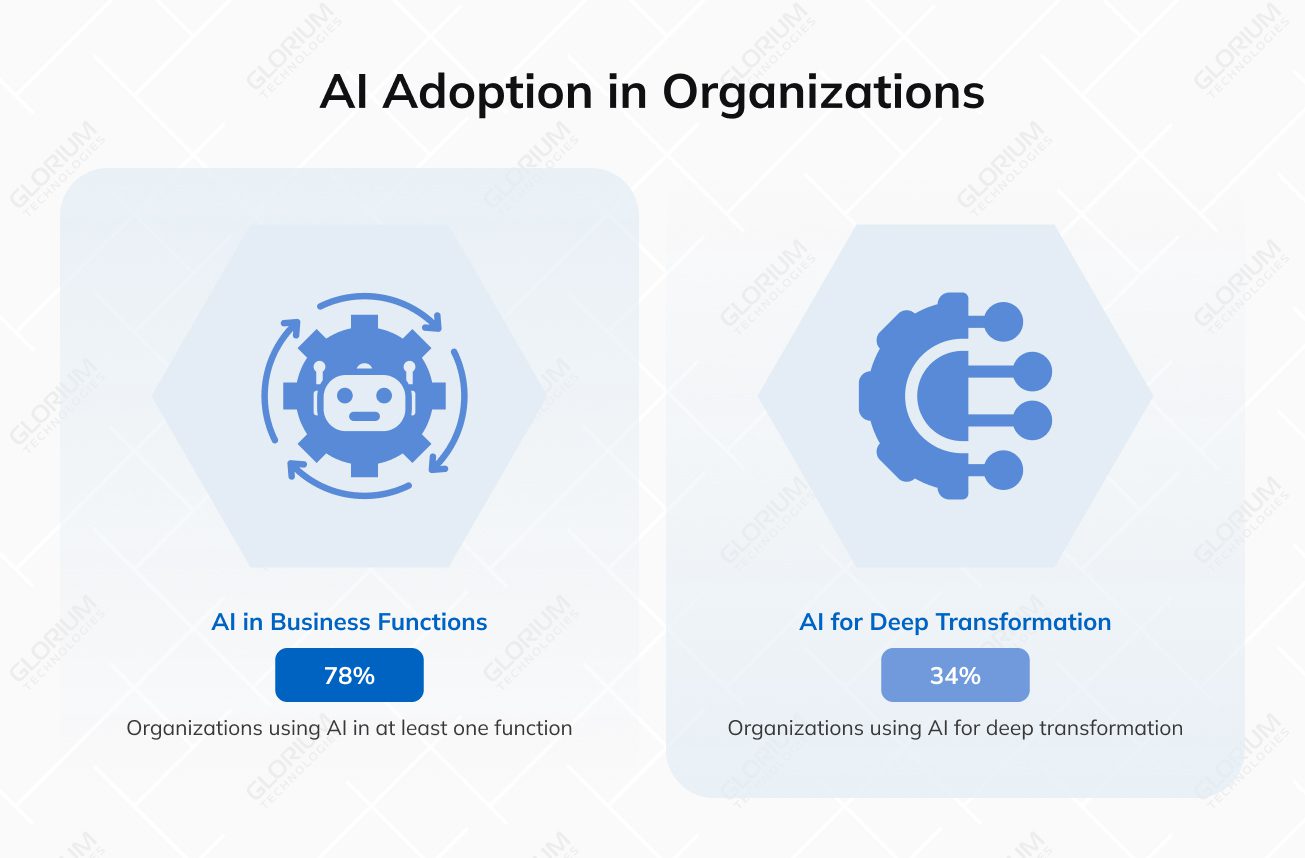
That shift is already happening. Deloitte reports that 66% of organizations are seeing AI-driven productivity and efficiency gains, yet only 34% say they are using AI to deeply transform the business rather than simply optimize existing processes. McKinsey also found that 78% of organizations now use AI in at least one business function, and that workflow redesign has the greatest impact on the bottom line. In other words, the real value of Odoo AI lies in moving from faster execution to smarter operations.
This article explores where AI fits into Odoo, how it works inside the applications, and what business value it can create beyond routine automation
Content
In Odoo 19, AI is built into the everyday user experience, so teams can call it up while they work. Users can launch Ask AI from anywhere in the database through Ctrl + K or the AI button in the top-right corner. From there, Odoo can help translate chatter, summarize threads, improve drafts, generate follow-up messages, or offer contextual suggestions. At the same time, the standard Ask AI layer remains fairly controlled: it can open views and display reports, but it does not modify records on its own.
That makes Odoo’s approach practical for business use. Companies can start with low-risk support for writing, search, and analysis, then move into more advanced workflows only when they are ready. In other words, AI in Odoo is designed to fit into existing processes first, not force a full redesign on day one.
| AI layer | Main role in Odoo | Business value |
| Ask AI | Supports users during day-to-day work | Saves time on small tasks and reduces friction |
| AI agents | Connect AI to business logic and actions | Extends AI beyond writing into workflow support |
| AI fields | Bring AI output directly into records | Keeps generated content inside the ERP workflow |
| Provider setup | Controls how AI is connected and managed | Gives businesses flexibility and governance |
For many teams, this is the most visible part of Odoo AI. It works like an AI assistant within the ERP, helping users handle small but recurring tasks without leaving the screen they are on. That may mean improving a sales message, summarizing internal communication, or helping support teams answer questions faster. It is a simple way to reduce manual labour and speed up repetitive actions without automating the whole process.
When businesses need more than basic writing help, Odoo uses AI agents. An AI agent is a smart assistant that understands natural language, performs tasks, and interacts with Odoo tools. These agents are shaped by topics, tools, and sources. Topics define what the agent is allowed to do, tools give it the functions it can perform in Odoo, and sources provide the information it can use when responding.
This is where AI becomes more operational. Odoo includes preconfigured topics such as Natural Language Search, Information retrieval, and Create Leads when CRM is installed. The tools can open a view or create a lead, while the sources can include PDFs, web links, uploaded documents, and Knowledge articles. This structure helps ground the agent in real Odoo business processes and data, rather than generic text generation.
Odoo also integrates AI directly into forms through fields that clients can add in Studio and configure with prompts, formats, and instructions for tone or output. Once added, the field can generate content based on the record context, and users can refresh it manually with the AI icon. Odoo also runs a scheduled action once a day to fill empty AI fields by default. This way, instead of switching between tools, employees can generate product descriptions, summaries, notes, or other structured content inside the same record.
Odoo’s AI app also lets companies connect their own provider accounts. The official documentation supports both ChatGPT and Google Gemini, with setup handled in the AI app settings and via each provider’s API key, giving businesses more control over AI model choice, governance, and cost management.
Artificial intelligence is most useful when it’s built into the apps you’re already using every day. Rather than acting like a separate tool, it supports writing, summarization, search, forecasting, and context-aware assistance.
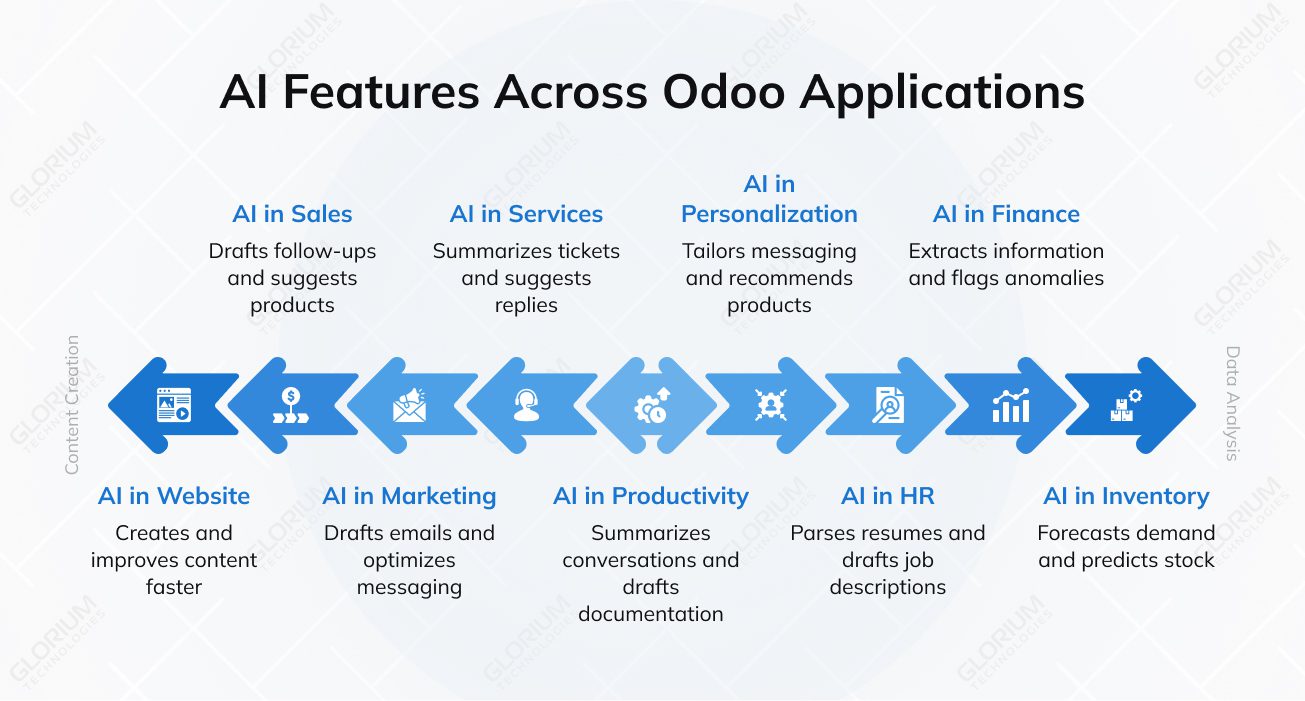
AI helps teams create and improve content faster without constantly switching between tools. It can support landing page copy, product descriptions, blog drafts, SEO titles, and meta descriptions, which is especially useful for businesses that frequently update content. AI can also assist with customer chat responses, helping teams handle common questions more quickly while maintaining consistent communication.
In sales, AI helps teams spend less time on repetitive communication and more time advancing deals. It can draft follow-ups, summarize recent customer interactions, suggest relevant products during quoting, and support proposal creation. The value goes beyond time savings. It gives sales reps a clearer context and helps them respond more consistently.
Finance is one of the strongest areas for AI because it combines structured data, repeated tasks, and a large volume of documents. AI can extract information from invoices, suggest expense categories, support reconciliation, and flag anomalies that deserve attention. It can also help classify and summarize financial documents, reducing manual work and simplifying reviews.
AI is especially beneficial for planning that relies on time, patterns, and changing demand, such as demand forecasting, stock prediction, replenishment decisions, and the detection of aberrant inventory behavior. AI can help teams analyze signals from warehouses and production lines more quickly, create better plans, and address delays or supply issues more effectively on the operations side.
AI can assist HR staff by automating repetitive operations such as hiring paperwork and employee communication. Additionally, it can organize resumes, summarize candidate profiles, create job descriptions, and assist with interview scheduling. AI is also often used to handle HR documentation and evaluation notes, making recruitment more effective and allowing teams more time to make key decisions.
Marketing is an ideal application for artificial intelligence because most of the work involves content generation, segmentation, and message optimization. AI assists with campaign email drafting, subject line improvement, content variant generation, and targeted messaging recommendations. It also offers audience targeting and segmentation, making advertising more relevant without requiring teams to create everything manually.
AI helps teams manage requests, changes, and coordination in service-related activities. It can summarize tickets, propose responses for support agents, improve project updates, and assist with status reporting. AI can also assist teams in managing and prioritizing resources, which is beneficial when working on numerous projects, customers, or field operations at the same time.
AI is useful when humans need to swiftly process a large amount of information while keeping internal knowledge usable. AI can help teams create structured content more quickly by summarizing talks, producing internal papers, extracting key information from knowledge sources, and more. In reality, this means you’ll spend less time searching, rewriting, and catching up on lengthy threads.
AI modifies messaging, offers items or next steps, and customizes information depending on user behavior, history, or preferences. This is important for sales, marketing, e-commerce, and service processes because improved personalization allows firms to make communication feel more timely, relevant, and specific.
Artificial intelligence enables firms to better exploit their existing ERP systems. When AI is integrated into regular operations, teams act more quickly, spend less time on repetitive tasks, and work with a clearer business context, leading to improved performance in sales, finance, operations, service, and internal collaboration.
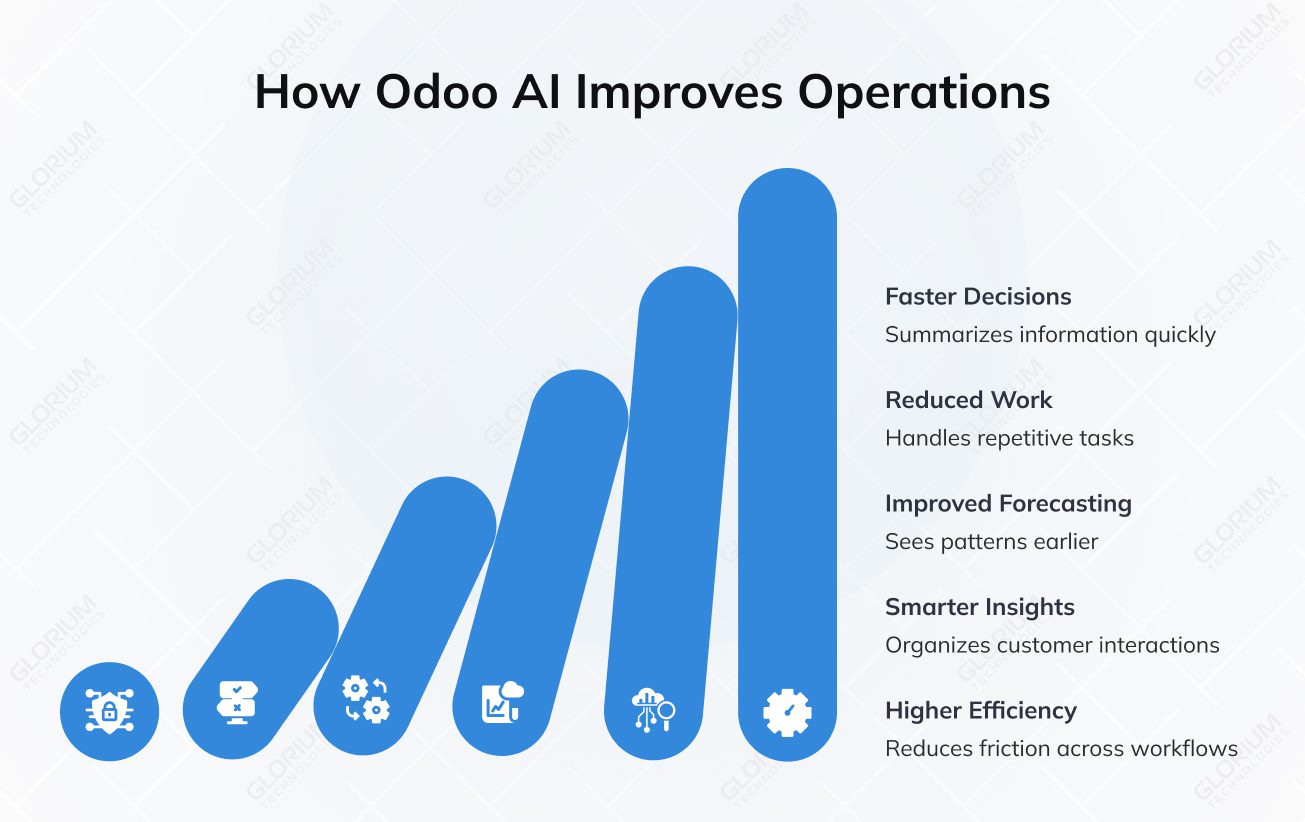
ERP systems hold vast volumes of corporate data, but data is useless unless it can be interpreted fast. AI helps users get to the point quicker by summarizing information, disclosing relevant context, and recommending next steps. Instead of combing through records, chat threads, or documents, teams may move from information to action faster.
Many components of an ERP job still need recurring effort, such as writing follow-ups, entering document data, organizing information, updating records, or creating internal notes. Odoo AI helps to alleviate this burden by handling repetitive procedures in the workflow, allowing teams to focus on exceptions, decisions, and customer-facing tasks that require human intervention.
Businesses benefit from better planning when they can see patterns and respond to them sooner. Odoo AI can help predict by merging historical data, current records, and operational signals from inventory, sales, and manufacturing. This enables firms to better estimate stock levels, plan for fluctuations in demand, and reduce the risk of overreaction or missed demand.
Customer data is more useful when teams can put it to use. Odoo AI interprets and organizes client interactions across sales, marketing, and service workflows, allowing teams to identify patterns, grasp context, and respond faster.
The greatest influence is frequently attributed to accumulation. When AI reduces process friction, the entire business becomes more efficient. Teams spend less time on low-value tasks, such as switching between systems and gathering information.
AI works best when the ERP already contains enough reliable information to detect patterns, support data-driven decisions, and generate useful outputs. In Odoo, this indicates that the quality of the setup is equally important as the quality of the model. Even the most powerful AI features will produce poor results if the data is insufficient, inconsistent, or spread across multiple disconnected workflows. To get the most out of Odoo’s AI features, your system data needs to meet these four criteria:
AI in ERP is shifting away from standalone assistants toward integrated workflow support. Odoo 19 is a great example of this transition. Its release included AI fields, natural-language search, AI-assisted drafting and summarization, live chat integration, server actions, voice transcription, and web page generation, all within the ERP rather than as a standalone tool.
A major trend is the move toward AI agents that can do more than answer questions. Odoo defines its agents as assistants that understand natural language, perform tasks, and interact with Odoo tools. McKinsey’s 2025 survey shows the market moving the same way: 23% of respondents say their organizations are already scaling agentic AI in at least one function, and another 39% are experimenting with it.
The next phase of ERP AI will be about proving value and keeping control. Deloitte’s 2026 research says efficiency gains are already common, but revenue impact is still much less mature: 74% of organizations hope AI will drive revenue growth, while only 20% say it already does.
Gartner expects 33% of enterprise software applications to include agentic AI by 2028, up from less than 1% in 2024, and 15% of day-to-day work decisions to be made autonomously by 2028. For ERP buyers, that means the question is shifting from whether AI will be part of the platform to how deeply it should be embedded, where human review should remain, and which workflows are worth scaling first.
The value of AI in Odoo goes beyond its key features: it shines when AI fits real-world day-to-day workflows, works with clean business data, and supports how teams already use the system. That is where an experienced Odoo partner makes a difference.
Glorium Technologies brings 15+ years of experience in digital transformation and supports companies from early planning to go-live and beyond. The approach remains practical: clear requirements, a rollout plan that aligns with the scope, controlled custom work, clean integrations, and training that helps teams adopt new capabilities faster. When businesses want to introduce AI into Odoo, that same foundation matters even more. AI features work best when modules are connected, records are structured, and workflows are stable enough to support automation, forecasting, and smarter decision-making.
A recent US construction project management rollout on Odoo 18 shows what such a structured implementation can achieve. Glorium Technologies rebuilt procurement and execution workflows across Purchase, Inventory, Project, Timesheets, and Accounting on Odoo.sh. As a result, the client achieved 2x faster supplier response, 18% lower procurement costs, 30% less administrative workload, and 23% faster project delivery through RFQ automation, real-time stock control, and connected project scheduling. Results like these matter for AI adoption too, because intelligent features deliver more value when the underlying ERP setup is already well connected and built around real operations.
Talk to us today to explore what a practical Odoo rollout can look like for your business.
The timeline depends on your project’s scope, the current state of your Odoo setup, and the amount of available Odoo data. For a small project with one or two AI features, such as document recognition, lead scoring, or drafting email templates, it usually takes about 3 to 6 weeks. This includes setup, testing, and gathering user feedback. If you want to add several AI tools across a single department, expect the project to take 2 to 4 months. Larger projects that involve custom workflows, connecting multiple Odoo modules, and preparing historical data can take 4 to 6 months or sometimes longer.
Glorium Technologies starts with a short product discovery phase of 1 to 2 weeks to define the use case, review existing ERP, and identify where AI can improve business operations without disrupting daily work. That phased approach helps businesses see value early and expand only when the first release proves useful.
Yes. Standard Odoo AI features can address common needs, but many businesses need deeper workflow automation tailored to their processes. Glorium Technologies can build custom AI tools, extend Odoo workflows, and connect external models or services to the ERP system. For deeper automation within Odoo, CogniAgent can integrate with Odoo modules and APIs to support AI-driven workflows such as invoice validation, anomaly detection, and payment follow-ups. To keep governance strong, these actions should follow role-based access, approval checkpoints, audit visibility, and a pilot rollout before scaling.
The best way to use AI in Odoo is to delegate routine tasks and reduce manual labor, while humans remain involved in decisions affecting revenue, compliance, and customer trust. AI can perform tedious tasks, provide useful ideas, and help teams work more efficiently, but it must have clear limitations. For example, an AI assistant can create emails, summarize records, and process data more quickly, while professionals continue to analyze uncommon circumstances, authorize actions, and make final decisions. Keeping this balance allows automation to assist in smarter decisions.
The safest approach is to begin with one workflow in which artificial intelligence can provide value without affecting the overall system. Many firms start with areas like accounting, customer service, or sales, where AI can reduce manual tasks, improve client interactions, or help teams generate content more quickly. Once the first use case is successful, businesses can spread their AI capabilities to other business processes. In reality, this includes testing the solution with real data, gradually rolling it out, and ensuring the new AI-powered layer aligns with how Odoo users already work.
A common mistake is the focus on technology before addressing the problem. Many businesses implement AI simply because it appears promising, but without a clear aim, it typically provides little benefit. It is preferable to begin with a specific use case, such as faster response times, forecasting, or decision-making.
Weak data quality is another common issue. If client data, financial records, or inventory details are missing or inconsistent, AI results will be unreliable. Companies face hurdles when they attempt to automate routine tasks too quickly or too much. AI is most effective when introduced gradually, with clean data and realistic expectations about how it may help in daily tasks.