Cloud ERP vs. On-Premise ERP: A Comprehensive Guide for 2026
Updated September 7, 2026

 Summarize in ChatGPT
 Summarize in ChatGPT
Companies are trying to get all their core processes, including finance, operations, HR, and inventory, into one system, and that’s what’s driving the growth of the ERP market. Allied Market Research projects the global ERP market will reach $40.6 billion by 2033. And current ERP software revenue is estimated at $58.6 billion in 2026. The numbers, once more, highlight the growing interest in ERP systems and the central role ERP plays in daily operations and long-term planning for many businesses.
When businesses start taking ERP seriously, they have one pressing question: should the system be cloud-based or on-premises? Both options can support the same core business processes, but they work differently. Cloud ERP is easier to launch, simpler to maintain, and more accessible for distributed teams. On-premises ERP gives businesses greater control over infrastructure and system customization, which is of utmost importance in more tightly regulated environments.
If you’re asking yourself the same question, this article is for you. We’ll walk you through each type of enterprise resource planning system, its benefits, features, and the difference that ultimately tips the scales.
Content
At its core, an ERP is the engine that pulls fragmented business processes into a single, functional system. It syncs everything, from accounting and HR to inventory and logistics. These systems wipe out the chaos caused by using too many disconnected tools. They allow companies to get a setup where every team is working from the same real-time information.
When a sales transaction is finalized, the impact propagates through the system in real time: financial ledgers are updated, and inventory levels are adjusted without manual intervention. This level of integration guarantees that reporting reflects the immediate state of the business and allows leadership to make data-driven decisions based on high-fidelity analytics.
Instead of forcing a “one-size-fits-all” solution, modern ERP architecture uses a modular approach that adapts to your specific business layout. By keeping the core database as the single anchor, the system naturally eliminates the friction of duplicate entries and the inevitable mistakes that come with manual data handling.
For most organizations, the real objective is building a scalable foundation where teams no longer have to guess what’s happening in the next department. As a result, companies have a high-level view of the entire operation; they can see that work isn’t being repeated and that leadership can actually see what’s driving the business in real-time.
The main difference between the systems is where they run and who maintains them. Cloud ERP solutions are hosted externally, and users access them through the internet. On-premises ERP solutions are hosted on the company’s own servers and therefore managed within the company. To choose the right fit, you have to look at how each model handles control, cost, and long-term scalability.
Cloud ERP is the software hosted on a provider’s remote servers and delivered over the internet via a SaaS (Software-as-a-Service) model. Instead of investing in maintaining local servers, companies subscribe to a managed environment. Platforms like Microsoft Dynamics 365 Business Central or Odoo are great examples of what cloud ERPs look like. These solutions provide a ready-to-use framework that integrates with the rest of a company’s digital stack. Some of the most prominent benefits are as follows:
The real value of this model is in speed. The internal team doesn’t have to maintain the server or do complex installation scripts. The company can quickly go from the decision to start using a cloud ERP system to a live environment without the months of hard, technical work.
On-premise ERP is installed on a company’s own servers and managed by its internal IT experts. In this setup, the system runs on local infrastructure, which is controlled by the company. Updates are handled manually, and data storage and security stay in-house. On top of that, the system can be customized more thoroughly and match specific business processes. Companies typically opt for on-premises deployments when they need to meet strict regulatory requirements or make deep system modifications. The core characteristics of this solution include:
Ultimately, this model is for organizations that prioritize granular control over convenience. It provides the technical flexibility to shape the ERP around unique operational workflows.
The financial commitment is important, but the core difference between the two solutions lies in the allocation of resources and long-term infrastructure responsibility. A cloud-based model shifts the maintenance and hardware lifecycle costs to the vendor. On-premises deployments are capital expenditures and require a significant upfront investment in licenses and physical hardware. However, this solution offers total ownership of the system’s lifecycle.
Cloud ERP is priced per user, per month, and the final cost depends on the system, number of users, and selected modules.
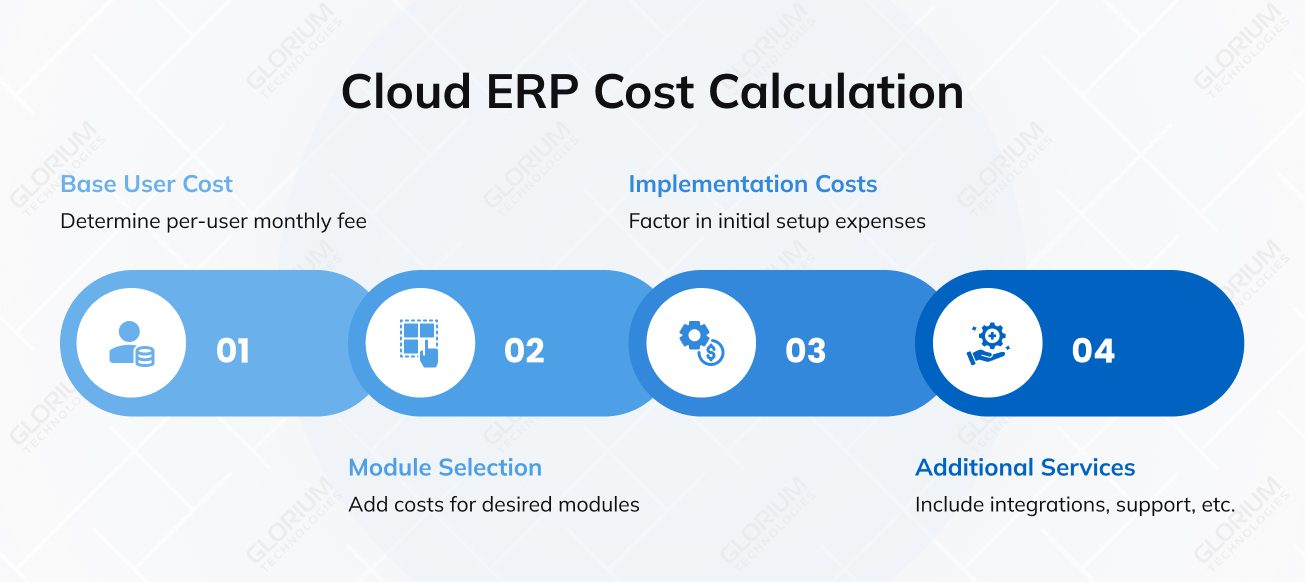
For example:
Additional costs usually include:
What’s more, infrastructure, hosting, and updates are already included in the price, and companies don’t need to manage servers internally.
On-premise ERP is usually more expensive, but companies handle everything in-house. Here’s a breakdown of what is included:
Sometimes, maintenance costs may include custom features, ongoing support, and all further upgrades.
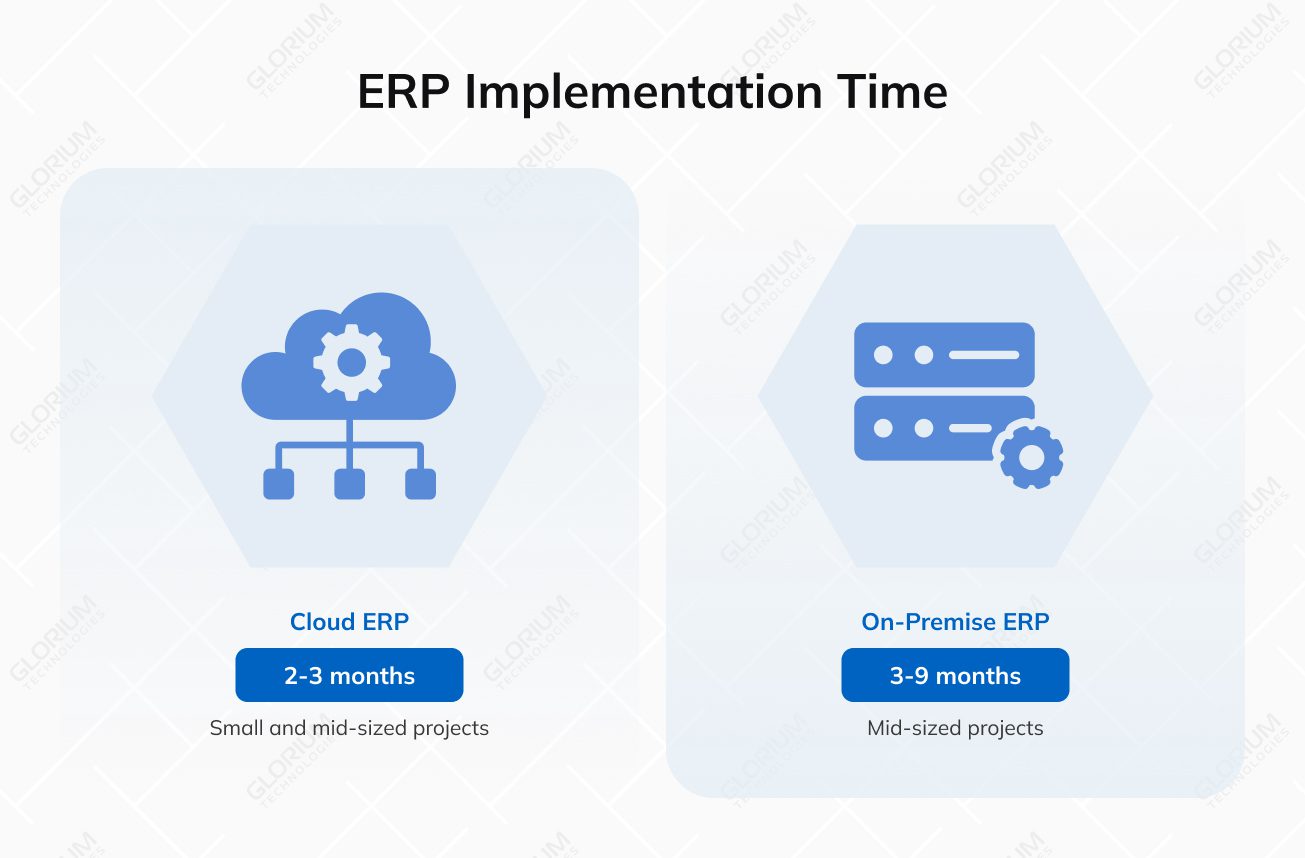
Everyone wants to minimize time-to-market, but the actual deployment schedule depends on organizational scale, the chosen ERP architecture, and the complexity of business logic. Cloud ERP typically offers a more aggressive timeline because it eliminates the need to provision physical infrastructure. However, most of the time is usually spent on configuration and data migration. For small to mid-sized enterprises, a standard cloud implementation can take 2–3 months; more complex configurations can take 3–6 months.
On-premise deployments naturally involve a longer lifecycle due to the extensive infrastructure setup and internal hardware configuration required before the software can even be tested. So, mid-sized projects may require a 3–9 month window; enterprise-level or highly customized systems can take 12 months or longer.
The primary bottleneck in either scenario is almost invariably data migration. Organizations must undergo a rigorous data cleansing process and determine which legacy records remain relevant for the new environment. Significant delays often stem from poorly defined initial requirements, rather than technical limitations of the software itself.
With cloud ERP, you have to follow the vendor’s strict templates. This means you must spend some time cleaning your data before you can even upload it. On-premise is different: you have direct access to the database, so you can tweak things more freely. However, that extra freedom often leads to technical errors if the old and new data structures don’t match. On top of that, the software itself rarely becomes a problem; projects typically stall because the company didn’t audit its legacy data before the migration began.
On-premise and cloud-based systems often cover the same core functions, including finance, operations, inventory, and HR. However, they differ in how scalable those features are over time.
For example, cloud ERP is built to scale more easily. Adding users, modules, or new locations usually doesn’t require major changes to the system. Here’s what you get:
On-premise ERP gives complete control over how the system is built and customized. With on-premise solutions, companies have:
Your choice should ultimately depend on your long-term growth strategy and internal technical capacity. If the goal is to scale rapidly without the friction of managing hardware, a cloud ERP provides the agility you need. However, if your operations require deep architectural control or complex legacy integrations, the on-premise model remains the most reliable solution. Review the table below that summarizes these core differences to help you weigh your options:
| Criteria | Cloud ERP | On-Premise ERP |
| Deployment | Hosted externally. Accessed via browser without local installation | Installed locally on company servers and managed internally |
| Infrastructure | Controlled by the vendor. No hardware required | Fully managed in-house, including servers and storage |
| Accessibility | High. Access from anywhere with an internet connection | Limited. Typically restricted to the internal network or VPN |
| Implementation Time | Faster. Often weeks to a few months | Longer. Can take several months to a year+ |
| Pricing Model | Subscription-based (per user/month) | Upfront license + ongoing internal costs |
| Upfront Costs | Lower. No infrastructure investment required | High. Includes hardware, licenses, and setup costs |
| Ongoing Costs | Predictable. Monthly or annual subscription | Variable. Maintenance, IT staff, upgrades |
| Customization | Moderate. Limited by platform capabilities | High. Deep customization based on business needs |
| Scalability | Easy. Add users, modules, or locations quickly | Complex. Requires additional infrastructure and setup |
| Updates | Automatic. Managed by the vendor | Manual. Controlled by the internal team |
| Maintenance | Vendor responsibility | Internal IT responsibility |
| Security | Managed by cloud providers using standard security practices | Fully controlled and managed internally |
| Integrations | Easier with modern cloud tools and APIs | Better suited for legacy or internal systems |
| Control | Limited. Depends on vendor environment | Full control over the system and data |
| Best Fit | SMBs, growing companies, distributed teams | Large enterprises, regulated industries, complex operations |
Cloud-based ERP solutions eliminate the operational burdens of managing on-site infrastructure by delivering the software via a secure, vendor-managed environment. This SaaS model guarantees the system remains accessible across global locations and provides the mobility and resilience required by modern enterprises.
From a technical and deployment perspective, this usually looks like:
Any ERP aims to unify data, but the cloud model guarantees the following:
In terms of security and compliance, companies rely more on the provider’s infrastructure and processes:
Companies still decide who can access what and how data is used, but the technical side is mostly handled externally.
Companies that require complete architectural independence should choose on-premise deployment, as this solution provides a robust framework for deep system configuration. When ERP is hosted on the internal infrastructure, enterprises can align the software’s core logic with complex business processes that standard cloud templates usually do not support. On top of that, this model allows companies to get full ownership of the system’s performance and lifecycle.
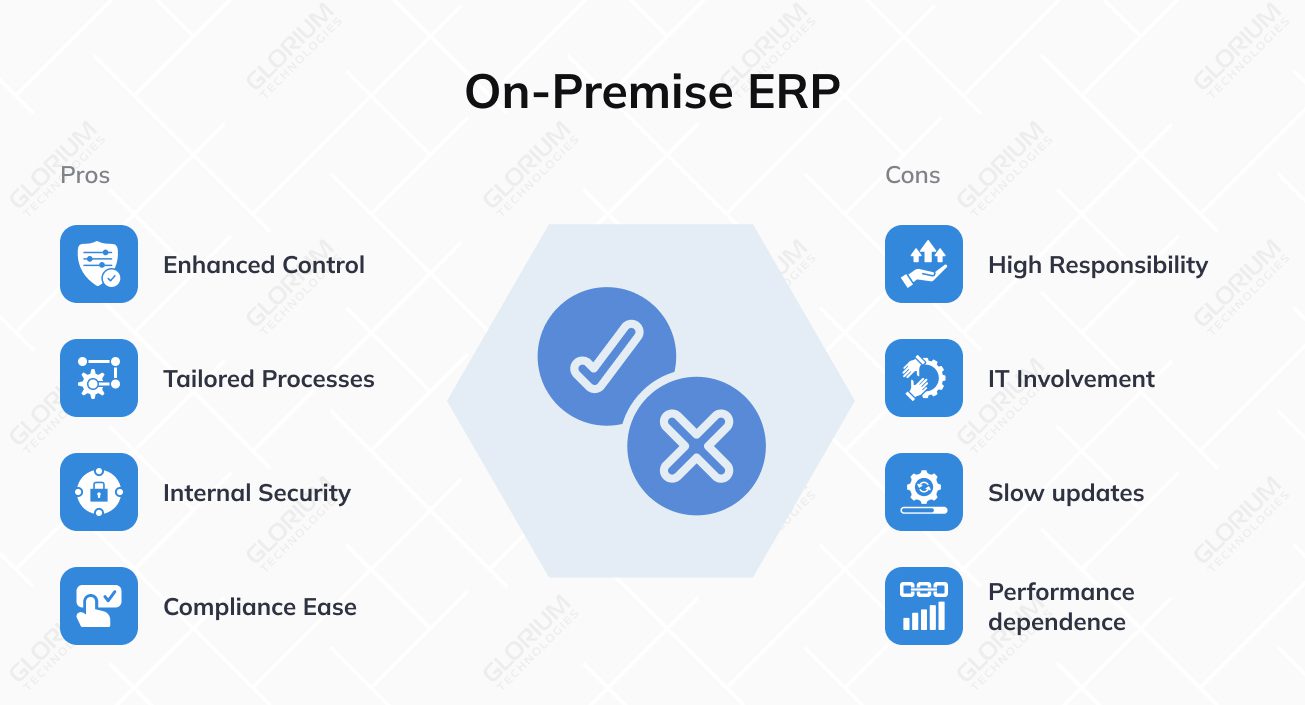
See how this shows up in daily operations:
Data stays inside the organization, and the internal team decides how it’s stored, accessed, and protected. On-premises software is often chosen by companies in strictly regulated industries. The higher level of control over where data is stored allows businesses to apply their internal rules—how the data is handled, where it’s stored, how it’s backed up, and more.
Both deployment models streamline enterprise operations, but they introduce fundamentally different risk profiles that companies must manage. The trade-off typically lies between external dependency and internal resource strain. In a cloud environment, the primary concerns revolve around data sovereignty and reliance on the vendor’s service uptime.
On-premise deployments face risks related to outdated hardware, manual security vulnerabilities, the high cost of maintaining specialized technical talent, and more. So, choosing the right model requires a balanced analysis of your current IT infrastructure and your long-term tolerance for operational disruptions. Check out the table below and find out more about the most critical challenges that come with each model.
| Risk Area | Cloud ERP Risk | On-Premise ERP Risk |
| Connectivity risk | System depends on internet access. Limited availability if connection is unstable | No internet dependency, but outages depend on internal infrastructure reliability |
| Customization risk | Deep customization is limited. Some processes may not fit the system | High customization can make the system harder to maintain and upgrade |
| Cost risk over time | Subscription costs increase as users, modules, or usage grow | Substantial initial investment and ongoing costs for maintenance and upgrades |
| Upgrade risk | Automatic updates may introduce changes without full control | Updates are often delayed, which can lead to outdated systems |
| Vendor dependency risk | Strong reliance on the provider for uptime, support, and changes | Full responsibility sits internally, which increases pressure on IT teams |
| Maintenance risk | Less control over how and when issues are resolved | Internal teams must handle all maintenance and troubleshooting |
| Scalability risk | Easy to scale, but costs grow with usage | Scaling requires new infrastructure, which takes time and investment |
| Security risk | Data is managed by a third party, which may raise concerns for some industries | Data security depends entirely on internal setup |
The ERP market size is expected to reach $175.94 billion in 2026, so instead of just competing on standard features, vendors are now doubling down on industry-specific tools and built-in AI. Most organizations gravitate toward established leaders like Microsoft, Odoo, or SAP. These platforms provide the long-term stability and deep integration required to support complex operations.
Choosing the right vendor is a long-term partnership that affects your budget for years. If you choose the wrong platform, you might get stuck in a “vendor lock-in,” where fixing or switching the system becomes more expensive than the benefits it provides. Simply put, you need a solution that handles your current tasks but is also ready for where you want to be in five years.
The following overview examines the dominant players to help you identify which platform aligns best with your business architecture:
Odoo is a modular ERP that allows companies to start with core applications, such as CRM, Accounting, Inventory, and Manufacturing, and gradually activate additional modules (when operations become more complex).
A key advantage is that Odoo is available as both a cloud and an on-premise solution. This flexibility is a major factor for businesses with diverse locations. For instance, in our recent case study of a multi-channel lighting manufacturer, Odoo.sh was used to unify their entire operation. This setup allowed the client to manage two separate warehouses and an e-commerce store through the cloud. As a result, the client received the deep control needed for complex multi-level Bills of Materials (BoMs). This solution allowed the manufacturer to achieve over 90% inventory accuracy and cut stock losses by 16% annually.
Microsoft Dynamics 365 is a premier choice for companies that need deep ERP functionality without sacrificing adaptability. Its biggest strength is how it integrates with the Microsoft ecosystem (Excel, Teams, and Power BI). This native connectivity turns the ERP into a unified workspace and allows teams to manage data through familiar tools.
It is a highly flexible cloud-based ERP software that fully supports on-premise and hybrid setups. This is a critical advantage for global enterprises that must balance cloud agility with strict local data residency rules. By choosing Dynamics 365, businesses get a scalable system that speeds up user adoption because the interface already feels familiar to the staff.
Consider a case of a Belgian metal manufacturer. This client had disconnected systems in finance, production, inventory, etc. Planning relied on spreadsheets, and teams had no shared view of ongoing projects. After implementing Microsoft Dynamics 365 Business Central, the company received a single environment where all departments worked with the same business data in real time. This approach reduced production downtime by 10× and even improved inventory planning without increasing infrastructure costs.
SAP is designed for organizations that need tight control over finance, supply chain, manufacturing, and reporting across multiple locations. Systems like SAP S/4HANA are available as cloud solutions or on-premises ERP software, depending on how much control the company needs over its infrastructure. SAP is often used in companies with complex operations, where multiple departments, entities, or countries must be managed within a single system.
Selecting the right deployment model is a pivotal decision, and it must align with your organization’s long-term infrastructure strategy and internal resource allocation. You must evaluate your available capital, the technical maturity of your IT department, and the specific speed-to-market requirements of your industry. A well-considered choice balances immediate operational needs with the long-term cost of maintaining and scaling the system.
Operational timing is also critical. There are usually clear signs, such as growing data volume, disconnected tools, and manual reporting, that show when existing systems stop working and that the time for change has come. This is often the point where businesses start comparing deployment models.
Cloud ERP is often easier to adopt because it doesn’t require building or maintaining infrastructure. Odoo or Microsoft Dynamics 365 Business Central are commonly used here. Both platforms provide a strategic advantage through their modular cost structures; they allow companies to avoid large upfront capital expenditures. Businesses can align their software spend directly with their current operational needs, without paying for features they don’t need. This “pay-as-you-grow” model guarantees that even smaller organizations can access enterprise-grade tools without straining their internal budgets.
With this type of setup:
Overall, if your company needs more structure but isn’t ready to manage a complex system internally, a cloud ERP like Odoo or Microsoft Dynamics 365 Business Central will be a game-changer. Our e-book breaks down all variables in detail and provides a clear roadmap to evaluate vendor terms and technical fit. It will surely help you cut through the marketing noise and choose the architecture that actually aligns with your long-term goals.
Large-scale enterprises choose on-premise ERPs when their priority is high-level control over a sprawling organization. These organizations require a system that unifies multiple legal entities, diverse geographic locations, and complex departmental structures within a single architecture. Market projections highlight this perfectly – the on-premise segment will grow to hold around 62.5% of the ERP market by 2035.
Large-scale operations rarely fit into standardized processes. This is why many global firms opt for the deep customization that local deployments offer:
However, this level of control is not without its trade-offs. Such an environment demands a massive resource allocation. Managing the underlying hardware, maintaining security patches, and handling system updates is impossible without a professional internal IT team. So, when companies choose this route, they need to invest in building and maintaining a private digital infrastructure.
The ERP market is advancing technically as platforms integrate next-generation features to meet modern operational demands. The ERP market is expected to exceed $225 billion by 2035, so this investment is being funneled into high-performance, intelligent systems that redefine traditional workflows.
Let’s take a closer look at the trends that are influencing cloud and on-premises ERP solutions:
All in all, ERP is becoming more flexible. Companies don’t need to rely on only one fixed system. They are building setups that are useful for their current business operations but can be changed over time.
The ERP implementation process goes beyond selecting software and requires aligning the system with existing workflows, data, and how teams operate day to day. Glorium Technologies works with companies that need ERP systems to fit into their operations, including cloud-based software and more complex on-premises implementations.
Choosing between cloud and on-premises deployments is only part of the decision. If you’re planning an ERP implementation and want to understand what approach would work best for your business, talk to our experts to define your technical requirements and deployment strategy.
In most cases, companies move from on-premise to the cloud. It typically means migrating your data, rebuilding integrations, and reworking customizations that were built for a local environment. Switching the other way—cloud back to on-premise—is rarer and more involved. What both have in common is that neither should be treated as a quick project. Before you decide, it’s worth thinking past your current setup and asking where you expect to be in five years. A hybrid model often makes that transition easier, letting you move in stages rather than making a difficult switch all at once.
You own your data either way, but where it lives and who controls the environment is a different conversation. On-premise keeps everything on your servers, giving you direct say over access, retention, and location. That’s a meaningful advantage if your industry comes with compliance requirements or data-residency rules. Cloud ERP puts that infrastructure in the vendor’s hands. Good providers offer solid encryption, access controls, and certifications, but you’re still dependent on their setup. Before you decide, make sure you know where your data is stored, who can reach it, and what retrieval looks like if you ever need to leave.
The upfront number doesn’t tell you much on its own. Cloud ERP is usually cheaper initially for the first 1-2 years since there is no hardware investment. Plus, it has built-in updates, and the subscription model is a natural fit for how most small and mid-sized businesses like to spend. The on-premise alternative can become more competitive over time for larger organizations with existing IT infrastructure. If you want to compare options, you need to calculate the total cost of ownership across three to five years. You should factor in licensing or subscription fees, implementation, maintenance, and the costs that rarely appear in the initial proposal but always show up eventually.
Cloud ERP depends on a stable internet connection, so if your connection drops, your access to the system is limited until it’s restored. For most businesses with reliable connectivity, this is rarely an issue, and providers maintain high uptime, but it is a genuine consideration for operations in areas with unstable internet or for processes that cannot tolerate any downtime. On-premise ERP keeps running locally regardless of your connection, which is one of the reasons some manufacturers and field-heavy operations still prefer it. If connectivity is a real risk in your environment, it is worth raising before you choose a deployment model rather than after.
This is one of the most overlooked questions, and it deserves attention before you sign a contract. Vendor lock-in shows up when you’re trying to leave. Your data belongs to you, but exporting it cleanly, with all the customizations and integrations built around it, is rarely straightforward in either model. A cloud ERP system can create quite a few dependencies that complicate a full exit despite the day-to-day flexibility it offers. The on-premise option puts more control in your hands, though migrating off an older system is still a real project. Before you sign anything, get answers on three things: how data export works, what formats are supported, and what happens to your customizations if you move on.
Not quite. The market has shifted toward the cloud in a meaningful way, and most new deployments start there, particularly for small and mid-sized businesses, where the flexibility and lower upfront cost make sense. But an on-premise ERP hasn’t disappeared. If you operate in a heavily regulated industry, have data-residency obligations, or run deep customizations that would be painful to rebuild, it still makes a strong case. What’s growing is the hybrid approach, where you keep sensitive or specialized workloads on your infrastructure and move everything else to the cloud. Rather than asking whether on-premise is dying, it’s more useful to ask what mix of the two fits how your business runs and where it’s heading.
Most companies realize they’re ready for ERP when their existing tools stop working together. They notice that their important data is stored in different places, reports take too long, and their employees have to rely on manual work to connect operational systems. Before moving forward, it’s important to review how processes actually run. If workflows are inconsistent, the ERP system will only make that more visible. A short internal audit usually helps understand what needs to be cleaned up before choosing an ERP deployment type.
Internal involvement is always required, especially at the early stages. Teams need to test the system before it goes live. The exact level of effort varies depending on the size of the company and the ERP environment, but most businesses should expect regular involvement over several weeks or months.
This problem occurs when the team selects the system too quickly and doesn’t do enough analysis. In some cases, adding more integrations or changing workflows helps. But sometimes, companies may need to rework parts of the setup or rethink how certain processes are handled.
Businesses need to spend more time choosing the right option, comparing available solutions, and talking to experts in this area, especially when looking at how cloud ERP compares to on-premise systems in terms of long-term use.
It is possible, but it’s not as easy as it may seem. This process requires moving large volumes of business data, retraining teams, and often redesigning working processes. Even though software-as-a-service models offer more flexibility in moving parts of the system, you still have to watch out for vendor lock-in; those dependencies on cloud ERP vendors often make a full migration much more complex than expected. Therefore, companies treat ERP as a long-term decision, recognizing that the choice they make today will dictate their operational flexibility for the next decade.