Your Microsoft Dynamics 365 Upgrade – Move from NAV to Business Central
Updated January 6, 2026

 Summarize in ChatGPT
 Summarize in ChatGPT
Do you believe that shifting to the latest version of a system you’ve relied on for years is often a practical next step? That’s exactly what happens with Microsoft NAV. It has served businesses well for decades, but its on-premises setup and aging customization model increasingly limit how easily data can move across the organization. In 2025, around 94% of enterprises follow cloud-first strategies, with 83% of mid-sized businesses using cloud-based ERP or CRM systems. Whether you want to admit it or not, hanging onto NAV means spending more resources just to maintain the status quo.
Dynamics 365 Business Central represents a cloud-based ERP that connects supply chain, real-time reporting, finance, and operations. Your team members can finally work with the same, always-up-to-date information. Many companies see this shift translate into a noticeable lift in day-to-day performance, including a 12.5% increase in operational staff productivity.
Content
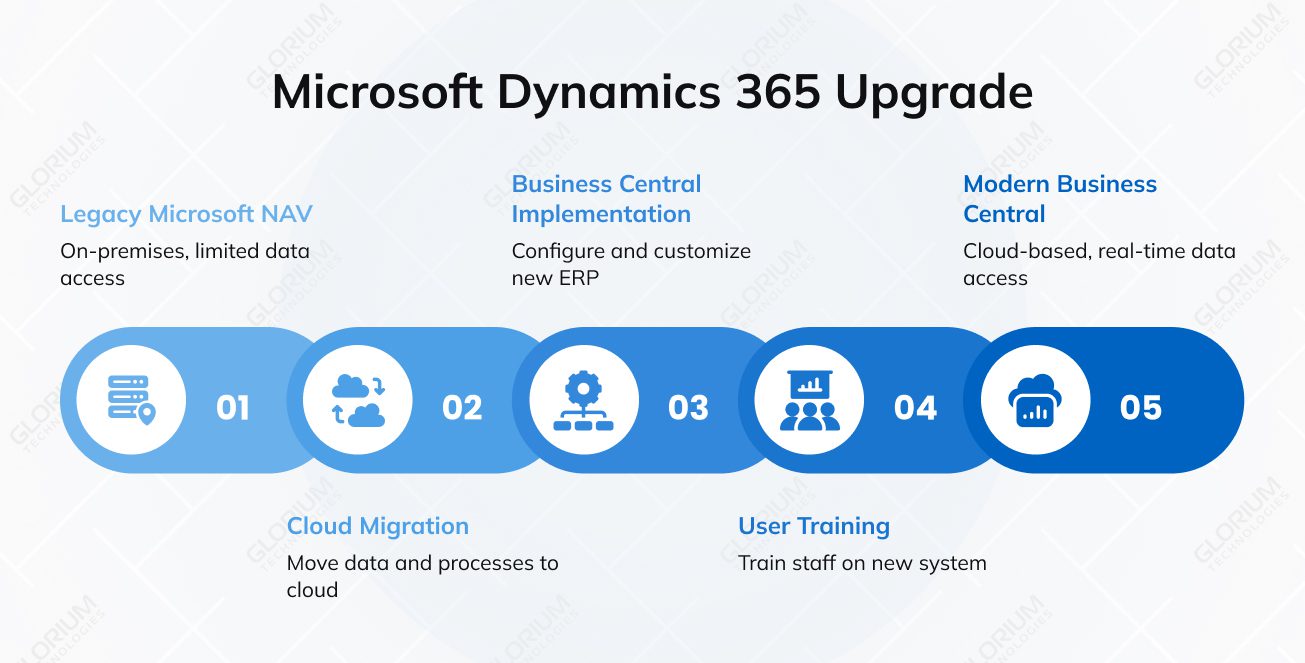
Once a strong on-premises ERP for small and mid-sized businesses, NAV is now considered a legacy system. Microsoft stopped releasing new features or improving them somehow back in 2018, but provided extended support until 2023. Some versions, like NAV 2017 and NAV 2018, can expect to get security updates until 2027 and 2028, respectively. That means growing security risks and increasing difficulty maintaining customized setups. If you don’t want to put your business growth on the line, it’s worth thinking about the upgrade process.
Start by reviewing your system’s age, level of customization, connected applications, and data structure. This gives you the clarity you need to plan a smooth, predictable upgrade—whether you’re modernizing current workflows or preparing to move fully to the cloud.
Your NAV version heavily influences the upgrade path you may choose. Older, pre-2015, releases often need intermediate steps because their data structures differ from Business Central. This can mean more hassle for you. But you can also reduce errors and support a smooth transition to a new system with better long-term efficiency.
Custom code and third-party add-ons can also complicate the migration. Like many businesses, you may have years of tweaks that back your daily business processes, but outdated or undocumented code can slow data migration or limit how easily you integrate modern tools.
External connections—whether to CRM systems, payroll, or industry applications—should be reviewed early as well. Checking data consistency, performance, and regulatory compliance upfront helps you plan realistically, avoid downtime, and gives users full visibility once you migrate to a future-ready environment.
Before upgrading to Dynamics 365, analyze your current processes. You may find out that you have adapted your workflows around NAV’s limitations or manual steps without even realizing how much inefficiency or risk has built up. When you compare your day-to-day processes with the capabilities Business Central offers out of the box, you may uncover opportunities to reduce manual errors and gain real-time insights across the entire business. You may also discover which routines NAV has quietly been masking for years: old approval steps no one questions anymore, duplicate tasks that add no value, or workflows that simply don’t support your goals today.
A structured review helps you:
Taking time to assess these gaps gives you the guidance you need to build a migration plan that feels intentional, efficient, and aligned with where your business is heading.
While the NAV ERP was built for a world that depended on on-premises servers, Dynamics 365 Business Central delivers a cloud-first ecosystem. The latter offers you automatic updates, lower maintenance costs, and real-time insights across your entire business. This shift mirrors a larger trend. According to Gartner reports, by 2029, half of all organizations will use industry cloud platforms to drive digital initiatives. More companies are choosing flexibility and faster innovation over hardware-heavy systems. If you’re still on NAV, moving to Business Central isn’t just a technical upgrade but an opportunity to rethink how you want your operations to run in the future.
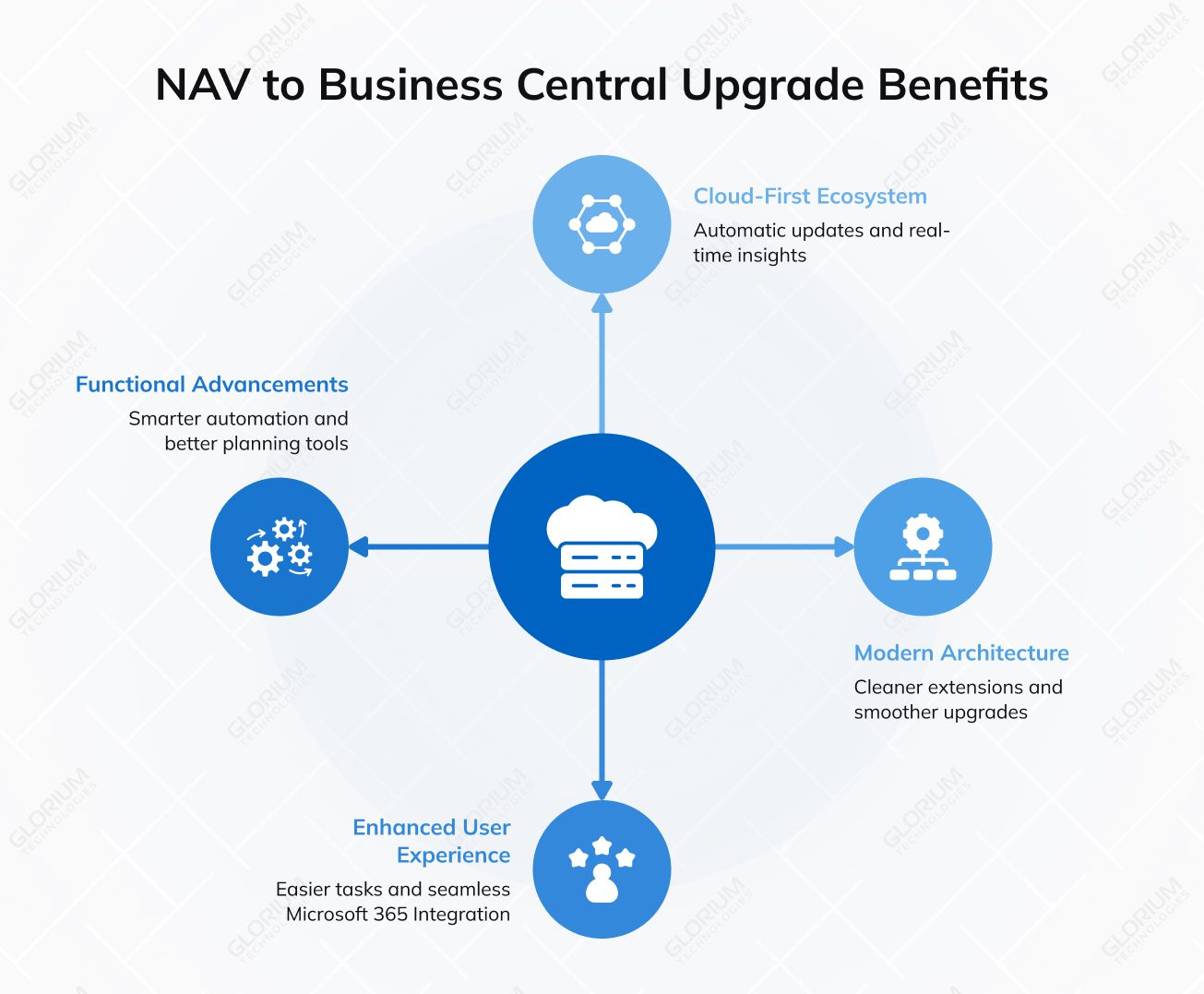
Business Central comes with a modern cloud-first architecture. However, you can still opt for on-premises if your business requires local control. It’s worth noting that the shift from C/AL to AL is a long-term game changer. You end up with cleaner extensions, smoother upgrades, and far fewer expenses tied to keeping old, unsupported code alive.
Suppose you’re processing high transaction volumes or expanding into new regions. In this case, Dynamics 365 Business Central ensures faster response times, reduced downtime, and stronger data protection.
The modern UI, cleaner navigation, and role-based dashboards are what Business Central brings to the table, making your daily tasks easier. You can capitalize on these features when approving orders, answering support requests, or reviewing existing reports, for example. What really boosts productivity is how naturally it connects with Microsoft 365. You can pull data into Excel, respond to approvals in Teams, or email quotes straight from Outlook. Add here mobile access, and you get a setup that supports remote work just as well as office work.
Business Central expands on NAV’s core capabilities with updates that span across finance, supply chain, manufacturing, and reporting. You get smarter automation and better planning tools, along with more accurate visibility into real-time data. When you bring in the Power Platform, including Power BI dashboards, Power Automate flows, and lightweight apps, you access predictive insights that can help you act before issues escalate.
AI-driven insights give you faster answers and clearer trends. These improvements modernize processes and give your teams a practical way to reduce manual work and improve outcomes across the entire business.
Nav vs. Business Central comparison
| Feature | Dynamics NAV | Dynamics 365 Business Central |
| User Interface | Classic desktop UI with a more dated look; limited personalization options | Modern, intuitive web-based UI with role-based dashboards and improved navigation for faster daily work |
| Deployment | Primarily on-premises; hosting and infrastructure managed internally | Cloud-first with optional on-prem deployment; automatic updates, backups, and built-in disaster recovery |
| Integration | Basic integrations; manual setup often required for Outlook, Excel, CRM, and other systems | Deep native integration with Microsoft 365, Power Platform, Teams, Outlook, Excel, and modern third-party apps |
| Updates | Manual, project-heavy upgrades every few years; risk of long gaps between versions | Monthly updates and two major releases per year, delivered automatically, reducing maintenance overhead |
| Customization | C/AL code modifications that complicate upgrades; risk of breaking core objects | Extensions in AL allow upgrade-safe customizations, cleaner architecture, and long-term sustainability |
| User Accessibility | Limited remote access; relies on desktop client or VPN for off-site work | Accessible from any browser or device; strong mobile experience for remote and hybrid teams |
| Support | Mainstream support ended (varies by version); extended support is time-limited | Fully supported by Microsoft with ongoing feature development, security enhancements, and cloud improvements |
You have postponed your ERP software modernization for ages. You may not have noticed the consequences of such a decision yet, but this doesn’t mean they won’t come. Growth and remote-work demands are only a few things your current system can no longer keep pace with.
As Microsoft pushes its cloud capabilities forward, you’re encouraged to take a fresh look at how you handle data and security, especially if your current system is no longer supported. Choosing the right upgrade path to Business Central allows you to keep the processes that still serve you well and add new tools where they deliver real benefits. The goal is to find an approach that allows you to streamline workflows without risking data breaches. Ultimately, the best path is the one that matches your readiness and long-term plans.
A reimplementation, aka a ‘clean start,’ is the #1 choice when your NAV environment is heavily customized or difficult to maintain. If years of modifications, workarounds, and outdated integrations don’t work for you anymore, starting fresh in Microsoft Dynamics 365 lets you rebuild processes the right way instead of carrying old issues forward. This approach gives you room to modernize workflows and adopt standard capabilities that are easier to support long-term.
Does your organization span multiple companies, departments, or locations, and you want a controlled approach to transitioning into Dynamics 365? You don’t need to change everything at once. You can upgrade in manageable stages. You might start with one site, learn what works, and use those lessons to guide the next rollout. This way, you can keep the business running smoothly and avoid overwhelming your teams.
Having knowledgeable experts involved in the ERP modernization process can make it far more manageable. By working with a dedicated team, you reduce the risk of downtime, protect critical data, and set up a system that supports the way your teams already work. Our specialists also help you strengthen security and start realizing benefits immediately after go-live. If you’re ready to modernize your operations, reach out to us to begin planning your upgrade.
You may face issues with inconsistent data, outdated structures, and years of unused or duplicated records. There might also be challenges mapping custom fields, validating historical data, and deciding what to carry forward. Addressing these points early helps reduce errors, shorten testing cycles, and avoid surprises during go-live.
For many businesses, AX is starting to feel like a constraint rather than a growth enabler. As support options narrow and upkeep becomes more demanding, it gets harder to adapt to changing needs. Companies planning ahead often look to modern cloud platforms that offer greater flexibility, stronger security, and room to grow without constant workarounds.
The timeframe really depends on what you’re starting with. If your system is fairly standard, you might complete the upgrade in a matter of weeks. Heavily customized environments usually take longer, sometimes a few months. Much of that time goes into planning, testing, and training, which helps you feel confident once the new system goes live.