Microsoft Dynamics Competitors Compared: Strengths and Trade-Offs of Business Central
Updated January 26, 2026

 Summarize in ChatGPT
 Summarize in ChatGPT
Each year, business operations grow more complex. You may overlook these changes at first, but inefficiencies caused by legacy systems or loosely connected tools can cost your company around 25% of annual revenue. And that’s something you can’t turn a blind eye to. You need real-time analytics, up-to-date customer data, and effective supply chain management tools to prevent and bridge operational gaps. An ERP system makes all your business systems function seamlessly and helps you keep all processes – simple and complex – under control.
Dynamics 365 BC is a go-to ERP solution for small to mid-sized businesses. Its adoption may feel like the most natural and easy-to-do thing in the world if you have experience with Microsoft products like Power BI or good-old Excel. However, your readiness for commitment depends on your business process alignment and willingness to adapt existing processes to new ERP software. Are there any alternatives that promise similar enterprise-grade functionality? Let’s find out.
Content
Selecting enterprise resource planning software is like buying a home. Once you move in, you have to adjust your daily routines, free time, storage needs, and plans based on the location. Sure, you can relocate, but it takes time, money, and brings stress to your family along the way. Replacing implemented ERP software is costly and disruptive; your team has to go through all the adaptation stages and training all over again to put it to good use.
While the number of doomed ERP projects is currently high, the situation is expected to worsen by 2027. According to Gartner, approximately 70% of ERP investments fail to deliver the expected business value. Brand recognition or feature lists don’t guarantee you a real operational fit.
Nearly two-thirds of ERP initiatives (64%) run over budget, with the most common drivers being staffing shortfalls, expanding project scope, and unforeseen technical complexity. Comparing ERP systems upfront allows you to validate assumptions and assess scalability.
What to pay attention to when comparing ERP systems:
If you are managing a growing business and finding that basic accounting software, spreadsheets, or disconnected business apps no longer keep pace, Business Central is built to close that gap. It is designed to support end-to-end business management, giving you a single system to oversee financial management, inventory management, sales activity, and core business processes without stitching together multiple tools.
You get a broad functional scope that connects operations and sales. Financial data flows directly from daily transactions, inventory movements, and sales orders, so you always know what’s going on within the company thanks to reporting. On the commercial side, sales data, opportunity management, and pipeline management are tied to real inventory and pricing. Your company’s sales team works with reliable information instead of assumptions.
Business Central is available as a cloud-based ERP solution or as an on-premises deployment. Cloud adoption suits organizations that want faster rollout, predictable updates, and easier access across locations. On-premises options, on the other hand, remain relevant for companies with specific compliance or infrastructure requirements.
Business Central is part of the Microsoft Dynamics 365 suite, supporting core financial and operational processes alongside other Microsoft applications. You can connect financials and operations with familiar tools like Excel, Outlook, Teams, and Power BI, supporting team collaboration and customized reporting dashboards. If you value continuity across productivity and analytics, let alone operational systems, Business Central represents a seamless enterprise resource planning solution.
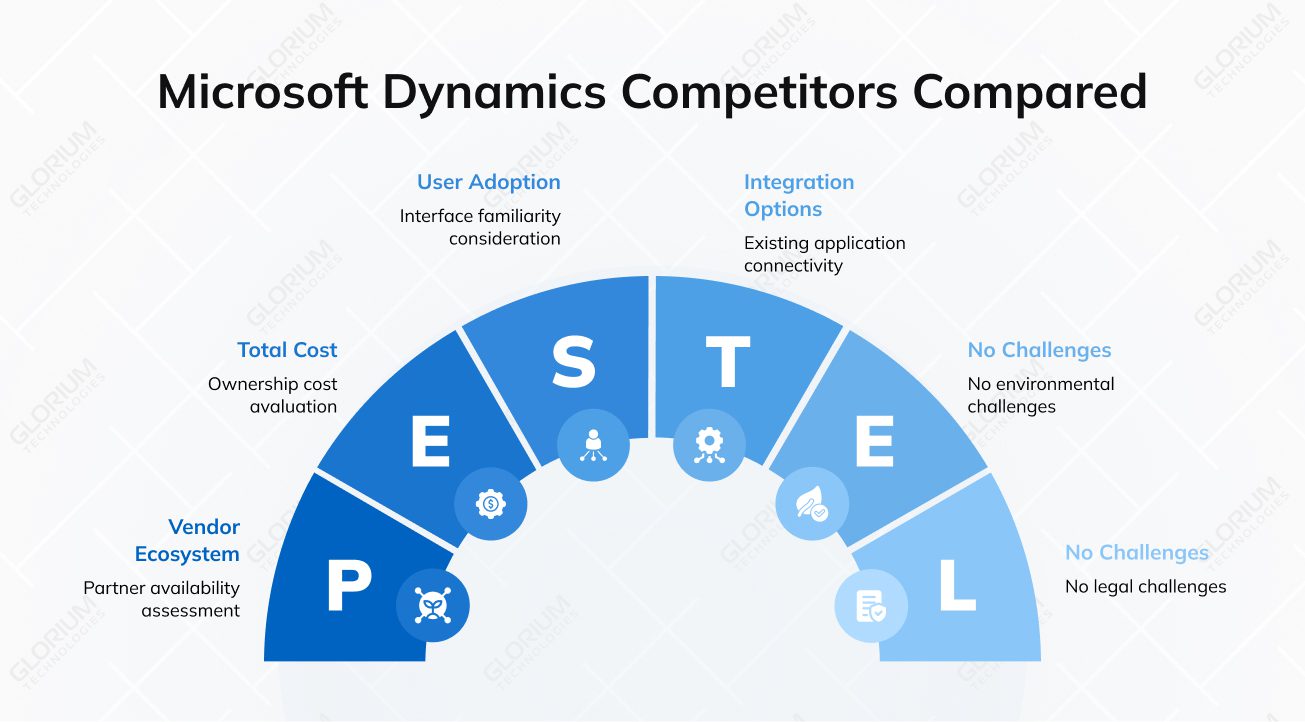
When companies compare Microsoft Dynamics competitors, the goal is rarely to find a ‘better’ system in absolute terms. More often, they are looking for an ERP platform that aligns more closely with their operating model or long-term plans. Dynamics 365 Business Central is used as the reference point in these comparisons because it balances financial control, operations, and integration (especially with the Microsoft ecosystem). If you are on the lookout for either deeper industry structure, a cloud-only architecture, or greater configuration freedom, you may consider the following ERP systems.
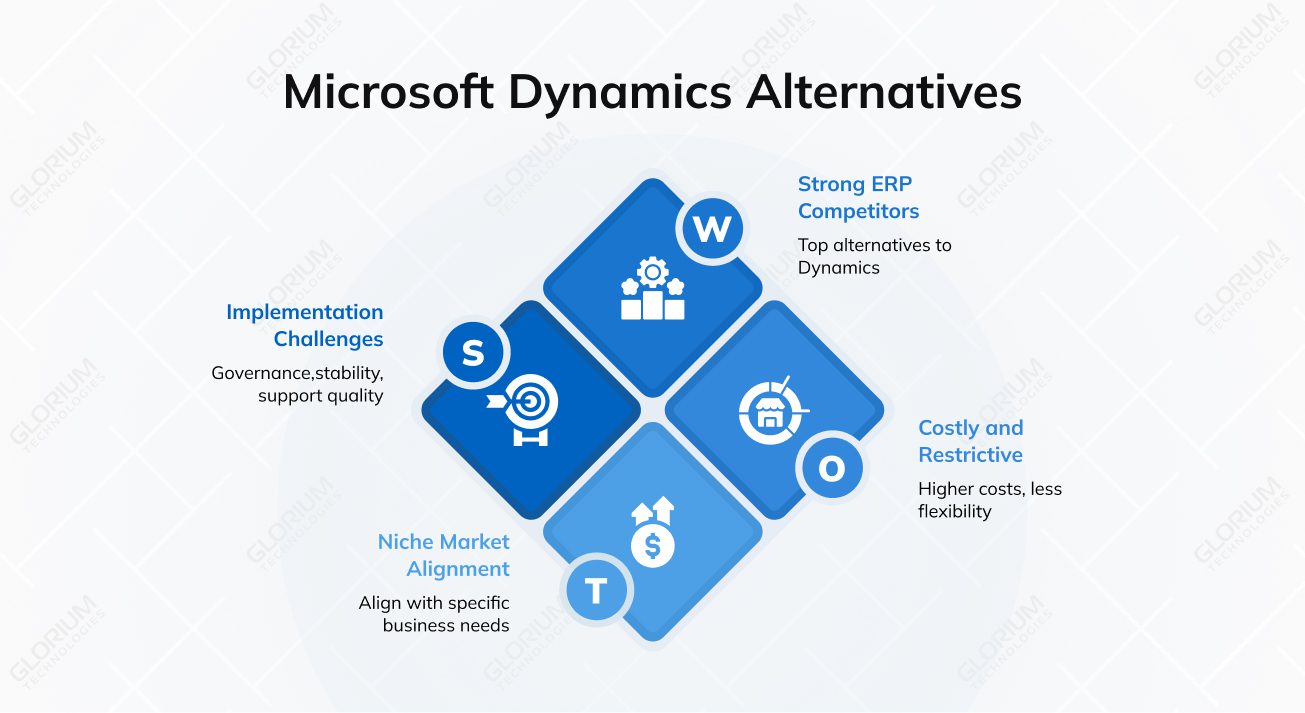
If you are operating in a manufacturing or finance niche, SAP Business One makes it to the top five Microsoft Dynamics competitors. You can benefit from its adoption if you prioritize strict control over production planning, cost accounting, and regulatory reporting. Implementations usually follow a predefined model, guided by SAP partners who rely on industry templates and standardized business processes.
That structure can work in your favor if consistency matters more than flexibility. However, compared to Microsoft Dynamics 365 Business Central, SAP Business One can feel restrictive in day-to-day use. Customizing workflows, adjusting reports, or connecting non-SAP business apps often requires additional effort. Those limits may affect how quickly your teams can adapt.
When freedom in how your ERP is assembled is the top priority, Odoo stands out. Its modular, open-source model lets you start with core financial management or inventory management and add business functions as your operations expand. If you are running a small business or a fast-changing organization, you can capitalize on Odoo implementation most of all.
Please note that governance, upgrading stability, and support quality depend heavily on the partner you team up with and how well internal processes are defined. Unlike the more structured approach of Microsoft Dynamics 365, Odoo requires you to manage process automation, integrations, and long-term consistency actively. Glorium Technologies can help you get prepared for that level of ownership, as its official partner.
Are you operating across multiple countries or managing complex financial structures? You may be interested in a cloud-first ERP with a strong global footprint, such as Oracle NetSuite. It offers centralized financial management, multi-entity reporting, and workflow automation. If global consolidation and standardized processes are among your top 3 objectives, NetSuite ERP makes for a noteworthy Microsoft Dynamics alternative.
Feels like there is a catch? Licensing and implementation costs are higher than those associated with Microsoft Dynamics 365 Business Central. Plus, customization relies on Oracle’s proprietary tools and certified partners. For mid-market companies or growing businesses with defined budgets, long-term cost predictability and flexibility can become a deal breaker.
When you compare ERP platforms, feature lists can look impressive, but they rarely show how a system will actually behave once it becomes part of everyday work. The real test is whether the ERP supports how your business runs, reduces manual effort, and helps teams act on information without workarounds.
Examining competitors through this lens reveals how different platforms approach core ERP capabilities in real-world situations. Let’s home in on the differences that matter after go-live.
With Business Central, you keep finance closely connected to how your business actually operates. You track general ledger, budgets, and cash flow in one system, so your numbers update automatically as sales are booked, inventory moves, and purchases are made. You spend less time double-checking figures and more time acting on them.
As your business grows, reporting and compliance stop being one-off tasks and become part of everyday operations. Here, you might value consistency the most. You know that every transaction follows the same rules and leaves a clear trail behind it. Business Central supports this with built-in audit trails, approval workflows, and localized requirements, so you stay in control as volume and complexity increase.
The impact is especially clear when it comes to reporting. Instead of working with static exports, you analyze live data directly in Excel and Power BI—tools your teams already know. That shift shortens the time between question and answer and helps finance teams see, in real terms, how sales, inventory, and operations influence overall results.
If inventory accuracy or supply planning is a concern, Business Central is built to give you a single, reliable view. Stock levels, purchasing activity, and fulfillment are directly connected to sales orders, meaning you can see demand and availability without relying on spreadsheets or parallel business tools.
Because operations and finance share the same data model, you can trace costs and margins back to specific inventory movements or suppliers. That’s true that some ERP systems offer deeper manufacturing features, but it’s worth mentioning that they often introduce added complexity through specialized modules, too. Business Central takes a more balanced approach, giving you operational transparency without overloading teams with unnecessary system layers.
Business Central fits naturally with Microsoft Dynamics 365, which means you work where your teams already are. Native connections with Excel, Outlook, Teams, and Power BI support faster adoption across departments. You spend less time switching systems and more time acting on information.
Beyond Microsoft tools, you can extend the system through third-party apps, cross-platform integrations, and robust APIs. Unlike some competitors with rigid or monolithic codebases, Business Central uses a modern extension-based architecture. This allows both partners and in-house developers to add custom logic without altering the core source code, ensuring the system remains easy to update and scale.
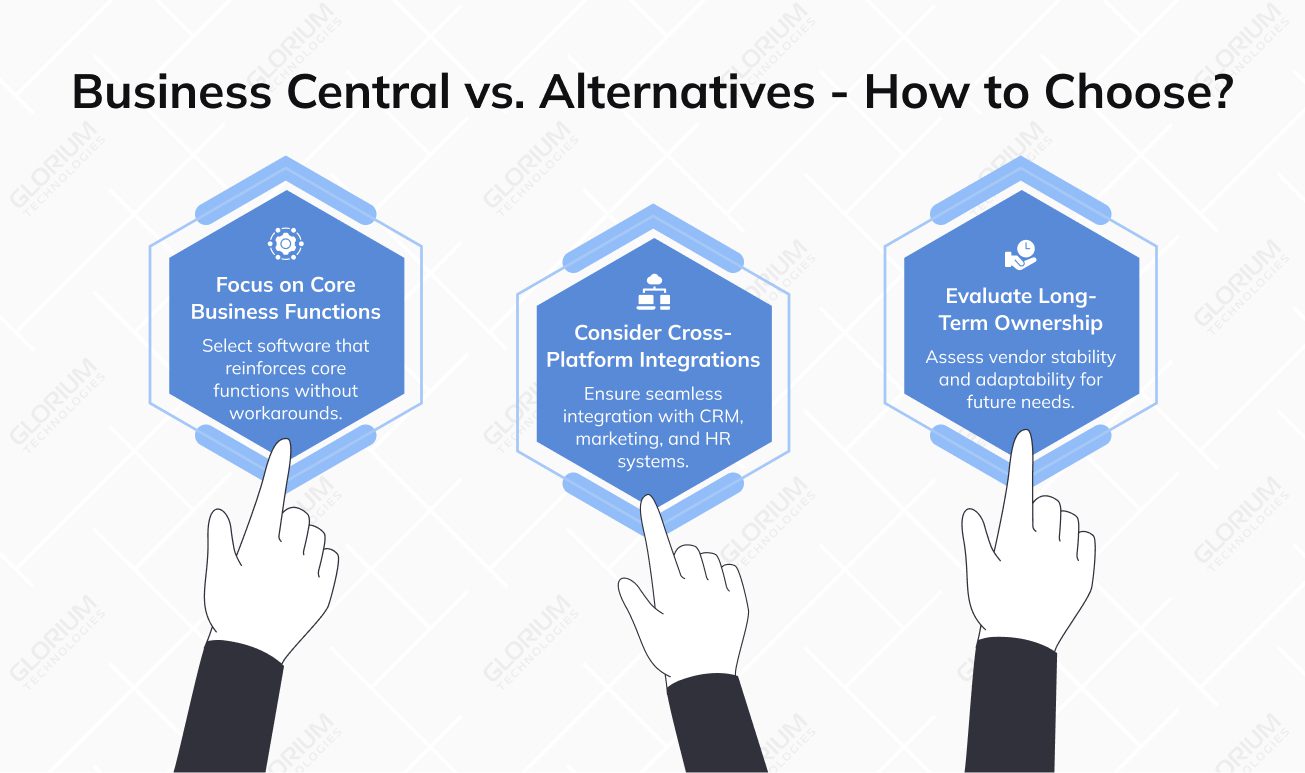
You don’t need the most feature-rich ERP system; you need the one that will support your business needs in the years to come. Go for software that can reinforce core business functions without workarounds.
You shouldn’t dwell on finance and operations; think beyond. You might also rely on customer relationship management, sales tools, or workflow automation to support the full sales process and drive customer satisfaction. The right ERP should either cover these areas natively or connect easily with CRM solutions, marketing tools, and human resources systems through cross-platform integrations. That’s a must-have thing to do if you already use business SaaS products for lead management, customer service management, or reporting.
Finally, consider ownership over the long term. ERP adoption is not a short-term project; it is a system your teams will depend on for years. Vendor stability, partner availability, and the ability to adapt as processes change are among the things that can help you keep any after-go-live risks at bay.
Key evaluation questions to ask yourself:
Dynamics 365 Business Central stands out among Microsoft Dynamics competitors by striking a balance between capability and complexity—more robust than entry-level tools, yet lighter than enterprise-scale ERP systems. This balance makes it well-suited for organizations whose operations, finance, and sales pipeline have reached a level of maturity where disconnected tools are no longer sustainable.
If you already rely on CRM software, pipeline management tools, or a cloud-based sales CRM such as HubSpot CRM, Salesforce Sales Cloud, or the Zoho CRM platform, your ERP must support cross-platform integrations rather than compete with them. Business Central integrates closely with Microsoft 365 platforms and can also connect to other CRM systems through APIs, Dataverse, and third-party connectors. You can link it to marketing automation tools and human capital management systems to extend what you already use instead of replacing your entire technology stack.
Here, at Glorium Technologies, we don’t dwell on generic feature lists. Our experts help you evaluate the system against your actual requirements and specific use case. Speak with our team to assess fit, understand potential risks, and define clear next steps before the wrong ERP choice starts holding your business back.
You may start by discovering how each platform supports your lead and contact management and overall sales process. Consider how easily you can customize sales journeys, connect with major email service providers, and extend functionality using AI tools. It also matters whether the CRM suite fits into a broader marketing cloud and supports creating business apps based on your workflows, rather than forcing your teams to adapt to rigid structures.
When you look at ERP alternatives, license fees are only the starting point. The real cost shows up over time in implementation effort, customization, ongoing support, and upgrades. You need to think ahead: how predictable will costs be once your user numbers increase or you add new integrations? Systems that seem affordable at first can quickly become expensive if they rely on manual work or make it harder to maintain accurate and timely financial insights.
When you come to Glorium Technologies, you can get end-to-end implementation services for both Odoo and Microsoft Dynamics 365 BC. As an official partner of both ERP systems, we can help you with system selection, implementation, customization, data migration, integrations, and ongoing support. Our experts always align all the services provided with your business goals, industry specifics, and long-term growth plans, so you can capitalize on software.