








How to Estimate Your Microsoft Dynamics 365 Business Central Implementation Cost
Updated January 12, 2026

 Summarize in ChatGPT
 Summarize in ChatGPT
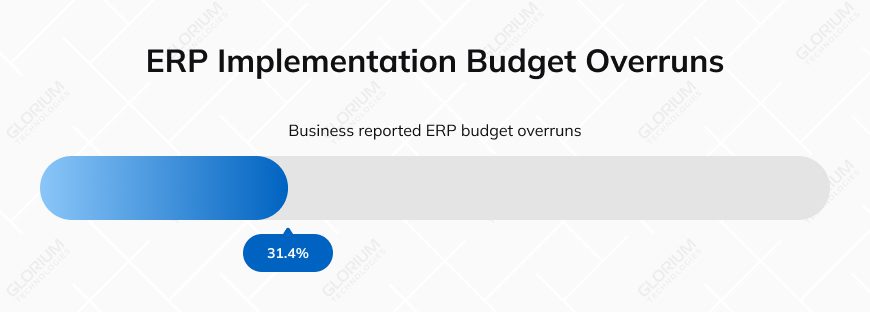
If you have ever budgeted for an ERP rollout, you know that it feels like aiming at a moving target. You change the user count, required functionalities, customization options, or opt for cloud deployment instead of on-premises, and the costs shift. For an SMB or mid-market company like yours, that mix creates uncertainty from the very first planning call. Around 31.4% of businesses reported ERP implementation budget overruns for multiple reasons. Cost estimation can help you prevent unexpected expenses, speed up internal approvals, and support a more predictable go-live.
For example, your initial $60,000 plan can grow to $95,000 once you realize you need additional integration and custom reporting to support daily operations. With a clearer budget upfront at your fingertips, you can keep delays and internal back-and-forth at bay.
Content
Your total investment will consist of multiple components, including niche complexity, licensing fees, the number of users, activated modules, and your deployment choice, as well as any necessary adjustments. These variables may result in a 40% budget swing across similar-sized companies. The more complex your processes, the more configuration and training your team will need, directly affecting the final price.
If you ask where companies underestimate long-term costs, the answer will be licensing. Microsoft prices the system by user type, with each license offering a different level of access. Instead of a one-size-fits-all structure, you build your monthly spend around your team’s working style. Who needs full functionality? Who needs occasional access? Where is a shared device more cost-efficient?
You may start with the Essentials license, which covers core operations such as finance, sales, purchasing, inventory, and project accounting. For businesses that run production, the Premium license adds Manufacturing and Service Management capabilities.
Suppose your team doesn’t need full access. In this case, you can lower recurring costs by assigning Team Member licenses to executives, approvers, or staff who only need light interaction. A Business Central Device license is intended for a dedicated shared device (POS/shop floor/warehouse). You can add multiple users to the device user group; however, simultaneous usage is limited by the number of purchased device licenses, and device-user constraints apply.
MD 365 Business Central licensing comparison
| License Type | Monthly Cost | Ideal For | Access Level |
| Essentials | $80/user | SMBs with standard operations | Finance, sales, purchasing, inventory, project accounting |
| Premium | $110/user | Manufacturing and service-focused companies | Essentials + Manufacturing and Service Management |
| Team Members | $8/user | Occasional users, approvers, executives | Read access + limited write (approvals, timesheets) |
| Device License | $45/device | Warehouses, retail, terminals | Multiple users per shared device |
Please note that the user/month prices are paid yearly.
Your choice between cloud and on-premises Business Central shapes far more than the initial project budget – it determines how much you’ll spend maintaining the system, how quickly you can scale, and how much internal IT support your team will need. The cost structure behind deployment models appears to be different in practice. The cloud lessens the burden of buying servers or handling updates, replacing unpredictable maintenance work with a steady monthly fee.
On-premises setups may initially appear appealing to companies with strict data policies, but they come with ongoing responsibilities. You need to manage hardware, handle data security patches, plan backups, and maintain uptime. Those demands can outweigh the flexibility of hosting everything in-house.
When comparing both options, consider how each one affects:
The core modules you choose shape the overall cost of your Business Central implementation. Each module reflects a part of your daily operations – finance, sales, supply chain, or production – and the more areas you bring into the system, the more configuration, testing, and comprehensive training your project will require. If you are running your business in the eCommerce or healthcare niche, the Essentials modules might be enough to support your workflows, as they cover finance and accounting, sales and CRM, procurement, inventory control, and project management.
Costs increase as soon as you add more specialized needs. If you run a factory, deal with complex production planning, or provide field services, you can hardly do without the Premium modules: Manufacturing and Service Management. These areas require deeper setup – routing, capacity planning, work centers, service orders, dispatching, and more – which naturally extends the timeline and adds both configuration and training hours.
More modules expand the project scope because every additional workflow must be aligned with your processes, tested with sample data, and taught to your team. The broader your module selection, the higher your implementation budget. If you are about to adopt Premium modules, you should expect a noticeably higher price due to the complexity these capabilities introduce.
As your user base grows, so do subscription costs, training needs, and the time required to configure security roles properly. Most companies also see their user count rise over time, often by 20–30% annually, especially as more teams adopt the system or seasonal staff come on board. Planning for this growth early prevents gaps in permissions or system access later.
More users naturally add more work to your setup. Every new person needs the right role, the right approval path, and the right level of access, especially when it comes to financial data. As your teams grow, so does the time required to define permissions and make sure everyone can work safely and smoothly inside the system. Training also expands, since bringing Business Central to larger groups or multiple departments takes longer and requires more hands-on support.
A broader user base can also impact ongoing costs. More people in the system may require enhanced security features, more frequent support, or some add-ons. Getting the user structure right from the start keeps costs manageable and ensures the system scales smoothly as your organization grows.
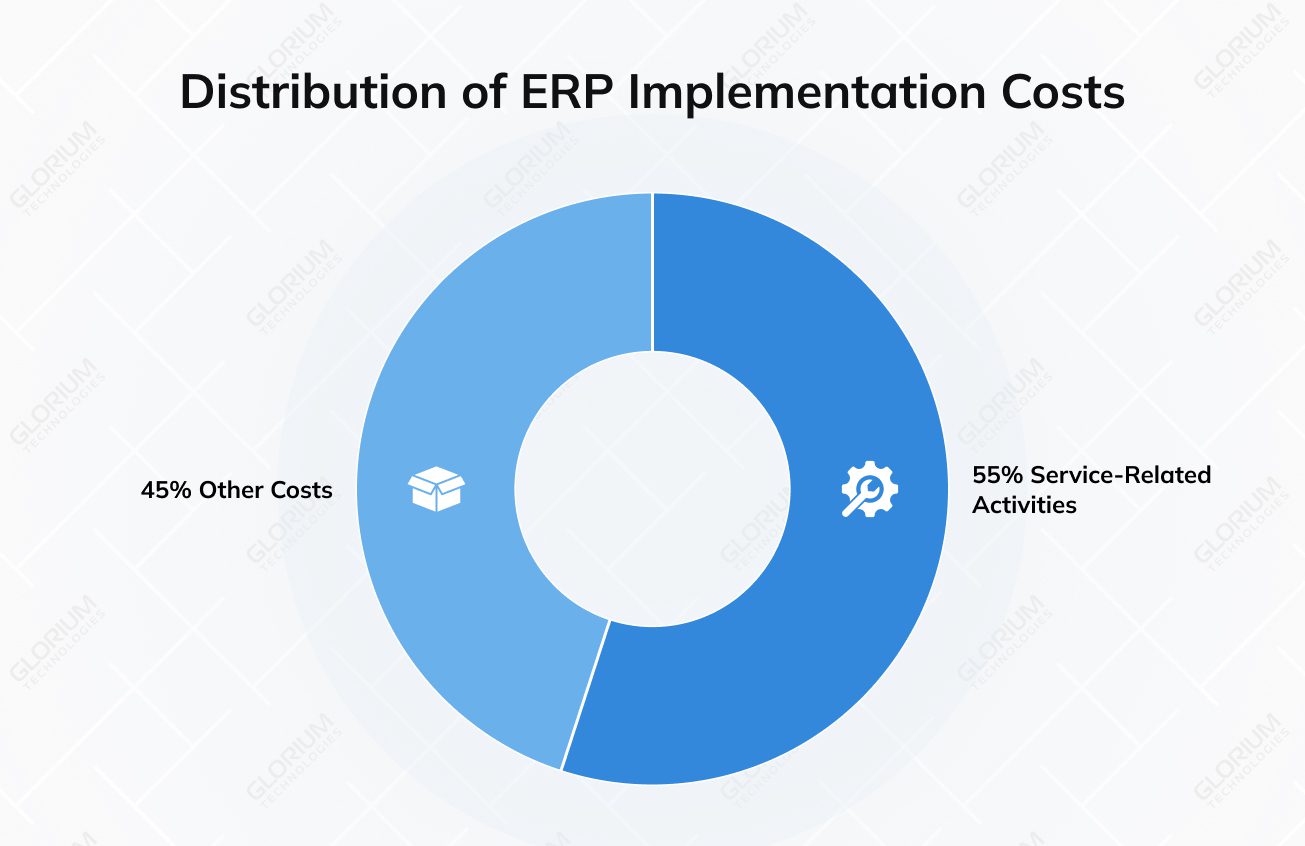
Service-related activities may account for up to 45–65% of the total implementation cost, depending on the scope and complexity. The more specialized your workflows, the more configuration your project will require, and the longer your team will spend testing, adjusting, and learning the system. For medium-sized businesses with less than $1 billion in annual revenue, an ERP system typically accounts for approximately 3–5% of their total earnings.
Before any configuration begins, Business Central projects rely on a clear understanding of how your company runs. This is where discovery workshops and process mapping set the foundation for the entire cost structure. They outline everything that follows, like scope, timelines, and ultimately, the project budget. These conversations help surface how work moves through your departments and which processes don’t fit neatly into the system out of the box. Here, you identify gaps and translate everyday needs into the workflows Business Central will support.
Once your automated and manual processes are mapped, the next step is configuration, aka adjusting settings, defining workflows, and using built-in tools to support your daily operations. Configuration is the most cost-effective method because it relies on what Business Central already offers. Costs rise when you move into customization. Light customization – such as tweaking templates or making minor workflow changes – tends to remain fairly simple and budget-friendly. Heavy customization is a different story. Once you need new functionality built from scratch, you’re looking at development work, testing, and ongoing maintenance, which quickly makes this one of the costlier parts of an implementation.
Common customization needs include:
Moving your data into Business Central is often where budgets start to stretch. The amount of information you’re bringing over – and how clean or structured it is – has a direct impact on the overall cost. Companies with years of historical records, inconsistent formats, or multiple legacy systems usually see higher migration expenses simply because there’s more work involved in preparing and validating the data.
A typical migration includes four key steps:
Common data sets that move into the new system include customers, vendors, products, the chart of accounts, inventory levels, and sometimes years of historical transactions. Getting this part right reduces errors at go-live and sets your teams up for smooth daily operations.
Microsoft Dynamics 365 BC is a powerful enterprise resource planning system, but it can hardly meet your business requirements in isolation. You may need to bring a mix of tools for sales, payroll, logistics, and online operations together to enable your team to work with accurate, real-time data. And this can add another layer of cost and complexity to an implementation. Seamless integrations with third-party apps ensure that information flows smoothly between platforms, whether that involves syncing customer details from a CRM, pulling orders from an eCommerce store, sending hours to payroll, coordinating outsourced logistics, or migrating data into analytics tools like Power BI.
Building these connections can be straightforward or more involved, depending on the technology behind each system. Some tools integrate Business Central through standard APIs, while others require middleware to bridge the gap or additional connector licensing for prebuilt integrations. The more systems you connect (and the more data that moves between them), the more time and expertise your project will need.
Even the most well-configured ERP system won’t deliver results if your team doesn’t know how to use it. That’s why training and change management are such important parts of the implementation and why they can influence the overall cost more than many companies expect. The approach you choose matters. Group training is efficient for introducing general concepts, while role-based training dives deeper into the tasks specific teams perform each day. Creating training materials, hosting Q&A sessions, and offering ongoing support can improve user adoption but may also increase the total cost.
Training can take several forms, depending on what works best for your organization:
Before your team can start leveraging Dynamics 365 BC daily, you need to test and support the new ERP system through the first weeks of real use. Testing begins at the unit level, where individual features and workflows are reviewed to ensure they behave as expected. From there, you move into user acceptance testing, where employees walk through real scenarios to confirm the system fits their needs.
Once UAT is complete, cutover planning outlines how and when you’ll switch from old tools to Business Central. After go-live, a hypercare period (usually two to four weeks) provides focused support to resolve issues quickly and help your team settle in.
If your company has between 10 and 500 employees and you’re feeling the strain of working across QuickBooks, spreadsheets, or an older NAV or GP system, you’re likely at the point where a modern ERP like Microsoft Dynamics 365 BC becomes a real necessity. Maybe your finance team is juggling reconciliations manually, operations rely on separate tools, or sales don’t have a clear view of data across departments.
If you’ve already been using Microsoft Teams, Power BI, and other tools – or are open to moving to the cloud – the shift to Business Central becomes even more natural. With strong leadership support and expert guidance from Glorium Technologies, you can finally consolidate your tools and bring everything into a single, connected system. Our team ensures an organized and easy-to-follow, smooth transition, so you always know what to expect at each step.
Business Central implementation options to choose from:
| Package | Best For | Timeline | Starting Price | What’s Inside |
| Starter for Retail and Wholesale | Small retailers, wholesalers, service providers, and online shops moving off spreadsheets or entry-level tools | 4–6 weeks | From $18,000 | Core Finance, Sales, Inventory setup + essential training |
| Growth Package for Retail and E-Commerce | Growing retail, e-commerce, and wholesale businesses needing more structure and integrations | 8–12 weeks | From $36,000 | Everything in Starter + CRM, multi-warehouse support, Shopify integration |
| Manufacturing Package | Light manufacturing, assembly operations, and job shops needing production planning | 12–16 weeks | From $54,000 | BOM, routing, MRP, capacity planning, production workflows |
| International Operations Package | Multi-entity or global organizations needing compliance and consolidated reporting | 12–20 weeks | From $54,000 | Consolidations, tax localization (UK, UAE, KSA), multi-currency, global reporting |
When it comes to budget overruns, 38% of companies underestimate the staffing needed, 35% end up expanding their original scope, and 34% encounter technical or data issues they didn’t plan for. You need to set your business goals clearly from the start because even a well-designed project can drift off track and cost more than expected.
Your teams should be aligned with what the system must deliver. Otherwise, new requests can pop up mid-project, increasing the amount of configuration, training, and testing required. A clear scope keeps the project focused and prevents avoidable rework.
Not every feature needs to be implemented on day one. Deciding what is essential versus what can wait allows you to phase your project, control costs, and reduce pressure during go-live.
Your partner has a direct impact on both project quality and budget. Glorium Technologies has industry expertise and experience with ERP projects. We offer both transparent pricing and clear communication, along with strong post-implementation support, so you can stay on track and avoid unnecessary spending.
Microsoft Dynamics 365 Business Central offers flexibility, but requires thoughtful planning to maintain predictable costs and realistic timelines. At Glorium Technologies, we offer a structured approach so that you can see ROI sooner. If you want a rollout that feels well-planned, our experts are ready to lead the way. Schedule a call with us today, and let’s discuss what the successful Business Central implementation process should look like for your team.
Choosing Dynamics 365 BC often comes down to whether your current tools can keep up with your growth. If you’re dealing with disconnected systems, manual data entry, or rising operational costs, Business Central offers a more comprehensive solution. It’s flexible enough for small teams yet strong enough to support scalable growth, better cash flow visibility, and smoother decision-making.
We offer support that helps your team make the most out of Dynamics 365 BC day after day. We handle technical questions, fine-tune system performance, and help you adjust workflows like inventory management as your business evolves. If you need to connect Business Central with existing systems or e-commerce platforms, we guide you through that too. Our team stays close to your key stakeholders, making sure your business data stays reliable and the system continues to fit the way you work.
Before moving to Dynamics 365 BC, you should analyze how well it aligns with your long-term goals. The system can replace repetitive tasks and support industry-specific solutions. It also may integrate smoothly with tools your teams already rely on. If you plan to use Power Platform or expand later, Business Central provides a solid foundation without disrupting operations.
UAT is the moment your team gets to see whether Dynamics 365 BC truly works for them. It’s where people try out real tasks—updating inventory, approving purchases, entering transactions—and make sure everything feels right before the system goes live. This step helps spot gaps early, avoids surprises later, and gives everyone more confidence in the rollout. When UAT is done well, it sets the stage for a smoother, more successful implementation.
Glorium Technologies provides hands-on leadership support throughout your Dynamics 365 BC project, giving your team a clear point of guidance from the very beginning. Our senior experts stay involved to help solve issues quickly, align priorities, and support both technical and business decisions. This keeps your teams moving in the same direction and makes the entire rollout feel more organized. It’s a core part of the professional services approach we bring to every successful Dynamics 365 BC implementation.