Best Zoho Alternatives for Growing Businesses
Updated March 11, 2026

 Summarize in ChatGPT
 Summarize in ChatGPT
In 2026, the CRM market is replete with numerous platforms, but Zoho is often the first choice for SMBs or mid-sized companies because it is easy to use, affordable, and can be set up quickly for a wide range of project management and workflow automation tasks. It’s a good first step toward going digital with their work.
However, as businesses grow, Zoho CRM, which used to work well, can start to cause issues due to its limitations. Teams may face scaling problems, financial limitations, struggle to manage their inventory, or navigate the growing complexity of using multiple apps. Things that worked for a small group may not work for a larger team.
Are you looking for a Zoho alternative now that your growing SMB needs more flexibility or scalability? This article highlights other solutions you may want to consider. Let’s see what other choices you have!
Content
The Zoho CRM platform has a suite of tools in a user-friendly interface that are affordable for small companies, but many businesses hit a “complexity ceiling” where the platform’s limitations start to outweigh its cost benefits. As companies grow, they often need stronger infrastructure, better financial controls, and customer data flows that are truly unified.
Business owners often call Zoho CRM a “startup-to-mid-market” solution, but when it comes to scaling up to the enterprise level, it often shows performance and structural problems.
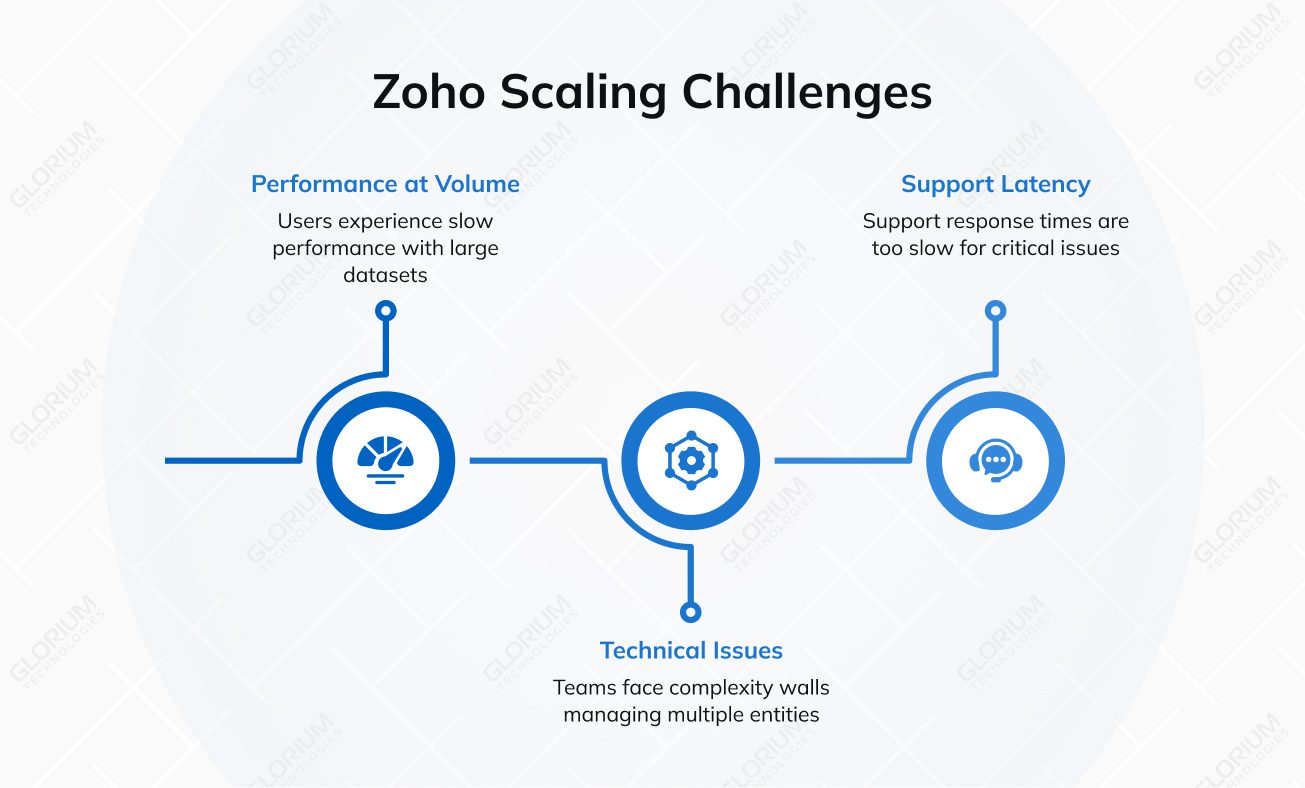
Zoho Books is suitable for basic accounting, but it often lacks the “heavy-lifting” features that other ERPs do.
When businesses grow, their inventory and operational workflows often get more complicated, so Zoho’s standard setup becomes limited.
Often, users report that Zoho CRM feels like a collection of separate applications rather than a unified system. Although every app is part of the Zoho system, each module functions as a separate product with its own rules, user experience, custom fields, and limitations. Such disconnection causes problems like friction, having to set business processes up twice, workflow automation that poorly works, and gaps in integration.
For teams already using Zoho, the search for an alternative usually comes down to one question: Can our systems grow together seamlessly? While Zoho connects its apps, Odoo unifies them. By eliminating the need for third-party connectors and manual syncs, Odoo offers a truly integrated experience. That’s why it stands out as a robust Zoho alternative in the key areas that matter for sustainable growth: integration, flexibility, and scalability.
Odoo is an open-source ERP business platform where the following functions work together in one database and interface:
With Odoo, you don’t have to put together different robust reporting tools for finance, operations, and customer relationship management. The task management system lets teams go from lead to quote, order, invoice, and delivery. This makes data more consistent and cuts down on the work that needs to be done to reconcile between departments.
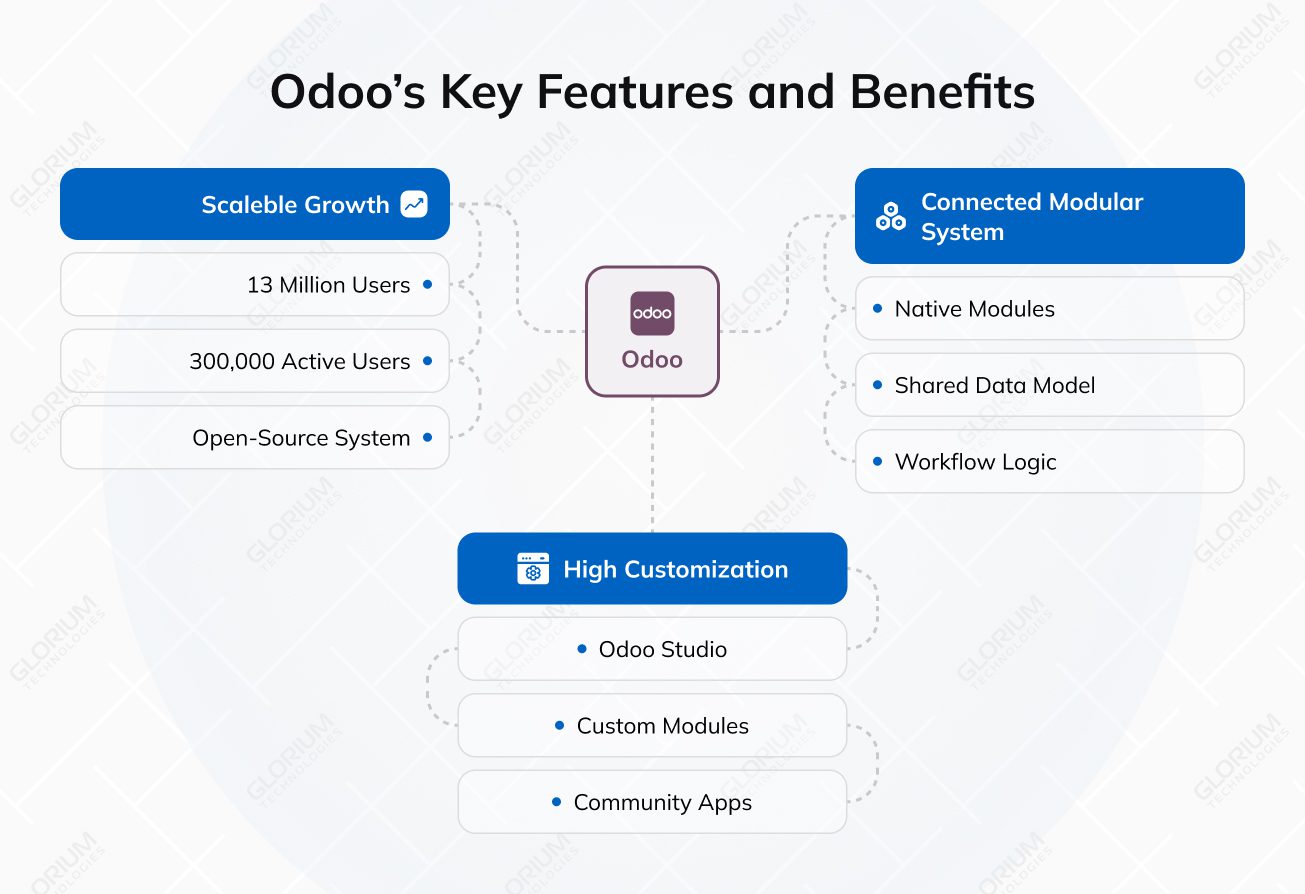
Odoo is a modular system with native modules that are loosely connected and linked to customer data. You can enable the modules you need; they are designed to work together out of the box on a shared data model, permissions structure, reporting framework, and workflow logic. For instance, confirming a sales team’s order can automatically make reservations for inventory, requests for purchases, orders for manufacturing, and accounting entries without the need for third-party connectors. It helps you to avoid the problems and extra work that come with having separate CRM, finance, and operations systems that don’t work well together.
You can customize Odoo to fit your industry-specific processes instead of having to follow set templates for workflows.
Businesses can add fields, automate approvals, make custom dashboards, or design custom reports without having to rebuild the whole system. You can do quick tweaks, add simple fields, or rename labels with Odoo Studio. Or hire developers who can add more advanced features beyond configuration by using custom modules or the large number of community apps available. Some of the best practices include working with a professional, Odoo-certified team, like Glorium Technologies. We specialize in industry-specific tweaks and help mid-market businesses set their ERP up successfully from the get-go.
Such flexibility is especially useful for your business if you have a mix of services and products, need special billing logic, or have multi-step operational processes that require customized automation. Want to see how Odoo customization works in practice? Explore this real-life case study of an Odoo 18 implementation for a lighting manufacturer that achieved 90% inventory accuracy with customized modules.
Odoo’s modular architecture allows SMBs to easily replace their outdated systems. There are 13 million users worldwide, ranging from small businesses to large enterprises, with over 300,000 active users, according to Odoo. The open-source system of the software allows organizations to implement their operations faster with Odoo than standard ERP systems, which enables small businesses to create fully customized workflows without incurring major technology expenses.
A successful Odoo implementation requires such essential elements as a discovery phase, correctly structured and formatted data, and migration elements, in addition to team expertise that handles the implementation process. Odoo supports independent implementation, but for better, faster results, you can select experienced partners to establish correct system configurations, which reduces the risk of data migration and third-party integration issues.
Glorium Technologies is an official Odoo partner. We provide comprehensive Odoo implementation services, including discovery, migration (from other ERPs, legacy systems, or older Odoo versions), third-party integrations, consulting, customization, and ongoing support.
Both Zoho and Odoo offer CRM, finance, and operations features, but they differ significantly in marketing automation, sales processes, and other business needs. Zoho CRM is based on a large number of integrated SaaS apps, while Odoo is a modular ERP system that can grow to handle complicated operational workflows.
| Area | Zoho CRM | Odoo |
| Platform model | Separate cloud apps that need integration | Modular ERP |
| Deployment | Cloud SaaS | Cloud + on-premise options |
| Accounting features | SMB accounting, but limited billing plans | Full ERP accounting integrated with operations |
| AI integration | Intelligent assistant Zia | Built-in AI + ability to be integrated with third-party AI like CogniAgent |
| Inventory and manufacturing | Available inventory, but limited for manufacturing | Advanced inventory, MRP, routing, procurement |
| Customization | Limited to platform extensions | Highly customizable |
| Pricing logic | Per-app or plan subscription | Per-user month, module plan, or free Community version |
Zoho CRM offers about 40–50 business apps with an intuitive interface that cover CRM, finance, HR, marketing, and team collaboration tools, which makes it a good choice for teams looking for a ready-made cloud ecosystem. However, these apps are still separate products that work together through integrations.
In contrast, Odoo is a single ERP system in which all its modules (80-100, including core, official, and integrated apps), such as CRM, accounting, inventory, manufacturing, sales, and project management, share the same data model. You do not need to sync data between apps, which helps keep operational and financial data consistent.
Odoo helps departments work together more smoothly, especially for businesses that want to move from app-level automation to ERP-level lead management to automate repetitive tasks and streamline customer interactions.
Zoho Books, Zoho’s accounting software, is suitable for small- to medium-sized businesses. It can handle invoicing, taxes, and reporting, and works well with the rest of the Zoho ecosystem, but it is still a separate accounting product with limitations mentioned earlier.
Odoo provides a built-in Accounting module. Inventory changes, purchase orders, manufacturing costs, and the entire sales process can all automatically create financial postings. Moreover, such a close connection between operations, finances, and sales automation lets you see costs and profits in real time across the supply chain. Odoo Accounting simplifies invoicing and accounting management, offering useful features like journal entry previews and automated late payment emails. So, Odoo is often a good fit for businesses that need operational accounting integration instead of simple bookkeeping.
Zoho Inventory includes stock tracking, order management, and warehouse control, making it suitable for trading and e-commerce operations. In contrast, Odoo’s Inventory Module has enterprise-style logistics features such as multi-warehouse routing, automated replenishment rules, barcode workflows, and extensive connections with procurement and manufacturing modules.
Users regularly report that Odoo inventory management is an excellent choice for such purposes because its MRP features help with bills of materials, work centers, and production scheduling. Odoo provides more native capabilities for manufacturing, distribution, and complex supply chains.
Zoho allows businesses to customize their workflows or connect to other systems through APIs, scripting, and CRM platform tools. But it is still a proprietary SaaS environment with built-in limits on how much you can customize it.
Unlike Zoho CRM, Odoo offers an open-source Community edition, and its modular architecture allows for extensive customization across both Community and Enterprise versions. Companies can adapt Odoo modules to match their specific workflows, either through basic interface changes with Odoo Studio or through deeper customization performed by experienced Odoo developers. With professional development support from Glorium Technologies, modules can be tailored extensively to fit precise business requirements. This level of flexibility is possible because Odoo is built on a Python-based framework. Therefore, Odoo is a good alternative to Zoho and a preferable choice in terms of customization, especially for businesses with highly complex workflows and industry-specific requirements.
Zoho CRM works effectively with small teams; however, businesses need to implement additional applications or create alternative solutions when their operational needs become more complex. Odoo functions as a scalable ERP system that allows you to expand your business’s system capabilities through its modular design.
Organizations can start with core modules and progressively add more advanced capabilities without switching systems. Odoo serves as an excellent solution for businesses that require a centralized platform that will assist in their growth while handling more sophisticated organizational operations.
When you migrate from one CRM system to another, you need to have a logical sequence of steps for data migration, updating workflows, and integrating the CRM solution for business needs.
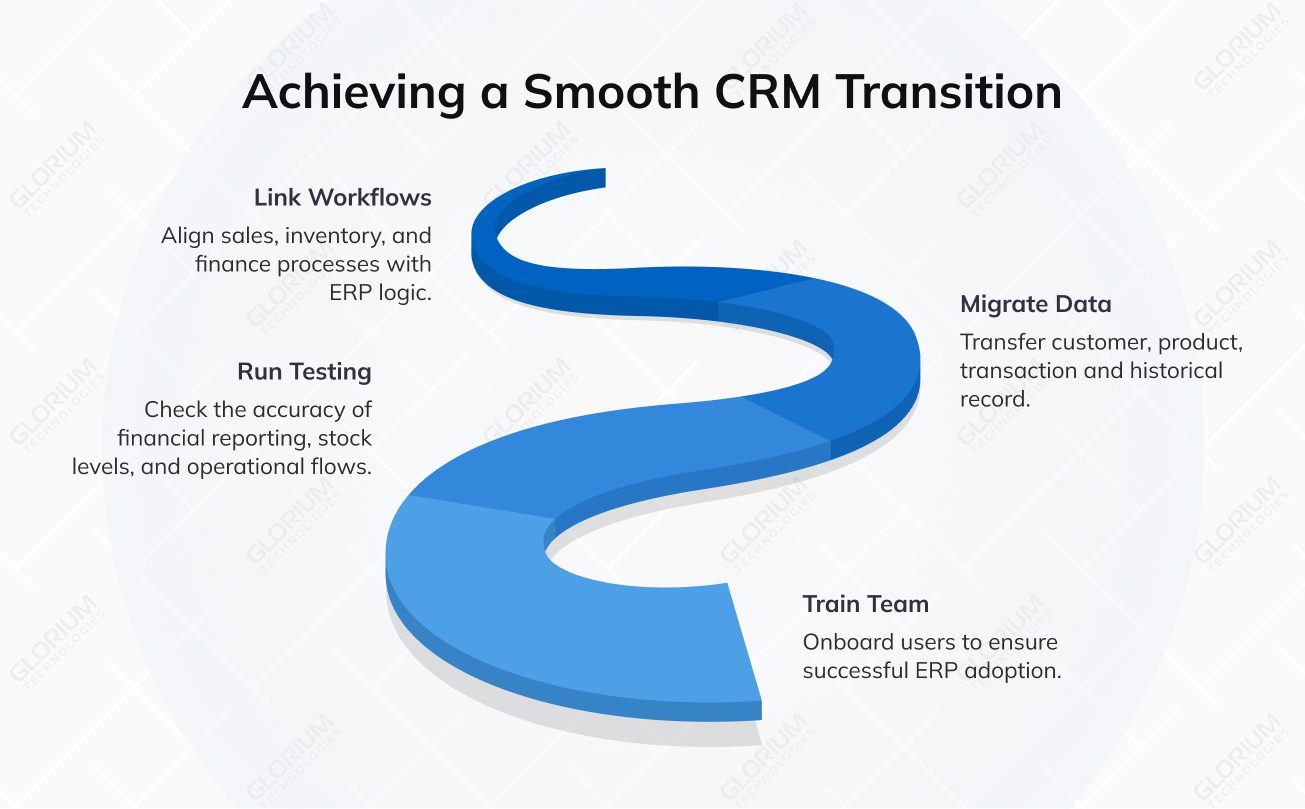
If your team does not have the internal competence to manage this process alone, at Glorium Technologies, we configure Odoo to your actual workflows, data structures, and operational goals. Working with a professional team guarantees the proper initial setup and true scalability. We offer a comprehensive suite of services, expert involvement, and the support needed to help the team transition to a new software.
Is Odoo not something you’re looking for? No problem. There are other alternatives to Zoho you can explore. Below, you’ll find a list of software you can use instead of Zoho, their pros and cons, an objective comparison, and more.
The Salesforce platform provides a cloud-based CRM solution, which allows users to manage sales processes, handle customer service operations, and conduct marketing automation activities. Its Einstein capabilities enable users to create automated workflows, which they can customize through their unique data structures and access AI-generated insights. The platform also provides the AppExchange marketplace and API system, which enables complete system connections and application development.
The Salesforce CRM system provides businesses with capabilities to handle their extensive customer databases and complex sales operations, whereas Zoho’s limited functions make it harder to scale. You can create customized workflows to design your specific business processes. The combination of a mature partner network with detailed documentation empowers organizations to develop new features while connecting Salesforce to their complete enterprise systems.
Unlike user-friendly Zoho CRM, Salesforce requires extensive time for users to become familiar with the system, which results in adoption difficulties. It results in the need for small teams to seek help to manage its vast capabilities. Salesforce provides seamless integration options, but they require extra expenses and middleware solutions, which create performance issues for users who need to handle large datasets and customizations.
Sage offers multiple business management solutions, including ERP systems, that emphasize financial management and precise accounting processes. The platforms Sage Intacct and Sage X3 provide users with tools to handle general ledger operations, compliance documentation, budgeting activities, purchasing processes, and stock management. The higher-tier systems support supply chain functions that enable companies to generate enterprise-wide reports.
Compared to Zoho CRM, the Sage platform delivers advanced accounting capabilities and powerful financial reporting tools. Sage is suitable for businesses that operate under strict regulations or require detailed audit assessments. The business software allows finance departments to control multiple business entities while achieving precise financial results through its budgeting and forecasting functions. Companies appreciate Sage because it has provided dependable accounting software solutions in the market for many years.
Some Sage products offer fewer options for customizing the user experience and workflow than modern cloud-based ERP systems, which run on native cloud technology. Organizations require additional software interfaces because they need to connect their existing tools for customer relationship management, marketing automation, and complex business processes. The operational difficulties and user experience of using Sage products differ based on the specific product line a business decides to use.
HubSpot combines customer relationship management with marketing automation, sales enablement, customer support tools, and content management features. The system enables users to track contacts and visualize pipelines, create automated email workflows, access analytics dashboards, and connect with numerous business applications. The platform operates through a modular structure that consists of multiple hubs, allowing you to upgrade from the free CRM to paid Marketing, Sales, Service, or Operations hubs as your needs grow.
The intuitive interface design and quick setup process of HubSpot CRM make it a strong Zoho alternative for small- and mid-size teams looking for an easy-to-use system. The SMB market segment relies on its marketing automation system, which includes inbound lead-management functions to help you integrate your CRM data with marketing campaigns and customer support. The integrated platform for marketing, sales, and service operations eliminates the need for multiple applications.
The basic CRM system provides entry-level access, but users must upgrade to premium plans to access advanced automation, analytics, and customization tools, leading to high costs as user demand increases. HubSpot software primarily provides CRM and marketing solutions, but lacks the comprehensive enterprise resource planning (ERP) features needed to manage finance, manufacturing, and complex supply chain operations.
NetSuite is also a cloud ERP solution that integrates accounting, CRM, inventory, manufacturing, and e-commerce management into a single platform. You can generate financial reports while executing multi-entity business operations, handling international tax requirements, and tracking supply chain activities.
NetSuite delivers extensive ERP functionality, allowing companies to conveniently manage their finance, operations, and customer information within a consolidated environment, in contrast to Zoho Books’ limitations. The financial consolidation aspect and the support for a global business model provide companies operating across multiple subsidiaries or countries with everything they need. NetSuite clients’ reviews show that NetSuite’s positive sides are worth using it.
Implementation may require significant degrees of planning, configuration, and consulting resources, thereby prolonging the implementation and increasing upfront implementation costs. Licensing and customization costs are likely to be high for smaller organizations without relatively high-level ERP requirements.
When choosing a Zoho CRM alternative, Odoo stands out as an all-in-one solution for companies seeking a single, fully integrated system that covers CRM, accounting, inventory, projects, HR, and operations in a single database. However, the success of Odoo adoption highly depends on proper data migration, correct settings, and team training. Glorium Technologies, as a certified Odoo partner, can support your seamless implementation, tailored customization, and smooth onboarding. If you’re considering switching to Odoo after this comparison, feel free to contact us!
One of the most popular Zoho alternatives is Odoo. Apart from Odoo, you may consider HubSpot CRM, Salesforce, Sage, and NetSuite, but they have certain limitations. The choice depends on your personal preferences, the complexity of your workflows, and scaling predictions.
Odoo offers better CRM features, such as finance, HR, customer relationships, inventory, and manufacturing.
Yes! At Glorium Technologies, we help businesses migrate their data and transform Odoo into a system tailored to their unique processes, with custom development and configuration to match your workflows.