ERP Cloud Migration: Benefits, Challenges, and Best Practices 2026
Updated September 7, 2026

 Summarize in ChatGPT
 Summarize in ChatGPT
Cloud enterprise resource planning migration has moved from a long-term modernization idea to a near-term planning priority. Grand View Research estimates the global cloud ERP market at $34.83 billion in 2023 and projects it will reach $110.26 billion by 2030. Additional market research points in the same direction, with cloud models accounting for 55.11% of the ERP market in 2025. For most companies, replacing legacy ERP, the cloud is now the default path, not the experimental one.
This guide explains what ERP cloud migration entails, where business value typically comes from, which risks tend to derail projects, and how to structure a migration plan that protects operations while improving long-term flexibility.
Content
ERP cloud migration is the process of moving an organization’s ERP environment from on-premises infrastructure to a cloud-based model. That may involve rehosting an existing ERP in cloud infrastructure, moving to a SaaS ERP platform, or combining both approaches in a phased migration. In practice, the work usually goes far beyond infrastructure. It includes data migration, integration redesign, security updates, process alignment, testing, and user adoption planning.
For some organizations, migration is mainly about reducing the cost and effort of maintaining legacy infrastructure. For others, it is about replacing rigid systems that slow reporting, limit remote access, or create too much friction as the business grows, adds entities, or launches new processes.
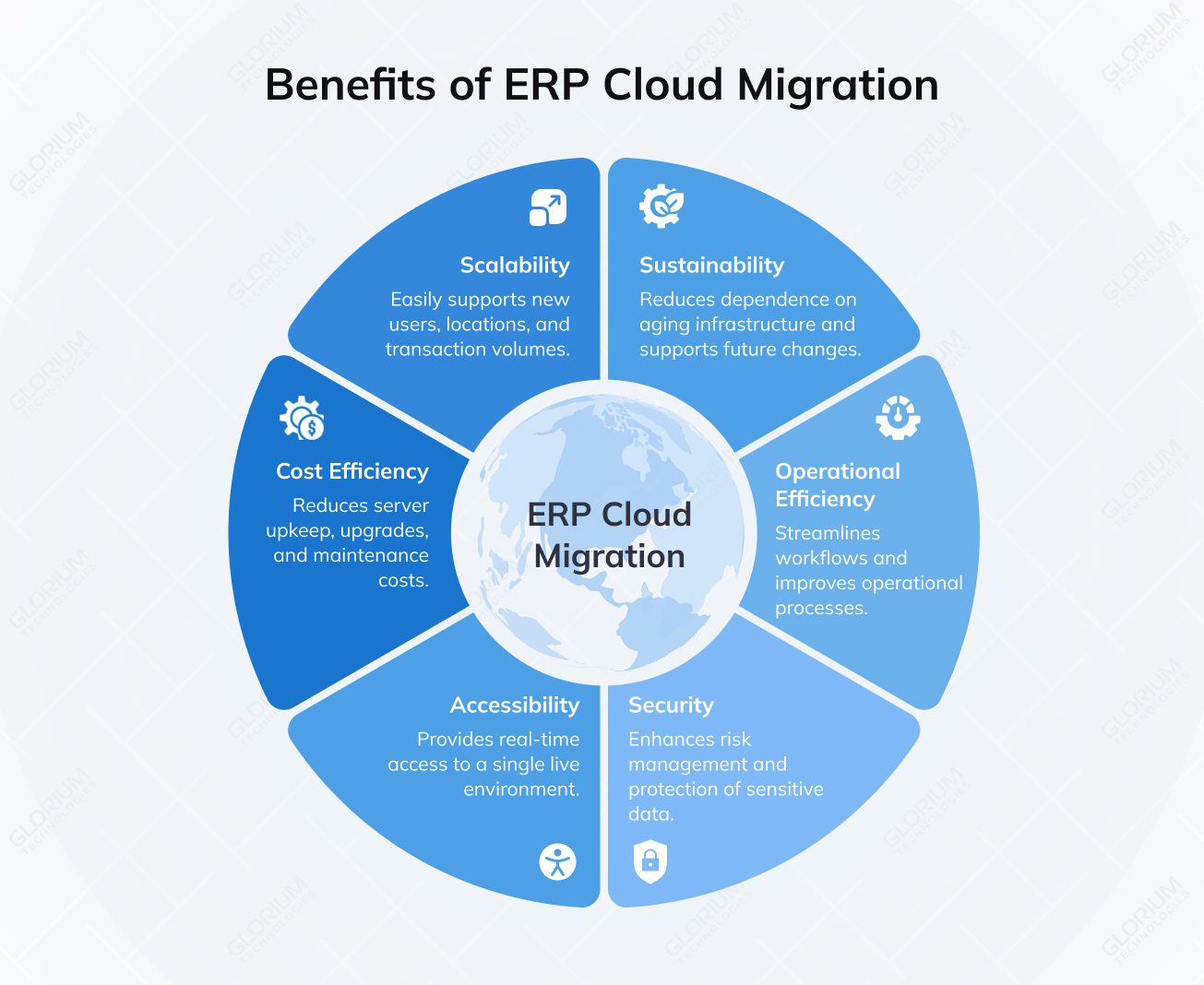
For many organizations, ERP cloud migration starts as an infrastructure decision but quickly becomes an operational one. The main value is not only moving servers or applications. It is gaining a more flexible ERP environment that is easier to scale, update, secure, and connect across functions.
One of the biggest reasons for migrating to cloud ERP is flexibility. A cloud ERP platform makes it easier to support new users, business units, locations, and transaction volumes without rebuilding the whole environment. This matters for companies expanding their supply chain, launching new business models, or adjusting to changing demand. Compared with many legacy systems, cloud-based ERPs offer a more practical way to scale without carrying the same long-term infrastructure burden.
Another major driver of cloud ERP migration is cost control. Moving away from on-premises ERP and other aging ERP software can reduce the burden of server upkeep, upgrades, and ongoing maintenance. It can also improve the overall business case for modernization when the current environment is too expensive or too rigid to support change. In Microsoft’s published study, the modeled organization achieved 265% ROI over three years, with payback in less than six months, which helps explain why many companies view cloud migration as a business investment rather than a pure IT project.
A modern cloud ERP solution gives finance, operations, procurement, and leadership teams real-time access to a single live environment, rather than working across disconnected files or delayed exports. That is especially useful when organizations manage multiple sites, entities, or remote teams and need better coordination across current business processes. Better access also helps the new system support faster approvals, clearer reporting, and fewer handoff delays across business operations.
Moving to cloud-based solutions does not remove responsibility for security, but it often makes controls easier to standardize across the environment. When the target architecture is thoughtfully designed, access controls, monitoring, encryption, backups, and the safeguarding of sensitive data become easier to manage. This is especially true for businesses dealing with financial data, customer records, or other vital information. Thoughtfully designed architecture can significantly improve risk management, reduce susceptibility to cyber threats, and streamline the ongoing maintenance of cloud ERP software over time.
An ERP migration often becomes the right moment to clean up workflows that already slow the business down. That may include finance approvals, purchasing, inventory control, reporting logic, and data handoffs between departments. ERP implementation creates more value when it improves existing processes and supports better business performance, not when it simply moves the same inefficiencies into the cloud.
Beyond short-term cost savings, cloud ERP helps reduce dependence on aging infrastructure and makes it easier to support future changes in automation, reporting, integrations, and data storage. For companies evaluating ERP solutions with a long planning horizon, that flexibility can create a stronger competitive edge and a smoother path toward a new ERP system that is easier to adapt as the business evolves.
A successful ERP migration depends on balancing numerous benefits with a few possible risks, especially when the business relies on mission-critical systems and cannot afford major disruption.
Most ERP systems do not operate alone. They connect with CRM, HR, payroll, BI, commerce tools, and supply chain systems. During cloud migration, those links often turn out to be more complex than expected, especially when older integrations or hidden dependencies come to light. In many projects, budget pressure comes from integration work that was not fully scoped from the start.
One of the biggest fears in migrating to cloud ERP is disruption to core operations. If order flow, finance, inventory, or production is interrupted, even a technically successful migration can hurt the business. That is why companies usually need a realistic timeline, minimal disruption planning, and a phased approach that protects business operations while the new ERP system is rolled out.
Security risk does not disappear in the cloud. It changes form. Teams must continue to safeguard sensitive data, establish access controls, and prepare for backup and recovery. They also need to minimize the risk of data loss or exposure to cyber threats. For businesses operating under regulations, this entails defining explicit rules for data governance, auditability, and accountability within the chosen cloud ERP platform.
Even a well-built cloud ERP environment can fail to deliver value if teams are not ready to use it. User adoption hinges on several key elements: clear communication, internal advocates, effective training, and robust support throughout the transition. User acceptance testing plays a critical role here, too; it verifies if the new ERP system genuinely facilitates everyday tasks before the system goes live. Ultimately, change management is often the most significant determinant of a successful transition.
Some ERP projects run over budget because the real effort is broader than expected. Extra integration work, more validation, support for legacy systems, and longer migration timelines all add pressure.
This initial groundwork sets the stage for a good migration plan and helps everyone avoid unexpected problems down the road. Here is what you need to do before the migration starts:
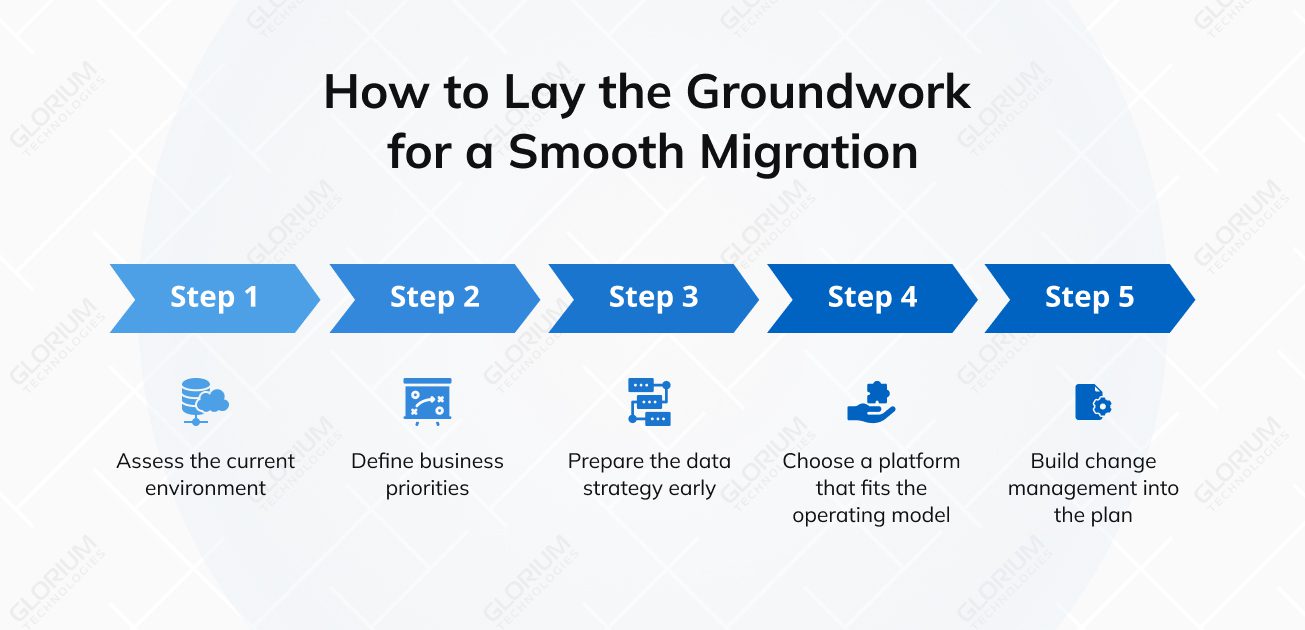
Before choosing a new platform, map the full scope of the existing ERP landscape. That includes applications, databases, integrations, custom workflows, reports, security roles, dependencies, and pain points. Without that baseline, teams often underestimate risk, overlook connected systems, and oversimplify the migration effort.
The next step is to define what the business expects from the new ERP system. For one company, the main driver may be lower IT infrastructure overhead. For another, it may be faster closing cycles, cleaner inventory control, simpler compliance reporting, or better support for multi-entity operations. Clear priorities make it easier to decide what should stay, what should change, and what should be retired.
Data strategy should begin before the migration process accelerates. Historical data should be reviewed, duplicates removed, inconsistent formats corrected, and ownership assigned. The goal is not to move every record from the old system. It is to move the data the business truly needs into a clean and usable structure.
Platform selection should reflect operational reality, not only brand recognition. A standardized SaaS deployment may suit businesses that want faster rollout and less maintenance. Companies with more complex workflows, third-party integrations, or industry-specific requirements may need a more configurable setup.
| What to evaluate | Why it matters |
| Process complexity | Affects how much flexibility the system needs |
| Integration needs | Shapes how the ERP will connect with existing systems |
| Compliance requirements | Influences, hosting, controls, and approval structures |
| Internal IT capacity | Affects how much support the business can manage after go-live |
| Growth plans | Helps determine whether the platform can support expansion |
Change management should be part of the project from day one. Role-based training, process owners, internal champions, communication checkpoints, and realistic post-go-live support often determine whether the system is only live on paper or actually used well across the business.
Execution works best when it follows a phased structure. The goal is not to move everything at once. It is to reduce risk, validate each stage, and keep the business stable throughout the rollout.
Most companies get better results when they divide the migration into manageable waves. This makes testing more useful, gives teams time to learn from each stage, and reduces the chance of major disruption to business operations.
The migration approach should reflect the current state of the ERP environment. In some cases, rehosting is enough as a first step. In others, the better decision is to adopt SaaS, redesign integrations, retire outdated modules, or simplify heavily customized processes. The right path depends on how much legacy complexity the business wants to keep and how much change it is ready to absorb.
Testing should confirm not only that the system works technically, but that it supports day-to-day operations. Finance, inventory, purchasing, reporting, and approval workflows all need to be validated before go-live. This is also where resource planning matters. If key people are unavailable, even a strong migration plan becomes harder to execute well.
Business continuity depends on sequencing, staffing, and user readiness. To reduce disruption during ERP migration, focus on the following areas:
There is no single best cloud ERP for every company. The right choice depends on your company size, operating model, process complexity, reporting needs, industry requirements, and the level of flexibility you want during implementation. Some businesses need a highly structured cloud ERP platform for complex operations, while others need a more modular, cost-conscious solution that supports growth without adding too much complexity.
Microsoft Dynamics 365 Business Central is a strong fit for companies that need tighter control over finance, inventory, warehouse operations, production, quality, and reporting. It is especially relevant for businesses already using Microsoft products and looking for a cloud ERP system that feels connected to their broader technology environment. Business Central often works well for companies that have outgrown lighter ERP software and need more structure, but still want flexibility during cloud ERP migration and future customization.
Glorium Technologies is a strong partner for complex ERP migration projects, particularly when businesses need to move away from spreadsheets, siloed tools, and manual workflows without disrupting daily operations.
If you want to see how Microsoft Dynamics 365 Business Central supports that kind of transition in practice, this client example offers a good reference point. The U.S. food manufacturer we worked with was relying on QuickBooks, spreadsheets, a standalone WMS, and paper-based quality logs, which made day-to-day operations harder to manage and increased the risk of manual errors. As those issues became harder to ignore, the company decided to move to Business Central. To make that shift safe and practical, we structured the migration in phases, starting with core processes and data migration, then expanding the system with FEFO logic, yield tracking, compliance records, and reporting. This phased rollout helped the client move from disconnected legacy tools to a more unified cloud ERP environment while keeping operations stable. After go-live, the company reduced ingredient waste by 25%, improved scheduling speed by 40%, reached 98% traceability accuracy, and cut compliance reporting time by 60%.
Odoo is often a good choice for businesses that want a modular cloud ERP solution, a faster setup, and greater flexibility in configuring workflows. It is especially suitable for small and mid-sized companies, project-based operations, and businesses that want to bring together manufacturing, inventory, purchasing, sales, and finance in a single environment without moving to a more complex enterprise platform. For companies seeking practical ERP solutions with room to grow, Odoo offers a strong balance between flexibility and cost control.
Glorium Technologies is a solid partner for cloud ERP migration, particularly for businesses moving away from fragmented systems and manual workflows. If you want to see how Odoo supports that kind of transition in practice, this client example is a good place to start. The U.S. restaurant chain we worked with was managing operations through disconnected tools, which made it harder to maintain control across locations, reporting, and day-to-day workflows. As the business grew, those gaps became more difficult to manage, and the company chose to move to a unified Odoo environment. To make the transition smoother, we supported a phased Odoo 18 / Odoo.sh rollout that helped the client improve operational control without forcing an abrupt change. After implementation, the business achieved 18% revenue growth, reduced food waste by 22%, and made reporting 50% faster.
For mid-sized businesses seeking a cloud-centric ERP, Oracle NetSuite presents a compelling choice, offering integrated visibility across key areas like procurement, production, inventory, shipping, and finance. The appeal of a single, cloud-based platform is often strong, particularly for those wishing to sidestep the intricacies of more extensive enterprise systems. When companies aim to boost visibility and embrace the cloud, NetSuite often surfaces as a leading contender.
SAP S/4HANA Cloud is usually the better fit for large organizations with complex operations, advanced planning needs, and multi-site coordination requirements. It is well-suited to businesses that need more detailed production planning, broader enterprise visibility, strong analytics, and tighter alignment across functions. Companies with several plants, complex engineering processes, or large-scale operational requirements often find SAP a better fit than lighter cloud-based ERP systems.
The table below gives a quick view of where each platform tends to fit best.
| Platform | Best fit | Key strengths | Watch-outs |
| Microsoft Dynamics 365 | Operationally demanding mid-sized businesses and manufacturers | Strong control across finance, inventory, warehouse, and production | May require a more structured implementation approach |
| Odoo | Small and mid-sized companies that want flexibility | Modular setup, faster rollout, broad workflow coverage | Edition and hosting model affect long-term flexibility |
| Oracle NetSuite | Cloud-first mid-market companies | Unified platform for finance, procurement, production, and inventory | May be less suitable for highly specialized enterprise complexity |
| SAP S/4HANA Cloud | Large enterprises with complex operations | Strong planning, analytics, and multi-site coordination | Usually involves more effort, governance, and implementation depth |
The success of an ERP cloud migration depends not only on the platform you choose, but also on the partner guiding the process. That is why partner evaluation matters early. Look for a team with official vendor recognition, proven migration experience, and the ability to handle more than technical setup alone, from business process alignment and data migration to integrations, user training, and post-launch support.
Glorium Technologies is a Microsoft Dynamics 365 Business Central Partner and a Certified Odoo Partner. We help businesses plan the right migration path, align the new ERP system with real operating needs, migrate data carefully, connect third-party tools, and support users through rollout and stabilization so the move from legacy or on-premises ERP to the cloud feels more structured and less risky. Book an intro call with our experts, and let’s map your ERP journey.
Glorium Technologies handles Odoo cloud migration from start to finish. The working process typically encompasses everything from initial discovery and solution design to module selection, data migration, and configuration. We also manage customization, third-party integrations, testing, user training, go-live support, and post-launch stabilization. Furthermore, at Glorium Technologies, we assist businesses in transitioning from outdated, disparate systems to a more streamlined Odoo environment, one that aligns more closely with the existing workflows and future objectives.
Glorium Technologies helps businesses migrate to Microsoft Dynamics 365 with a structured delivery approach that covers assessment, process mapping, data migration, system configuration, integrations, user acceptance testing, training, and post-launch support. Our goal is to ensure Microsoft Dynamics 365 meets the company’s finance, operations, inventory, reporting, and compliance needs from day one.
Yes. Glorium Technologies can integrate Odoo with legacy systems and the tools your teams already rely on, including accounting software, CRM platforms, e-commerce systems, warehouse tools, reporting solutions, and other operational applications. The goal is to maintain data integrity across different systems, minimize manual intervention, and facilitate the migration by supporting existing business processes.
Glorium Technologies specializes in bridging Microsoft Dynamics 365 with older software and other platforms. This ensures the new ERP system functions seamlessly across finance, supply chain, operations, and reporting. This could involve connecting data between current systems, external business tools, and custom integrations.
The duration of an ERP implementation depends on several factors, including the scale of the enterprise, the number of modules to be integrated, the condition of the pre-existing data, the extent of required integrations, and the degree of process reengineering. A more efficient and uniform deployment could be achieved in a matter of months; however, a more complex ERP migration involving numerous business units, existing systems, tailored workflows, and demanding compliance requirements could require a significantly longer duration.