ERP Inventory Management for Modern Businesses
Updated September 7, 2026

 Summarize in ChatGPT
 Summarize in ChatGPT
Counting boxes on shelves used to be enough. But as a business scales, adding new suppliers, markets, and channels, inventory becomes an elusive challenge. Even a minor data error can quickly snowball into delayed shipments and lost revenue long before the problem is even caught.
67.4% of supply chain managers still use Excel spreadsheets as a primary tool for inventory management. However, they were not designed to support modern business models. These tools may work at an early stage, but they can’t keep up as order volumes increase and warehouses multiply. Manual updates, data silos, and limited visibility often result in errors that affect costs, and, of course, customer satisfaction. So, what’s the solution?
This is where growing companies can find solutions to these issues in ERP (Enterprise Resource Planning) systems, which transform the way businesses operate. Instead of keeping inventory in a bubble, an ERP ties it directly to sales, finance, and procurement. It shifts the focus from simple tracking to a data-driven operation. When your data lives in one place, you stop reacting to problems and start planning ahead, cutting out the typical risks of managing high-volume stock.
This article breaks down inventory management within an ERP framework. We’ll look at how these systems actually function, the specific operational headaches they address, and the tipping points that show a growing business is ready for implementation.
Content
Inventory management in ERP refers to how businesses manage inventory within an ERP system, where stock data is connected to other core business areas instead of being handled in isolation. Companies do not rely on separate inventory management software; they use ERP to bring inventory into the same environment as finance, sales, and customer relationship management.
In some cases, businesses extend this functionality through custom ERP development, building additional integrations with warehouse systems, e-commerce platforms, or third-party logistics providers.
Standalone tools usually support only a limited set of inventory management processes (tracking stock levels or recording inventory movements). This fragmentation has real costs: research shows that 34% of retailers ship orders late simply because their systems fail to sync stock across channels, leading to accidental overselling. But when the workload increases, these tools often create data gaps between departments and increase reliance on manual updates. When a company controls inventory this way, it is harder to maintain accuracy and respond to changes in demand.
If you want to integrate inventory data into a centralized system, ERP-based inventory management is the way to go. Stock updates automatically as sales orders are placed, purchase orders are approved, or goods move through operations. This approach helps businesses keep ERP inventory aligned with real activity across teams and reduce manual work. On top of that, this supports smoother coordination among inventory, finance, sales, and operations.
The numbers confirm this. A 2025 study on how companies use ERP found that integrating inventory with other departments is a massive performance driver. In fact, shared data and cross-functional teamwork accounted for 67% of the boost in supply chain efficiency. It’s clear proof that when teams stop working in silos, the whole operation runs smoothly.
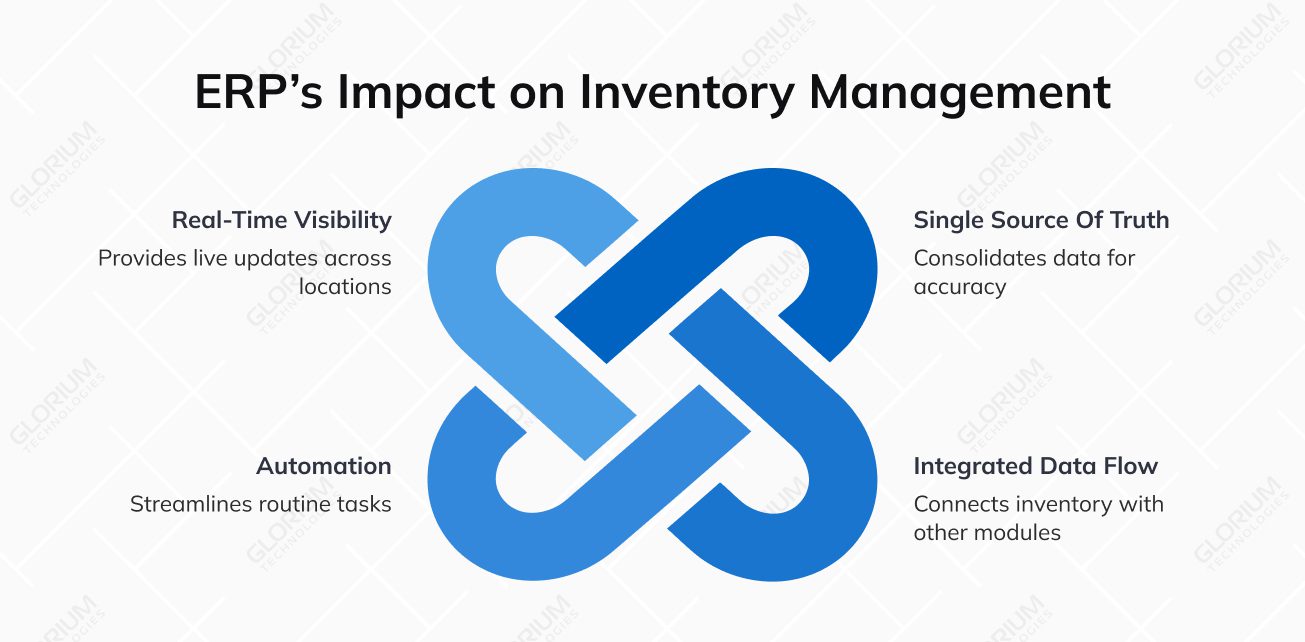
The ERP’s main goal is to improve inventory management. It helps shape how data is stored, shared, and updated across everyday business activities, and the following sections break this down into a few core areas.
Inventory data is scattered across spreadsheets and disconnected tools, so teams rarely trust the numbers they see. Stock levels may look fine on paper, but the warehouse may tell a different story. Over time, this lack of clarity leads to excess inventory in some locations and shortages in others.
An ERP consolidates all inventory records into a single environment. Stock updates happen automatically as goods are received, moved, or sold. Automation does more than just fix the numbers; it builds trust across the team. When your ERP handles updates, you gain a clear, real-time view of your stock without the manual double-checking. As a result, you can plan smarter and won’t face such issues as emergency shortages or overstock issues.
Just imagine this: a sales rep confirms a bulk order based on a morning report, but he doesn’t know the warehouse shipped those exact units thirty minutes ago. It’s a classic mess that ends in a frantic apology call. An ERP can fix this; it is ‘locking’ inventory the second a deal is struck. Managing stock levels in real time is much easier now, and you end the nightmare of overpromising. Moreover, you have optimal inventory levels across all your locations.
Inventory doesn’t operate in isolation; it’s deeply tied to sales, purchasing, finance, and broader supply chain management. When these areas don’t share data, teams are forced to manually reconcile numbers. This slows down operations and increases the risk of errors. However, an ERP helps inventory data flow naturally across modules. A confirmed sales order updates available stock, a purchase order reflects incoming goods, and finance works with the same data set.
In Odoo, a modular, all-in-one ERP platform, this happens across modules, so inventory always reflects real demand. In turn, businesses can plan more accurately and improve inventory turnover without extra manual work.
Look at how Odoo handles restocking. Instead of having someone run around the warehouse checking shelves or panic-buying at the last second, the system does the watching for you. When the stock gets low, Odoo automatically drafts a purchase order for the supplier. It’s a huge relief because your money isn’t tied up in extra boxes gathering dust. In doing so, you reduce carrying costs significantly. Moreover, you can focus on growing the business and adopting better inventory practices. You don’t waste time on endless manual counts anymore.
Not every inventory task needs human involvement. In fact, manual updates are often the reason inventory data becomes inaccurate in the first place. Imagine a busy warehouse: it’s easy to scan a barcode while unloading a truck, but it’s just as easy to forget to update a spreadsheet later. An ERP handles this; it updates stock levels the moment that barcode is scanned, so you don’t have to choose between moving fast and being accurate. It’s efficient inventory management that actually works in real-time.
ERP systems automate routine inventory transactions (receipts, transfers, adjustments, and validations) so updates happen as part of normal operations. This reduces manual effort and improves overall inventory performance, especially in fast-moving environments where stock changes constantly. Moreover, automation allows employees to focus on planning, optimization, and other important tasks without worrying about data issues.
Over time, businesses grow, so inventory spreads across warehouses, stores, and sales channels. Without real-time visibility, it becomes harder to know where stock is, how fast it’s moving, and what should be replenished next.
ERP provides a live view of inventory across all locations and channels. Managers can see current stock positions, monitor movements, and spot risks before they turn into delays or stockouts. Just imagine the situation: a customer wants a product that’s sold out in your main warehouse. If you don’t use ERP, you may lose the sale because you don’t know that this item is actually sitting on a shelf in your retail store across town. An ERP pools all that data together, and you can fulfill the order from another location. It turns “out of stock” into an opportunity to move inventory from where it’s stuck to where it’s needed.
The right ERP solution should adapt to your business. If you’re evaluating your options, here are the non-negotiable features your system needs.
The ERP system you choose should allow businesses to see current stock levels, inventory movements, and status as they change throughout the day. This makes it easier to track inventory across warehouse operations, sales channels, and locations. At the same time, it reduces manual data entry. On top of that, it allows employees to avoid situations when sales orders are accepted for items that are already unavailable.
Look for a system that keeps stock aligned with actual demand. ERP systems support this by combining stock levels with purchase orders, supplier lead times, and historical data. This approach helps reduce inventory carrying costs and guarantees that the business can meet customer demand as it grows.
If you’re choosing an ERP for inventory management, it should support working with multiple warehouses and locations out of the box. The system needs to provide a centralized view of stock, allow teams to track transfers between sites, and keep inventory balanced as operations expand. For example, Odoo has this feature; this functionality helps businesses maintain visibility, coordinate inventory across locations, and scale without losing control.
This feature is essential in industries where traceability and quality control matter. ERP systems allow tracking inventory items individually or in groups as they move through business processes. This helps businesses manage physical inventory more accurately, respond quickly to recalls or quality issues, and maintain clear records across warehouse operations.
Inventory is not just about what sits in a warehouse; it directly affects costs and financial reports. When inventory is connected to accounting in an ERP system, stock values update automatically as items are bought, moved, or sold. Business owners have a clearer view of carrying costs and can make better decisions about pricing, restocking, and cost control. There is no need to jump between different systems.
A good ERP system should also have demand forecasting as a built-in feature. It uses past sales data, current sales performance, and market trends, and helps teams understand what customers are likely to need next. And its main benefit is that instead of guessing, businesses can plan inventory based on real numbers.
Before choosing the right solution, you need to understand how the ERP inventory system compares to more traditional approaches, such as spreadsheets or standalone inventory tools. Each option may work at a certain stage, but their long-term impact on accuracy, scalability, and daily operations can differ significantly. Here’s a comparison to illustrate the difference.
| Aspect | Spreadsheets | Standalone Inventory Software | ERP-Based Inventory Management |
| Primary use | Manual stock tracking | Inventory tracking only | Inventory as part of end-to-end business operations |
| Scalability | Very limited; breaks down as volume grows | Moderate; suitable for small to mid-size operations | High; supports business growth, multiple locations, and complex workflows |
| Inventory accuracy | Low; relies on manual updates | Medium; depends on user discipline | High; updates automatically across the system |
| Real-time visibility | No real-time data | Limited or partial | Full real-time visibility across the business |
| Integration with sales | Manual updates | Partial or via connectors | Native integration with sales orders |
| Integration with purchasing | Manual tracking | Often limited | Fully integrated with purchase orders and suppliers |
| Financial integration | Not connected to accounting | Usually separate | Direct link to accounting and cost tracking |
| Manual data entry | Heavy reliance | Reduced, but still required | Minimal; most updates happen automatically |
| Multi-warehouse support | Difficult to manage | Often limited | Built-in support for multiple warehouses and locations |
| Inventory planning | Manual forecasts | Basic planning tools | Advanced planning based on demand and historical data |
| Reporting and analytics | Manual reports | Standard reports | Advanced analytics and real-time dashboards |
| Error risk | High | Medium | Low |
| Operational efficiency | Low at scale | Moderate | High across inventory processes |
| Long-term cost | Hidden costs from errors and labor | Moderate licensing + integration costs | Higher upfront, lower long-term operational costs |
| Best fit for | Very small teams or early-stage businesses | Simple inventory needs | Growing and complex businesses |
At first glance, spreadsheets may seem cost-effective. However, manual processes often lead to errors, duplicated work, and limited visibility, especially when the business matures. Standalone inventory tools can improve tracking, but still operate separately from other business systems. So gaps between inventory, sales, and finance are guaranteed.
Managing inventory through ERP is about thinking long-term. When inventory is connected to everyday operations, data stays accurate, and manual work goes down. Plus, decisions become easier to make. Overall, ERP can require a bigger upfront investment, but it often pays off over time through better efficiency.
If inventory is managed through ERP, the impact goes beyond cleaner numbers or better reports. It changes how teams work day to day. Here are the main benefits companies notice in practice:

Inventory operations vary depending on the industry specifics. ERP helps businesses adapt inventory processes to their specific workflows instead of forcing the same setup everywhere.
Manufacturers work with raw materials, work-in-progress, and finished goods at the same time. This makes inventory control challenging. Even small gaps in visibility can lead to delays or wasted materials.
This matters more than it may seem. Every ruined component or dusty box sitting too long on a shelf is cash leaving your pocket. In platforms like Odoo, inventory is closely connected to production planning, and you always know exactly what’s on hand. It is easier to keep inventory levels under control and avoid waste caused by missing or excess components.
Retail inventory changes every day. ERP supports real-time tracking across online stores, warehouses, and physical locations, and this helps teams keep inventory levels accurate. This makes it easier to respond to demand spikes and maintain optimal stock levels without overstocking.
Inventory efficiency is all about timing and volume for wholesalers. ERP systems help align stock with large sales orders, improve supplier management, and keep replenishment predictable. Having real-time visibility into stock locations simplifies daily operations.
Logistics businesses rely on visibility above all else. ERP supports supply chain transparency. It shows where inventory is, how it’s moving, and what’s available at each stage. In platforms like Odoo, this makes it easier for teams to react to changes, adjust routes or priorities, and keep inventory moving without losing control.
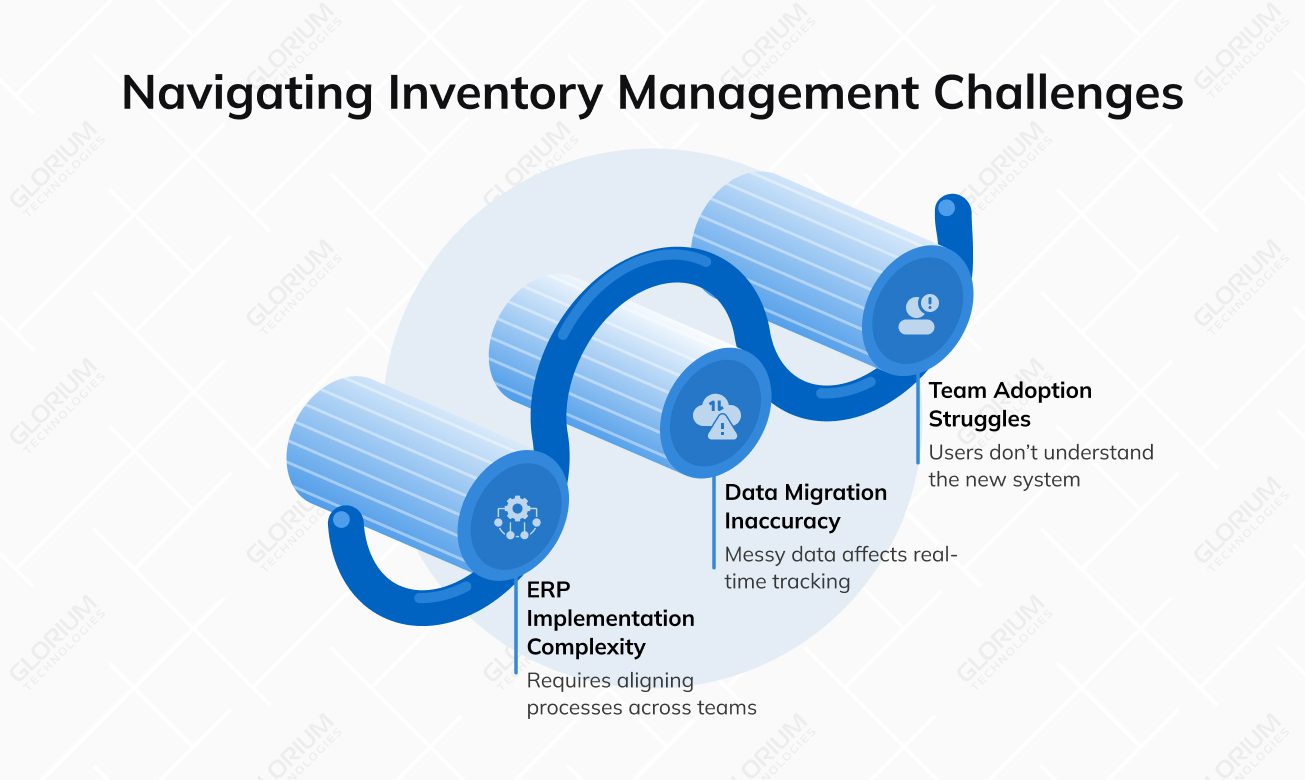
Controlling inventory can come with its own set of challenges, especially during the transition period. Let’s review the most common issues businesses run into and how to handle them.
The thing is that inventory touches many parts of the business, so implementation often requires aligning processes, roles, and data across teams. If you don’t have a clear structure, progress slows down. Plus, it becomes harder to see an accurate inventory status early on.
Data from spreadsheets or old systems can be messy or outdated. If it isn’t checked and cleaned first, real-time tracking won’t be accurate. Unfortunately, teams won’t be able to trust stock numbers or react quickly to supply chain disruptions.
Even a well-configured ERP can fall short if users don’t understand how to work with it. When teams don’t have access to relevant data or revert to old tools, businesses miss out on the significant improvements ERP is meant to deliver.
Companies need more than just the right ERP software for inventory management. A clear implementation plan, realistic timelines, and early involvement of key teams make a real difference. Beyond this, inventory data should be reviewed and tested before migration.
User training also matters. Teams need to understand how the system supports their daily tasks. Working with an experienced ERP partner like Glorium Technologies helps businesses take a practical, step-by-step approach and get real value from ERP, not just a new platform.
Searching for the right solution is less about features on paper and more about how well the system fits your business today. Remember that the right platform should support daily operations without adding complexity to daily tasks. Let’s analyze the main factors to consider:
Analyze how the system handles stock updates, replenishment, and day-to-day inventory tasks. A good ERP should support your existing processes and improve them, not replace them with rigid workflows.
Industry-specific businesses should also evaluate whether the platform supports specialized solutions like fashion ERP software, which is designed to manage apparel inventory structures, seasonal collections, and variant-heavy product catalogs.
Inventory needs are very dynamic. As orders increase or new locations are added, the system should be able to grow without starting from scratch. Platforms like Odoo make this easier. It allows businesses to add inventory, warehouse, or planning features only when they actually need them.
Make sure the ERP connects inventory with sales, purchasing, accounting, and operations. This allows your teams to always work with consistent data. With Odoo, for example, these areas use the same data, which helps teams keep information consistent across the business.
You should also understand how much effort is needed to maintain the system and how flexible your work can be. Check out the table below, which compares a cloud-based and an on-premise ERP.
| Aspect | Cloud ERP | On-Premise ERP |
| Deployment | Hosted in the cloud, accessed via the internet | Installed and maintained on local servers |
| Initial setup time | Faster to launch, minimal infrastructure required | Longer setup, hardware, and environment preparation needed |
| Upfront costs | Lower initial investment | Higher upfront costs for hardware and licenses |
| Ongoing maintenance | Handled by the provider | Fully managed by internal IT teams |
| Updates and upgrades | Automatic and regular | Manual, often delayed due to cost and effort |
| Scalability | Easy to scale as inventory volumes or locations grow | Scaling often requires additional hardware and setup |
| Remote access | Accessible from anywhere | Usually limited to internal networks or VPN |
| Inventory visibility | Real-time access across teams and locations | Visibility depends on internal setup and access rules |
| Disaster recovery | Built-in backups and recovery options | Requires separate planning and infrastructure |
| IT resource requirements | Minimal internal IT involvement | Ongoing IT support required |
| Flexibility over time | Adapts easily as business needs change | More rigid, harder to adjust |
| Best suited for | Growing, distributed, or fast-changing businesses | Organizations with strict on-site infrastructure requirements |
Cloud-based ERP solutions offer greater flexibility and lower operational overhead, especially when inventory spans multiple locations. However, on-premise systems may still make sense in very specific cases, but they often limit how quickly a business can adapt as it grows.
Solutions like Odoo are available as cloud-based platforms. They allow companies to manage inventory, warehouses, and related operations without maintaining their own infrastructure. What is more important, they leave room to scale and evolve over time.
Glorium Technologies is often chosen when inventory management needs to work as part of a broader ERP environment, not as a standalone tool. The team works as an end-to-end ERP implementation partner, helping companies implement and integrate inventory processes within platforms like Odoo. The goal is simple: connect inventory with production, purchasing, finance, and sales in a way that continues to work long after go-live.
You can see this approach in real projects. For a Belgian food manufacturer with €15M in annual revenue, Glorium Technologies replaced spreadsheet-based planning and disconnected tools with Odoo 18 Enterprise. Inventory, production, HR, and accounting were brought into one system with real-time visibility. The result was a 90% reduction in reporting time, a 10% drop in production costs, and full transparency into inventory and labor expenses.
In another project for a US healthcare company, an AI-enabled ERP setup helped unify inventory, supply chain, and financial data. This allowed to achieve better planning as the business scaled.
Looking to achieve similar results in your inventory operations? Schedule an introductory call and explore how an ERP-based approach to inventory management could work for your business.
This usually happens when inventory becomes harder to manage. If stock numbers don’t match across teams or the business grows with more locations and suppliers, spreadsheets no longer work. At that stage, ERP and inventory management need to work together in a single system to reduce risk and support smarter planning.
In most cases, yes. ERP centralizes data and removes the need for separate tools that don’t talk to each other. As a result, businesses don’t need to maintain multiple systems and can use one environment where all operations are updated automatically. Inventory management ERP software reduces manual effort and data inconsistencies.
A lot depends on the complexity of operations, data quality, and how many processes are involved. It can take a few weeks for smaller setups and several months for more complex environments. However, speed is not the main priority. The real focus should be on configuring the inventory management module in ERP around how teams actually work.
ERP connects inventory with sales, purchasing, finance, and operations in one shared environment. This means teams don’t need to reconcile numbers between systems or wait for updates from other departments. With ERP in inventory management, everyone works with the same data, which speeds up coordination across the business.
ERP uses historical sales, current stock levels, and supplier data. Teams don’t need to rely on intuition anymore. Instead, they can plan based on real numbers and actual demand patterns. This allows them to reduce the risk of overstocking or running out of stock. Ultimately, the built-in features of ERP inventory management allow businesses to balance demand, availability, and cost over time.
First, the ERP partner should understand how inventory works in real operations, so the selected company must have a decent experience in this area. Pay attention to experience with data migration, user training, and process alignment. A good partner helps adapt the system to the business, not the other way around, and guarantees the chosen ERP inventory management software delivers value after go-live. So always ask for case studies and request details on post-launch support.
Businesses notice practical improvements when they start using ERP. These are fewer stock discrepancies, faster reporting, better visibility across locations, and better coordination between teams. Over time, companies also see stronger planning accuracy and more confidence in inventory-related decisions.