Odoo Data Migration Guide
Updated September 7, 2026

 Summarize in ChatGPT
 Summarize in ChatGPT
Often, when companies decide to implement an ERP, they plan the licensing and the implementation itself thoroughly. User training and data migration are usually considered technical tasks and sometimes neglected in favor of, for example, change management, post-go-live support, and even discovery. Many don’t realize this, but the state of your business’s data determines the new system’s performance following go-live. Gartner’s ERP report highlights this perfectly — according to the document, 70% of ERP initiatives fail mostly because of insufficient data preparation, cleaning, and migration.
The consistency and format of old data directly impact reporting, inventory records, and day-to-day operations. Careful planning of data migration helps avoid the issues most companies face when implementing an ERP system.
Experts often refer to data migration as the “silent killer,” since the failed migration can remain undetected until it’s too late. Server crashes and small bugs are easy to notice, but what happens when you go live in July and discover your opening balances or VAT tags haven’t been migrated properly only in December? By this time, your team has built months of new transactions on a broken foundation, and cleaning that up is often more expensive than the original Odoo implementation itself.
Migration is a general term for different levels of effort: data migration, version migration, and platform migration. A “rough” migration of any effort could mean broken workflows and operational downtime. And in this article, we’ll show you how to handle each effort the right way.
Content
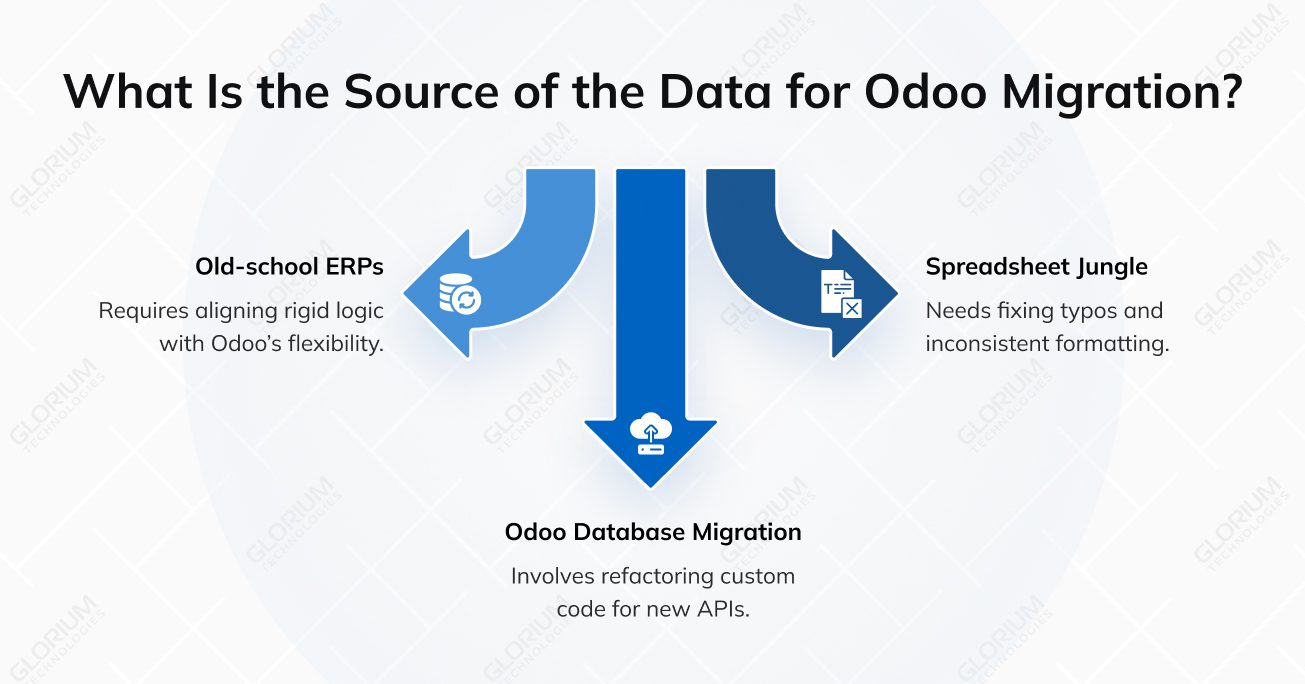
Odoo data migration is the process of transferring business data from existing systems, databases, or earlier Odoo versions into a new or updated Odoo environment. To achieve a successful Odoo data migration, you have to account for two main things: master records (your list of customers, vendors, and products) and transactional data (your actual history, including past sales orders, invoices, and accounting entries). A lot depends on the current setup, but in general, you’re usually moving data from one of these:
Data migration requires expert attention, a proper plan, and clear formatting. Usually, when things go sideways, it’s because one of these four areas was overlooked:
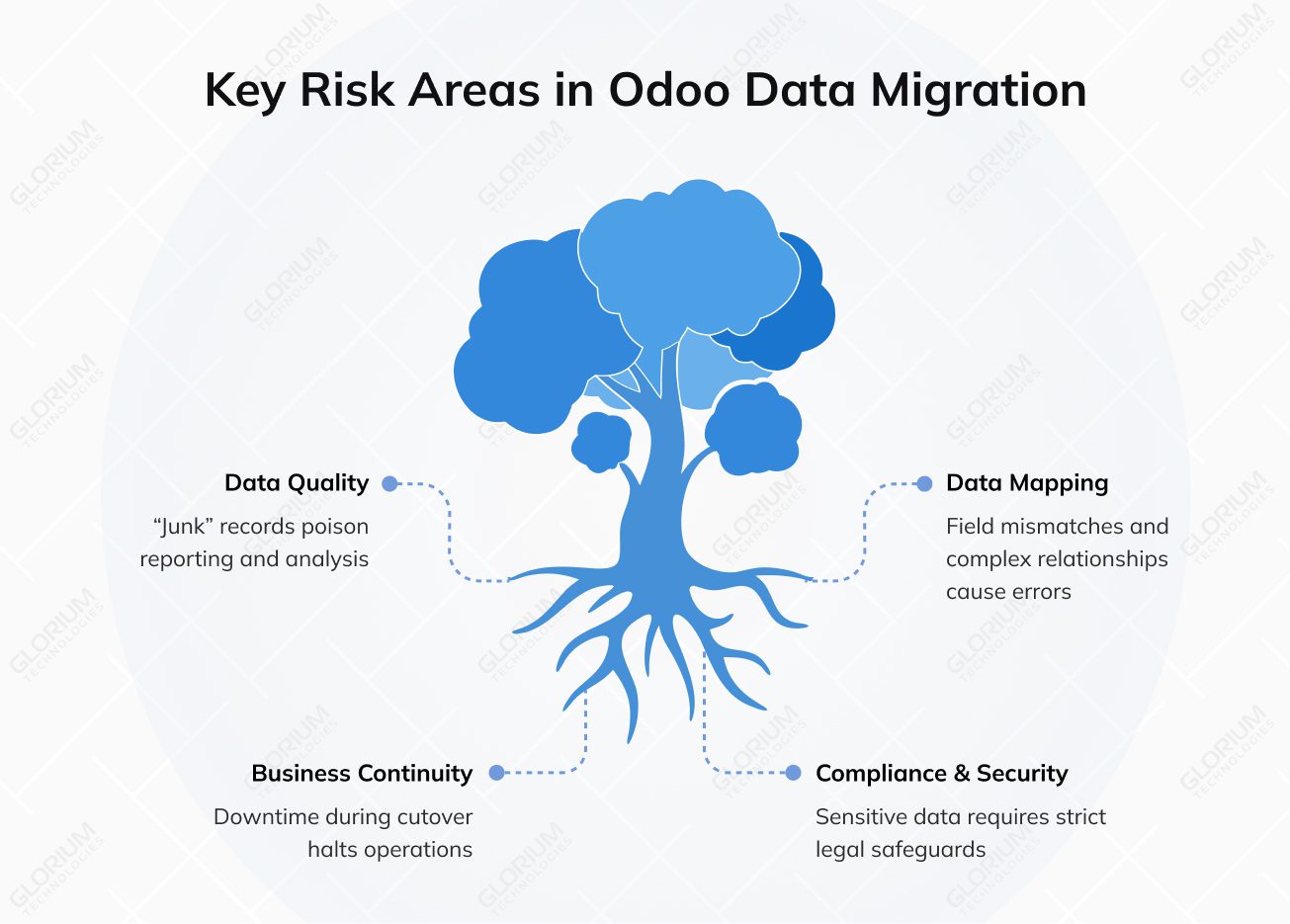
Every migration project starts with data analysis, because the efficiency of your new Odoo environment depends on the data you put into it.
Here’s what happens when your data has quality issues:
The Odoo relational database is a specific database where you can’t just push information. Sometimes, the fields don’t line up, and sometimes, the customizations don’t line up.
Here’s what happens when data isn’t mapped correctly:
If you take a look at Glorium Technologie’s case studies, you’ll notice that we implement phased approaches for all our Odoo implementation projects. This approach is specifically designed to mitigate business continuity risks and prevent workflows from freezing for weeks. It shouldn’t be impossible to continue working while data migrates to your new platform, especially since downtime can affect daily operations.
This problem becomes even more significant when you’re dealing with several systems. That’s why it’s always recommended to do migration in phases and test it out in a sandbox environment.
Moving data from one system to another, whether it’s an ERP or new software, means you’re moving sensitive data. Especially if you’re operating in a highly-regulated industry like healthcare. Compliance and data security are always important, but when it comes to migration, you need to follow strict legal safeguards like GDPR, HIPAA, and others.
A successful Odoo migration means making sure your business processes continue to work after the transition. Many companies try a DIY migration to save money, but they often end up with broken workflows or data that doesn’t reconcile on day one. Look at Lidl’s case; the company scrapped a €500M SAP project because it couldn’t reconcile its inventory data with a new system. In 2024, the medical giant Zimmer Biomet paralyzed its shipping operations because of a broken ERP transition. So, getting a professional Odoo migration service is often the best solution, as experienced specialists can manage the migration process and reduce the risk of data or system issues.
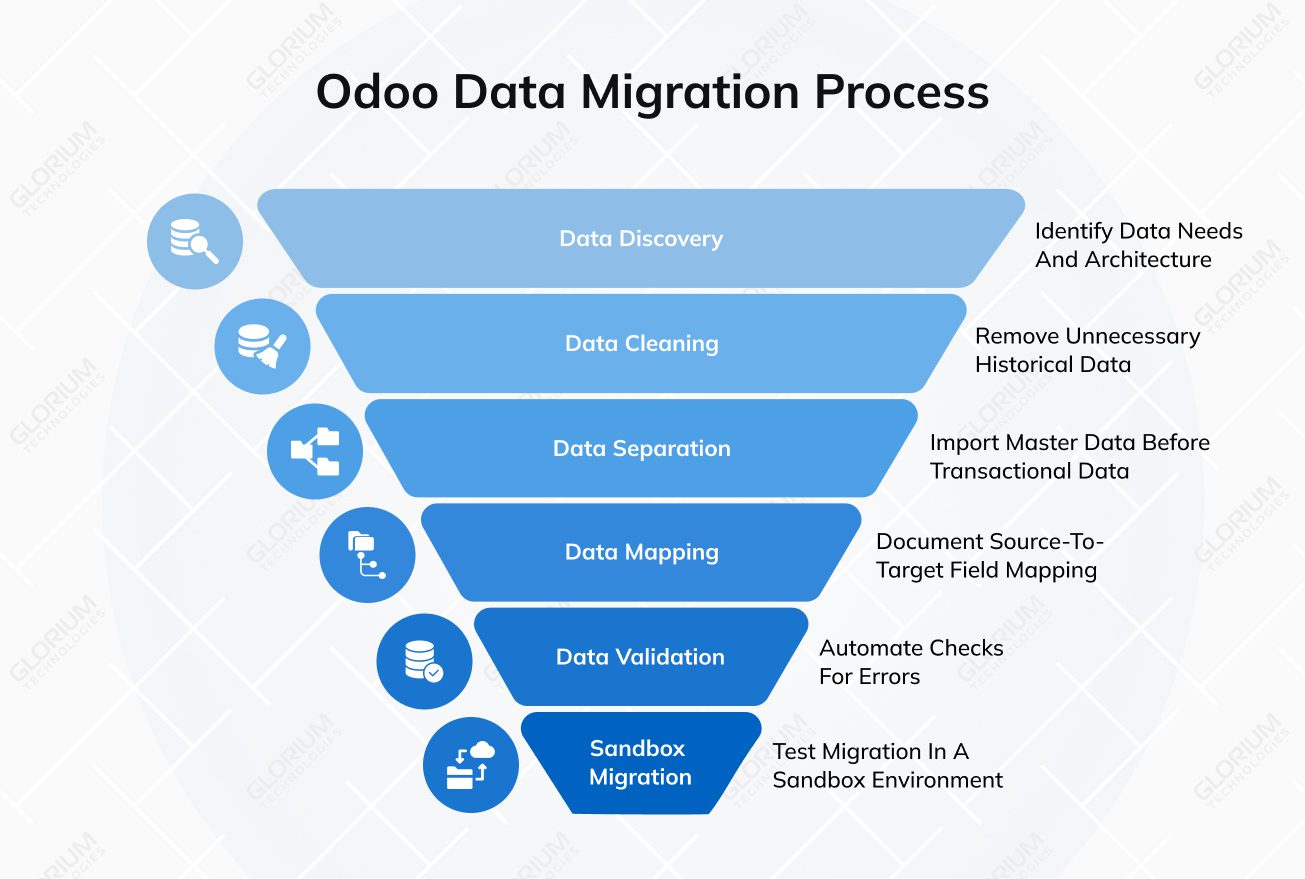
Before you touch a single row of data, you need to understand what you’re moving. First, it is necessary to audit your current systems, an old ERP, a collection of random spreadsheets, or a custom database. Simply put, the team responsible for the migration needs to define the migration scope: what is coming with you and what is better left behind?
At this stage, prioritizing master records (contacts and products) over heavy transactional data is usually the smartest move. Map out your goals, like record count accuracy and the maximum “freeze window” your operations can handle.
The fastest way to poison your new Odoo setup is importing “dirty” data. At this step, you need to merge duplicates, standardize address formats, and clear out records that haven’t been touched in years. On the technical side, you need to run SQL checks to guarantee relational integrity. In other words, you need to make sure every sales order is linked to a real customer. Most experts follow the best practices for data migration to Odoo: using validation scripts to catch “orphaned” records and formatting errors before they reach the staging environment.
Legacy data fields almost never match Odoo’s models perfectly. This phase is dedicated to data transformation, during which old data structures are mapped to Odoo’s relational model. It’s quite challenging since you need to handle custom modules or computed fields that trigger during import.
At this stage, you create a clear map that shows where each piece of old information belongs in Odoo. When you move something like a “Lead Source,” the new system connects it to your sales reports and automation. Without this step, there’s a chance you can lose the functional links that make your data useful for day-to-day work.
The ERP system migration is a multi-layered task, and there isn’t one tool that fits every situation. Your choice depends on the volume and the complexity of the data transfer. Let’s briefly review some of the most popular options:
This is the ultimate safety net for your data security. The data is not pushed directly to your live system. The entire process is run first in a staging environment that mirrors your real setup. As a result, professionals can check record counts and run workflow tests.
It’s also the time for User Acceptance Testing (UAT), where the team can verify everything works in practice. This is the chance to reconcile the books and make sure the Odoo trial balance matches the old ledger to the last cent.
Before the switch, teams usually set a short freeze period when no new data is added to the system. This avoids missing or duplicate records during the transition. The final migration then pulls in anything created during testing: recent sales, new contacts, or other updates.
Once the new system is live, the team closely monitors day-to-day operations. Orders should move through the workflow normally, and payments should be processed the same way they were before.
Getting the data into Odoo is only half the battle. The first few days usually involve a fair bit of troubleshooting as the team gets used to their new workspace. But the best solution is to have an expert at this stage who can oversee user training and set up a long-term archiving strategy for old files. Moreover, you still need to make sure the system stays fast as your data grows. An expert can fine-tune the database performance and rebuild indexes. Overall, if you have a trusted partner who can help you with complex migrations, it can save you a lot of time and money.
When you start a data migration without a strategy, it increases the risk of errors and rework later in the project. Simply put, you need to follow a set of rules to ensure your legacy databases don’t just dump their old problems into your new Odoo system.
Let’s examine a few tips that will help you protect the entire dataset. They will help you make sure the transition improves your business operations:
In most cases, organizations can migrate their data to Odoo from virtually any ERP platform. Companies regularly transition from SAP, Microsoft Dynamics, QuickBooks, and even legacy systems that can’t scale anymore. Of course, from a technical standpoint, a full migration is doable. However, the effort needed to extract and then prepare data from your existing system before moving it to Odoo varies greatly.
For example, companies that move from SAP need to do extensive work. They must handle financial structures and large volumes of transactional data. For those who previously used QuickBooks, migration includes transferring accounting records, customers, vendors, and product catalogs into Odoo’s accounting and sales modules. Organizations moving from legacy ERP systems may encounter additional complexity, as these platforms often contain large volumes of historical data and established business processes. Beyond this, several other factors influence a smooth transition:
So, yes, in most cases, data can be migrated from any ERP to Odoo. The process begins with a technical assessment of the existing system and the data that needs to be transferred. Core records (customers, vendors, invoices, and products) are migrated first. However, historical data and custom workflows are evaluated separately.
Migration projects have become increasingly common across industries. The Odoo ecosystem has grown to over 15 million users, but the support structures for the platform’s two editions have diverged. Organizations using Odoo Enterprise can rely on a global network of more than 16,000 certified implementation partners that assist with migrations, integrations, and custom development. Glorium Technologies is one of these certified Odoo partners. It supports businesses during migration projects and helps ensure that data, workflows, and system configurations are transferred correctly.
Odoo data migration projects are more likely to succeed when experienced specialists are involved. A qualified migration partner can guarantee that critical business data is transferred properly and that the new system is configured correctly from the start.
Glorium Technologies supports companies in planning and executing complex data migration projects. The company helps businesses plan and execute migration projects and ensure that relevant data and integrations are transferred properly. Consider a case of a Belgian chocolate manufacturer that replaced spreadsheet-based processes with Odoo 18 Enterprise hosted on Odoo.sh, connecting manufacturing, inventory, HR, and sales in a single system. After implementation, reporting time dropped by 90%, giving managers faster access to production and financial insights.
Another example that could interest you is a U.S. lighting manufacturer that previously relied on Excel, Outlook, and QuickBooks. After migrating data to Odoo 18 Enterprise, the company unified manufacturing, CRM, inventory, and accounting processes.
Curious about how you can achieve the same results with Odoo and a certified partner? Request a customized demo or talk to our experts about your data migration challenges to Odoo.
The timelines depend on the number of systems used, the overall data complexity, the data volume, and the setup’s complexity. For example, if a small company is moving from spreadsheets to a simple accounting software, the process may take about 2 weeks. Mid-size businesses migrating from tools like QuickBooks or smaller ERP systems need three to six weeks. If it is a large project, the whole process may take two to four months. However, the technical import is usually very quick. Validating financial data and checking if the system produces accurate financial reports usually takes the most time.
Not always. Many companies avoid moving all their data history and focus on master data (customers, vendors, products, and the chart of accounts). These are the datasets needed for everyday operations. Older records can stay in the legacy system for reference. This approach allows them to reduce unnecessary data volume and preserve historical financial data for audits if needed.
A well-planned migration should not stop daily operations. Moreover, most of the work happens in a testing environment, while your current system continues to run. The final step takes place during a short freeze window, often overnight or over a weekend. At that point, the team performs the final data extraction so the new system starts with the latest records.
First, migration begins with master data. This includes customers, vendors, products, employees, and the chart of accounts. When all these records are in place, teams move on to operational and financial data such as invoices, sales orders, and inventory balances. The thing is that Odoo relies heavily on relational data. Therefore, it is important to identify dependencies between records before importing them. For instance, invoices must reference existing customers, and inventory transactions must be linked to valid products. Therefore, it is important to identify dependencies between records before importing them to maintain data integrity.
Most companies keep their previous system for a while after migration. On average, it remains available in read-only mode and allows teams to review older transactions or check historical financial reports (if needed). Over time, when the new system is stable, the legacy platform is usually archived.
In many cases, using professional Odoo migration services makes the migration process much easier. Experienced specialists handle the technical work, support proper project management, and help reduce the risk of data loss. They also organize the migration in a way that protects data integrity and helps the system remain stable during future upgrades.