Odoo AI Invoice Automation: How to Reduce Manual Bookkeeping
Updated September 7, 2026

 Summarize in ChatGPT
 Summarize in ChatGPT
Finance teams keep pushing for faster, cleaner invoice work, but manual effort still dominates. In 2024, manual keying into the enterprise resource planning system and accounting software counted for about 60%, and many AP teams spent more than 10 hours a week just processing invoices and handling repetitive data entry.
That time loss shows up in cost and cycle time. Ardent Partners’ 2024 benchmarks show a huge performance gap: best-in-class teams process an invoice in 3.1 days at $2.78 each, while others average 17.4 days at $12.88 per invoice. That’s why invoice automation has become a practical priority for growing businesses.
This article explains what invoice automation looks like inside Odoo accounting software and Odoo ERP finance workflows. We walk through the main invoice workflows, the setup that makes automation reliable, and the controls that keep finance comfortable while financial operations continue without disruption.
Content
Invoice AI uses machine learning and document understanding to turn invoices into structured accounting data. It captures key fields from PDFs or scanned documents, including vendor details, invoice dates, totals, taxes, and line items. It can also validate what it captured by checking for missing fields, unusual amounts, and potential duplicates.
The greatest value lies in the “messy middle” of invoice processing. That’s where teams spend time on intake, cleanup, coding, and routing bills for approval. Invoice AI reduces manual typing and speeds up handoffs, while still keeping humans responsible for exceptions, policy decisions, and final posting.
Finance teams adopt AI because invoice volume grows faster than headcount. Manual entry creates avoidable errors, approvals stall in inboxes, and exceptions stack up right when month-end pressure peaks. Even small inconsistencies, like vendor naming, VAT fields, or cost-center tagging, can lead to rework and slow the close across core financial operations.
Time often disappears in invisible tasks: chasing missing POs, fixing tax details, recoding lines, and following up on approvals. When Odoo becomes the finance system of record, those steps are consolidated into a single workflow with consistent vendor data, clear rules, and defined approval paths. That shortens cycle time, reduces rework, and gives finance a live view of what is pending, blocked, or ready to be paid, improving short-term cash flow visibility.
In the latest Odoo releases, Odoo 19 (September 2025) and Odoo 19.1 (January 2026), AI becomes more visible in everyday screens through the Ask AI button and the AI app. Ask AI works best for quick help within the database, such as finding records, summarizing what’s on a screen, or getting guidance on next steps. For actions that change data automatically, teams usually rely on configured workflows, access rights, and (when needed) custom automation.
For accounts payable, the most practical AI feature is invoice digitization. Odoo uses OCR plus AI to read supplier invoices and create draft vendor bills (and it can also digitize customer invoices). Invoices can be uploaded or sent to an email alias, and Odoo fills in key fields for review. Digitization is typically billed via IAP credits, so it’s worth planning usage and cost early, especially if invoice volume is high.
For PO-based flows, Odoo can link the vendor bill to the purchase order (and receipts when used), then prioritize PO details over what it detects on the PDF. That reduces retyping and helps avoid posting errors when procurement data is already structured. Draft creation and prefilled fields can be automated for selected vendors, but posting still depends on the control model: who has posting rights, what must be reviewed, and how exceptions are handled.
If the goal is automation beyond Odoo’s standard digitization and rules, third-party automation layers like CogniAgent can orchestrate steps across modules and integrations. They can help with validation checks, exception routing, follow-ups, and cross-tool handoffs. The exact level of “hands-free” processing still depends on policy choices, access control, and how strict the exception paths are.
Invoices rarely slow teams down because of one big problem. It’s the small steps that pile up: opening PDFs, retyping fields, checking totals, chasing approvals, and fixing entries that don’t match a PO. Below are the invoice workflows where Odoo saves the most time in day-to-day finance work, and where automation speeds up the process without weakening review and control.
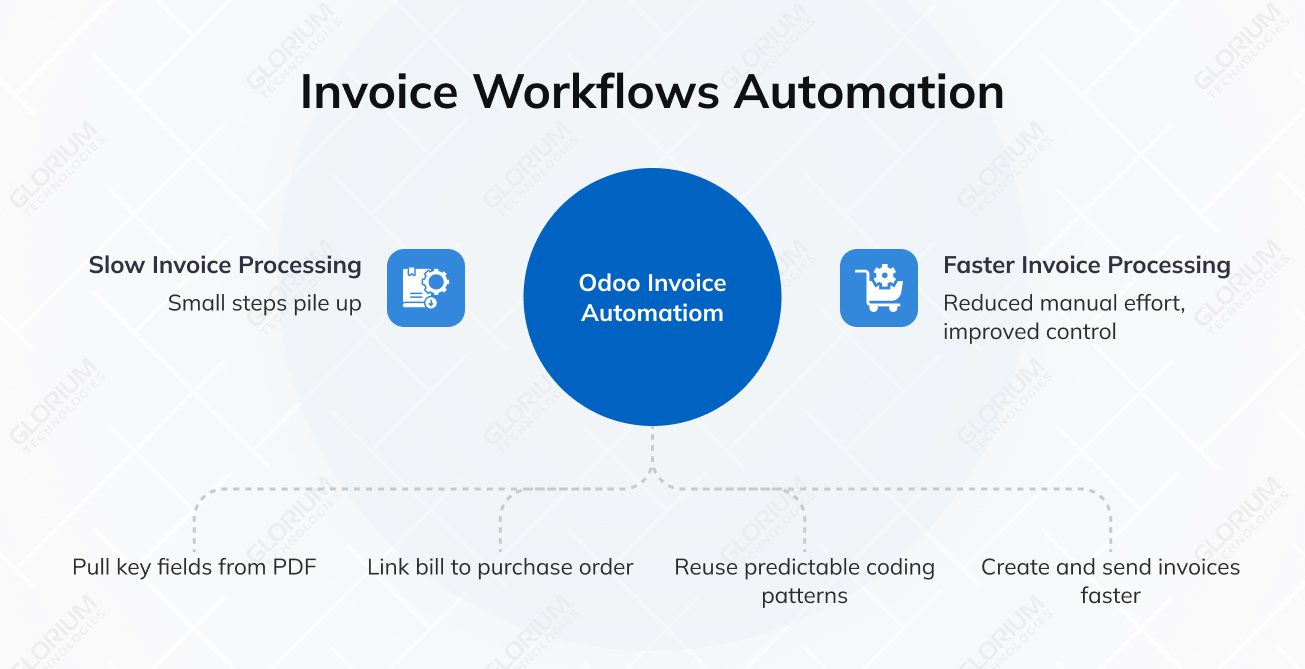
The invoice arrives as a PDF through upload or an email alias. Odoo digitizes it and creates a draft vendor bill with the key fields prefilled. It can reuse vendor defaults (payment terms, taxes, accounts) and suggest coding based on past bills. From there, review follows the control model you set: posting rights, activities, the Approvals app, or a custom workflow, before the bill is posted and ready for payment.
Odoo links the vendor bill to the purchase order and, when applicable, to the receipt, reducing retyping and keeping pricing, quantities, and tax details consistent. When something doesn’t match, Odoo flags the variance, and your exception rules decide who reviews it and what happens next.
Bills usually follow stable coding patterns. Odoo can reuse vendor defaults and past postings, so incoming bills are close to “ready to post.” The team focuses on quick outlier checks, then confirms and posts instead of rebuilding entries each month. For recurring billing on the customer side, Odoo Subscriptions automates invoice creation, sending, and tracking. That keeps recurring AR consistent and reduces follow-up work.
Odoo helps teams create and send customer invoices faster, with fewer mistakes and better consistency. It also tracks invoice status, so fewer items get lost after issuance. Reminder workflows support follow-ups and help reduce payment delays, thereby strengthening accounts receivable and improving the company’s cash flow planning.
Invoice AI matters most in routine work that eats up hours every week. These are the finance and bookkeeping use cases where automation typically delivers the fastest impact while maintaining approvals, controls, and reporting quality across your finances.
Capture and prefilled fields reduce manual entry, while validation and coding suggestions reduce avoidable fixes. The team spends less time correcting basics and more time reviewing the invoices that truly need attention.
When invoices are linked to purchase orders and receipts, Odoo can automatically match details and flag variances early. Instead of hunting for mismatches, teams follow a defined exception path for missing POs, quantity issues, or pricing differences.
Automation reduces “approval limbo” by making the next step obvious and pushing items to the right people through the workflow you configure. In Odoo, that usually means clear posting permissions, structured responsibilities, and activities or approval flows for bills that need review. The result is faster decisions without weakening spending control.
Consistent coding across accounts, taxes, and analytic dimensions keeps the ledger clean throughout the month. That means fewer correction entries later and fewer surprises when finance reviews postings.
When invoices are categorized correctly from the start, finance can track spend by category, team, project, or location without manual cleanup. Variance reviews get faster because the reports reflect real activity, not inconsistent tagging.
Cleaner postings reduce mismatches in bank reconciliation and lower the amount of last-minute rework. Over time, the month-end close becomes more predictable as fewer items require clarification or correction.
When the basics are clean and consistent, the system can suggest the right coding and route work correctly.
Vendor names, tax IDs, payment terms, and bank details must be consistent, as they drive everything from invoice recognition to payment accuracy. You also want a clear approach to duplicate vendors, since that’s a common source of duplicate bills and messy reporting.
Tax setup and the chart of accounts are where small inconsistencies turn into a lot of cleanup, covering VAT rules, exemptions, and common edge cases, as well as how to structure accounts so that postings support reporting. It also helps ensure your tax reports stay consistent as volume grows.
Automation works best when analytic dimensions are clear and enforced. Here, you explain how teams define cost centers, projects, departments, or locations, and when those tags are required, so reports don’t fall apart later.
Accountability covers who can edit, approve, post, and pay, as well as how separation of duties and audit trails protect internal controls as invoice volume grows in your Odoo accounting system.
Invoice automation works best when it’s treated as a process change. The biggest risks usually surface in edge cases, missing data, unclear approvals, and inconsistent controls, so it’s worth designing the workflow around reality before you scale it. These are the key areas finance leaders should align on early.
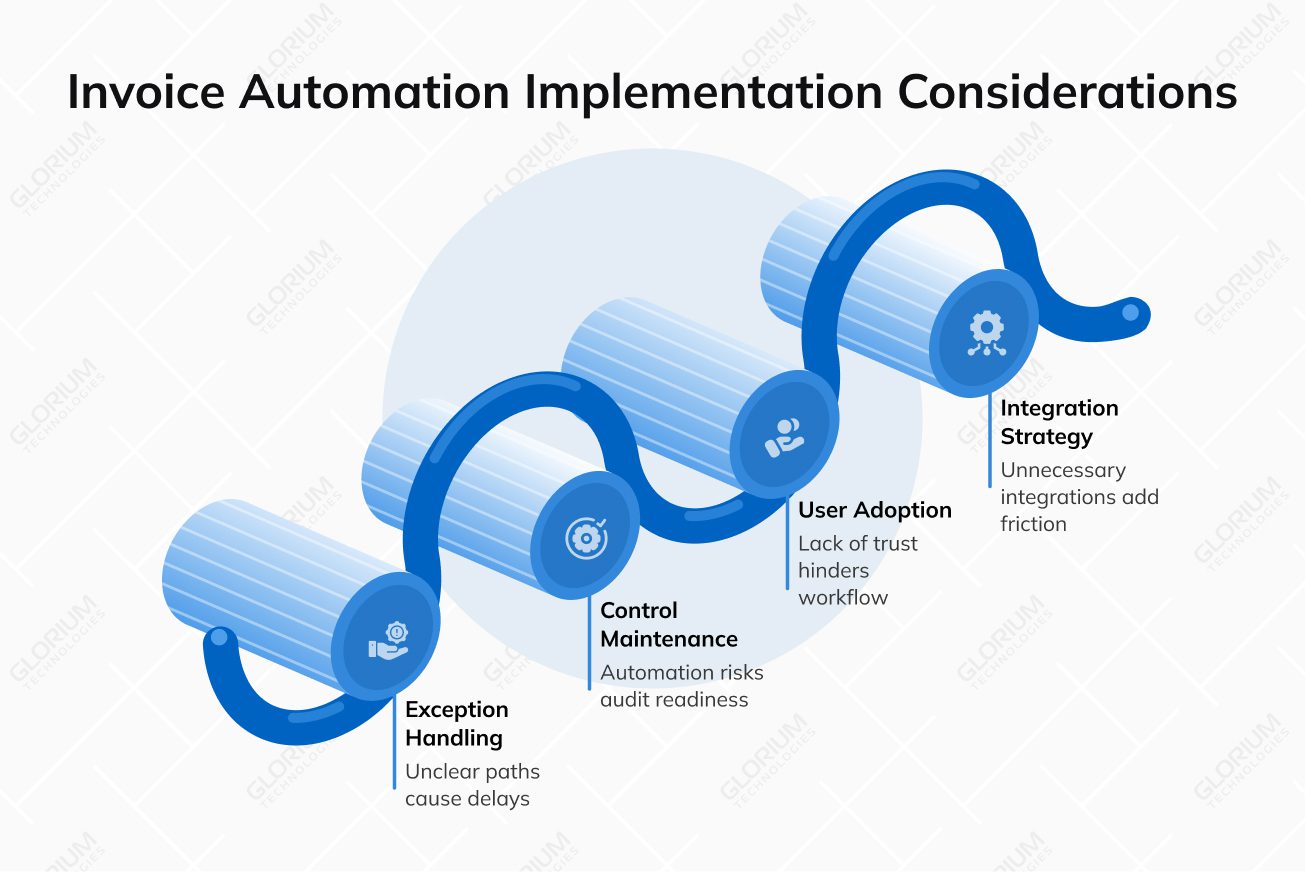
Missing POs, incorrect VAT, partial deliveries, and credit notes are common. Clear exception paths keep these cases moving to the right reviewer, so invoices don’t sit in a generic queue.
You cover how to maintain evidence, approvals, and change logs even when more steps are automated. You also explain segregation of duties and why it reduces overpayments, prevents fraud, and makes audits smoother.
A new workflow only works if people trust it. Role-based training helps AP processors, accountants, approvers, and managers understand what to review, approve, and escalate. Review rules can then be adjusted during the first 30–60 days based on actual invoice patterns and the exceptions that occur most often.
Not every integration is worth it. The focus should be on connections that remove friction, such as invoice intake from shared inboxes or vendor portals, document storage, bank feeds, payment providers, and any legacy ERP or procurement tools still upstream. Bank statement handling also matters here, because consistent imports and matching rules reduce noise during reconciliation.
Automation only matters if it changes results you can see in day-to-day operations. These metrics help you confirm that invoices move faster, quality remains high, and risk decreases. They also make it easier to pinpoint where the workflow still needs tuning, such as approvals, exception handling, or coding rules.
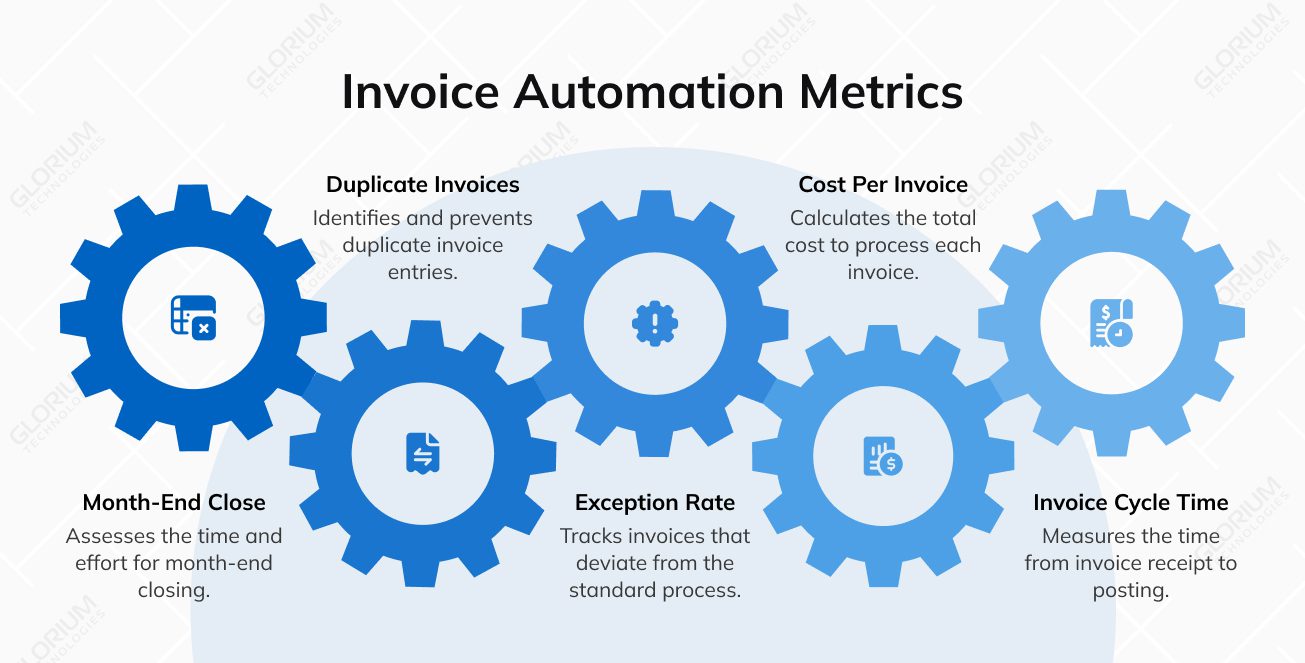
Track how long an invoice takes to move from “received” to “posted,” and separately how long it waits for approval. The split makes it clear whether the delay comes from capture, review, or decision-making. It also helps pinpoint approvers or departments where invoices tend to stall.
Cost per invoice reflects the total effort required to process a bill, including entry, review, and fixes. Manual touch rate shows how often a human has to edit fields before posting, which is one of the clearest signals that Odoo bookkeeping is getting cleaner.
Exception rate measures how many invoices fall out of the happy path due to missing POs, VAT issues, mismatches, or unclear data. Rework rate captures how often posted items need corrections later. Posting accuracy is the quality signal behind both, showing whether invoices land in the right accounts, taxes, and analytic dimensions the first time.
These are the “leakage” metrics finance leaders care about. Track detected duplicates, prevented duplicates, and any overpayments or credit-note corrections tied to duplicate processing. Late fees and missed early-payment discounts also indicate whether approvals and scheduling have improved.
Measure how long close takes and how much of that time is spent on AP cleanup. For reconciliation, track match rates and the number of unmatched bank lines that require manual investigation. When invoice posting is cleaner, reconciliation becomes more predictable, and closing becomes less dependent on last-minute fixes across recurring transactions.
Working with a certified Odoo partner reduces risks and speeds up rollout because you get a team that knows the product, understands common challenges, and uses implementation patterns that stick. Glorium Technologies takes an expert-led approach that prioritizes operational continuity and strong adoption among real users. The goal is a smooth transition to more automated, data-driven workflows without creating downtime or chaos for finance, operations, or leadership at your company.
We also help you go beyond the standard setup when your processes don’t fit “out of the box.” Our team can build custom modules for niche requirements, such as advanced PLM for manufacturers, and tailor workflows to match the way your teams really work. When Odoo needs to integrate with a larger ecosystem, we deliver API integrations that connect it to third-party platforms and legacy systems, keeping your data consistent across tools rather than living in silos.
If you’re planning an Odoo rollout or want to automate finance and invoice workflows, schedule a call with our experts. We’ll review your current process, define a realistic phased plan, and outline the quickest path to measurable results. See how Odoo works with a free demo.
Yes. Glorium Technologies can introduce invoice automation in phases, so AP keeps moving. We usually start with a controlled pilot, such as one entity or a vendor group. We validate capture quality, coding rules, and approvals before expanding the scope. If needed, we run parts of the process in parallel during rollout so financial operations continue to run.
Similarly, we handled an Odoo 18 Enterprise rollout for a U.S. lighting manufacturer that moved away from Excel, Outlook, and QuickBooks. We used a phased approach, starting with core operational modules and adding finance integration later, so the business kept running while the new workflows stabilized. You can check more of our Odoo cases here.
Most teams start with invoice intake and capture because it quickly eliminates repetitive work. Next come validation and coding suggestions to keep postings consistent. After that, we set up approval routing based on your control needs. Payment automation comes last, once roles, limits, and audit trail rules are stable.
We scope based on your real invoice flow and real exceptions. We review monthly invoice volume, vendor mix, and a sample set of invoices. We also need your chart of accounts, tax rules, and approval matrix. If you use POs, we review matching rules and common variance cases. We also confirm how invoices are received and how payments are processed in your current accounting software today.
The timeline of your implementation depends on scope, entities, tax complexity, and integrations. A focused rollout for invoice capture, coding rules, and approvals can be much faster than a multi-entity, multi-country setup. Timelines also depend on master data quality and exception design. We reduce risk by piloting first, then scaling once results are stable.
Yes. We design approvals around your policy and audit requirements. That includes thresholds, roles, routing rules, and exception paths. We also set access control and segregation of duties when required. The goal is a clear approval history, a clean audit trail, and consistent financial records.
It depends on your scope, but most finance rollouts start with the Odoo Accounting app and then add other apps that shape your invoice process. For vendor bills, that often includes Purchase for PO-based workflows and matching, plus Documents for invoice intake and AI-powered digitization when needed. For customer invoicing and accounts receivable, teams typically use Sales (or Invoicing) along with payment follow-ups and reporting. We focus on Odoo apps that reduce manual work across the full invoice lifecycle, rather than adding extra apps that don’t support day-to-day finance operations.
Yes. We start by mapping how your company actually handles approvals, posting rules, and reporting, then adjust the system to align with those processes. Odoo Studio is often used for minor changes, such as updating forms or quickly changing fields. When you need more than configuration, we add targeted development and help clients choose the right other apps, so Odoo stays highly customizable and reaches its full potential.
Plan choice affects both scope and cost. Some teams start with the One App Free plan and move to the Standard plan or a Custom plan as they add apps, users, and integrations. We’ll also flag where broader access or integrations can add extra cost, so you can plan rollout phases with no surprises.
Yes. Odoo accounting connects the core financial modules, keeping your financial operations (customer invoices, vendor bills, accounts receivable, expenses, and reporting) in a single accounting software flow with consistent financial records. Revenue and AR follow posted customer invoices, while AP follows posted vendor bills; when you also use Odoo apps like Purchase and Inventory, Odoo can link bills to POs and receipts and use PO details to override OCR-detected data when needed.
For AP, AI-powered invoice digitization reduces manual data entry by converting invoices into draft vendor bills. The most common setup is email integration via a journal email alias: suppliers email invoices in, and each attached PDF is converted into a draft bill (journal aliases process PDF and XML). Digitization typically uses IAP credits, so it’s smart to estimate volume and cost early.
Once bills and customer payments are in, teams usually import bank statements and use bank reconciliation to match payments and keep bookkeeping clean and cash movement visible.