A Practical Guide to Cloud Legacy System Migration
Updated May 4, 2026

 Summarize in ChatGPT
 Summarize in ChatGPT




Legacy application migration has become a buzzword that often finds its way into IT discussions. But what does it really mean, and why should you care?
Legacy application migration is the process of upgrading or using legacy programs and transitioning aging or outdated software systems to modern platforms. Why does it matter to migrate legacy anything? Because legacy applications, while once the crown jewels of tech innovation, can become ticking time bombs. They pose security risks, hinder agility, and are often costlier to maintain than to replace.
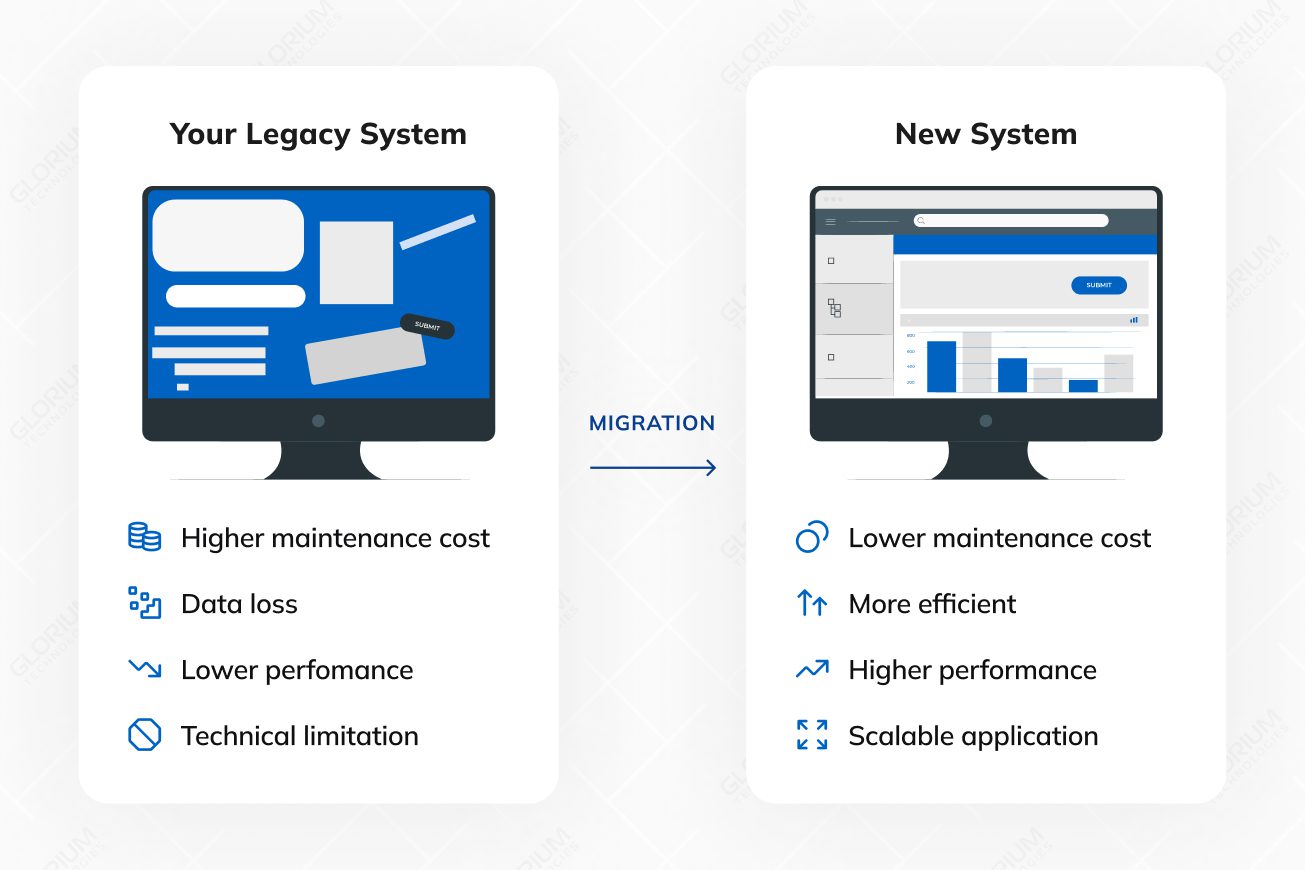
The pot of gold at the end of the migration rainbow includes more cloud computing resources, enhanced performance, improved security, cost savings and the ability to embrace new technologies, business processes, and methodologies. It’s like trading in your old flip phone for a shiny new smartphone – a game-changer.
Content
A legacy application is an existing application that supports critical business operations but runs on an older stack. It may rely on outdated software, outdated technology, or a current legacy system that is hard to change safely. Many businesses keep legacy applications because they power essential business processes and store valuable data.
Over time, legacy systems struggle with poor performance, limited scalability, and rising maintenance costs. Vendor support can fade, security patches may arrive late, and security risks increase. Legacy apps also tend to depend on tight coupling, custom integrations, and older data formats, which makes system migration and cloud migration harder.
Legacy application migration typically involves both code migration and data migration processes. You’re not only moving apps to the cloud. You also need to migrate legacy data, validate existing data, and confirm that all the data still adheres to business rules in the new environment.
Modernization focuses on enhancing an existing legacy system. Migration involves relocating workloads and data to a new platform and cloud environment. Many migration projects combine both approaches to protect business continuity and reduce operational costs.
| Decision factor | Modernization | Migration |
| Primary goal | Improve the current system step by step | Move apps to the cloud and adopt a new operating model |
| Typical scope | Targeted upgrades across code, data, and interfaces | System migration across runtime, data, integrations, and operations |
| Data work | Data audit, cleanup, governance for existing data | Full data migration process for legacy data and data sources |
| Risk profile | Lower change surface per release | Higher coordination needs across old and new systems |
| Timeline | Shorter increments | Longer program with staged cutovers |
| Cost pattern | Lower upfront spend, and ongoing maintenance costs continue | Higher upfront spend, cost savings depend on optimization |
| Cloud impact | Often, hybrid cloud services use | Cloud migration is central and deeper |
Old software applications, known as legacy applications, sometimes reach a point where they’re no longer up to the task. In this part of our guide on legacy application migration, we’re going to explore the signs that tell you it’s time for an upgrade. These signs are like warning lights, indicating that your old software needs a refresh.
From the software company no longer providing support to your application crashing too often, these signals are like clues that it’s time to migrate legacy applications:
One of the earliest signs that may trigger the need for migration is dwindling vendor support or outdated software systems. When the software or platform your application relies on is no longer receiving updates, patches, or security fixes, it becomes increasingly vulnerable.
Performance degradation is like the warning lights on your dashboard flickering. Sluggish response times, longer loading periods, or increased resource utilization are indicators that your legacy application may be struggling to keep up with modern demands.
Just as a car breaking down frequently signals mechanical issues, frequent application crashes are a glaring sign of underlying problems. These crashes disrupt productivity, frustrate users, and can even result in data loss or corruption.
Users are often the first to experience issues, and their feedback can be invaluable in identifying pain points within the application.
In summary, recognizing the signs that herald the need for migration, conducting evaluation of the existing system, and assessing the potential business impact are foundational steps in the decision-making process. Organizations must proactively address the health and well-being of their IT systems to ensure resilience, security, and continued competitiveness in the digital landscape.
In IT, it involves defining goals, assessing scope, and creating a detailed plan with a well-defined timeline.
Let’s delve into these crucial aspects with a professional IT perspective:
Objective clarity: When initiating a migration, it’s paramount to define your business application goals with absolute clarity. Ask yourself, “What are we trying to achieve with this migration?” Is it enhanced system performance, increased scalability, cost reduction, continuous integration, or perhaps modernization to meet evolving business needs? By articulating these objectives precisely, you establish a clear direction for the system migration project.
The Road ahead: Similar to planning a road trip, understanding the scope of your sstem migration efforts is crucial. It involves comprehending the full landscape of the migration effort. Scope assessment includes:
Complexity: Evaluate the intricacy of network architecture in your existing IT environment. Are there numerous dependencies, legacy systems, or third-party integrations? Recognizing complexity is vital to anticipate challenges.
Scale: Determine the scale of migration. Is it a single application, a suite of systems, migrating legacy systems and applications, or an entire data center? Understanding the breadth of migration helps allocate resources effectively.
Dependencies: Identify dependencies between applications and data, as well as any interdependencies within the migration project. Mapping these dependencies is akin to plotting waypoints on your journey to avoid unforeseen “potholes.”
Precise navigation: A migration plan is your roadmap for the journey. It’s more than just a list of tasks; it’s a strategic document that guides every phase of migration. Elements of a well-structured and complete migration plan include:
Timelines: Define specific timelines for each new system and migration phase. Establishing deadlines for milestones keeps the project on track and ensures alignment with business objectives.
Milestones: Milestones are like signposts along the way. They mark significant achievements and progress during the migration of legacy software. Achieving milestones provides a sense of accomplishment and helps track project success.
Contingency strategy: Like having a backup navigation system, a contingency strategy is essential. It outlines actions to take if unexpected challenges arise. Contingencies could involve rollbacks, alternative routes, or resource reallocation.
Resource allocation: Allocate resources, including personnel, equipment, and budget, in a well-considered manner. This ensures that the project has the necessary support throughout its lifecycle.
Risk assessment: Consider potential risks and challenges at each phase of the migration. Develop mitigation strategies and incorporate them into the plan of moving your applications to the cloud.
In conclusion, the planning phase of migration is the foundational pillar upon which the entire project stands. Preparation minimizes uncertainties, reduces risks, and sets the stage for a successful migration journey in the dynamic landscape of IT.
Migration strategies are like different routes on a map: rehost, replatform, or refactor. Each has its pros and cons, and the choice depends on your business requirements.
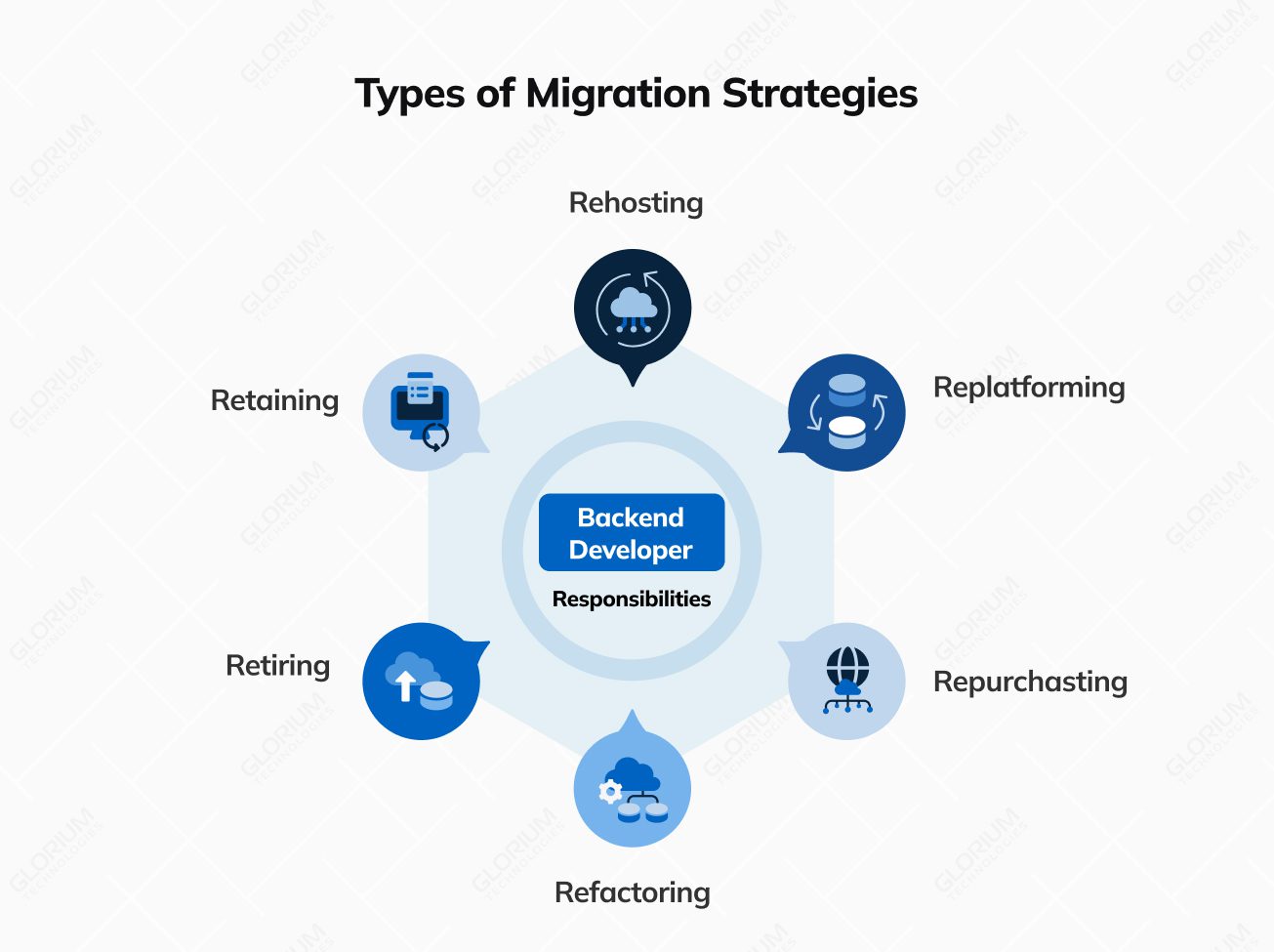
Description: Rehosting entails relocating the existing application to a new environment with minimal alterations. This process typically involves transferring the application and its data to a different hosting infrastructure, often within a cloud computing environment. The primary objective is to reduce costs while maintaining the core functionality.
Pros: Rehosting is an economically efficient and relatively swift option that minimizes disruption to ongoing operations.
Cons: While cost-effective, this strategy may not bring significant improvements in terms of functionality, scalability, or performance. It might not address the underlying issues present in the legacy code.
Description: Replatforming represents a step beyond rehosting by making selective adjustments to the application to ensure compatibility with the new environment. These adjustments could involve updating elements like the operating system, middleware, or database while preserving the core code.
Pros: Replatforming enhances compatibility and offers the potential for improved performance and scalability. It typically carries a reduced risk compared to a full-scale rewrite.
Cons: This strategy may not fully capitalize on modern technologies, and certain legacy issues may persist.
Description: Refactoring is a more comprehensive approach involving the rewriting or rebuilding of specific sections of the legacy application’s code using contemporary development practices and technologies. This strategy seeks to enhance code quality, maintainability, and scalability while preserving the application’s core functionality.
Pros: Refactoring yields improved performance, scalability, and maintainability. It also presents an opportunity to introduce new features and align the application with current business needs.
Cons: While offering substantial benefits, refactoring tends to be more resource-intensive and time-consuming compared to rehosting or replatforming. The increased complexity may lead to longer project timelines.
Description: Rearchitecting involves a fundamental redesign of the application’s architecture to bring it in line with modern standards. This often necessitates the transformation of a monolithic application into microservices or adopting a new architectural pattern.
Pros: Rearchitecting offers advantages such as greater scalability, agility, and flexibility. It empowers organizations to leverage cloud-native technologies and embrace microservices architecture.
Cons: This strategy can be complex and resource-intensive, demanding a deep understanding and seamless integration of both legacy and modern technologies.
Description: In certain scenarios, it may prove more cost-effective to retire or sunset a legacy application, particularly if it no longer serves a purpose or if its functionality can be adequately replaced by off-the-shelf solutions or newer systems.
Pros: Retirement simplifies the IT landscape, reducing ongoing maintenance costs, and eliminating security risks associated with the legacy application.
Cons: Successful retirement may require meticulous data migration and careful planning to ensure a smooth transition for users.
Choose the strategy that aligns with your goals and resources.
Legacy application migration is a complex process, especially when teams migrate legacy systems that have grown over the years. The main challenges usually look like this
The migration phase is a pivotal juncture in the legacy application migration process to cloud environment, demanding meticulous planning and execution.
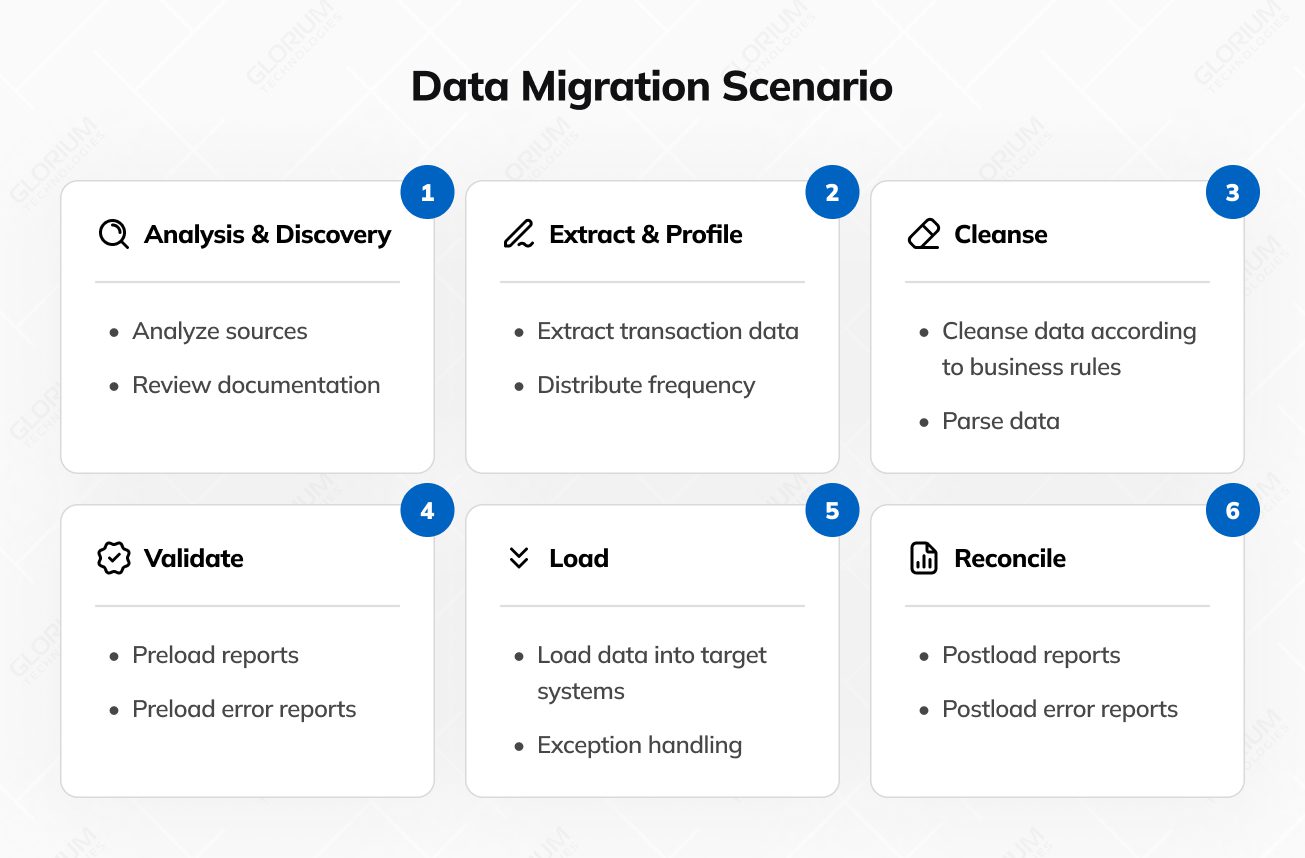
Here’s a closer look at this critical stage:
Data, often the lifeblood of an application, must be treated with precision and care. Data cleanup involves identifying and rectifying inconsistencies, redundancies, and inaccuracies within the already existing systems and data repositories. This cleansing process ensures that only relevant and accurate data is migrated, minimizing disruptions in the new, cloud infrastructure environment.
Compatibility is paramount during migrating legacy and applications to the cloud first. It entails assessing whether the existing and migrating legacy apps and software components, including software libraries, databases, and integrations, are compatible with the cloud migration target environment. Compatibility checks help identify potential roadblocks and the need for adjustments or upgrades to address during migrating legacy applications.
The private cloud migration plan, meticulously crafted during the planning phase, serves as the blueprint for the actual migration process. Following the cloud migration plan diligently is of paramount importance. It delineates the sequence of actions, timelines, and milestones. Deviations from the system migration plan should be well-documented and justified.
Constant vigilance is essential during legacy systems migration. Regularly monitor the progress of each migration task, cross-referencing it with the predefined timeline. Monitoring provides early detection of any deviations or complications, enabling timely intervention and corrective actions.
Security and compliance should guide the migration process from day one, especially when sensitive data is involved. A practical approach usually includes a small set of controls that teams apply consistently across old and new systems
As a seasoned Project Manager with extensive experience in IT infrastructure and application migrations, I have overseen numerous legacy application transitions to cloud environments. Based on my experience, here are some key insights and recommendations for successfully managing such a migration:
In essence, migrating a legacy application is a highly structured and technically intricate undertaking that demands meticulous attention to detail. By embracing data cleanup, compatibility checks, and dependency management, organizations can ensure a seamless transition of legacy apps to a modernized environment.
Legacy application migration is not just about modernizing your IT systems; it’s about future-proofing your whole business operations. Embrace the change, choose the right legacy applications migration options and path, and navigate the IT highway toward a brighter, more agile, and secure digital future.
Glorium Technologies runs legacy system migration as a structured delivery program, supported by proven quality and security practices, as certified by ISO 9001 and ISO 27001. We plan and execute cloud migration on primary cloud services, backed by AWS Select Tier Partner and Microsoft Silver Partner status.
We begin with discovery: inventory, dependency mapping, and a clear migration strategy. Then we create a detailed migration plan with staged cutovers, testing gates, and rollback steps. For data migration, we define the data migration process, validate data formats, reconcile legacy data, and track exceptions to protect data integrity. We test migration waves and monitor the system’s performance through the cutover window.
Glorium Technologies also brings delivery maturity and external credibility, including 150+ products delivered, multi-year recognition on Inc. 5000, IAOP Global Outsourcing 100, and Clutch Top 1000.
Reach out to us to book an intro call with Glorium Technologies to review your legacy system migration scope, risks, and next steps.
Legacy application migration is the process of transferring an older, outdated software system (legacy application) to a modern and up-to-date technology stack or platform. This is done to improve performance, security, scalability, and maintainability.
Legacy applications can become inefficient, insecure, and difficult to maintain over time. Migration is necessary to ensure that the software remains relevant, secure, and can meet evolving business requirements.
The duration varies significantly based on factors like the complexity of the application, chosen migration strategy, resources, and testing requirements. It can take several months to a few years.
Begin by assessing the current legacy system, its dependencies, and data sources. Select a migration strategy, develop a migration plan with milestones and rollback steps, conduct a test migration, verify data integrity and performance, complete user acceptance testing, and execute the cutover in controlled waves.
Timelines depend on scope, integrations, and the data migration process. Smaller legacy apps can take weeks. Large legacy systems with numerous dependencies and sensitive data often require months to implement, especially when parallel run requirements are in place for business continuity.
Replatforming updates parts of the runtime or services while keeping most code unchanged. Refactoring changes the codebase to improve maintainability and support modern technologies, often with a bigger impact on long-term flexibility.