Most founders hit the same fork early. You can ship software that customers install on their own machines, or you can deliver it as a subscription they open in a browser. In 2026, the second road is the default for new products. Gartner projected end-user spending on cloud application services (SaaS) at $299.1 billion for 2025, up 19.2% from the year before. Its July 2026 forecast puts total software spending at $1.47 trillion in 2026.
Buyers keep adding tools as well. Zylo’s 2026 SaaS Management Index found that organizations now spend an average of $55.7 million a year on SaaS, and spending on AI-native SaaS apps grew 108% year over year. For anyone entering the SaaS market, the demand is there. The hard part is building something that wins a place in a crowded stack.
Winning that place depends on decisions made before the first line of code. How the product charges customers, how tenants share infrastructure, and who builds the platform all shape your SaaS application development budget. Those same choices decide how quickly the product reaches paying users.
What Is SaaS Application Development?
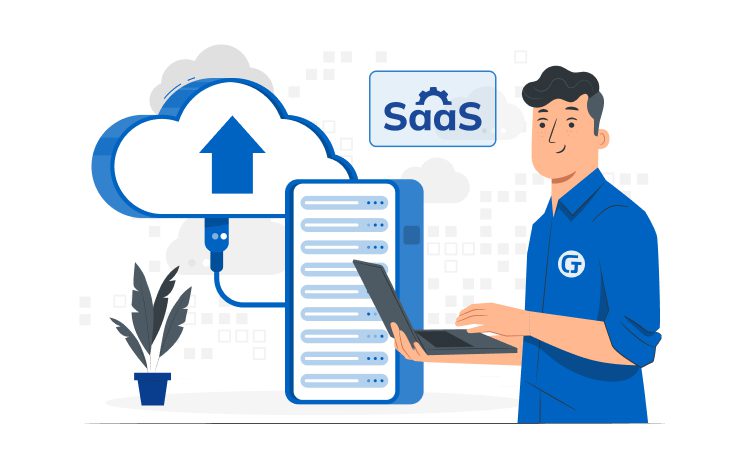
SaaS application development is the process of designing, building, and running SaaS applications that customers access over the internet instead of installing software locally. Software as a service runs in the cloud, and service providers handle hosting, updates, and security. Customers pay a recurring fee and log in from a browser or a mobile app.
In most SaaS applications, multiple customers share the same application instance, while each tenant’s data stays logically separated. This software delivery model lets SaaS providers ship one update to every user at once and keep unit costs low as the customer base grows.
Cloud computing made the SaaS concept practical. Instead of buying servers, teams rent compute, storage, and managed databases from leading cloud providers such as AWS, Microsoft Azure, and Google Cloud. These cloud services are billed by usage, so teams pay only for the capacity they use, which keeps early SaaS projects lean.
SaaS development also differs from a one-off software build. Software as a service is never finished, because the provider keeps operating, securing, and improving the product for as long as customers pay. That ongoing commitment shapes the team, the budget, and the SaaS business model from day one.
How SaaS differs from traditional software
The table below compares SaaS apps with classic on-premise software across the factors that matter most to buyers and builders.
|
Criteria |
SaaS application |
Traditional (on-premise) software |
|
Deployment |
Hosted by the provider in the cloud |
Installed on the customer’s servers or devices |
|
Pricing |
Subscription model, billed monthly or annually |
One-time license plus maintenance fees |
|
Updates |
Shipped centrally, often every sprint |
Installed by each customer, version by version |
|
Scalability |
Users and capacity added on demand |
New hardware and licenses required |
|
Upfront cost for the buyer |
Low |
High |
|
Maintenance |
Handled by the SaaS provider |
Shared with the customer’s IT team |
Key components of SaaS applications
A SaaS product rests on a handful of building blocks. Getting them right early saves painful rework when your first enterprise client asks for single sign-on or a data residency guarantee.
- Cloud infrastructure: Compute, storage, and networking from AWS, Azure, or Google Cloud, configured for auto-scaling and backups
- Multi-tenant architecture: One codebase and infrastructure layer that serves every customer, with tenant isolation at the database or schema level
- Identity and access management: Sign-up, SSO, role-based permissions, and audit logs
- Subscription and billing engine: Plans, trials, invoicing, and usage metering
- APIs and integrations: Connectors to CRMs, payment gateways, and other third-party services
- Analytics and monitoring: Product usage tracking, error logging, and uptime alerts
The cloud architecture behind these pieces shapes both your hosting bill and your ability to grow. An experienced team will balance proven components with newer tools, so your SaaS platform can absorb new features without a full rebuild.
Popular SaaS application examples
The best-known SaaS apps show how wide the model stretches. Salesforce built its name on customer relationship management, Google Workspace moved email and documents to the browser, and Slack and Asana turned team chat and project management into subscriptions. Shopify, Canvas, and NetSuite cover e-commerce, learning management systems, and enterprise resource planning.
These leading companies set a high bar for usability, uptime, and integrations. Newer SaaS companies usually win by going narrow: industry-specific SaaS solutions for clinics, property managers, or wealth managers often beat general cloud-based solutions on fit. Younium revenue recognition software is a good example of a B2B SaaS product that helps record revenue as per the rules and regulations.
Benefits of SaaS Application Development
For companies building SaaS applications, the model changes the economics in two ways. Revenue arrives every month instead of once, and every release reaches all customers at the same time. Both effects compound as the customer base grows, which is why the SaaS business model attracts so much investor interest.
Financial advantages
Recurring subscriptions turn sales into predictable monthly or annual revenue, which makes forecasting and fundraising easier. Shared cloud computing resources lower the cost of serving each extra customer, so margins tend to improve with scale. Buyers of SaaS apps avoid a large upfront license and pay as they grow. That lower entry barrier speeds up customer acquisition, especially among small and mid-sized businesses looking for cloud-based solutions.
Faster time to market
Cloud delivery shortens the path from idea to paying users. Teams can release a Minimum Viable Product (MVP) to a small group, collect feedback, and ship improvements every two to three weeks. Cloud-based deployment means bug fixes reach every user at once, with no patch installs on the customer side. This short feedback loop is where most SaaS apps find product-market fit.
Scalability and cost efficiency
A well-designed SaaS platform grows with demand and supports business growth without a rewrite. Auto-scaling in modern cloud infrastructure adds capacity during traffic spikes and releases it afterward, so you pay for resources only while customers use them. This cost efficiency explains why scalable solutions built on cloud computing have become the norm for startups and enterprises alike.
Choosing the Right SaaS Pricing Model and Monetization Strategy
Your pricing model shapes everything from how you design your database schema to how your sales team pitches the product. Getting it wrong means leaving revenue on the table or, worse, pushing potential customers toward competitors with more flexible options. Before your development team starts building billing logic, you need a clear monetization framework that aligns with your target audience and the value your application delivers. This is a critical step in any SaaS platform development initiative.
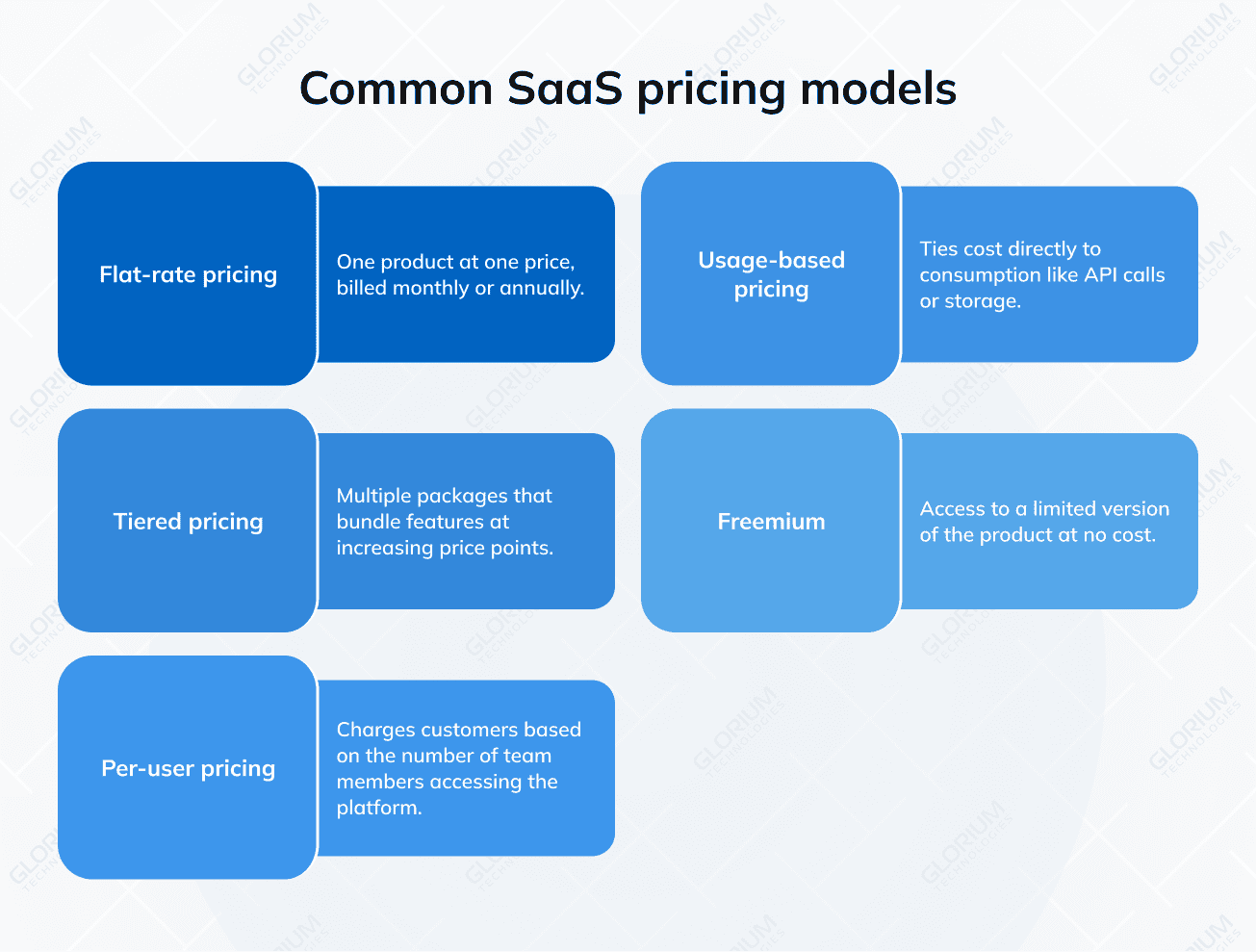
Common SaaS pricing models
Below are the most common SaaS pricing models, with quick notes on when each fits and what it tends to require on the product and engineering sides.
Flat-rate pricing
Flat-rate pricing is the simplest approach. You offer one product at one price, billed monthly or annually. This works well for straightforward tools with a narrow feature set, but the model limits your ability to capture value from power users who would be willing to pay more. Basecamp is a well-known example of this model in action.
Tiered pricing
Tiered pricing is the most widely adopted model across the SaaS landscape. You create multiple packages (typically three to four) that bundle features at increasing price points. Each tier targets a different customer segment. A startup might select the basic plan while an enterprise client opts for the premium tier with advanced analytics, priority support, and higher usage limits. This model requires your development team to build robust feature gating and plan management into the application from day one, so factor that into your architecture planning.
Per-user pricing
Per-user pricing charges customers based on the number of team members accessing the platform. This model is predictable for both you and your customers, and revenue scales naturally as organizations grow. However, per-seat billing can discourage adoption within larger teams since companies may limit seat counts to control costs. Slack originally popularized this approach before evolving its model.
Usage-based pricing
Usage-based pricing (sometimes called pay-as-you-go) ties cost directly to consumption. Think API calls, storage used, messages sent, or transactions processed. This model lowers the barrier to entry because customers only pay for what they actually use. On the technical side, usage billing demands accurate metering infrastructure and real-time usage tracking, so your engineering team needs to plan for that complexity early in SaaS web application development.
Freemium
Freemium gives users access to a limited version of your product at no cost, with the expectation that a percentage will convert to paid plans over time. Dropbox and Canva have built massive user bases with this strategy. The challenge is finding the right balance. Offer too much for free, and users never upgrade. Offer too little, and they never experience enough value to justify paying.
How to pick the right model
Start by analyzing your target customer. Small businesses and individual users tend to respond well to freemium or usage-based models because they minimize financial risk. Enterprise buyers often prefer tiered or per-user pricing because this structure aligns with procurement budgets and provides predictable costs.
Next, look at your value metric. This is the unit of value your customers care about most. If your SaaS product helps companies send email campaigns, the value metric might be the number of subscribers or the number of emails sent per month. Aligning your pricing to this metric ensures that as customers get more value, you capture a proportionally greater share of revenue.
Consider hybrid approaches as well. Many successful SaaS products in 2026 combine elements from multiple models. A tiered structure with usage-based overages, for instance, gives customers pricing predictability while still allowing you to fairly monetize heavy usage.
Finally, plan for iteration. Your first pricing model will almost certainly evolve. Build your billing infrastructure with enough flexibility to adjust plan structures, experiment with trial lengths, and introduce add-ons without requiring a complete system overhaul. Integrating with established billing platforms such as Stripe Billing or Chargebee early in development saves costly rework later and keeps your team focused on core product features rather than payment edge cases.
SaaS Application Development Process: 7 Steps From Idea to Launch
A clear SaaS development process keeps scope, budget, and architecture tied to your business objectives. The steps below reflect how Glorium Technologies runs SaaS product development for startups and growing companies. In practice, teams often overlap stages to move faster.
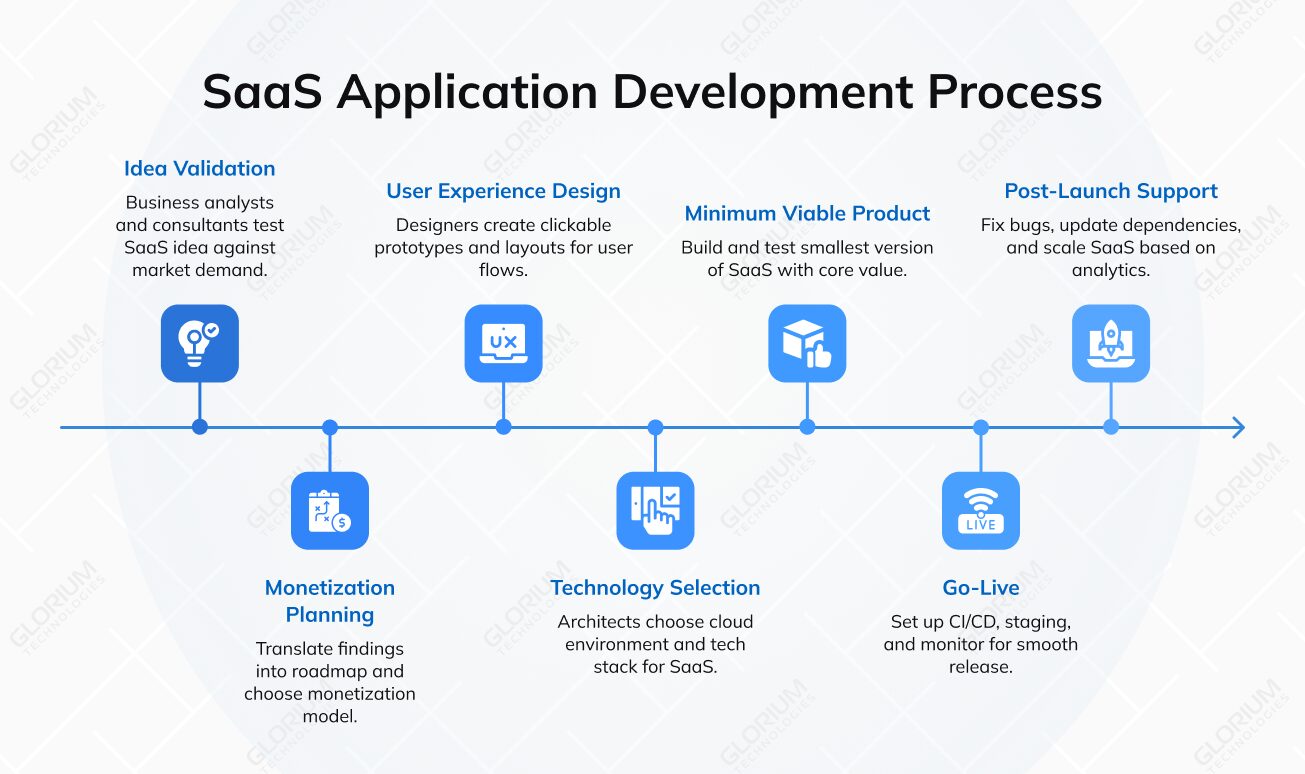
step1
Discovery phase and idea validation
Start the SaaS development process by testing the idea against real demand. During a discovery phase, business analysts and SaaS consultants interview target users, map competitors, and turn business requirements into a prioritized feature list. You leave with a scoped backlog, early wireframes, and a realistic estimate.
Skipping this step is the most common reason a SaaS vision drifts away from what customers will pay for. A short discovery costs far less than rebuilding features nobody uses.
step2
Product roadmap and monetization model
Next, translate the findings into a product roadmap that sequences SaaS product development around your business needs. Choose the monetization model at this stage too. Plan tiers, trials, and usage limits affect the database schema and permission logic, so they belong in the plan before coding starts.
step3
UX/UI design
UX/UI design turns the backlog into flows users can follow without training. Designers build clickable prototypes, test them with a handful of target users, and prepare layouts for desktop, tablet, and mobile app screens. In B2B SaaS solutions, onboarding and admin dashboards deserve as much attention as the core feature, because they decide whether a free trial converts.
step4
Architecture and tech stack selection
Architects then choose between single-tenant and multi-tenant setups, define the cloud environment, and pick technologies for each layer. The right tech stack balances hiring availability, performance, and long-term maintenance costs. Common choices for SaaS apps in 2026 include:
|
Layer |
Common technologies |
|
Frontend |
React, Angular, Vue.js |
|
Backend development |
Node.js, .NET Core, Python (Django), Java (Spring Boot) |
|
Database and caching |
PostgreSQL, MS SQL, MongoDB, Redis |
|
Cloud and DevOps |
AWS, Microsoft Azure, Google Cloud, Docker, Kubernetes |
|
Billing and payments |
Stripe Billing, Chargebee |
|
Monitoring |
Datadog, Sentry, Grafana |
Glorium Technologies has shipped SaaS products on each of these combinations, from Angular and .NET Core on Azure to React and Node.js on AWS.
step5
MVP development and testing
Build the smallest version of your custom SaaS product that delivers the core value, then harden it. Software developers work in two-week sprints while QA engineers run manual and automated tests for functionality, load, and security. Beta users from your target market often uncover use cases nobody planned for.
For a US renovation management startup, Glorium Technologies delivered an investor-ready MVP in eight months. The platform included unit-level renovation tracking, connectors to Yardi, RealPage, and Entrata, and a tiered pricing plan with a free 14-day trial. The client secured its first lead within a month of launch.
step6
Deployment and launch
Before launch, set up CI/CD pipelines, staging environments, and monitoring. Blue-green or canary deployments let you release new versions of SaaS applications without interrupting active users. A phased rollout to beta customers surfaces edge cases that test environments miss.
step7
Ongoing maintenance and scaling
Launch opens the longest stage of the SaaS application development process. For live SaaS applications, ongoing maintenance covers bug fixes, security patches, dependency updates, and infrastructure tuning. Usage analytics and customer feedback then decide which features ship next. For tactics on growing without slowing down, see our guide on how to scale a SaaS business.
Challenges in SaaS Software Development
Software as a service removes many deployment headaches, though it adds problems of its own. The challenges below come up on almost every SaaS project, and each one is cheaper to solve at the architecture stage than after launch.
Integration with third-party services
Customers expect SaaS applications to connect with the tools they already use: CRMs, accounting software, payment service providers, and identity providers. Each API has its own limits, data formats, and failure modes, so integrations with third-party services need careful design, retries, and monitoring.
Glorium Technologies met this challenge on a collaboration tool for German property managers at Control.IT. The app had to sync partial data sets from a massive data model with bison.box and refresh records from automated third-party sources. Our team added a validation layer that checks uploaded data before it enters the main system. Today the tool is sold as part of the bison.box package.
Experienced Quality Assurance engineers should cover every integration with automated tests, so a vendor’s API change does not break your product overnight.
Ensuring data security and compliance
SaaS applications hold data from many companies in one place, which makes them an attractive target. The IBM Cost of a Data Breach Report 2025 puts the global average cost of a breach at $4.44 million, and US organizations face an average of $10.22 million. To protect user data, build security into the architecture from the first sprint:
- Encryption: TLS for data in transit and AES-256 for data at rest
- Access control: Role-based permissions, single sign-on, and multi-factor authentication
- Tenant isolation: Strict separation of each customer’s records in shared databases
- Compliance: GDPR for EU users, HIPAA for health data, and SOC 2 for enterprise buyers
- Monitoring: Audit logs, intrusion detection, and regular penetration tests
Achieving zero downtime deployment
Customers in different time zones use SaaS applications around the clock, so long maintenance windows are hard to justify. Blue-green deployment runs two identical production environments and switches traffic only after the new version passes health checks. If something goes wrong, the team routes traffic back to the stable version. Feature flags add another safety net by enabling new functionality for a small group first.
Keeping performance stable as you scale
In multi-tenant SaaS applications, one heavy tenant can slow down everyone else. Rate limiting, caching, database indexing, and per-tenant resource quotas keep response times steady even as customer growth accelerates.
Building the Right SaaS Development Team
The team you assemble shapes product quality as much as the tech stack does. Founders usually choose between hiring in-house, outsourcing SaaS development to a partner, or combining both. Match the model to your business needs, then review past SaaS solutions, check references, and ask how the team handles scope changes.
In-house vs. outsourcing
An in-house team knows your business objectives and gives you direct control, though hiring senior SaaS developers takes months and adds fixed payroll costs to your app development budget. Hiring outsourced developers gives faster access to proven expertise and flexible capacity. A third option, outstaffing, adds dedicated developers to your existing team under your management.
|
Model |
Best for |
Speed to start |
Control |
Cost structure |
|
In-house team |
Long-term core product with stable funding |
Slow, months of hiring |
Full |
Fixed salaries and benefits |
|
Project-based outsourcing |
A defined SaaS project with clear scope |
Fast, usually weeks |
Shared through milestones |
Fixed price or time and materials |
|
Outstaffing (dedicated team) |
Scaling an existing product or filling skill gaps |
Fast, usually weeks |
Full day-to-day control |
Monthly rate per specialist |
Key roles in a SaaS development team
A typical SaaS development team includes the following roles, especially when developing SaaS applications from scratch:
- Product manager: Owns the roadmap and aligns features with business goals
- Business analyst: Turns business needs into user stories and acceptance criteria
- Solution architect: Designs the cloud architecture, data model, and integrations
- Frontend and backend developers: Build the interface, APIs, and business logic
- UX/UI designer: Shapes user flows, prototypes, and the design system
- QA engineers: Run manual and automated testing
- DevOps engineer: Manages CI/CD, infrastructure, and monitoring
Small MVP teams often combine roles. A tech lead, for example, may also act as the solution architect until the product grows.
How to choose a SaaS development company
When you compare SaaS software development services, look past the sales deck. A reliable SaaS application development company should be able to:
- Show named SaaS projects: Case studies with real clients, stacks, and outcomes
- Explain multi-tenancy and billing: Concrete answers on tenant isolation, metering, and plan management in SaaS apps
- Cover the whole lifecycle: Development services from discovery and design to DevOps and post-launch support
- Prove domain knowledge: Experience with the regulations in your industry, such as HIPAA or GDPR
- Share client references: Reviews on Clutch or GoodFirms, plus a call with a past client
A strong SaaS development company also employs SaaS consultants who challenge your assumptions in the first calls, which is a healthy sign. Glorium Technologies’ SaaS development services cover each of these stages, from discovery to post-launch support.
How Much Does SaaS Development Cost?
SaaS development cost depends on scope, team location, and the technology behind the product. Planning the full budget, including hosting, maintenance, and marketing, helps you avoid a product that launches and then stalls. Most SaaS app development budgets break down into the drivers below.
|
Cost driver |
Typical range or impact |
|
Simple SaaS app with basic features |
$10,000–$50,000 |
|
Complex, enterprise-level SaaS solution |
$100,000 and up |
|
Developer rates, North America and Western Europe |
$50–$150 per hour |
|
Developer rates, Eastern Europe and Asia |
$20–$80 per hour |
|
Maintenance and updates |
Recurring yearly cost, a share of the initial build |
|
Hosting, marketing, and sales |
Grow with your user base; marketing can match or exceed the build cost |
Development team location and rates
The geographic location of your development team plays a big role in determining the cost. For example, developers in North America and Western Europe typically have higher rates than those in Eastern Europe or Asia. Hourly rates can range widely from $50 to $150 per hour in the former regions, whereas in the latter, rates might range from $20 to $80 per hour.
Complexity and customization
The more complex and customized the software, the higher the development cost. A simple application with basic functionalities might cost anywhere from $10,000 to $50,000, whereas a complex, enterprise-level custom SaaS application can easily exceed $100,000.
Technology stack
The choice of technologies also influences the cost. Emerging, cutting-edge technologies might lead to higher costs due to the need for more skilled professionals.
Apart from direct development costs, other expenses need to be considered:
Maintenance and updates costs
Every SaaS product needs continuous maintenance and regular updates. These software maintenance costs recur every year, usually as a percentage of the initial development cost.
Hosting and infrastructure costs
The costs for servers, cloud services, and other infrastructure elements can vary based on the scale of the application.
Marketing and sales costs
These costs are often overlooked but are vital for the success of a SaaS product. Marketing and sales can sometimes equal or exceed the development costs, especially in competitive markets.
Industry-Specific SaaS Solutions We Build
Domain knowledge shortens discovery for SaaS apps and prevents compliance surprises later. Glorium Technologies has built custom SaaS products for three industries in particular, each with its own regulations, data models, and buyer expectations. The SaaS solutions below show what that looks like in practice.
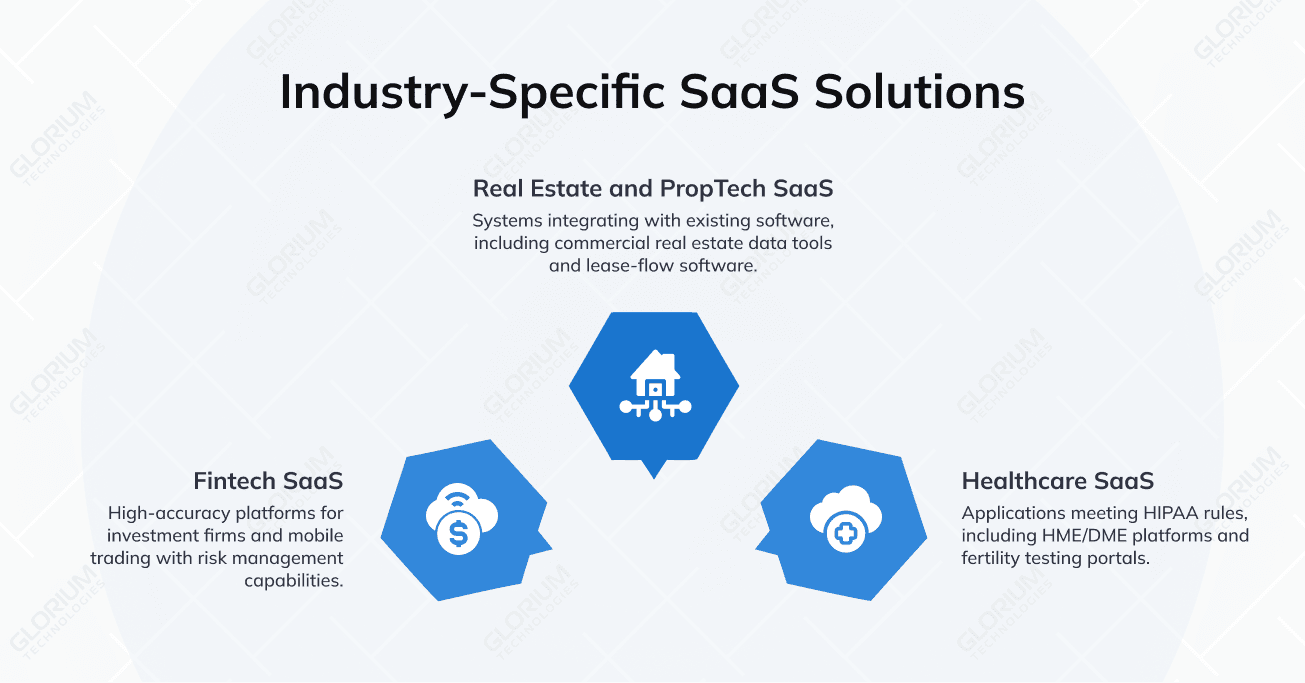
Healthcare SaaS
Healthcare SaaS applications must meet HIPAA rules from the first release. Since 2014, Glorium Technologies has partnered with a US software provider on an all-in-one platform for HME/DME suppliers. The team built billing for three payer types, real-time inventory tracking, patient records, order flow, and a mobile delivery app. For fertility startup Turtle Health, we delivered patient, provider, and admin portals that doubled operational speed by keeping all data in one place. Explore our healthcare software development services for more examples.
Real estate and PropTech SaaS
Real estate clients need SaaS applications that plug into the systems they already run. Beyond the Control.IT collaboration app and the renovation MVP described above, our real estate portfolio includes data-driven software for commercial real estate for RealPage FUEL and a lease-flow tool for (Re)Meter.
Fintech SaaS
Fintech SaaS applications demand accuracy, audit trails, and speed with large data volumes. For global investment firm Old Well Partners, Glorium Technologies built a data platform on a Django REST microservices architecture. The system sped up data collection and laid the groundwork for AI-driven forecasting. Through our fintech software development services, we have also delivered a mobile trading and risk management app for Scouras Consulting.
Launch Your SaaS Product with Glorium Technologies
Every decision covered above connects to the next one. Your pricing model shapes the database, your architecture sets hosting costs, and your team decides how fast you can respond to the first paying customers. A partner who has already made these calls on live SaaS products shortens the path to revenue and lowers the cost of every release after launch.
Glorium Technologies is a full-cycle software development company founded in 2010 and headquartered in Houston, with offices in Poland, Cyprus, and Ukraine. We have delivered 150+ products, keep a 99% client satisfaction rate, and appeared on the Inc. 5000 list of America’s fastest-growing private companies four years in a row (2020–2023). Our SaaS development services help founders build SaaS apps in three ways:
- MVP for startups from scratch: Validate your SaaS idea and reach paying users with minimal upfront investment
- Project-based development: SaaS product development for an existing platform, from new modules and integrations to a full rebuild, with a fixed scope
- Outstaffing: Extend your team with dedicated SaaS developers who follow your processes
Our deepest domain experience sits in healthcare, real estate, and fintech, where SaaS solutions must handle strict compliance rules and complex data flows. Whether you are planning SaaS app development for a first release or modernizing a mature platform, successful SaaS application development starts with a clear plan. Contact us for a free consultation, or estimate your project in a few minutes.
FAQ
What is the difference between SaaS, PaaS, and IaaS?
IaaS rents raw computing resources such as servers, storage, and networks. PaaS adds a managed environment for building and running code. SaaS (software as a service) is the finished application that end users log into. Most SaaS products run on top of IaaS or PaaS from one of the major clouds. Glorium Technologies typically builds SaaS platforms on AWS, Microsoft Azure, or Google Cloud, picking the layer by how much infrastructure control the product needs.
Can I turn my existing on-premise software into a SaaS product?
Yes, though a simple “lift and shift” to the cloud rarely delivers SaaS economics. Most teams refactor the application for multi-tenancy, add subscription billing and self-service onboarding, and automate deployments. A phased migration lets current customers keep working during the transition. Glorium Technologies can start with a technical audit of your codebase to decide which modules to refactor first.
Should I choose single-tenant or multi-tenant architecture?
Multi-tenant setups cost less to run and update, so they suit most B2B and B2C SaaS solutions. Single-tenant deployments make sense when enterprise or healthcare buyers require dedicated infrastructure for compliance. Many platforms offer both, with single-tenant hosting sold as a premium plan. Glorium Technologies helps clients make this choice during discovery, based on compliance requirements and target buyers.
How long does it take to build a SaaS application?
Timelines depend on scope, integrations, and team size. A focused MVP can take a few months, while complex platforms with many integrations often take a year or longer. For reference, Glorium Technologies brought the renovation management MVP described above to investor-ready status in eight months.
Who owns the source code when I outsource SaaS development?
With a reputable provider of SaaS development services, you do. Your contract should transfer intellectual property rights for all code, designs, and documentation to your company. You should also hold admin access to repositories and cloud accounts from day one. Glorium Technologies can sign an NDA before your first technical discussion.
Which metrics should I track after launching a SaaS product?
Start with monthly recurring revenue (MRR), churn rate, customer acquisition cost (CAC), and customer lifetime value (LTV). Net revenue retention shows whether existing customers expand over time. Pair these business metrics with in-app analytics for SaaS apps, such as activation rate and feature adoption. Glorium Technologies can build these dashboards into your admin panel during MVP development.
About Hanna Reshetniak