







Azure vs. AWS AI in 2026: Which Platform Fits Your Use Case?
Updated February 27, 2026

 Summarize in ChatGPT
 Summarize in ChatGPT
Microsoft Azure AI and AWS AI sit at the center of most 2026 cloud roadmaps. Artificial intelligence (AI) is becoming part of more business and engineering workflows, and machine learning (ML) is moving from small experiments to systems that need clear governance, security, and cost control.
The market numbers explain why cloud AI keeps gaining attention. In Q2 2025, cloud infrastructure spending was close to $99B, up about 25% year-over-year (YoY), with AWS at 30% share, Azure at 20%, and Google Cloud at 13%. Azure and Google also grew above 30% YoY in that quarter, while AWS grew about 17%, which changes the competitive picture. GenAI-specific cloud services also grew an estimated 140–180% in the same quarter, which is pulling budgets toward AI platforms even faster.
This guide compares AWS AI vs. Azure AI for 2026 planning, focusing on what matters in practice: platform capabilities, pricing patterns, and where each one fits best across healthcare, finance, retail, and manufacturing.
Content
Teams usually mix several components of the Azure ecosystem, depending on the job: custom ML, ready-made APIs, generative AI features, AI agent tooling, and a strong data layer. Below, you can see its core components.
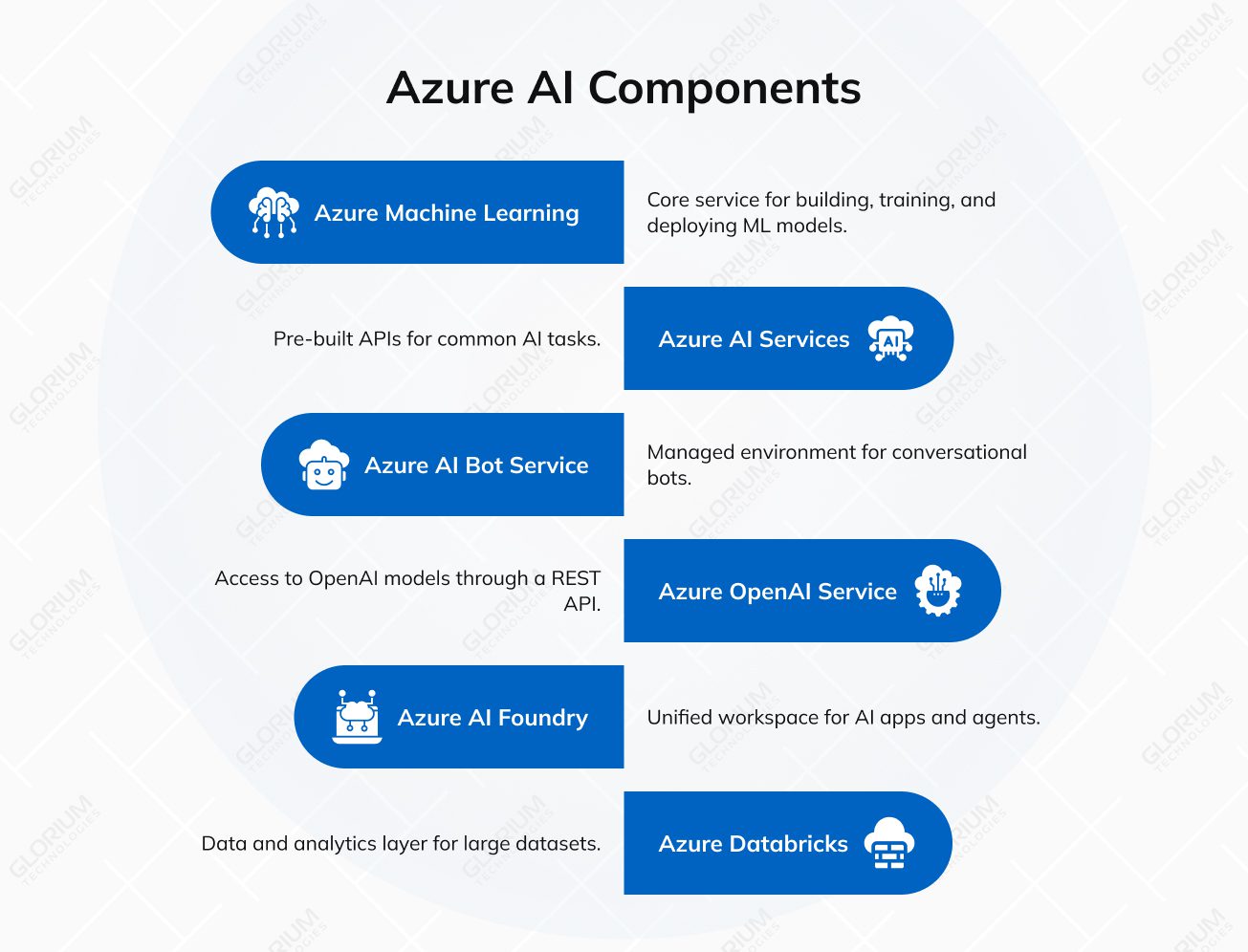
Azure ML is the core service for building, training, and deploying machine learning models. The platform provides Azure developers with the tools needed for end-to-end pipelines, automation, and CI/CD, enabling teams to ship models with repeatable processes.
Azure AI Services (formerly Azure Cognitive Services) offers pre-built APIs for common tasks. That includes speech (translation, transcription, conversational AI), vision (image and video analysis, OCR), language (sentiment, summarization, conversational understanding), and decision services (anomaly detection, content moderation, recommendations). This layer is often the fastest path when you need “good enough” AI features with a clear scope.
Azure AI Bot Service is a managed environment for conversational bots. It integrates with Microsoft Copilot Studio, which supports low-code agent building and quicker AI deployment for typical chatbot scenarios. In practice, teams use it when they want channels, identity, and operations to stay in Azure.
Azure OpenAI Service provides access to OpenAI models through a REST API. Teams use it for text generation, code support, and image generation without training an advanced AI model from scratch. When you move from a feature demo to a real product, the work usually shifts to product steps like data readiness, UX, safety checks, and scaling — the same path we describe in our guide on how to build an AI product in 2026.
Azure AI Foundry (previously Azure AI Studio) is a unified workspace for AI apps and agents. It brings models, tools, and frameworks into one place, and it supports development and launch in a modular setup. It is often the “hub” when you combine prompts, evaluations, and deployments in one workflow.
Recently, Azure AI Foundry added a few models that are useful for specific production tasks:
“Over 70,000 customers are using Azure AI Foundry to bring AI into their organizations. Over 10,000 have already used the Azure AI Foundry agent service.”
Yina Arenas, Corporate Vice President, Microsoft Foundry
Azure Databricks is the data and analytics layer that many teams use for large datasets. It supports collaboration across engineering and data science, and it connects well with Azure AI Services for near real-time analytics and AI-driven insights.
AWS offers a large AI and ML stack designed for teams that need strong infrastructure options and tight integration with core cloud services. In practice, AWS AI usually combines a managed ML platform, a set of ready-made AI APIs, and GenAI tooling for building applications and assistants.
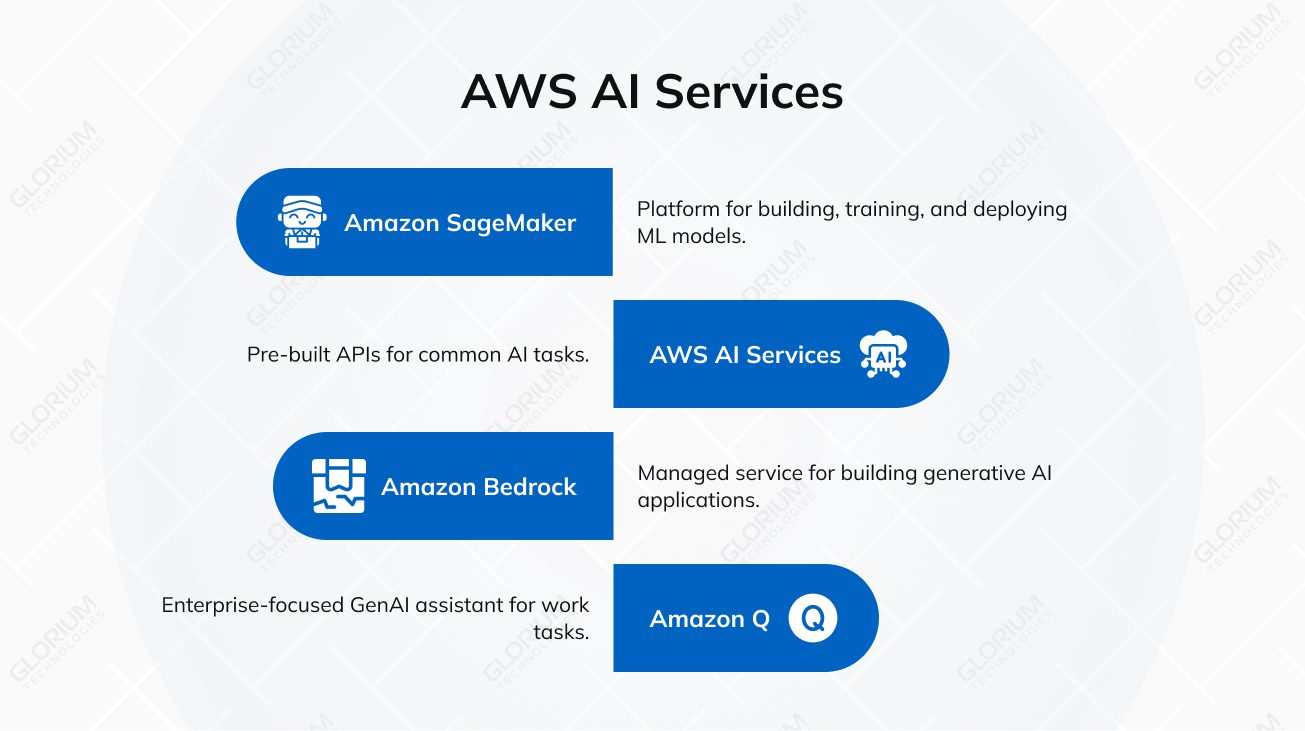
Amazon SageMaker is AWS’s main platform for building, training, and deploying ML models. Teams use it to manage the full ML lifecycle in one place, including data prep, training jobs, model hosting, and monitoring. It’s a common choice when you need repeatable MLOps and the ability to scale training and inference without reinventing your own tooling.
AWS AI Services are pre-built APIs for common AI tasks. They’re often used when AWS developers need to add language, vision, or speech features quickly, without training models from scratch. Typical examples include:
Amazon Bedrock is AWS’s fully managed service for building generative AI applications. It provides access to multiple foundation models through a single API, so teams can choose models based on quality, cost, latency, and context length. Bedrock is often used for RAG systems, summarization, content generation, and agent-style workflows, with customization options depending on the model and use case.
In December 2025, Amazon Bedrock highlighted a major drop of 18 fully managed open-weight models. Here are a few notable additions and the types of workloads they support:
Amazon Q is an enterprise-focused GenAI assistant designed to support work across development and business tasks. Teams use it for help with coding, documentation, analysis, and finding answers in internal knowledge sources. In real deployments, the value comes from connecting Q to the systems employees already use and applying access controls so responses align with permissions and governance rules.
This section compares Azure AI and AWS AI across ML platforms, pre-built services, generative AI, and developer tooling, so the key differences stay clear.
Azure Machine Learning and Amazon SageMaker both cover the full ML lifecycle, but they differ in how teams work day to day and how deeply each integrates with its broader cloud ecosystem. Azure ML is usually quicker to adopt for mixed-skill teams because its workflow is more guided. SageMaker often appeals to experienced data science and platform teams that want deeper control and don’t mind a more hands-on setup.
Both platforms provide ready-to-use APIs for vision, speech, language, and decision use cases. The choice usually comes down to how quickly you need to ship, how much control you want, and which cloud ecosystem your applications already depend on.
Both platforms help teams build and ship GenAI features in a controlled, enterprise-ready way. The practical differences usually come down to which models you want access to, how you prefer to develop and evaluate prompts, and how tightly the GenAI layer needs to connect to the rest of your cloud stack.
Tooling matters because it shapes how quickly teams can experiment, evaluate, and ship. Azure AI Foundry and SageMaker Studio both support notebooks and end-to-end workflows, but they feel different in day-to-day use, especially once multiple teams need to collaborate.
The simplest way to compare Azure AI and AWS AI is to look at how each platform behaves in real delivery. AWS typically emphasizes model choice and cloud-native building blocks, while Azure often emphasizes enterprise rollout inside the Microsoft ecosystem. Here’s a quick snapshot to make the differences easy to scan.
| Feature | AWS (Amazon Web Services) | Microsoft Azure |
| Core approach (GenAI layer) | Model choice via one API. Bedrock gives access to multiple foundation model providers in one place. | Workspace + managed model access. Azure AI Foundry is the workspace; Azure OpenAI provides OpenAI models, and Foundry also expands model options beyond OpenAI. |
| Best fit | AWS-first teams, cloud-native products, and teams that want flexible model options. | Microsoft-centric enterprises using Entra ID, Microsoft 365, and Azure-native governance. |
| Flagship GenAI service | Amazon Bedrock (managed GenAI service and model access). | Azure OpenAI Service (with Azure AI Foundry as the build workspace). |
| Machine learning platform | Amazon SageMaker for ML lifecycle, training, deployment, and MLOps. | Azure Machine Learning for ML lifecycle, MLOps, and Azure-native integration. |
| Pre-built AI APIs | AWS AI Services like Comprehend, Rekognition, Polly, Lex. | Azure AI Services (formerly Cognitive Services) for vision, speech, language, decision APIs. |
| Hardware options | Purpose-built chips for efficiency: Trainium (training) and Inferentia (inference). | NVIDIA-accelerated infrastructure for AI workloads (including H100-class options depending on region/availability). |
| Pricing model (GenAI) | Mostly usage-based; Bedrock supports batch pricing discounts for some models. | Usage-based plus Provisioned Throughput Units (PTUs) for steadier, more predictable throughput. |
| Day-to-day delivery | Very flexible and configurable once AWS foundations are mature. | Often faster adoption |
Big platforms might look abstract and overwhelming until you see how companies apply them. These examples show what the stack looks like day to day, which services are used, and what outcomes teams report.
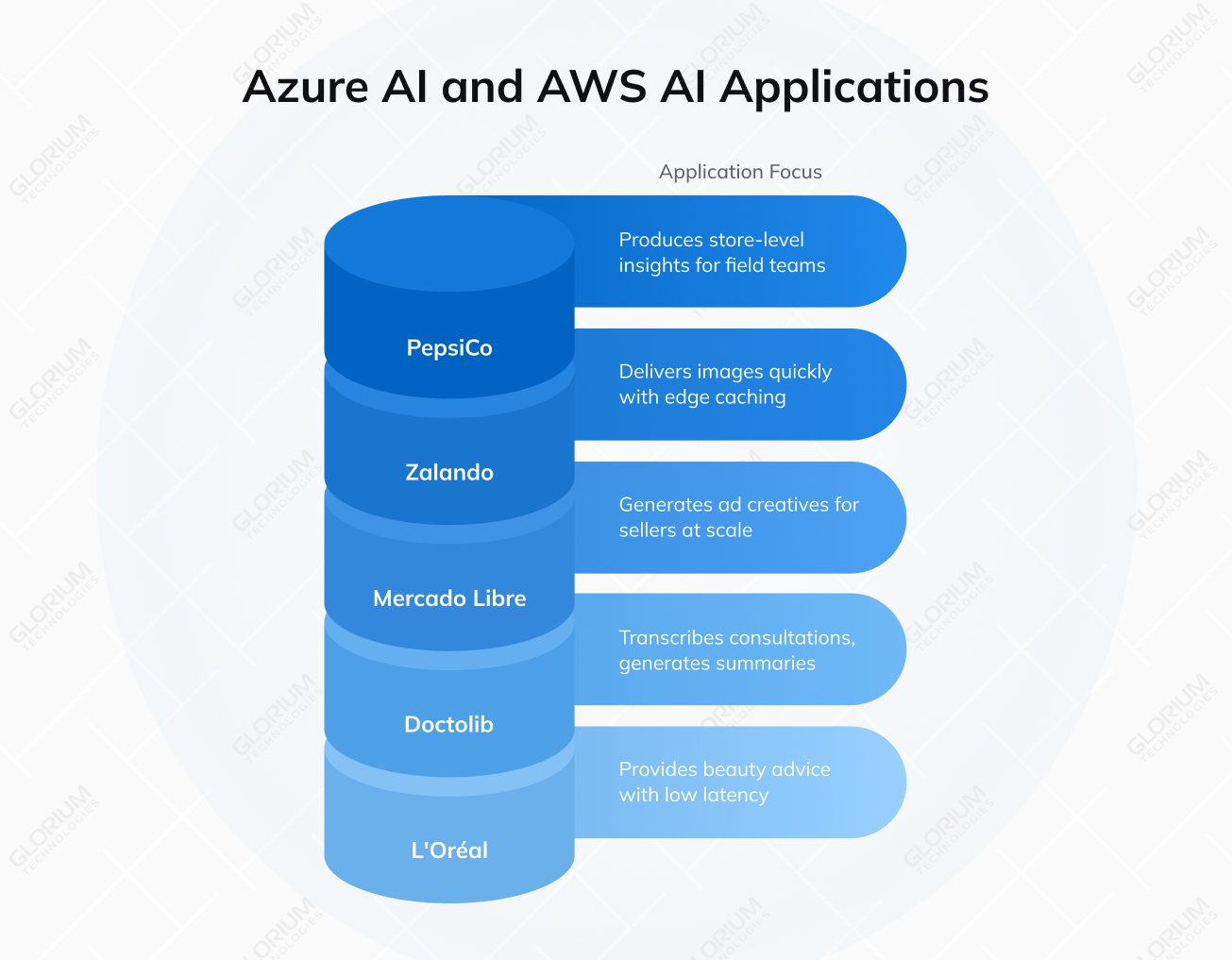
L’Oréal built Beauty Genius, a customer-facing beauty assistant on Azure OpenAI Service. The solution is designed for high concurrency, with the customer story highlighting low-latency responses and global scale. In real life, this usually means a front-end experience tied to controlled prompts, brand knowledge, and privacy safeguards that fit enterprise requirements.
Mercado Libre launched GenAds, powered by Amazon Bedrock and Stability AI, to generate ad creatives for sellers. The case describes a rollout across multiple countries, with creatives produced at scale and refreshed frequently. Reported results include 45% more impressions and 25% higher click-through rates, showing how GenAI can plug into commerce workflows without custom model training.
Zalando moved image delivery to Amazon CloudFront and added edge capabilities with CloudFront Functions and Lambda@Edge. In practice, this enables fast image resizing, routing, and caching close to users, improving load times and reducing origin load. AWS reports a 99.5% cache hit ratio and delivers around 5 billion images daily, with peak traffic exceeding 100,000 requests per second.
PepsiCo used Azure Machine Learning to build predictive models that produce store-level insights for field teams. The outputs guide daily store actions, using data-driven prioritization rather than manual analysis. Microsoft describes this as a practical ML deployment focused on operational decisions and repeatable model delivery.
Doctolib built a medical assistant using Azure OpenAI Service that transcribes consultations and generates structured summaries. The workflow keeps clinicians in control, since practitioners review and validate the content before it becomes part of the medical record. Microsoft reports that summaries are produced in about 15 seconds, demonstrating how GenAI can reduce documentation time while maintaining a human verification step.
Services and tooling are only part of the decision. The bigger differences show up when you run models at scale, connect them to enterprise systems, and keep cost and compliance under control.
Both platforms scale well, but they scale in slightly different ways. Azure leans on its global footprint and managed services, and Azure Machine Learning can tap into high-performance compute for training and deployment. For GenAI, Azure OpenAI is a common route when teams want OpenAI models within Azure’s enterprise boundaries.
AWS is built around large-scale infrastructure patterns and offers multiple paths to optimize model training and inference. SageMaker covers a wide range of ML workflows, and AWS also provides hardware options, including purpose-built chips for inference and training, which can support performance and cost planning.
Azure AI typically fits neatly when your organization already relies on Microsoft identity and governance. Azure’s security stack and identity integrations make it easier to enforce access policies, auditing, and data boundaries across teams, which matters in regulated environments.
AWS offers a similarly strong security foundation with mature services for threat detection and data protection. If your governance model is already AWS-native, it can be straightforward to extend existing IAM and network controls to AI workloads.
If you live in the Microsoft ecosystem, Azure AI often feels like the faster path to integration. It connects naturally to Microsoft 365, Power Platform, and Azure Databricks, which can simplify rollout across business teams and data platforms.
AWS AI typically shines when your application backbone is already built on AWS primitives such as S3, Lambda, and EC2. It also tends to be flexible for cloud-native architectures that mix open-source components and third-party tooling.
Both platforms are mainly pay-as-you-go, but the real cost story is driven by usage patterns. For GenAI, token-based pricing can swing quickly based on prompt size, retrieval design, and output length. Azure offers provisioned capacity options (PTUs) for steadier workloads, while AWS offers provisioned throughput options for certain scenarios and services. In both cases, teams usually see the biggest savings from good architecture choices: caching, batching, and controlling retrieval scope.
Azure often reduces friction for teams that want guided workflows, templates, and a consistent UI across services. That can help when your AI work includes developers, analysts, and platform teams working together.
AWS tends to reward teams that are comfortable with deeper configuration and AWS-native building blocks. The learning curve can be steeper at the start, but experienced AWS teams often appreciate the flexibility and the breadth of options once the foundation is in place.
Glorium Technologies brings 15+ years of software engineering experience, a team of ~200 specialists, and 150+ delivered products. Our delivery approach is backed by ISO 9001 and ISO 27001 certifications, and we also hold ISO 13485 for medical device quality management. We are an AWS Select Tier Partner, which helps when your roadmap depends on public cloud services and regulated workloads.
If you want a concrete example of how Glorium Technologies applies AI in regulated healthcare, check out our mammography analytics for enhanced breast cancer detection case study. For this client, Glorium Technologies built a cloud-based mammography analytics solution that supports breast cancer detection workflows. The platform processes medical imaging data, applies AI models to generate clinician-ready insights, and is designed with the controls and documentation expected in regulated healthcare environments.
Explore our case studies to see how we build AI solutions in real projects. Reach out to us, and let’s map your AI journey from first build to early traction.
We map each use case to the platform capabilities that matter in production: data access patterns, latency and throughput needs, security boundaries, model lifecycle requirements, and how your teams already operate. We also look at the AI infrastructure you already have and the scope of AI deployment you target, including multi-step AI workflows such as RAG, automation, and an AI agent for internal tasks. Then we compare Azure AI and AWS AI against your constraints, including identity setup, compliance expectations, and integration with existing systems. With 15+ years in custom software delivery, we focus on the option that will stay stable and cost-effective after the pilot stage.
The more concrete the inputs, the faster we can give you a confident recommendation. The most useful items are your target use cases, data sources, and sensitivity (PII/PHI, retention needs), expected traffic and SLAs (real-time vs. batch), current cloud footprint and tooling (Microsoft stack, AWS accounts, CI/CD, observability), and your security requirements (IAM model, network boundaries, audit needs). If your scope includes image and video analysis (for example, Azure Computer Vision) or search-based AI features (such as Azure Cognitive Search), include those details too. For GenAI, share expected usage patterns and pricing models, plus any plans for fine-tuning or custom model training, and the preferred model provider. If you require customer-managed encryption keys, we factor that in from day one.
Yes. We build a TCO model based on how your GenAI feature will be used, including input and output tokens, caching, batch options, and throughput requirements. We compare Azure OpenAI pricing models with AWS Bedrock options and the surrounding costs that drive real spend: retrieval/RAG, storage, logging, monitoring, and network. If your plan uses foundation models from multiple models or a specific model provider, we include those assumptions and show what changes the cost the most.
Even with strong compliance programs, it’s smart to minimize exposure. In practice, we recommend avoiding the use of raw credentials, private keys, and internal tokens. You should also be cautious with highly sensitive personal or regulated data (PHI, financial identifiers, full customer records) unless you have a clear legal basis, strict access control, and a defined retention policy. We also apply controls for auditability and retention, especially when you run AI projects that include conversational AI or external-facing AI features. For image use cases, we scope what is sent for image and video analysis, such as Azure Computer Vision, and apply strict access rules.
Glorium Technologies sets up a repeatable evaluation flow before launch. We define a fixed test set, clear scoring metrics, and version control for prompts and configurations. Then we run structured checks for accuracy, safe refusals, and boundary behavior, and we re-run the same tests whenever you change prompts, retrieval, or models. If you fine-tune models or do custom training, we add drift checks and quality gates across model versions and deployment updates, so releases stay predictable.
For most enterprises, the best long-term setup is a hybrid. A small central team owns standards, security guardrails, shared components, and FinOps. Product squads own the use cases and outcomes, but they build on the shared platform so you don’t end up with dozens of one-off AI solutions. Glorium Technologies helps define responsibilities, workflows, and governance that stay lightweight, so teams can move fast without losing control.
Glorium Technologies adds Google Vertex AI to a Vultr vs. AWS vs. Azure for AI and cloud workloads comparison when you already run key data pipelines on GCP, or when policy, regions, or vendor strategy requires a third cloud. In that case, we review how Vertex AI fits your workflow, including its model garden and Gemini models, plus the impact on integration, governance, and operating cost. We keep it scoped so Vertex AI is included only when it can change the decision in a meaningful way.
Glorium Technologies treats AWS Bedrock vs. Azure AI Foundry as a GenAI workflow choice. Bedrock is AWS’s managed layer for using foundation models through a single API and plugging them into AWS services. Azure AI Foundry is a workspace for building and evaluating GenAI apps and agents, often paired with Azure OpenAI for model access. When comparing Azure AI Foundry to Bedrock, we usually focus on model choice, integration paths, and how you want to handle governance and throughput. This Azure AI Foundry vs. AWS Bedrock comparison becomes much clearer once those constraints are defined.