AI Security Vulnerabilities in SaaS Products: What Teams Miss Before Production
Updated September 7, 2026

 Summarize in ChatGPT
 Summarize in ChatGPT
Somewhere between the pilot and the product roadmap, AI stopped being a feature and became the product. It’s in the support queue, the onboarding flow, the pricing logic, the document parser; it’s becoming a part of SaaS platforms, mobile apps, and enterprise workflows, creating an enormous value, but also changing what product security means.
Traditional software security focuses on infrastructure, code, permissions, APIs, authentication, and access control. Those layers still matter. But AI adds something entirely different: system behavior. On top of executing fixed logic, AI-powered products interpret inputs, classify information, generate outputs, retrieve context, and may influence human decisions.
That means the attack surface is no longer limited to code paths and infrastructure. It now includes prompts, model context, retrieval systems, uploaded files, user interface design, low-confidence outputs, and the way users interpret AI-generated results.
What’s at stake when these gaps go unaddressed was the central question of Glorium Technologies’ webinar, “AI Security Vulnerabilities Inside Digital Products,” hosted by Maksym Ostrovskyi, Senior Project Manager and AI solutions expert at Glorium Technologies, with guest speaker Asna Khan, Head of Product at FIT:MATCH. The webinar focused on real-world AI security risks, guardrail design, and architecture decisions for AI-powered SaaS and digital products.
This article covers the main AI security vulnerabilities product teams need to understand before scaling AI features: what changes when AI enters the product architecture, where teams usually underestimate risk, and how to build practical guardrails across product, UX, engineering, and QA.
Content
In classical software, a product usually follows predefined logic. A user clicks a button, submits a form, opens a record, or triggers an API request. The system checks permissions and returns an expected result. AI changes this pattern.
An AI-powered product can receive broad natural-language instructions, interpret ambiguous input, retrieve information from multiple sources, synthesize answers, and produce a response that looks authoritative. This is powerful, but it also means that the product can behave in ways that are harder to predict and harder to test through standard QA alone.
As Asna Khan, Head of Product at FIT:MATCH, explained during the webinar:
“AI changes a product from a system of fixed roles into a system that can interpret, classify, generate, or predict.”
The core security question also changes. It is no longer only: Can someone break into the system? It becomes: Can someone manipulate the system into producing the wrong output, exposing the wrong context, taking the wrong action, or making users trust something they should question?
That is why AI security should be treated as a product architecture issue, not only as a model issue.
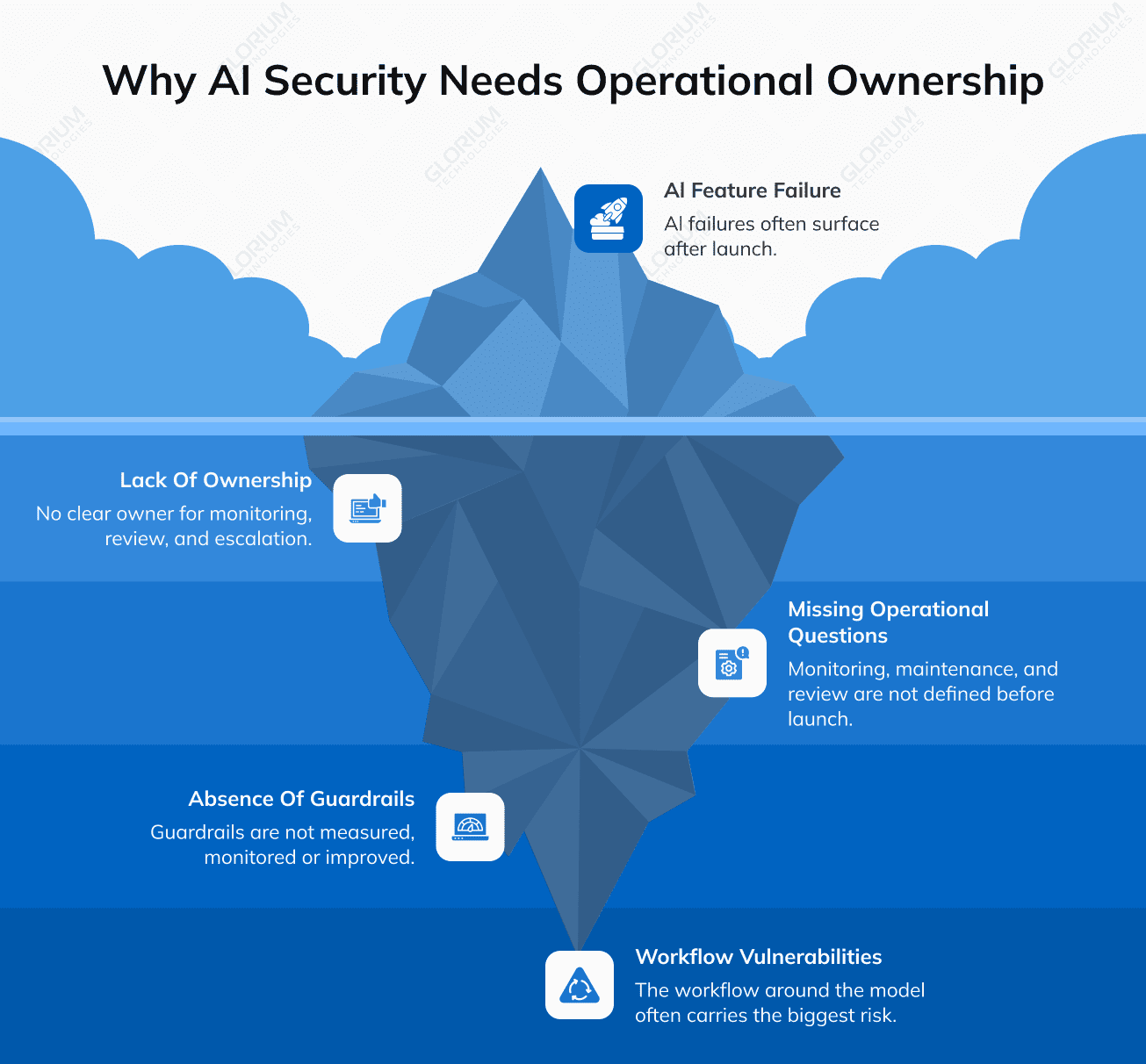
Of course, the model matters, but in production, many AI risks appear in the workflow wrapped around the model: what data the system collects, what context the model receives, how permissions are applied, how outputs are shown, how low-confidence cases are handled, and who owns the operational monitoring after launch.
AI security vulnerabilities often appear across several product layers at once. A SaaS team may have strong cloud infrastructure, solid API security, and standard role-based access control, and still introduce risk by adding AI without redesigning the workflow around it.
For product teams, the most important AI vulnerabilities usually fall into five groups.
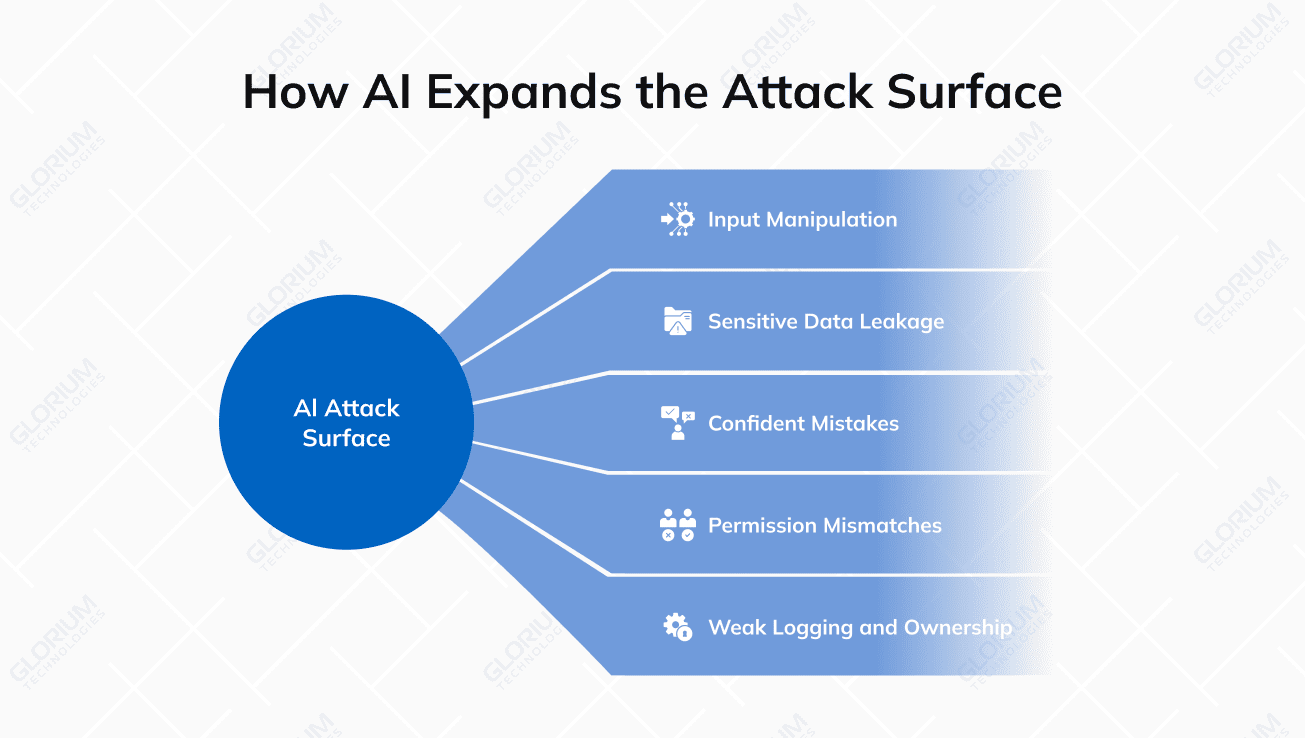
AI systems are deeply dependent on input quality. In text-based AI systems, attackers may try to manipulate the model through prompt injection, hidden instructions, malicious wording, uploaded files, or external content.
In a SaaS AI assistant, this could look like a user trying to override the system instruction, extract hidden prompts, retrieve unauthorized context, or make the AI ignore its intended workflow.
In vision AI, the manipulation surface is different. The risk can come from lighting, camera angle, blur, pose, clothing, framing, edited images, or poor capture conditions.
The user may not even act maliciously. A poor-quality input can still lead to a poor-quality output. From a product perspective, both intentional manipulation and accidental bad input matter because both can create unreliable results.
This is why AI security cannot be separated from input design. The product has to help users create inputs that the model can process safely and reliably.
One of the most underestimated AI security vulnerabilities is prompt-based data leakage.
Many teams still treat prompts as casual text. In reality, once a prompt includes customer data, internal documentation, system instructions, partner records, or business logic, it becomes part of the security boundary.
A data leak in an AI product does not always happen because a database permission failed. It can happen because the model was given more context than it needed.
For example, an AI assistant may receive a full customer profile when it only needs one field. A retrieval system may pull internal documentation into the model context even though the current user should not access it, resulting in prompts or responses being stored in logs without the right data-handling policy.
The key principle is data minimization. The model should receive exactly the information it needs to complete the task — not the largest possible context window, not the full record, and not everything that might be useful “just in case.”
Before launching an AI feature, teams should ask:
If these questions are answered only after production, the product is already carrying avoidable risk.
Traditional software tends to fail in ways that announce themselves: broken APIs, missing pages, validation errors that stop the user in their tracks.
AI, on the other hand, is subtle when it comes to failure. It can produce an answer that is wrong, irrelevant, or unsafe, but still sounds fluent, confident, and complete. That makes the failure harder to detect and easier to trust.
This is one of the most important differences between deterministic software and probabilistic AI systems. A model can generate a plausible answer even when it lacks the right context, receives poor input, or operates outside the intended workflow.
For example, during the webinar, Maksym described a practical product scenario: an AI workflow built for sales could answer an unrelated weather question with full confidence. The system technically responds, but the response does not belong inside that workflow. That is not just a content issue. It is a product behavior issue.
If the AI feature is used for low-risk tasks, such as playlist recommendations, the cost of a wrong answer may be low. But if AI influences healthcare workflows, financial decisions, athlete performance insights, enterprise compliance, or customer operations, the product needs stronger validation, fallback paths, user guidance, and human review.
The question is never whether the model is “good overall” — it’s what level of accuracy, confidence, and explanation this specific use case actually requires.
Permission mismatch is one of the most dangerous AI vulnerabilities in SaaS products. In traditional SaaS, permissions are usually attached to screens, records, APIs, and user roles. A user can open certain pages, see certain records, and perform certain actions.
With AI, the interaction becomes broader. A user can enter a query such as:
If the AI assistant retrieves information from several systems, summarizes across records, or triggers actions, permissions must be enforced at retrieval time and action time. Otherwise, the AI layer can become a shortcut around the product’s access controls.
The rule is simple: the AI assistant should not know more than the user is allowed to know. This sounds obvious, but it is easy to miss when teams add AI as a feature layer on top of an existing product instead of rebuilding the permission model around AI workflows.
Many AI features fail not because the model is unusable, but because nobody owns the system after launch.
Founders and product teams often ask: Can we add AI? Instead of asking:
This operational layer separates a demo from a production product.
A prototype proves that AI can create value in a controlled environment. Production proves that AI can create value with real users, messy data, edge cases, security boundaries, and ongoing monitoring.
Without logging, alerting, and ownership, teams cannot see whether their guardrails are working.
This is why Asna Khan emphasized that AI risk is often not isolated inside the model itself:
“The biggest vulnerability is often not the model. It is the workflow wrapped around the model.”
For SaaS teams, that is one of the most important mindset shifts. AI security is not only about choosing a safer model. It is about designing the full workflow around data, permissions, outputs, user decisions, and operational response.
Text-based AI and vision-based AI require different security thinking. In text systems, adversarial inputs usually happen through language. A user may try to override instructions, manipulate the model, extract hidden prompts, or force the system to reveal sensitive context.
In vision systems, the attack surface is more physical and environmental. A poor scan, bad lighting, incorrect pose, blur, cropping, wrong height information, or edited image can affect the model output. That means vision AI needs a different type of guardrail.
It needs capture guidance, quality checks, recapture flows, and clear user instructions. Sometimes, the safest product decision is to stop the workflow before a low-quality input becomes a trusted output.
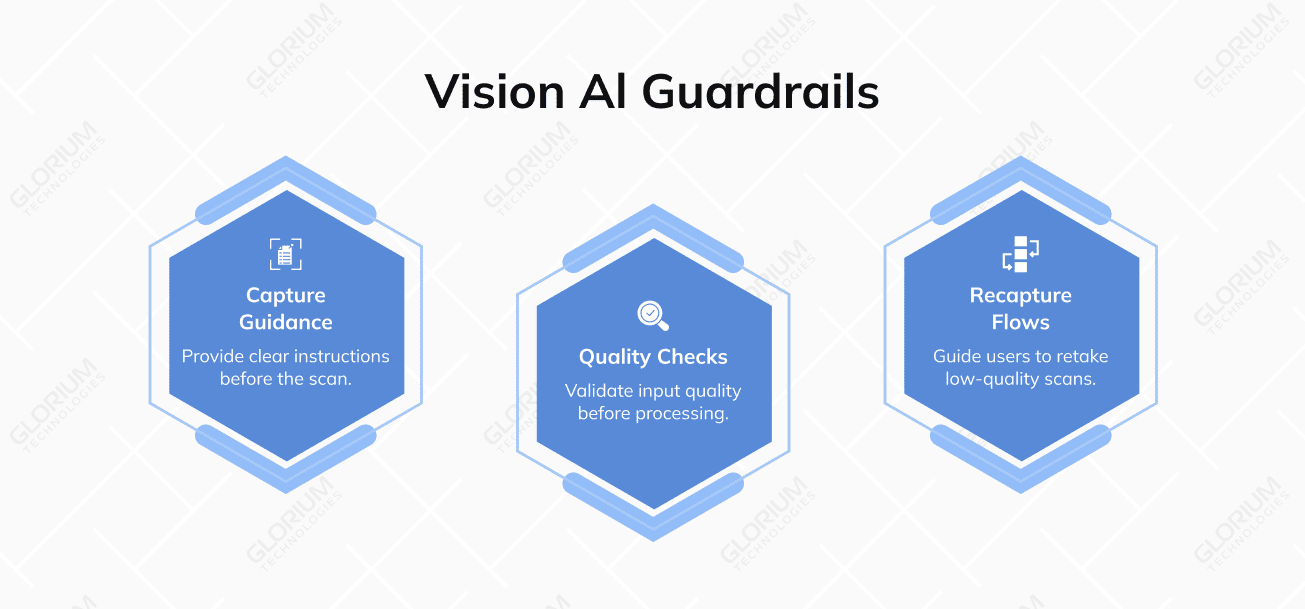
In the webinar, Asna Khan shared a practical example from computer vision products: if the scan quality is not high enough, the product should guide the user to retake the scan instead of showing a result that may look precise but is not reliable enough for the intended use.
This matters because the risk is not only a bad image. The real risk is downstream: a coach, clinician, partner, or business user may make a decision based on an output that looked credible but came from weak input. For vision AI, UX is not decoration. It is part of the risk control system.
A common mistake is thinking of guardrails as one final filter added after the model response. In production, guardrails are not one layer.
As Asna Khan put it:
“Guardrails are not one filter added at the end. They are a system of decisions across the entire experience.”
In practice, AI guardrails should start with clear use-case boundaries:
Once these use-case boundaries are defined, they need to be translated into practical controls across the product experience, UX, engineering, QA, and operations. This is where AI guardrails become more than a policy statement: they become specific product behaviors, technical rules, monitoring processes, and response paths that help the system behave safely in real-world use.
A practical AI guardrail system usually includes three groups of controls: Blocking controls, detection controls, and response controls.
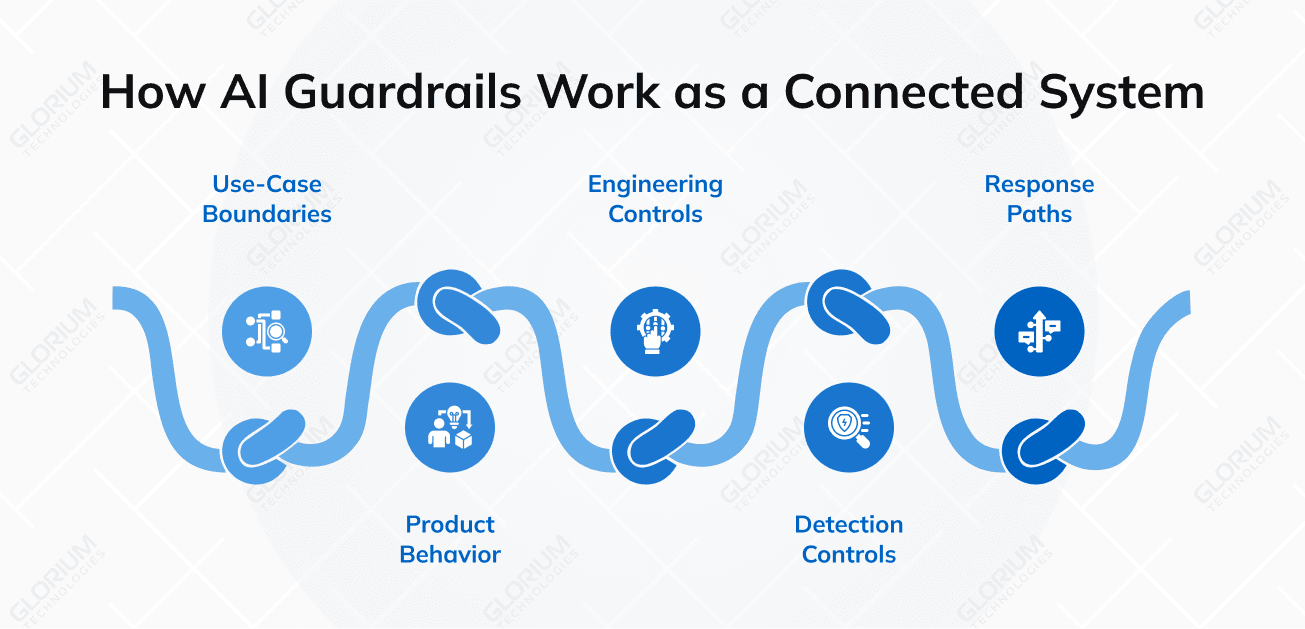
Blocking controls limit what the AI can access, process, or do. For example, constrained inputs, role-based retrieval, action permissions, data minimization, restricted tool access, refusal logic, and workflow boundaries.
For vision AI, blocking controls may include scan quality gates, recapture flows, or hiding metrics when the input is not reliable enough. For text AI, however, they may include prompt boundaries, retrieval filters, output validation, and restrictions on external tool use.
Detection controls help the team identify when something is going wrong. For example, confidence scoring, anomaly detection, prompt and response logging, model evaluation, red-team testing, user feedback loops, and alerts for unusual behavior.
Detection is especially important because AI failures may not look like classic software failures. The system may still produce a polished answer even when the answer is wrong.
Response controls define what happens after a risk signal appears. For example, fallback logic, human review, user re-guidance, issue escalation, temporary feature limitations, model rollback, or changes to the retrieval scope. This layer is often missing in early AI products. Teams build the AI flow, but they do not define what happens when the AI cannot safely complete the task.
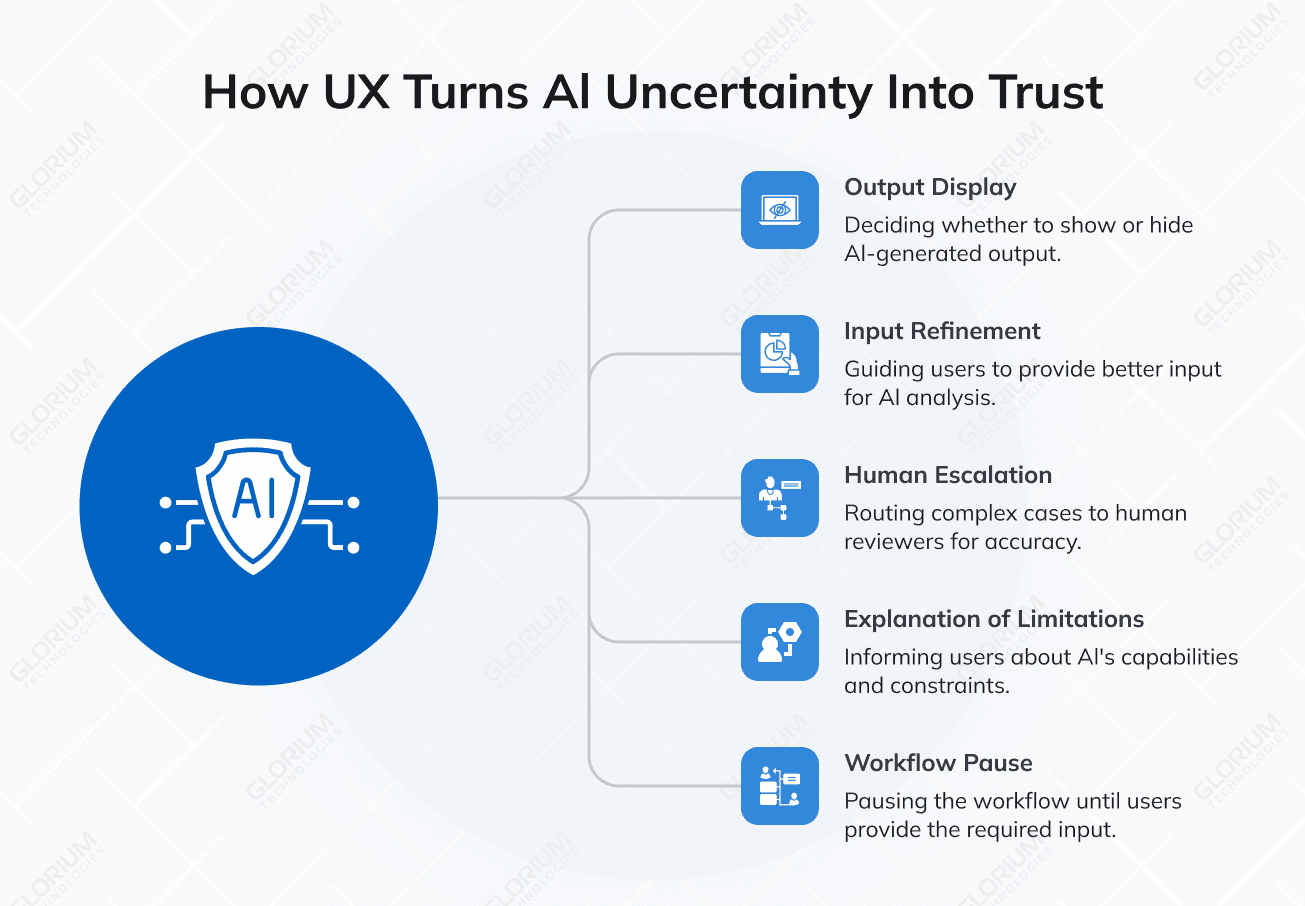
Many teams assume AI guardrails belong mostly to backend engineering. Backend controls are critical, yes, but UX often carries more security weight than teams expect. A technical system may detect low confidence, but UX decides what the user sees next.
Some UX decisions carry heavier security and business consequences, including:
A good AI UX does not make the product feel broken. It gives the user a clear next step.
Instead of “We cannot process your request,” a well-designed AI product tells the user something actionable: that the image is too dark for reliable analysis and needs to be retaken in better lighting, that the answer requires data outside their access level and they can request permission or work with what’s available, or that confidence is too low for automated completion and the case has been routed for review.
That is how UX turns uncertainty into a manageable product experience.
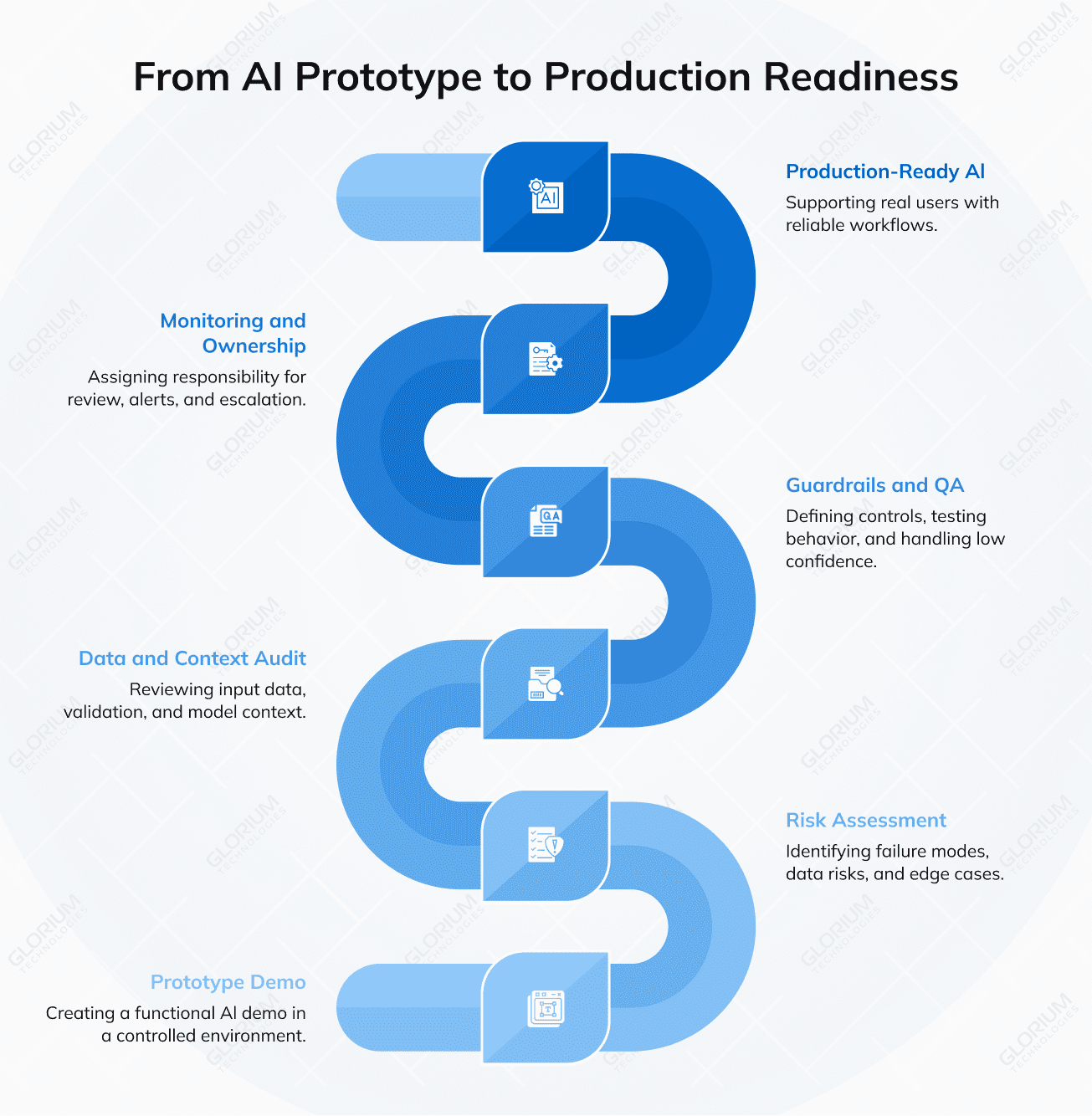
The biggest mistake in AI product development is assuming that because the demo worked, the product is ready. A prototype proves that AI can create value under controlled conditions, but production requires a different level of maturity.
Real users do not behave like test users. Real data is messy: Inputs vary, edge cases appear, partner systems behave differently, prompts change, models drift, users over-trust outputs, and logging gaps become painful.
Before moving from prototype to production, teams should answer the following questions:
For teams that already have AI in production, the fastest improvement usually starts with the input layer. Audit what data enters the system, how it is validated, what context is passed to the model, and where the output goes next.
This is where Maksym Ostrovskyi, Senior Project Manager at Glorium Technologies, highlighted the importance of building a deliberate system around AI interactions:
“We need to build a system around what we provide to AI and what AI provides back to us.”
That idea is central to production AI development. Teams need to understand not only the model output, but also the full flow of data, user intent, system permissions, third-party tools, and business actions connected to that output.
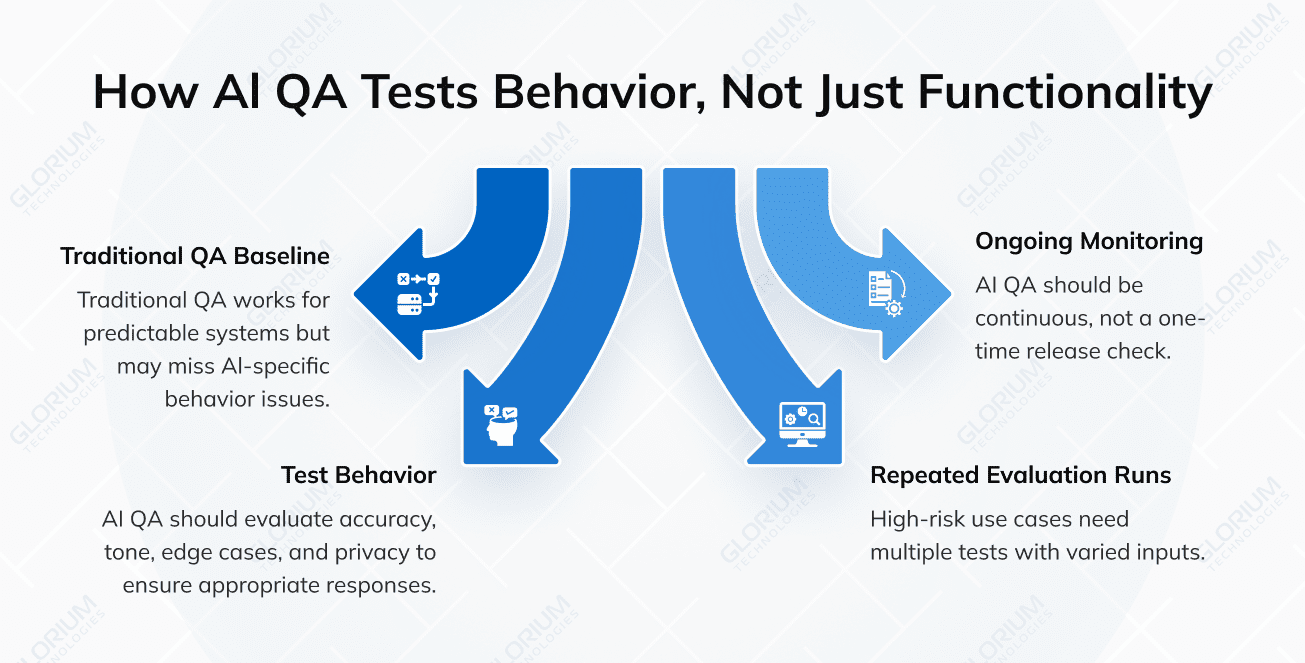
Traditional QA is built for predictable systems where a tester defines input, expected output, and pass/fail logic. But we already know that AI differs from traditional systems, and the QA process is not an exception.
The same prompt may produce slightly different outputs. A model may be technically working but still produce a response that is low quality, misleading, too confident, too vague, or inappropriate for the workflow. That means AI QA has to test behavior, not only functionality.
AI QA should evaluate:
For higher-risk use cases, one test run is not enough. Teams may need repeated evaluation runs across a set of prompts, inputs, personas, and edge cases. The number of evaluation runs should depend on the product’s risk profile.
A customer support AI and a healthcare operations AI do not need the same risk threshold. A playlist recommender and a financial decision-support tool should not be tested with the same level of tolerance. AI QA is not a one-time pre-release checkpoint. It should become an ongoing monitoring loop.
Teams do not need to rebuild the entire product to make meaningful progress. If an AI feature is already live or close to launch, the first improvement cycle can focus on the highest-risk areas.
Start with the data entering the system. Review what users upload, type, scan, or connect. Check whether the product validates input quality before the model sees it. In text systems, this includes prompts, documents, URLs, and retrieved context. In vision systems, this includes capture quality, image conditions, framing, and user-provided metadata.
Then review the context passed to the model. The model should not receive sensitive data unless it is required for the task. If the AI system retrieves information, permissions should be applied before retrieval, not only after the output is generated.
Next, review what the AI is allowed to do. If the AI can take actions, call tools, update records, send messages, or trigger workflows, those actions need clear boundaries and human review where the risk is high.
Then review logging and monitoring. Teams should know what prompts are being used, what outputs are generated, where errors happen, where users get stuck, and where the model shows low-confidence behavior.
Finally, define ownership. AI security is not only an engineering responsibility. Product, engineering, QA, UX, compliance, and support all need aligned responsibilities.
A simple production readiness check can start with these questions:
AI security is not only about choosing the right model. It is about building the right product architecture around the model. Glorium Technologies helps companies design, build, and scale AI-powered products across industries, including AI software development, AI consulting, custom AI agents, machine learning, data science, and digital product development.
If your team is planning an AI feature, moving from prototype to production, or already seeing risks around AI outputs, permissions, data leakage, or workflow reliability, Glorium Technologies can help you assess the architecture, define guardrails, and build a safer path to production.
Need to understand the risks in your AI product before scaling? Book a consultation with Glorium’s AI experts or get a realistic AI project estimate before your next release.
An AI feature is not production-ready just because the demo works. Before launch, your team should understand what data the model uses, what the AI should not do, how low-confidence outputs are handled, how permissions are enforced, and who owns monitoring after release. If these questions are still unclear, the product may need an architecture and risk review before scaling. If you’re asking yourself the questions above, we recommend getting our free AI Feasibility Guide to understand what your AI can and cannot do. And if you need professional consultation, reach out to our experts for a free intro call.
Before adding an LLM, teams should define what business task the AI will support, what data it can access, what it should never reveal or do, how user permissions apply, where prompts and outputs are logged, and how the system handles uncertainty. One specialty insurer we worked with spent the first phase entirely in discovery — mapping data flows and access boundaries before a single line of AI code was written. The AI layer should not become a shortcut around the product’s existing access controls.
No. The model provider is only one part of the system. Security also depends on how your product sends data to the model, what context is included, how permissions are enforced, how outputs are validated, and how users act on AI-generated results. The workflow around the model is often where the most important product risks appear.
If the AI feature is already in production, start by reviewing the current workflow: what inputs enter the system, what context the model receives, what data is stored in logs, how users report issues, and whether low-confidence or risky outputs are monitored. This can help identify quick improvements before deeper architecture changes are planned.
AI guardrails should cover more than final output filtering. A stronger setup includes use-case boundaries, permission-aware retrieval, data minimization, input validation, low-confidence handling, logging, alerting, escalation paths, and human review for higher-risk cases. The right guardrails depend on the use case and the cost of a wrong output.
External help can be useful when a team is moving from prototype to production, handling sensitive data, integrating LLMs into existing workflows, or adding AI to a product with complex permissions. A technical partner, like Glorium Technologies, can help review architecture, data flow, guardrails, UX, QA, and monitoring from an outside perspective.
The timeline depends on the product complexity, data flows, number of integrations, and whether the AI system is already live. A focused assessment usually starts with reviewing the use case, model context, permission logic, user workflow, logging, QA process, and risk ownership. More complex SaaS or enterprise products may require deeper technical discovery.
Glorium Technologies can help product teams review AI architecture, identify hidden risks, design safer workflows, implement guardrails, improve AI QA, and prepare AI features for production. This is especially relevant for companies building SaaS products, AI assistants, internal automation tools, or industry-specific AI systems that need to handle real user data reliably.