How to Build an AI Product in 2026: From Idea to Scalable Business
Updated September 7, 2026

 Summarize in ChatGPT
 Summarize in ChatGPT
The technological ecosystem of 2026 represents a fundamental departure from the exploratory AI phases characterized by the early 2020s. We have transitioned from an era defined by the novelty of generation to an era defined by the utility of agency. The paradigm shift is absolute. Market demands autonomy, reliability, and measurable economic outcomes.
For product leaders, CTOs, and enterprise architects, the objective is to construct AI-native ecosystems where agentic AI solutions serve as the primary drivers of operational execution. This evolution represents a complete rethinking of the technology stack. It is shifting from monolithic databases to semantic ontologies and from cloud-only processing to hybrid infrastructure.
Glorium Technologies has prepared a comprehensive guide about AI development. Let’s investigate common AI product categories, the 7 steps to build an AI product, AI solution development costs, and timelines.
Content
Artificial intelligence products today fall into several broad categories of real-world applications. Key types include:
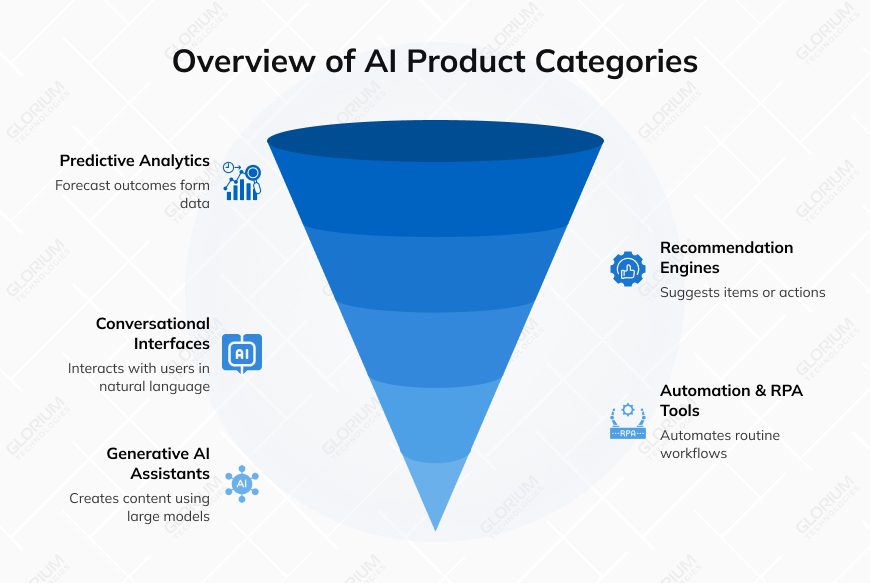
Each category relies on different ML techniques and user interfaces. For instance, chatbots (conversational AI) often use transformer models like GPT, while vision or sensor-based products use deep neural networks in PyTorch/TensorFlow. Choosing the right type depends on your business goal: whether you need real-time automation, personalized suggestions, or creative generation.
A fundamental decision facing every product leader in 2026 is the choice between an AI-Native and an AI-Powered architecture. This distinction dictates the product’s long-term viability, security posture, and competitive moat.
| AI-Powered Products | AI-Native Products | |
| Description | The AI-Powered approach involves taking existing software (a CRM, an ERP, a document editor, etc.) and layering AI features on top. This is the “turbocharger” model: it makes the existing engine faster but does not change the fundamental mechanics of the vehicle. | AI-Native products are built on the premise that AI is the primary user of the system. The database is not just an SQL store but a Vector Database designed for semantic retrieval. The UX is not a static dashboard but a dynamic interface generated on the fly by the agent. |
| Characteristics | These systems typically use remote APIs to process data, often sending sensitive information outside the corporate firewall. They rely on data schemas designed for human data entry (forms, fields) rather than machine learning (vectors, embeddings). | These systems often host models locally or in a private cloud (VPC), ensuring data sovereignty. They use “Ontologies” (rich maps of business concepts) to give the AI deep context about how data points relate (e.g., understanding that a “Customer” is also a “Plaintiff” in a legal context). |
| Advantages | While faster to deploy, these solutions hit a “complexity ceiling”. They struggle with context because they view data through the narrow lens of the current screen or form, lacking the holistic “memory” of the entire business context. They are “assistive” rather than “agentic”. | AI-Native companies report significantly better economics. Because the value is intrinsic and the product often “does the work” rather than just helping the user, conversion rates from trial to paid are nearly double that of traditional SaaS (56% vs 32%). They capture the “Unit of Value” (the completed task) rather than just the “Unit of Time” (the software subscription). |
“I view good UX as the ergonomics of artificial intelligence. For decades, we’ve perfected the physical ergonomics of tools like chairs and power drills. At day one of figuring out the ergonomics for AI, it’s still very rudimentary. Our role in UX is really to design the interface between the human and the technology. One key difference in the AI era is that the interface is also changing. Now everything is a chat interface. Every type of intent is not through a button click but through a prompt that gets recorded. A key piece of research now is the study of user prompts to understand what people are requesting.”
Ayça Cakmakli, head of UX, society-centered AI, Google ex-product research leader, Meta & Instagram
Building an AI product involves 7 stages. Below is a practical roadmap.
Don’t start coding on an AI hunch. First, define the exact problem and confirm AI is truly needed. Talk to stakeholders to ensure the problem is real and painful. Read our article about 20 AI agent use cases that can inspire you.
When you have an idea, perform a feasibility check:
A best practice is to run quick pilots with low-code tools (like ChatGPT API or Google AutoML) to see if the idea works in practice. This is called a Proof-of-Concept (PoC) – it tests technical feasibility. However, remember that PoC alone isn’t enough. You should also calculate expected business value: define a clear success metric, such as % reduction in error rate, cost savings, revenue uplift, etc.
MIT’s 2025 research found that only 5% of AI pilots achieve rapid revenue acceleration. The vast majority stall. Why? They deliver little to no measurable impact on profit and loss.
The high failure rate of AI projects has necessitated a rigorous change in validation methodologies. The era of the Proof of Concept—a technical exercise to see if a model can do X—is over. In 2026, the standard is the Proof of Value (PoV).
| Feature | Proof of Concept | Proof of Value |
| Primary Question | Is it technically feasible? | Is it business viable? |
| Focus | Functionality, APIs, Architecture | ROI, KPIs, User Adoption, Trust |
| Success Metric | “The model runs without error.” | “The process costs 30% less.” |
| Environment | Sandbox / Local Laptop | Staging / Limited Production |
| Stakeholders | Engineering, CTO | Business Units, CFO, Compliance |
A PoV forces the product manager to define the business outcome before writing custom code. If the goal is “Customer Service Automation”, the PoV does not measure “Model Accuracy” alone. It measures “Ticket Deflection Rate” and “Customer Satisfaction Score (CSAT)” in a live environment.
Data is king in AI. Gartner predicted that by 2026, 75% of data used in AI projects will be synthetically generated. By 2030, synthetic data will completely overshadow real data in AI model training. In our experience, the right data strategy is often more important than the choice of model.
First, inventory data sources:
Second, assess data quality. Check for completeness, accuracy, and bias. Remember that most of an AI project’s effort goes into data preparation—labeling, cleaning, and integrating. In fact, labeling data can consume 80% of an AI project’s time, and poor labels can ruin a model. Invest in high-quality labeling (in-house or via a service) and measure label accuracy.
Third, plan for data governance and compliance. If you handle sensitive data, build in privacy from the start: anonymize or pseudonymize personal data, and get legal approval for AI use. For example, healthcare AI products must follow HIPAA rules in the U.S. and GDPR/ISO 27001 in Europe. Establish roles, access controls, and audit trails for data handling. Also set up processes for continuous data collection and retraining – new data should flow back into the model pipeline to keep it up-to-date.
In short:
This upfront planning avoids bottlenecks later: a model can’t perform well on bad data.
With use case and data strategy in hand, pick the tools and frameworks to build your AI. This includes ML platforms, libraries, and deployment tech.
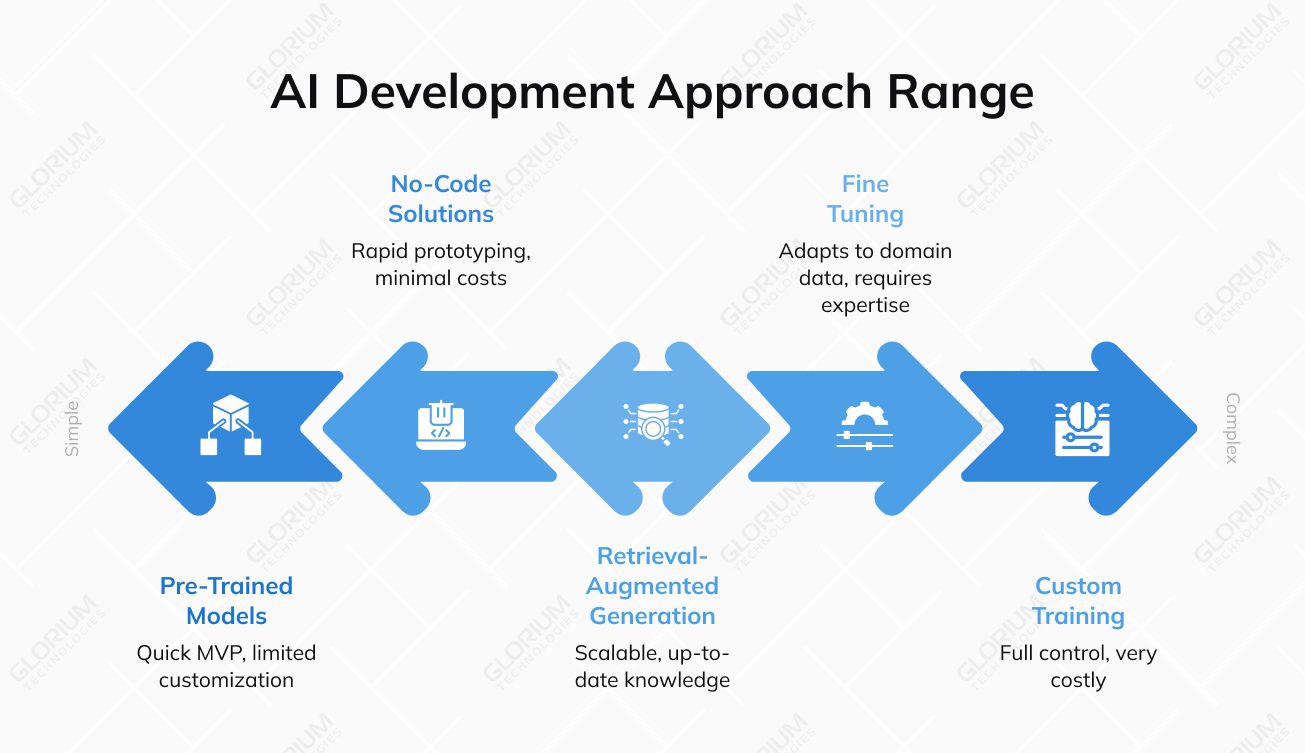
Often, the fastest way to start is with a pre-trained model from a cloud API or an open-source checkpoint. For many features (e.g., chat, summarization, image generation), a model like GPT-4 can work immediately. Pre-trained models require minimal setup and are low-risk: you don’t need to train anything from scratch. This drastically cuts time-to-market. For example, a developer can integrate GPT-4 or Claude via API in a few days and already offer useful functionality.
However, there are trade-offs. Pre-trained APIs charge per token or hour, which can get expensive at scale. They may also not fit every use case. A general GPT model won’t know proprietary domain data or your internal formats unless fine-tuned or supplemented with context. Also, you’re dependent on the vendor’s update schedule and pricing.
In short, pre-trained models are great for rapid MVPs or standard tasks, but know their limits. They offer minimal resources and proven functionality, but limited customization and potential lower accuracy in niche tasks.
If pre-trained models aren’t enough, there are three main ways to customize:
As a rule of thumb, start simple. If an off-the-shelf model is nearly sufficient, try that first. Many startups only build custom models when they have a proprietary data moat or when API usage exceeds a high threshold (e.g., $15k+/month). In many cases, a hybrid strategy works: prototype with RAG/APIs, then layer in fine-tuning or private hosting as needs grow.
No-code/low-code platforms (Microsoft Power Platform, Bubble, or AI-focused tools like DataRobot) can accelerate development for non-technical teams. They allow dragging-and-dropping ML components or using visual interfaces to build simple AI features. The upside is rapid prototyping, minimal up-front costs, and the ability for business users to iterate without deep coding. This makes them great for internal tools, workflows, or basic analytics.
However, these platforms have limits. No-code solutions have restrictions for highly complex AI apps and often require developer help for advanced integrations. For serious AI products, no-code often falls short. Especially for those needing custom models, real-time performance, or strict compliance. Eventually, you’ll hit performance ceilings or security constraints that force you back to hand-coding.
In practice, no-code tools are best used for early exploration or non-critical components. When building a customer-facing AI product at scale, a professional AI team (in-house or outsourced) is usually required to handle the complexity beyond what no-code can safely do.
With the technology selected, architect the system. A typical AI product has layers such as:
Ensure these are decoupled and modular so you can swap models or scale parts independently. For example, you might have a microservice that handles only model inference (with Docker/Kubernetes scaling), separate from the web app servers.
Key considerations include high availability and fault tolerance. We recommend using container orchestration (K8s) and multi-zone deployments.
Cloud AI (AWS, Azure, Google) offers elasticity and managed services for ML (like SageMaker, Vertex AI, AzureML). It’s easy to scale up GPUs and pay-as-you-go, which is ideal for startups or variable workloads. However, cloud models do incur ongoing usage fees and can introduce latency. A common rule of thumb is that when your steady-state cloud spend approaches ~60–70% of the fully loaded cost of equivalent on-prem capacity (TCO), it’s worth re-evaluating whether dedicated hardware would be cheaper for that workload.
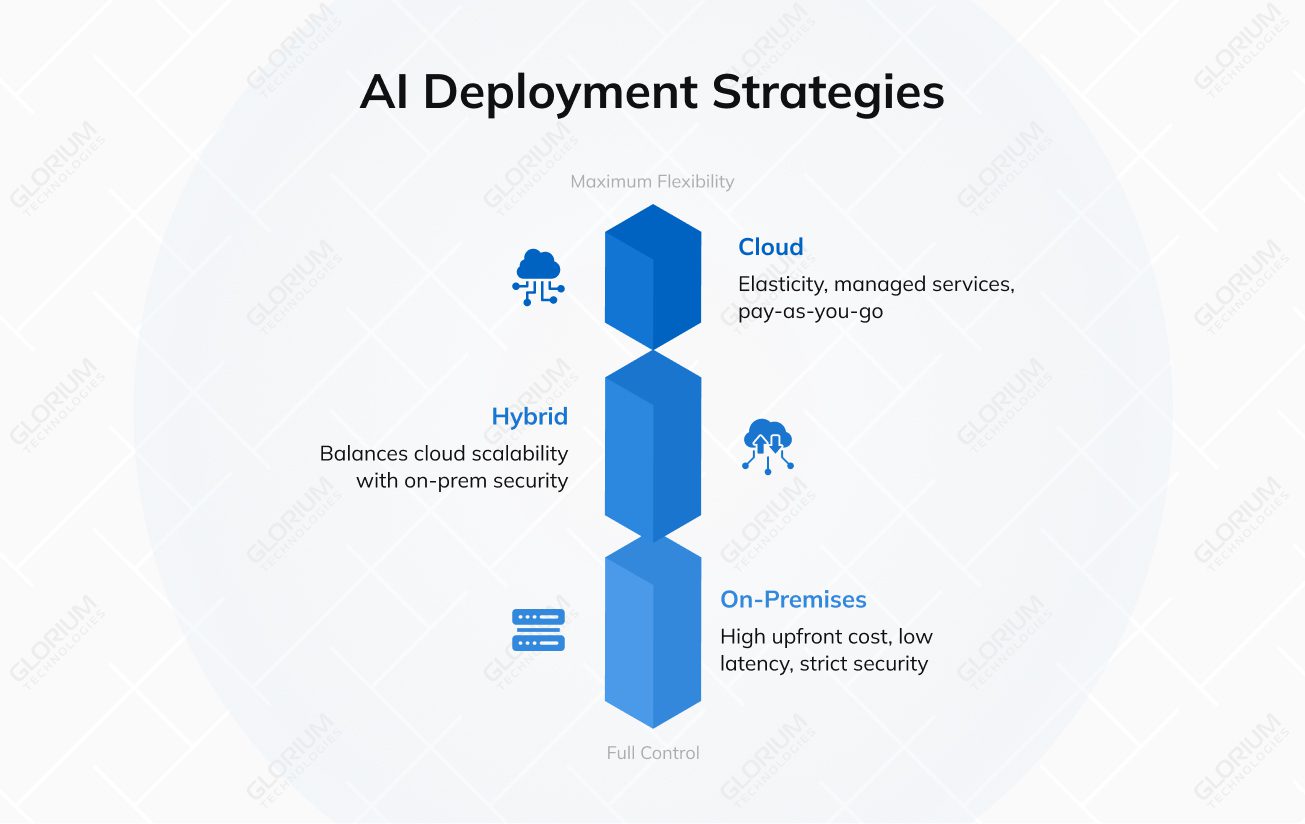
On-premises or private cloud gives you full control over hardware and data. You pay higher upfront (buy/lease servers, GPUs), but benefit from low-latency inference (especially for real-time needs) and stricter data security. Studies show that on-prem solutions can save costs in the long run for stable, high-volume workloads. They also align better with regulations. An AI in healthcare or finance may require that data never leave the corporate network.
Hybrid architectures combine the best of both. They use the cloud for tasks like large-scale model training or backup storage, and keep sensitive inference on-prem. Often, the recommendation is to keep real-time, user-facing tasks and private data on-premises, and burst-train heavy models in the cloud. This hybrid approach can reduce latency and compliance risk while still leveraging cloud flexibility.
In any case, align your choice with your industry’s requirements (e.g., HIPAA, ISO27001, SOC2) and your performance needs. For instance, we at Glorium Technologies (with ISO 27001 and HIPAA-certified infrastructure) often set up hybrid AWS environments for clients in healthcare to satisfy both scalability and compliance.
Define a clear MVP scope to test core assumptions quickly. Focus on the minimal set of features that demonstrate the AI’s value. Break down functionality into prioritized user stories, for example, “user uploads document → AI returns key valuable insights”. Use simple, clean UX rather than a fancy design. The goal is to learn, not to perfect the interface.
Lean heavily on existing tools for the MVP. You might connect a few microservices:
Ensure you include human-in-the-loop where needed (for example, manual review of model outputs during initial pilots). This speeds up validation and prevents catastrophic errors. It’s often wise to add a confidence threshold so low-confidence outputs get flagged for review.
When building the MVP, prioritize speed and learning over technical polish. The smartest MVP development teams understand that the simplest solution is usually the smartest. You might start with rule-based logic or classical ML, where a full deep model isn’t needed. For instance, an AI resume screener MVP could begin as a keyword matcher before evolving into a neural model.
In 2026, the primary barrier to enterprise AI adoption is reliability. A single “hallucination” can destroy trust and incur legal liability. Product teams in 2026 use precise metrics to evaluate AI performance:
| Metric Category | Metric Name | Definition | Business Impact |
| Hallucination | Faithfulness | Alignment between Response and Retrieved Context. | Prevents fabrication of facts; critical for legal/compliance. |
| Retrieval | Context Recall | % of relevant info retrieved from the DB. | Ensures the AI isn’t missing critical data points. |
| Quality | Answer Relevance | Alignment between Response and User Query. | Ensures the user gets a useful answer, not a generic one. |
| Safety | Toxicity / Bias | Presence of harmful/biased language. | Protects brand reputation and prevents PR disasters. |
We also must mention the safety aspects. The testing team must check that the Control Plane sits between the user and the model, acting as a firewall. It provides:
Companies also actively use “Red Teaming”—attacking your own system to find flaws. It is fully automated in 2026. Product teams use “Attacker Agents” to bombard their product with thousands of edge-case queries, prompt injections, and logic traps. This “Synthetic Red Teaming” uncovers vulnerabilities that human testers would miss.
When you’re confident in your MVP, plan a controlled rollout. Define your AI product launch strategy: who is the ideal customer, and what is the value proposition? In marketing materials, emphasize how the AI feature solves real problems (for example, “reduces 90% of manual review time”).
For pricing, consider your cost model: SaaS AI products often use subscription tiers or per-usage pricing. You might charge a flat license plus overage on usage (tokens or compute), or a simple tier based on model access. Many AI SaaS adopt hybrid pricing (seat-based + usage caps) to balance revenue and customer needs.
Ensure legal and compliance checks are in place. If your product uses personal data, update your privacy policy with AI-specific disclosures. For healthcare AI, list relevant certifications (HIPAA, ISO27001, FDA for medical software, etc.) to reassure customers. Provide clear terms of use around AI-generated content (e.g., disclaimers about accuracy).
Train and onboard customers. Offer demos or tutorials showing how to use the AI features, and provide support channels for questions. During launch, set up metrics dashboards to track adoption, performance, and satisfaction. Collect early feedback systematically: surveys, user interviews, and usage logs. Use this data to plan the next development sprints.
Here is what you should avoid during AI implementation in your product:
Remember: chasing AI innovation just for the sake of it is the worst business goal.
Building an AI product is expensive. Operating it at scale is even more expensive. The “unit economics” of AI products are fundamentally different from traditional SaaS, where the marginal cost of a new user is near zero. In AI, every interaction costs money (compute/tokens).
The cost of AI development varies wildly based on complexity:
| Solution Tier | Description | Est. Cost (USD) | Timeline |
| Basic Chatbot | Rule-based, simple Q&A, limited NLP. | $15,000 – $40,000 | 3-4 Months |
| Advanced Agent | Workflow integration, reasoning, custom RAG. | $60,000 – $150,000 | 5-7 Months |
| Enterprise System | Multi-agent, autonomous, high security/compliance. | $300,000 – $1M+ | 12+ Months |
| Maintenance | Annual OpEx (Retraining, API fees, Monitoring). | 15–30% of Dev Cost | Ongoing |
To make the unit economics work, product leaders employ AI FinOps strategies:
Here are the realistic timelines you should expect when building an AI product.
| Step | Timeline | Core Activities | Key Deliverables |
| Validation | 3–5 Weeks | Identify high-ROI problems; perform “Wizard of Oz” testing; interview 30+ potential users; define success metrics (KPIs). | Validated Business Case & Product Requirement Document (PRD). |
| Data Strategy | 4–7 Weeks | Map data sources; assess quality; implement HIPAA/GDPR masking; set up ingestion pipelines and labeling workflows. | Data Governance Plan & Cleaned Training/Inference Dataset. |
| Tech Stack | 3–4 Weeks | Compare models (GPT-4o vs. Claude 3.5); evaluate frameworks like LangChain or PyTorch; decide on “Build vs. Buy.” | Technology Blueprint & Vendor Selection Matrix. |
| Architecture | 3–5 Weeks | Design the inference and data layers; select Vector DBs (Pinecone/Milvus); plan for cloud-native scalability on AWS/GCP. | System Architecture Diagram & Cloud Infrastructure Plan. |
| MVP Build | 10–15 Weeks | Develop core features; integrate RAG or Fine-tuning; design UI/UX for AI interactions; build human-in-the-loop triggers. | Functional AI MVP (Production-ready core engine). |
| Testing | 4–6 Weeks | Benchmarking accuracy, bias, and hallucination audits; red-teaming for security; monitoring for model drift. | Model Evaluation Report & Safety/Compliance Audit. |
| Launch | 2–3 Weeks | Final compliance certifications (SOC 2); set up usage-based pricing; GTM execution; establish user feedback loops. | Live Production Product & Scalability Roadmap. |
Glorium Technologies offers extensive experience and tools across AI development:
In short, Glorium Technologies can guide you through each step. We welcome you to explore our case studies. Book an intro call with our experts, and let’s map your AI MVP journey from the first build to traction.
Expect to spend between $25,000 and $50,000 for a realistic functional MVP. Simple wrappers or internal tools might only require $5,000, but enterprise-grade agents with complex workflows frequently exceed $100,000. GPU rental prices remain high, so infrastructure typically eats 20% of your budget. If you want a basic chatbot, you can get away with $10,000. High-end predictive systems or custom vision platforms will likely push you toward the $300,000 mark. If you need more certainty, book an intro call with our representatives and get a custom estimate.
A standard timeline is 10 to 20 weeks from the first sketch to a public launch. We see fast-moving teams ship in about 7 weeks by using pre-built agent frameworks. If you are operating in a regulated space like finance, add another 3 months for security audits. Don’t rush the “grounding” phase, where you connect the AI to your specific data. It usually takes 3 weeks just to get the prompts and data retrieval working reliably.
Start with an API like OpenAI, Anthropic, or Gemini. Building a model from scratch in 2026 is usually a strategic error unless you have a truly unique dataset that no one else can touch. Fine-tuning is the middle ground that costs $6,000 to $20,000. APIs give you instant access to frontier-level reasoning without the $100,000+ price tag of custom training. Honestly, most “AI breakthroughs” this year are just clever prompt engineering and solid data pipelines.
Probably not for your first version. You can really build an AI agent without being an AI expert. The 2026 market is full of AI-enabled Full-Stack Developers who can handle API integrations and vector databases. You only need a specialized ML engineer if you are doing heavy fine-tuning or building proprietary architectures. Most startups are better off hiring someone who understands agentic AI workflows and system design. If your product is just a clever layer on top of GPT-5, a senior software engineer is plenty.
Focus on quality over volume. For many tasks, a “Golden Dataset” of 50 to 100 high-quality examples is more effective than millions of messy records. We use synthetic data to fill the gaps now. You don’t need a massive warehouse of information to start. Just make sure the data you do have is clean and actually represents what your users will ask.
HIPAA and SOC2 Type II are the non-negotiables for the US market. If you are selling in Europe, the EU AI Act transparency requirements are now fully active and very strict. You will need a “Quality Management System” and detailed documentation on how your model makes decisions. ISO 27001 is also becoming a standard request from hospital procurement teams. Expect to provide a “model card” that explains your training data sources and any known biases.