What Is Real Estate ERP Software? Types, Costs, and How to Choose
Updated September 11, 2026

 Summarize in ChatGPT
 Summarize in ChatGPT
Some real estate companies still run on a stitched-together stack: a CRM here, a spreadsheet there, a separate accounting product, a few PDFs for leases, a chat thread where the maintenance team coordinates with vendors. It works until it doesn’t. Once a real estate portfolio grows past a handful of buildings, that patchwork starts costing real money in missed renewals, double-entry errors, late financial reports, and tenants who churn because no one followed up on time.
That’s where a real estate ERP system comes in. The broader IT market in real estate is expected to grow from $11.63 billion in 2025 to $19 billion by 2030, with ERP listed among the core solution categories used by real estate companies. This growth reflects a practical need: property owners, developers, and managers are looking for connected systems that bring finance, leases, procurement, asset data, reporting, and compliance into one operational environment instead of adding another narrow point solution.
This guide walks through what real estate ERP software actually does, the three main types you can choose from, how to think about cost, and where companies typically go wrong during implementation
Content
Real estate companies adopt ERP systems when disconnected tools start slowing down daily operations. A growing portfolio usually means more properties, vendors, contracts, invoices, budgets, legal entities, and reporting requirements. When this information lives in spreadsheets, accounting tools, email threads, and separate property management systems, teams lose visibility and spend too much time checking the same data in different places.
ERP helps real estate companies bring the operational and financial sides of the business closer together. Instead of managing property costs, vendor bills, procurement, project budgets, and financial reports separately, teams can work from one connected system. This is especially useful for companies that manage mixed-use portfolios, development projects, construction work, or multiple entities.
The main reasons real estate companies move to ERP usually include:
Wondering how this works in practice? A good example comes from a U.S. construction project management company that worked with Glorium Technologies to implement Odoo 18 on Odoo.sh. While the case comes from construction, the challenges are very familiar to real estate developers and companies managing project-heavy portfolios: scattered procurement, limited budget visibility, delayed supplier communication, and too much manual coordination between teams.
Glorium Technologies helped the client connect procurement, inventory, project management, timesheets, and accounting in one Odoo environment. The company could send RFQs to several suppliers at once, compare vendor offers, track purchase orders, monitor stock levels, plan labor, and see project costs more clearly. As a result, the client reduced procurement costs by 18%, cut administrative workload by 30%, achieved 2x faster supplier response, and improved project delivery speed by 23%.
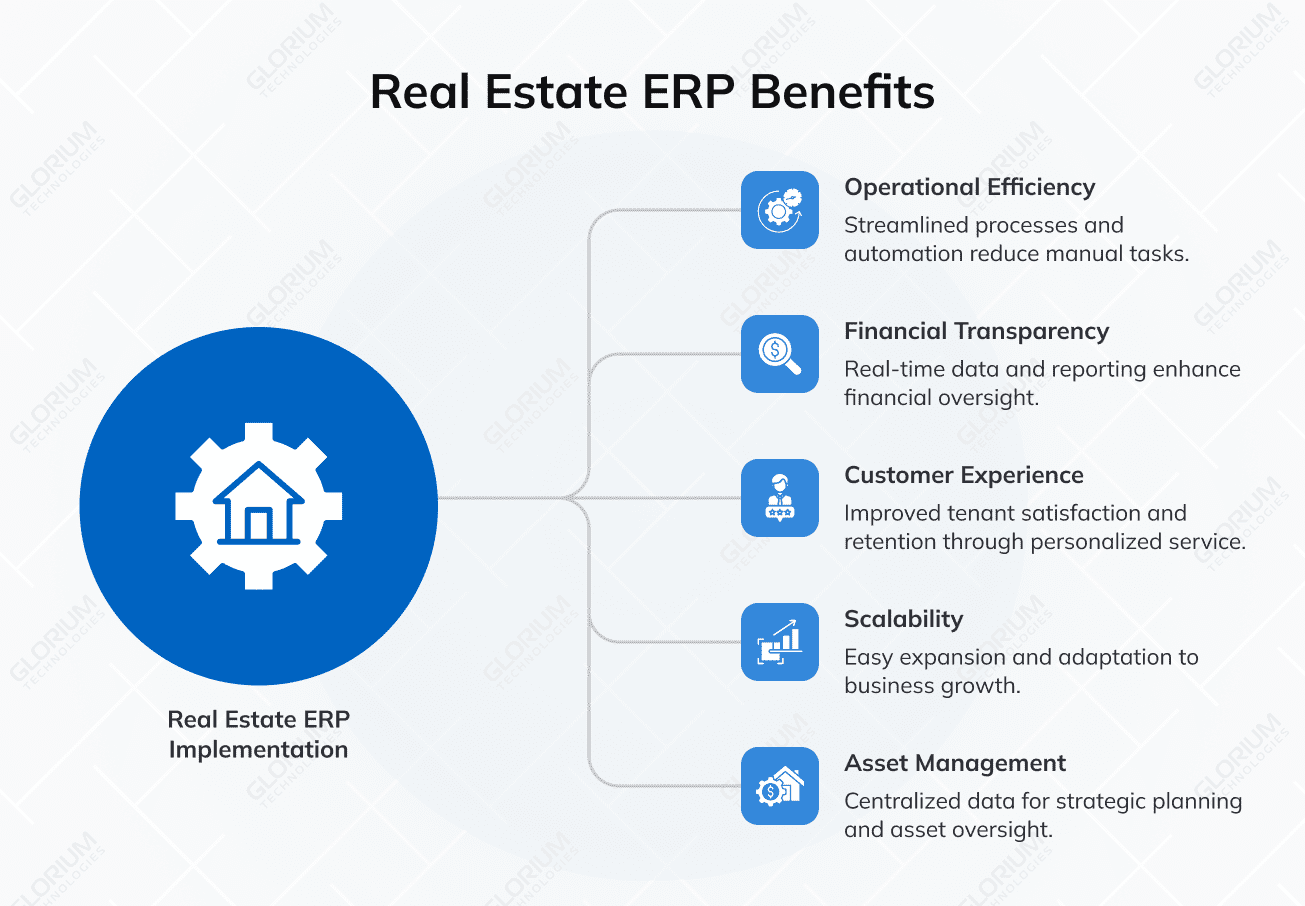
Put together, a connected ERP system changes how a real estate business runs day to day. The benefits stack up in three categories: operational efficiency, financial transparency, and customer experience. Here’s what companies tend to see after a successful real estate ERP implementation:
Once a real estate company commits to ERP, the next decision is which model to adopt. There are three main options: an off-the-shelf ERP, a customized off-the-shelf ERP, and a fully custom ERP built from scratch. Each one carries a different cost profile, time to value, and long-term maintenance burden, and switching between them later is expensive — so the choice is worth making deliberately. Here’s how each option works and where it fits.
An off-the-shelf real estate ERP is a packaged product you license, configure, and roll out. The strength is speed and a known feature set: you get a mature ERP system with a proven roadmap, ongoing data security updates, and a vendor that handles upgrades.
Boxed ERP software usually makes sense for smaller property management firms, residential portfolios that fit standard workflows, or real estate companies that don’t need any unusual financial structures. If your operational data, lease structures, and reporting needs look like everyone else’s, paying for a packaged product is hard to beat on cost.
The middle option is taking a packaged ERP system and extending it. You start with a base platform, and then a partner builds custom modules, integrations, or workflows on top. Most enterprise real estate companies end up here. You get the maturity and support of a known platform plus the flexibility to handle your specific business processes.
This option fits real estate firms that have outgrown a pure off-the-shelf product but don’t need a completely full custom build. Common examples are commercial real estate operators with unusual lease structures, multi-entity holding companies, or real estate developers running construction and operations on the same property management platform.
A fully custom real estate ERP is built from the ground up around your own data model. Properties, units, leases, entities, and funds become first-class objects designed for how your business works, rather than generic customer and invoice records bent into shape. There are no license fees, no unused modules, and no vendor roadmap to wait on — every screen exists because someone on your team asked for it.
The trade-off is ownership. You carry the architecture, the hosting, the security patches, the integrations, the documentation, and the cost of every future change. There is no vendor support line and no pool of consultants who already know the system, so the internal team or the development partner becomes the roadmap. Timelines are longer as well: a full custom build for a complex portfolio typically runs 12-18 months before go-live.
Full custom builds earn their cost in a narrow set of cases:
For everyone else, a customized off-the-shelf platform reaches the same operational outcome with less money, less risk, and a shorter path to go-live. The honest test is simple: if a proven platform plus custom modules can cover 80-90% of your workflows, a full custom build is usually solving a problem you don’t have.
| Criteria | Off-the-shelf (boxed) | Customized off-the-shelf | Fully custom |
| Initial cost | $$ (lowest) | $$$ | $$$$ (highest) |
| Time to deploy | 2-6 months | 4-12 months | 12-18 months |
| Fit to unique workflows | Limited | Good | Exact |
| Ongoing maintenance | Vendor handles | Shared (vendor + custom code) | Fully yours (in-house or partner) |
| Upgrade complexity | Seamless | Customizations need re-testing | Every change is a development task |
| Best for | SMB property managers, standard residential portfolios | Mid-market and enterprise real estate firms | Proptech products and non-standard business models |
| Typical ROI horizon | 12-18 months | 18-24 months | 24-36 months |
| Vendor lock-in | High | Medium | None (you own the code) |
The three types above describe how you buy. The next question is what actually lands on the shortlist. In practice, real estate ERP shortlists mix two families of systems, and they behave very differently once implementation starts.
Real estate-specific platforms are built for property operations from day one. Leases, units, rent rolls, and CAM reconciliation are native concepts, not something you configure. Horizontal ERP platforms such as Odoo and Microsoft Dynamics 365 Business Central start from finance, procurement, and project management, and the real estate layer is added through configuration, extensions, or custom modules.
| Platform | Category | Where it usually fits | What to check before committing |
|---|---|---|---|
| Odoo | Horizontal ERP | Operationally complex companies that want flexible workflows, procurement, and project costing in one place | Lease administration is not native; long-term leases, escalations, and CAM need Studio, custom models, or a property module |
| Microsoft Dynamics 365 Business Central | Horizontal ERP | Finance-led operators needing multi-entity consolidation and dimensional property-level reporting | Real estate lease logic requires an AppSource extension or custom development, and the dimension structure must be designed up front |
| Yardi (Voyager, Breeze) | Real estate-specific | Institutional and mid-market operators across multifamily, commercial, affordable housing, and self-storage; deep native lease and CAM logic | Enterprise pricing and long configuration cycles; Voyager targets larger portfolios while Breeze is the entry-level product |
| MRI Software | Real estate-specific | Commercial and mixed portfolios, multi-entity operators, investment-heavy structures | Flexibility comes largely from a partner and third-party ecosystem, so integration ownership needs to be defined early |
| AppFolio | Real estate-specific | Mid-market residential and growing mixed portfolios that want fast deployment and modern usability | Less depth in complex multi-entity, fund, and investment accounting than enterprise platforms |
| RealPage | Real estate-specific | Large multifamily operations with heavy leasing, resident, and revenue-management workloads | Multifamily-first design; commercial-heavy or development-heavy portfolios usually need something else alongside it |
The split matters more than any individual feature list. A real estate-specific platform gives you lease and property logic on day one, but it constrains everything that is not property operations — development and construction, facility services, hospitality, or a group structure with several businesses under one roof. A horizontal ERP gives you one finance, procurement, and project backbone across all of that, but the real estate layer has to be designed and built.
That is why companies whose portfolio is purely stabilized rental assets often stay with an industry platform, while developers, construction-to-operations groups, and diversified holding companies more often build on a horizontal ERP core. Neither answer is universally right, and plenty of portfolios end up running one of each with an integration between them — which is a legitimate architecture as long as someone owns the data contract between the two systems.
A real estate ERP is a collection of modules that share the same database and authentication layer. Some companies start with two or three modules and add the rest later. Others go all-in from day one. The right configuration depends on the type of properties you manage, your team size, and how much custom workflow you need. Here’s what core capabilities typically cover.
For property and lease management, Odoo can support basic workflows through Contacts, Documents, Sales, Invoicing, and Rental. Its Rental app handles rental quotations, schedules, pickup/return flows, deposits, and invoicing, but it does not cover complex real estate lease administration by default. Long-term lease terms, rent escalation, CAM reconciliation, renewal alerts, occupancy logic, and tenant-specific workflows usually require Odoo Studio, custom models, or a third-party property management module. Odoo Studio can add fields, views, models, approval rules, and reports without full custom development, but larger portfolios often need deeper customization.
In Business Central, lease and property management are also not native strengths. The platform can manage customers, vendors, recurring invoices, financial dimensions, fixed assets, and reporting, but real estate-specific lease logic usually requires an AppSource extension or custom development. This is important for companies that need lease schedules, deposits, unit history, tenant billing, renewal workflows, or property-level rent reporting.
Odoo Accounting can manage invoices, vendor bills, payments, bank reconciliation, budgets, and financial reporting. With analytic accounting, companies can track income and costs by property, project, department, or cost center. Still, reports such as NOI, rent roll, CAM reconciliation, or investor reporting packs need the right data structure and custom reporting setup.
Business Central is especially strong for real estate finance. Its dimensions can tag transactions by property, legal entity, region, project, or asset class, which helps finance teams build cleaner property-level and portfolio-level reporting. This works well only if the dimension structure is designed correctly before implementation.
Odoo CRM can manage leads, opportunities, activities, meetings, and sales stages. For real estate, this can support buyer inquiries, leasing pipelines, broker follow-ups, or renewal conversations. To make it truly useful, the CRM should be connected with property records, available units, pricing, documents, and contract workflows.
Business Central can manage contacts and opportunities, but sales-heavy real estate teams usually connect it with Dynamics 365 Sales or another CRM while keeping finance and billing inside Business Central.
For developers and property owners, ERP can also support project cost control and maintenance workflows. Odoo Project, Purchase, Accounting, Timesheets, and analytic accounts can help track renovation costs, fit-outs, vendor bills, and project profitability. Business Central Projects can manage budgets, resources, usage, and project costs. More complex construction needs, such as draw schedules, RFIs, retainage, or subcontractor compliance, usually require specialized construction software or custom extensions.
The same logic applies to reporting. ERP can show property-level P&L, project costs, vendor spend, budget variance, and portfolio performance only when the system captures clean property, lease, project, and financial data from the start. In practice, Odoo is often a better fit for flexible operational workflows, while Business Central is stronger as a finance and reporting backbone. Both can work for real estate, but neither should be presented as a full real estate ERP without configuration, integrations, or customization.
An ERP for real estate developers has to hold two businesses at once. On one side is the build: budgets, subcontractors, draws, and change orders that run for months or years before a single unit is occupied. On the other is the operating asset that the build turns into, with leases, tenants, and recurring revenue. Most systems handle one side well and treat the other as an afterthought, which is where the handover pain starts.
The capabilities that separate a developer-ready ERP from a general one:
Neither Odoo nor Business Central covers all of this natively. Odoo Project, Purchase, Timesheets, and analytic accounting handle job costing, procurement, and project profitability well, and Business Central Projects combined with dimensions handles budgets, resources, and multi-entity reporting well. Draw schedules, retainage, lien waiver tracking, and AIA-style progress billing generally need an extension or custom development on either platform. That is normally the deciding factor between a customized off-the-shelf build and a specialized construction product running alongside the ERP.
The construction project management case described earlier is a working example of the procurement and cost-control half of this picture: connecting RFQs, purchase orders, inventory, timesheets, and accounting in one Odoo environment cut procurement costs by 18% and administrative workload by 30%. Development portfolios that add lease and tenant operations on top of that foundation are running the same architecture, one phase further along.
Real estate ERP projects tend to stumble on the same handful of issues, and most of them are about how the project is run, how data is prepared, and how teams are brought on board. Below are the pitfalls that come up most often, and what tends to separate the projects that recover from them from the ones that don’t:
Real estate companies often have decades of operational data in formats that don’t translate cleanly. Lease abstracts often live in scanned PDFs, maintenance history is buried in old email threads, and owner reporting can stretch across dozens of Excel workbooks with inconsistent formatting. Skipping the data cleanup step almost always backfires: the new ERP system inherits the mess from the old one and produces unreliable financial reports, broken reconciliations, missed renewals, and compliance issues that can take months to unwind. Plan for structured data mapping, deduplication, and validation as a real project, not a side task.
Even when the platform itself works as intended, adoption can fail for reasons that have nothing to do with the software. The property management platform works, but the team never fully switches over — sometimes because training was rushed or one-off, sometimes because of resistance to a new process, and often because change management wasn’t planned alongside the rollout. The result is the same either way: property managers fall back to their spreadsheets, and the investment quietly stops paying off. Investing in role-based training, clear documentation, change management, and post-launch support tends to be what separates a system that delivers real value from one that gets quietly abandoned.
Over-customization locks the property management platform into how the business runs today and makes future upgrades painful. Under-customization forces users to fight the system every day. Working with a partner who can push back on requests that don’t deserve custom code, and who can spot the workflows that genuinely need it, is worth more than any feature checklist.
Choosing an ERP is less about comparing feature lists and more about working through a sequence of decisions in the right order. Each step narrows the field, so by the time you’re evaluating specific platforms, most of the hard thinking is already done.
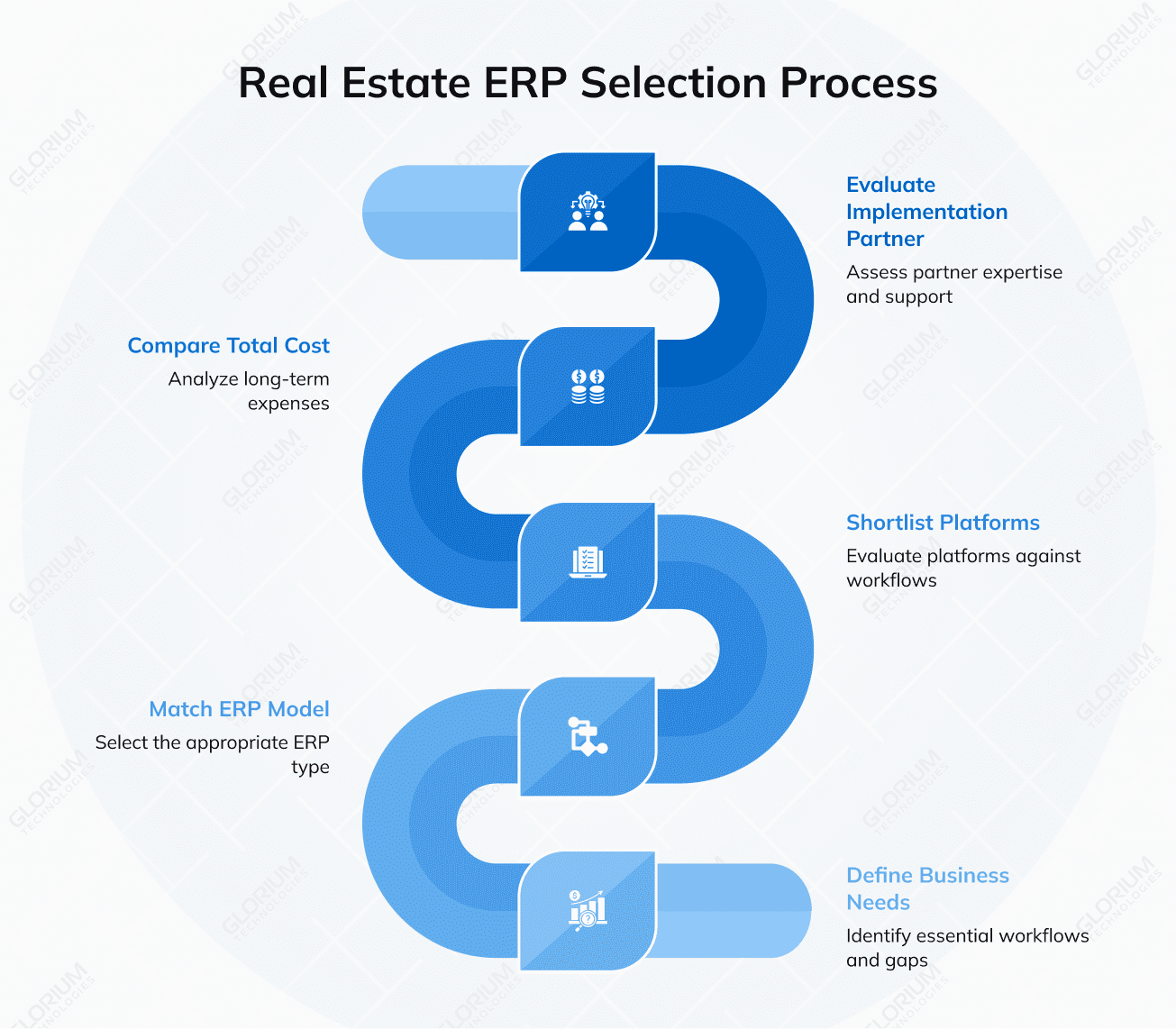
Before you start listing challenges, map the workflows your ERP will need to support. Walk through the full lifecycle of a lease — from listing to signing to renewals to move-out. Trace a maintenance request from a tenant call to a paid vendor invoice. Follow a monthly financial close from the first journal entry to the investor report that goes out the door.
Where do handoffs break? Where does someone re-key data from one system into another? Where does reporting take days instead of hours? Those are the gaps your ERP needs to close. Separate the must-haves from the nice-to-haves early — it prevents scope creep later.
The three ERP types covered earlier in this guide — off-the-shelf, customized off-the-shelf, and fully custom — each fit a different profile. This is where you decide which category you’re shopping in:
Making this call early saves significant time. It cuts your shortlist from dozens of platforms to a handful.
Once you know the model, shortlist two or three platforms and evaluate them against the workflows you mapped in Step 1. Ask for demos that use your scenarios and are customized to your unique processes, not the vendor’s — a generic demo tells you very little about how the system will handle your lease structures, your entity hierarchy, or your reporting cadence.
During evaluation, also confirm the integration story. A real estate ERP that doesn’t connect to the systems around it becomes another data silo. Integrations with tools like DocuSign, your bank feeds, your CRM, and any industry-specific standards (RESO, MLS, IDX) should be confirmed before you sign, not discovered during implementation.
License fees are only one piece of the cost. Before committing, build a realistic picture of what the full project will cost over three to five years:
The cheapest license often isn’t the cheapest ERP. A platform that requires heavy customization or has limited partner support can end up costing more over its lifetime than one with a higher sticker price but a better fit out of the box.
The platform is one half of the equation; the team that implements it is the other, and most ERP outcomes depend more on the second than the first. Ask for success stories. Ask who specifically will be on your project. Ask what happens when something breaks six months after go-live. A strong platform paired with a partner that doesn’t understand lease accounting, CAM reconciliations, or multi-entity reporting structures will deliver worse results than a solid platform paired with a team that does.
The ERP platforms are powerful, but the value lies in how well the system reflects how your real estate business actually runs. That’s why the partner choice matters as much as the technology choice, and it’s why most successful real estate ERP rollouts involve a team that understands lease accounting, CAM reconciliations, multi-entity reporting, and property-level financial structures from the start.
Glorium Technologies has delivered real estate ERP software, custom platforms, and property management systems for clients across the US and Europe. Our work spans commercial real estate, multifamily property management, brokerages, and construction-to-operations developers.
If you’re weighing options for a real estate ERP implementation, book a 15-minute intro call with our team. On the call, we’ll talk through your current setup, the issues you’re looking to solve with an ERP, the platforms that tend to fit a portfolio like yours, and what a realistic timeline and budget could look like.
Most real estate ERP software rollouts require between 4 and 12 months. A small property management firm moving to a packaged real estate management software platform can go live in 4-6 months. A mid-market customized real estate ERP implementation usually runs 6-9 months. A full custom build for a complex real estate portfolio is typically 12-18 months. Every project benefits from a 2-4 week discovery phase up front to lock down scope, data accuracy needs, and integration points.
Yes, but the modules and reporting structures look different. Residential property management firms lean on unit-level occupancy, rent rolls, and tenant communications. Commercial real estate operations need lease abstractions, CAM reconciliations, and tenant improvement allowances. Many real estate organizations with mixed portfolios run one real estate management software platform with both configurations active, but the property management software needs to support that flexibility from day one — generic ERP systems often don’t deliver the financial reporting depth real estate companies need across both portfolio types.
Most modern real estate ERP platforms include a CRM module, so for many real estate companies, the answer is no. The question is whether the built-in real estate CRM software is strong enough for your sales and leasing teams. If you need sophisticated marketing automation or deep prospect scoring across real estate agents and brokers, a dedicated CRM integrated with the ERP may still make sense. For most property management firms and brokerages, the integrated module covers the use case.
Generic ERP software treats the customer or invoice as the central object. Real estate ERP treats the property as the central object, with every lease, payment, maintenance event, and financial transaction tied back to the asset. That changes how financial reporting and financial management work, and how workflows are designed for property operations, lease management, and real estate accounting. Generic platforms can be made to work for real estate companies, but it usually requires significant customization to handle the financial management capabilities real estate accounting actually demands.
Yes. Most real estate ERP software includes a project accounting layer for real estate developers and construction service providers. The construction project management module handles job costing, budget vs. actual tracking, subcontractor management, vendor management, and payment tracking. For construction companies that operate the buildings they develop, having job costing inside the same ERP system as property operations removes a painful handoff between real estate development and stabilized-asset phases. Strong financial management and lease management on the operations side complete the picture.
Most real estate ERP projects that struggle do so for a combination of reasons. The most common ones include weak user adoption (when the team falls back to old tools), incomplete or messy data migration, scope creep on customizations, underestimating change management, and choosing an implementation partner without enough real estate experience. The technology itself works most of the time; the projects that fail usually do so because one or several of these areas were not planned for early enough. Investing in those areas up front is the highest-leverage decision in any real estate ERP implementation.
Most shortlists include at least one industry-specific platform — typically Yardi, MRI Software, AppFolio, or RealPage — alongside a horizontal ERP such as Odoo or Microsoft Dynamics 365 Business Central. Industry platforms arrive with lease administration, rent rolls, and CAM logic already built, which shortens time to value for pure property operations. Horizontal ERP platforms give you one finance, procurement, and project backbone across development, construction, facility services, and property operations, with the real estate layer added through configuration or custom modules. The right comparison depends on how much of your business sits outside property management: the more there is, the stronger the case for a horizontal ERP core.